
BGP——基本配置
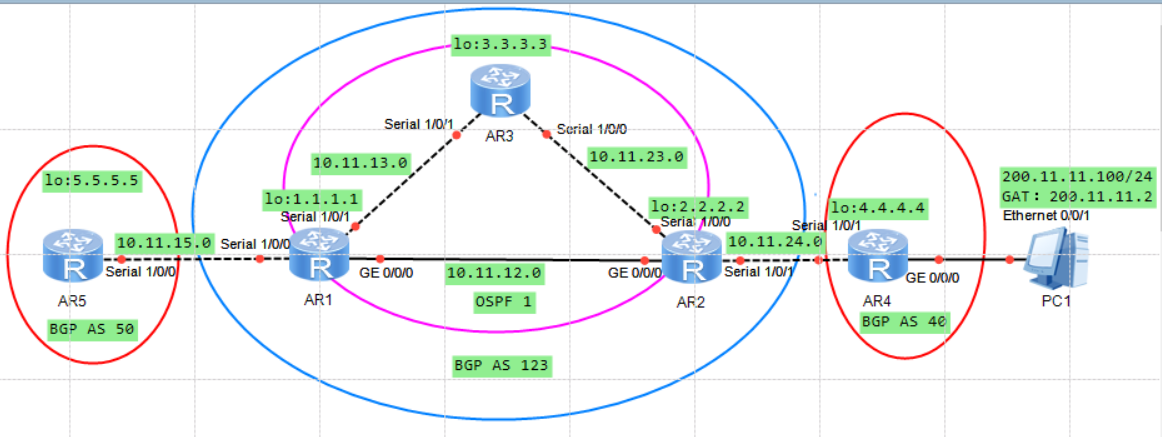
根据TOP图配置接口的IP地址
AR1基础配置信息:
点击查看代码
[AR1]interface Serial1/0/0
[AR1-Serial1/0/0]ip address 10.11.15.1 255.255.255.0
[AR1]interface Serial1/0/1
[AR1-Serial1/0/1]ip address 10.11.13.1 255.255.255.0
[AR1]interface GigabitEthernet0/0/0
[AR1-GigabitEthernet0/0/0]ip address 10.11.12.1 255.255.255.0
[AR1]interface LoopBack0
[AR1-LoopBack0]ip address 1.1.1.1 255.255.255.255
AR2基础配置信息:
点击查看代码
[AR2]interface Serial1/0/0
[AR2-Serial1/0/0]ip address 10.11.23.2 255.255.255.0
[AR2]interface Serial1/0/1
[AR2-Serial1/0/1]ip address 10.11.24.2 255.255.255.0
[AR2]interface GigabitEthernet0/0/0
[AR2-GigabitEthernet0/0/0]ip address 10.11.12.2 255.255.255.0
[AR2]interface LoopBack0
[AR2-LoopBack0]ip address 2.2.2.2 255.255.255.255
AR3基础配置信息:
点击查看代码
[AR3]interface Serial1/0/0
[AR3-Serial1/0/0]ip address 10.11.23.3 255.255.255.0
[AR3]interface Serial1/0/1
[AR3-Serial1/0/1]ip address 10.11.13.3 255.255.255.0
[AR3]interface LoopBack0
[AR3-LoopBack0]ip address 3.3.3.3 255.255.255.255
AR4基础配置信息:
点击查看代码
[AR4]interface Serial1/0/1
[AR4-Serial1/0/1]ip address 10.11.24.4 255.255.255.0
[AR4]interface GigabitEthernet0/0/0
[AR4-GigabitEthernet0/0/0]ip address 200.11.11.2 255.255.255.0     |     “200.11.11.2作为PC1的网关”
[AR4]interface LoopBack0
[AR4-LoopBack0]ip address 4.4.4.4 255.255.255.255
AR5基础配置信息:
点击查看代码
[AR5]interface Serial1/0/0
[AR5-Serial1/0/0]ip address 10.11.15.5 255.255.255.0
[AR5]interface LoopBack0
[AR5-LoopBack0]ip address 5.5.5.5 255.255.255.255
``以上为TOP图的基本IP配置
AR1_AR2_AR3的OSPF配置
AR1配置信息:
点击查看代码
[AR1]ospf 1
[AR1-ospf-1]area 0
[AR1-ospf-1-area-0.0.0.0]network 1.1.1.1 0.0.0.0
[AR1-ospf-1-area-0.0.0.0]network 10.11.12.0 0.0.0.255
[AR1-ospf-1-area-0.0.0.0]network 10.11.13.0 0.0.0.255
AR2配置信息:
点击查看代码
[AR2]ospf 1
[AR2-ospf-1]area 0
[AR2-ospf-1-area-0.0.0.0]network 2.2.2.2 0.0.0.0
[AR2-ospf-1-area-0.0.0.0]network 10.11.12.0 0.0.0.255
[AR2-ospf-1-area-0.0.0.0]network 10.11.23.0 0.0.0.255
AR3配置信息:
点击查看代码
[AR3]ospf 1
[AR3-ospf-1]area 0
[AR3-ospf-1-area-0.0.0.0]network 3.3.3.3 0.0.0.0
[AR3-ospf-1-area-0.0.0.0]network 10.11.13.0 0.0.0.255
[AR3-ospf-1-area-0.0.0.0]network 10.11.23.0 0.0.0.255
验证AR1_AR2_AR3邻居:
点击查看代码
  ----------------------------------------------------------------------------
| [AR1]dis ospf peer brief                                                     |
| ---------------------------------------------------------------------------- |
| OSPF Process 1 with Router ID 10.11.12.1                                     |
| Peer Statistic Information                                                   |
| ---------------------------------------------------------------------------- |
| Area Id          Interface                        Neighbor id      State     |
| 0.0.0.0          GigabitEthernet0/0/0             10.11.12.2       Full      |
| 0.0.0.0          Serial1/0/1                      3.3.3.3          Full      |
| ---------------------------------------------------------------------------- |
| [AR2]dis ospf peer brief                                                     |
|                                                                              |
| OSPF Process 1 with Router ID 10.11.12.2                                     |
| Peer Statistic Information                                                   |
| ---------------------------------------------------------------------------- |
| Area Id          Interface                        Neighbor id      State     |
| 0.0.0.0          GigabitEthernet0/0/0             10.11.12.1       Full      |
| 0.0.0.0          Serial1/0/0                      3.3.3.3          Full      |
| ---------------------------------------------------------------------------- |
| [AR3]dis ospf peer  brief                                                    |
|                                                                              |
| OSPF Process 1 with Router ID 3.3.3.3                                        |
| Peer Statistic Information                                                   |
| ---------------------------------------------------------------------------- |
| Area Id          Interface                        Neighbor id      State     |
| 0.0.0.0          Serial1/0/0                      10.11.12.2       Full      |
| 0.0.0.0          Serial1/0/1                      10.11.12.1       Full      |
| ---------------------------------------------------------------------------- |
BGP的邻居建立:
AR5_AR1配置信息:
点击查看代码
[AR5]bgp 50
[AR5-bgp]router-id 5.5.5.5
[AR5-bgp]peer 10.11.15.1 as-number 123

[AR1]bgp 123
[AR1-bgp]router-id 1.1.1.1
[AR1-bgp]peer 10.11.15.5 as-number 50

查看状态是否为 Established
[AR5]dis bgp peer
 BGP local router ID : 5.5.5.5
 Local AS number : 50
 Total number of peers : 1		  Peers in established state : 1

  Peer            V          AS  MsgRcvd  MsgSent  OutQ  Up/Down       State Pre
fRcv

  10.11.15.1      4         123       38       33     0 00:29:49 Established
   9
AR1_AR2_AR3配置信息:
点击查看代码
[AR1]bgp 123
[AR1-bgp]router-id 1.1.1.1
[AR1-bgp]peer 2.2.2.2 as-number 123
[AR1-bgp]peer 2.2.2.2 connect-interface LoopBack0
[AR1-bgp]peer 3.3.3.3 as-number 123
[AR1-bgp]peer 3.3.3.3 connect-interface LoopBack0

[AR2]bgp 123
[AR2-bgp]router-id 2.2.2.2
[AR2-bgp]peer 1.1.1.1 as-number 123
[AR2-bgp]peer 1.1.1.1 connect-interface LoopBack0
[AR2-bgp]peer 3.3.3.3 as-number 123
[AR2-bgp]peer 3.3.3.3 connect-interface LoopBack0

[AR3]bgp 123
[AR3-bgp]router-id 3.3.3.3
[AR3-bgp]peer 1.1.1.1 as-number 123
[AR3-bgp]peer 1.1.1.1 connect-interface LoopBack0
[AR3-bgp]peer 2.2.2.2 as-number 123
[AR3-bgp]peer 2.2.2.2 connect-interface LoopBack0

查看邻居状态是否为 Established 以AR1为例:
[AR1]dis bgp peer
 BGP local router ID : 1.1.1.1
 Local AS number : 123
 Total number of peers : 3		  Peers in established state : 3

  Peer            V          AS  MsgRcvd  MsgSent  OutQ  Up/Down       State Pre
fRcv

  2.2.2.2         4         123       41       47     0 00:37:17 Established
   4
  3.3.3.3         4         123       40       47     0 00:37:20 Established
   1
  10.11.15.5      4          50       40       46     0 00:37:22 Established
   1
AR2_AR4配置信息:
点击查看代码
[AR2]bgp 123
[AR2-bgp]peer 4.4.4.4 as-number 40
[AR2-bgp]peer 4.4.4.4 connect-interface LoopBack0
[AR2-bgp]peer 4.4.4.4 ebgp-max-hop 5

[AR4]bgp 40
[AR4-bgp]peer 2.2.2.2 as-number 123
[AR4-bgp]peer 2.2.2.2 connect-interface LoopBack0
[AR4-bgp]peer 2.2.2.2 ebgp-max-hop 5

> 由AR2_AR4连接线为串口线,需配置静态路由,实现邻居建立成功
[AR2]ip route-static 4.4.4.4 255.255.255.255 10.11.24.4
[AR4]ip route-static 2.2.2.2 255.255.255.255 10.11.24.2

查看邻居状态是否为 Established:
[AR4]dis bgp  peer

 BGP local router ID : 4.4.4.4
 Local AS number : 40
 Total number of peers : 1		  Peers in established state : 1

  Peer            V          AS  MsgRcvd  MsgSent  OutQ  Up/Down       State Pre
fRcv

  2.2.2.2         4         123       47       48     0 00:42:13 Established
   7
BGP宣告及引入
点击查看代码
AR5宣告Lo0(5.5.5.5)进入BGP
[AR5]bgp 50
[AR5-bgp]network 5.5.5.5 255.255.255.255

查看BGP路由
[AR1]dis bgp routing-table

 BGP Local router ID is 1.1.1.1
 Status codes: * - valid, > - best, d - damped,
               h - history,  i - internal, s - suppressed, S - Stale
               Origin : i - IGP, e - EGP, ? - incomplete


 Total Number of Routes: 17
      Network            NextHop        MED        LocPrf    PrefVal Path/Ogn
*>   5.5.5.5/32         10.11.15.5      0                     0      50i

> AR1引入BGP
[AR1]bgp 123
[AR1-bgp]import-route direct

> AR2宣告Lo0(2.2.2.2)进入BGP
[AR2]bgp 123
[AR2-bgp]network 2.2.2.2 255.255.255.255

> AR2宣告Lo0(3.3.3.3)进入BGP
[AR2]bgp 123
[AR2-bgp]network 3.3.3.3 255.255.255.255

> AR4宣告Lo0(4.4.4.4)进入BGP
[AR4]bgp 123
[AR4-bgp]import-route direct
[AR4-bgp]network 4.4.4.4 255.255.255.255
修改Lo(5.5.5.5)的环回地址的BGP路由的下一跳为自身:
点击查看代码
未修改前)_以AR3为例
[AR3]display bgp  routing-table
 BGP Local router ID is 3.3.3.3
 Status codes: * - valid, > - best, d - damped,
               h - history,  i - internal, s - suppressed, S - Stale
               Origin : i - IGP, e - EGP, ? - incomplete


 Total Number of Routes: 12
      Network            NextHop        MED        LocPrf    PrefVal Path/Ogn

   i  1.1.1.1/32         1.1.1.1         0          100        0      ?
   i  2.2.2.2/32         2.2.2.2         0          100        0      i
 *>   3.3.3.3/32         0.0.0.0         0                     0      i
 *>i  5.5.5.5/32         10.11.15.5      0          100        0      50i
 *>i  10.11.12.0/24      1.1.1.1         0          100        0      ?
 *>i  10.11.13.0/24      1.1.1.1         0          100        0      ?
 *>i  10.11.13.3/32      1.1.1.1         0          100        0      ?
 *>i  10.11.15.0/24      1.1.1.1         0          100        0      ?
 *>i  10.11.15.5/32      1.1.1.1         0          100        0      ?
 *>i  10.11.24.0/24      2.2.2.2         0          100        0      40?
 *>i  10.11.24.2/32      2.2.2.2         0          100        0      40?
 *>i  200.11.11.0        2.2.2.2         0          100        0      40?

为了验证修改效果先对AR3进行修改:
[AR3]bgp 123
[AR3-bgp]peer 1.1.1.1 next-hop-local
[AR3-bgp]peer 2.2.2.2 next-hop-local
若查看未改变,quit到<AR3>refresh bgp all import 重新加载
再次查看即是 下一跳为1.1.1.1
*>i  5.5.5.5/32         1.1.1.1      0          100        0      50i

[AR1]bgp 123
[AR1-bgp]peer 3.3.3.3 next-hop-local
[AR1-bgp]peer 2.2.2.2 next-hop-local

[AR2]bgp 123
[AR2-bgp]peer 1.1.1.1 next-hop-local
[AR2-bgp]peer 3.3.3.3 next-hop-local
查看AR5的BGP路由:
点击查看代码
[AR5]dis bgp routing-table

 BGP Local router ID is 5.5.5.5
 Status codes: * - valid, > - best, d - damped,
               h - history,  i - internal, s - suppressed, S - Stale
               Origin : i - IGP, e - EGP, ? - incomplete


 Total Number of Routes: 10
      Network            NextHop        MED        LocPrf    PrefVal Path/Ogn

 *>   1.1.1.1/32         10.11.15.1      0                     0      123?
 *>   5.5.5.5/32         0.0.0.0         0                     0      i
 *>   10.11.12.0/24      10.11.15.1      0                     0      123?
 *>   10.11.13.0/24      10.11.15.1      0                     0      123?
 *>   10.11.13.3/32      10.11.15.1      0                     0      123?
 *>   10.11.15.0/24      10.11.15.1      0                     0      123?
 *>   10.11.15.5/32      10.11.15.1      0                     0      123?
 *>   10.11.24.0/24      10.11.15.1                            0      123 40?
 *>   10.11.24.2/32      10.11.15.1                            0      123 40?
 *>   200.11.11.0        10.11.15.1                            0      123 40?
验证AR5 ping/tracert PC1
点击查看代码
[AR5]ping -a 5.5.5.5 200.11.11.100
  PING 200.11.11.100: 56  data bytes, press CTRL_C to break
    Reply from 200.11.11.100: bytes=56 Sequence=1 ttl=125 time=30 ms
    Reply from 200.11.11.100: bytes=56 Sequence=2 ttl=125 time=40 ms
    Reply from 200.11.11.100: bytes=56 Sequence=3 ttl=125 time=30 ms
    Reply from 200.11.11.100: bytes=56 Sequence=4 ttl=125 time=30 ms
    Reply from 200.11.11.100: bytes=56 Sequence=5 ttl=125 time=30 ms

  --- 200.11.11.100 ping statistics ---
    5 packet(s) transmitted
    5 packet(s) received
    0.00% packet loss
    round-trip min/avg/max = 30/32/40 ms
----------------------------------------------------------------------------
[AR5]tracert -a 5.5.5.5 200.11.11.100

 traceroute to  200.11.11.100(200.11.11.1
00), max hops: 30 ,packet length: 40,press CTRL_C to break

 1 10.11.15.1 20 ms  20 ms  10 ms

 2 10.11.12.2 < AS=123 > 40 ms  10 ms  20 ms

 3 10.11.24.4 < AS=40 > 30 ms  30 ms  20 ms

 4 200.11.11.100 < AS=40 > 40 ms  30 ms  20 ms

 40?  ?标识此路由通过引入的方式成为BGP路由的
 50i  i标识此路由通过network的方式成为BGP路由的
 *>   *代表有效的路由, >代表最优路由

 浙公网安备 33010602011771号