

ueditor编辑器的使用
介绍:
UEditor 是由百度「FEX前端研发团队」开发的所见即所得富文本web编辑器,具有轻量,可定制,注重用户体验等特点,开源基于MIT协议,允许自由使用和修改代码。
1,首先在官网下载好压缩包https://github.com/fex-team/ueditor
2,下载后解压这个压缩包到你想应用的文件所在文件夹中
3.在你的html代码中填入
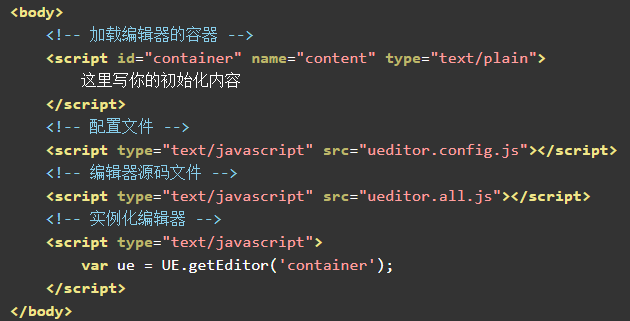
在你的页面中打开就下面这个样子了
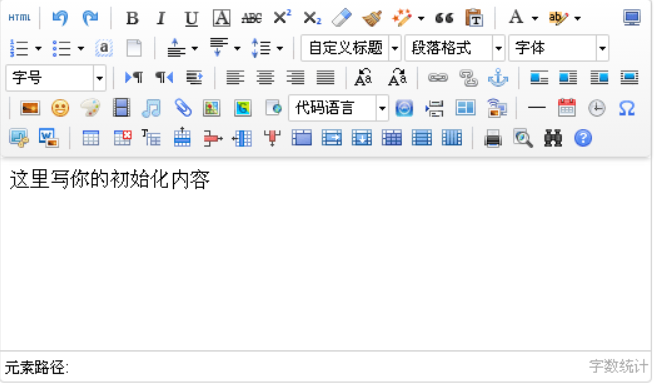
4.UEditor 工具栏上的按钮列表可以自己定义,共有两种方式
一:修改 ueditor.config.js 里面的 toolbars
二:实例化编辑器的时候传入 toolbars 参数
简单列表
toolbars: [
    ['fullscreen', 'source', 'undo', 'redo', 'bold']
]
多行列表
toolbars: [
    ['fullscreen', 'source', 'undo', 'redo'],
    ['bold', 'italic', 'underline', 'fontborder', 'strikethrough', 'superscript', 'subscript', 'removeformat', 'formatmatch', 'autotypeset', 'blockquote', 'pasteplain', '|', 'forecolor', 'backcolor', 'insertorderedlist', 'insertunorderedlist', 'selectall', 'cleardoc']
]
两行的例子:
工具栏按钮分割线
配置项里用竖线 '|' 代表分割线
完整的按钮列表
toolbars: [
    [
        'anchor', //锚点
        'undo', //撤销
        'redo', //重做
        'bold', //加粗
        'indent', //首行缩进
        'snapscreen', //截图
        'italic', //斜体
        'underline', //下划线
        'strikethrough', //删除线
        'subscript', //下标
        'fontborder', //字符边框
        'superscript', //上标
        'formatmatch', //格式刷
        'source', //源代码
        'blockquote', //引用
        'pasteplain', //纯文本粘贴模式
        'selectall', //全选
        'print', //打印
        'preview', //预览
        'horizontal', //分隔线
        'removeformat', //清除格式
        'time', //时间
        'date', //日期
        'unlink', //取消链接
        'insertrow', //前插入行
        'insertcol', //前插入列
        'mergeright', //右合并单元格
        'mergedown', //下合并单元格
        'deleterow', //删除行
        'deletecol', //删除列
        'splittorows', //拆分成行
        'splittocols', //拆分成列
        'splittocells', //完全拆分单元格
        'deletecaption', //删除表格标题
        'inserttitle', //插入标题
        'mergecells', //合并多个单元格
        'deletetable', //删除表格
        'cleardoc', //清空文档
        'insertparagraphbeforetable', //"表格前插入行"
        'insertcode', //代码语言
        'fontfamily', //字体
        'fontsize', //字号
        'paragraph', //段落格式
        'simpleupload', //单图上传
        'insertimage', //多图上传
        'edittable', //表格属性
        'edittd', //单元格属性
        'link',