
pytest(15):配置文件pytest.ini
前言
pytest配置文件可以改变pytest的运行方式,它是一个固定的文件pytest.ini文件,读取配置信息,按指定的方式去运行。
ini配置文件
pytest里面有些文件是非test文件
- pytest.ini pytest的主配置文件,可以改变pytest的默认行为
- conftest.py 测试用例的一些fixture配置
- _init_.py 识别该文件夹为python的package包
ini基本格式
# 保存为pytest.ini文件
[pytest]
addopts = -rsxX
xfail_strict = true
解释
addopts
addopts参数可以更改默认命令行选项,这个当我们在cmd输入指令去执行用例的时候,会用到,比如我想测试完生成报告,指令比较长
pytest -v --reruns 1 --html=report.html --self-contained-html
每次输入这么多,不太好记住,于是可以加到pytest.ini里
# pytest.ini
[pytest]

markers =
  webtest:  Run the webtest case
  hello: Run the hello case

 xfail_strict = true

 addopts = -v --reruns 1 --html=report.html --self-contained-html
这样我下次打开cmd,直接输入pytest,它就能默认带上这些参数了
xfail_strict
设置xfail_strict = true可以让那些标记为@pytest.mark.xfail但实际通过的测试用例被报告为失败
什么叫标记为@pytest.mark.xfail但实际通过,这个比较绕脑,看以下案例
def test_hello():
    print("hello world!")
    assert 1

@pytest.mark.xfail()
def test_yoyo1():
    a = "hello"
    b = "hello world"
    assert a == b

@pytest.mark.xfail()
def test_yoyo2():
    a = "hello"
    b = "hello world"
    assert a != b

if __name__ == "__main__":
    pytest.main(["-v", "test_xpass.py"])
测试结果

test_yoyo1和test_yoyo2这2个用例一个是a == b一个是a != b,两个都标记失败了,我们希望两个用例不用执行全部显示xfail。实际上最后一个却显示xpass.为了让两个都显示xfail,那就加个配置
xfail_strict = true
修改ini文件
[pytest]
markers =
  webtest:  Run the webtest case
  hello: Run the hello case
xfail_strict = true
再次运行,结果就变成
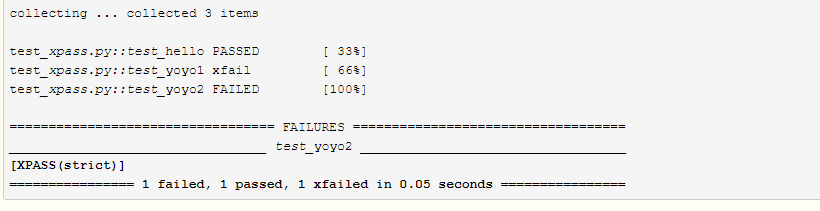
这样标记为xpass的就被强制性变成failed的结果
修改匹配规则
pytest默认查找用例匹配规则
- 测试文件以test_开头(以_test结尾也可以)
- 测试类以Test开头,并且不能带有init方法
- 测试函数以test_开头
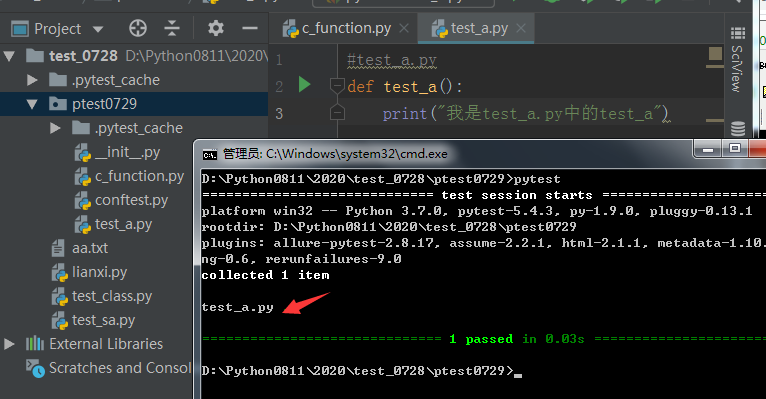
如果我们想匹配以c_*.py的文件,pytest.ini文件放到项目的根目录。
在pytest.ini文件添加一项python_files即可。
修改ini文件
[pytest]
markers =
  webtest:  Run the webtest case
  hello: Run the hello case
xfail_strict = true
python_files=*.py

匹配测试用例类和方法相关配置参考如下多个匹配规则中间用空格隔开
#在testcase目录是下查找测试用例
#查找以py结尾的文件
#查找以Test_开头的类方法
#查找以test_开头的函数方法
testpaths=testcases
python_files=*.py
python_classes=Test_*
python_functions=test_* *
配置文件如何放
一般一个工程下方一个pytest.ini文件(不要瞎jb拍脑袋乱命名,瞎jb命名是找不到的)就可以了,放到顶层文件夹下
追加(完整的pytest.ini)
[pytest]
# mark
markers =
    weibo: this is weibo page
    toutiao: toutiao
    xinlang: xinlang
# 命令行参数
addopts = -v --reruns=1 --count=2 --html=reports.html --self-contained-html -n=auto
# 匹配文件
#在testcase目录是下查找测试用例
#查找以py结尾的文件
#查找以Test_开头的类方法
#查找以test_开头的函数方法
testpaths=testcases
python_files=*.py
python_classes=Test_*
python_functions=test_* *
追加(pytest.ini添加中文注释)
前提
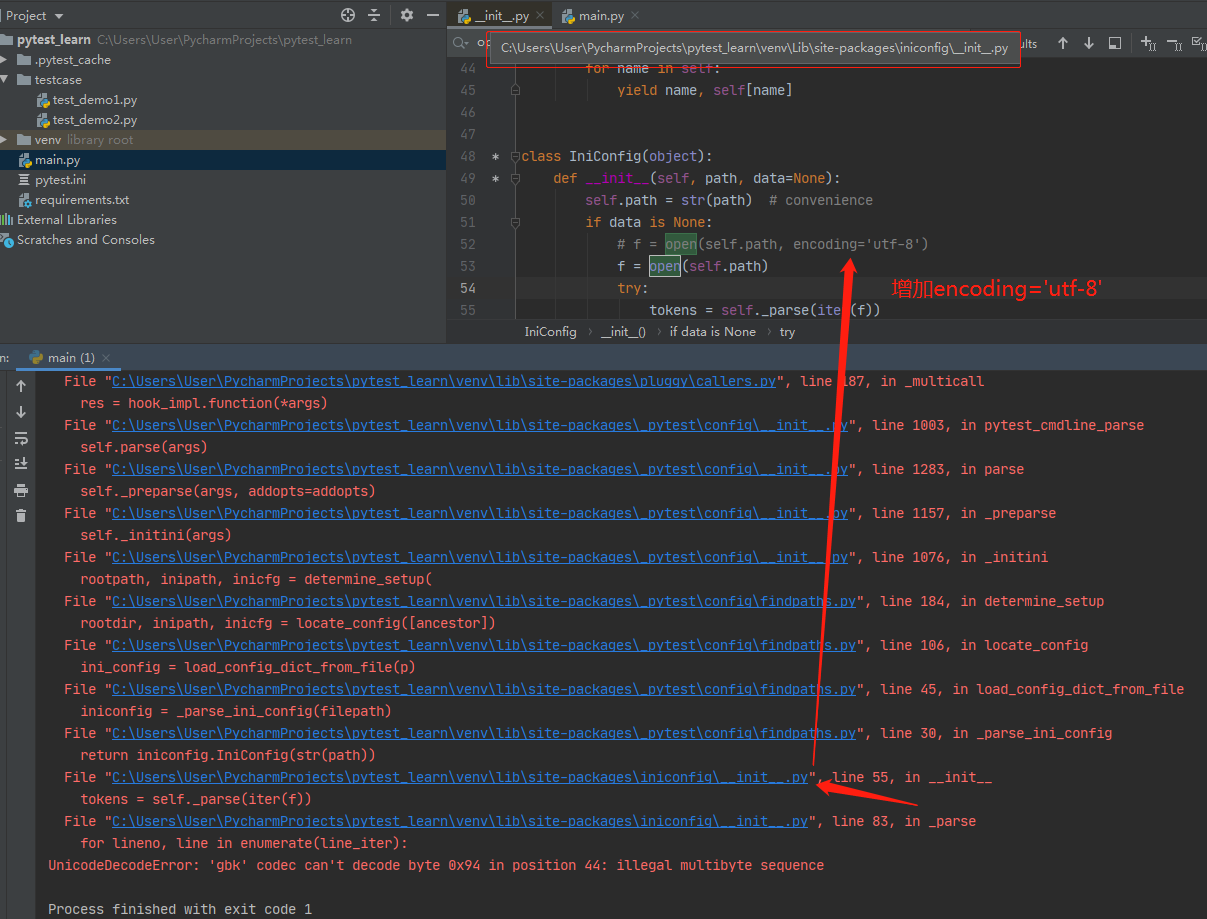
一般来说,在pytest.in配置文件i中不能出现和使用任何中文符号;例如:
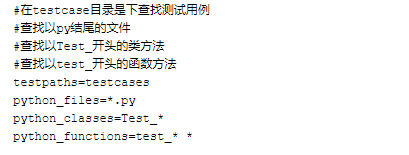
否则会报错:UnicodeDecodeError: 'gbk' codec can't decode
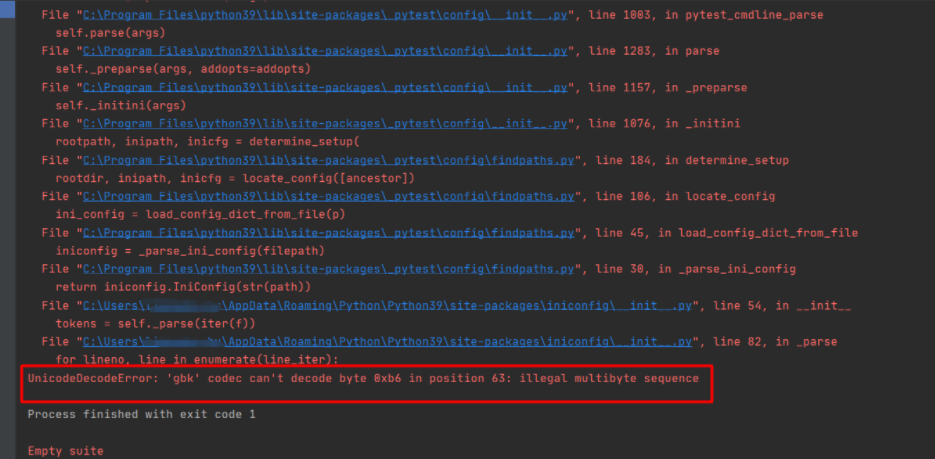
解决方法
找的iniconfig模块,找到前一行代码open()函数,在里面添加encoding='utf-8'

 浙公网安备 33010602011771号