
15.Qt使用QTcpServer实现网络助手服务端
Qt使用QTcpServer实现网络助手服务端
QTcpServer是qt用来操作服务的类。
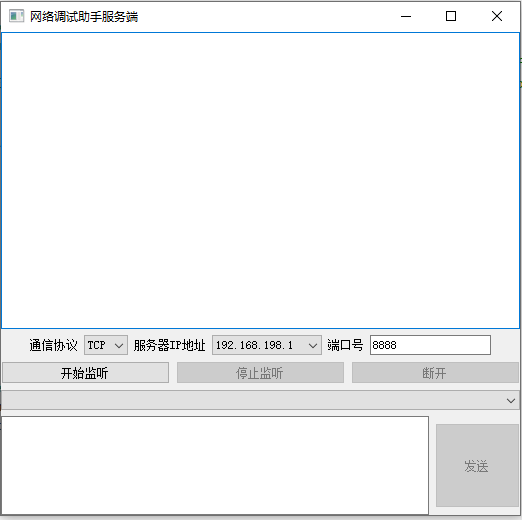
.pro需要增加network
QT += core gui network
headers
mycombobox.h
#ifndef MYCOMBOBOX_H
#define MYCOMBOBOX_H

#include <QComboBox>
#include <QWidget>

class MyComboBox : public QComboBox
{
    Q_OBJECT
public:
    MyComboBox(QWidget *parent);
protected:
    void mousePressEvent(QMouseEvent *e) override;
signals:
    void comboBoxClick();
};

#endif // MYCOMBOBOX_H
widget.h
#ifndef WIDGET_H
#define WIDGET_H

#include <QWidget>
#include <QTcpServer>
#include <QDebug>

QT_BEGIN_NAMESPACE
namespace Ui { class Widget; }
QT_END_NAMESPACE

class Widget : public QWidget
{
    Q_OBJECT

public:
    Widget(QWidget *parent = nullptr);
    ~Widget();
    QTcpServer *server;
private:
    Ui::Widget *ui;
    int indexComboBox;
    void setInsetColor(Qt::GlobalColor color, QString str);
public slots:
    void newClientConnect();
    void on_btnListenStart_clicked();
    void on_readyRead_handle();
    void on_btnListenStop_clicked();
    void mdisconnected();
    void on_btnSend_clicked();
    void mcomboBoxRefresh();
    void on_comboBoxChildren_activated(int index);
    void on_btnDisconnect_clicked();
};
#endif // WIDGET_H
sources
mycombobox.cpp
#include "mycombobox.h"

#include <QMouseEvent>

MyComboBox::MyComboBox(QWidget *parent):QComboBox(parent)
{

}

void MyComboBox::mousePressEvent(QMouseEvent *e)
{

    if(e->button() == Qt::LeftButton)
    {
        emit comboBoxClick();
    }

    QComboBox::mousePressEvent(e);
}
widget.cpp
#include "widget.h"
#include "ui_widget.h"

#include <QMessageBox>
#include <QNetworkInterface>
#include <QTcpSocket>

Widget::Widget(QWidget *parent)
    : QWidget(parent)
    , ui(new Ui::Widget)
{
    ui->setupUi(this);
    //对verticalLayout布局进行窗口自适应
    this->setLayout(ui->verticalLayout);
    //创建一个tcp服务
    server = new QTcpServer(this);
    //绑定当新连接进来时的槽
    connect(server,SIGNAL(newConnection()),this,SLOT(newClientConnect()));
    //绑定MyComboBox点击的信号与槽
    connect(ui->comboBoxChildren,&MyComboBox::comboBoxClick,this,&Widget::mcomboBoxRefresh);

    ui->btnListenStop->setEnabled(false);
    ui->btnDisconnect->setEnabled(false);
    ui->btnSend->setEnabled(false);
    ui->comboBoxIPServer->clear();

    //获取当前的电脑所有的ip地址
    QList<QHostAddress> hostAddrs = QNetworkInterface::allAddresses();
    for(QHostAddress tmp: hostAddrs)
    {
        //只取ipv4的ip地址
        if(tmp.protocol() == QAbstractSocket::IPv4Protocol){
            ui->comboBoxIPServer->addItem(tmp.toString());
        }
    }
}

Widget::~Widget()
{
    delete ui;
}

//新连接进来时
void Widget::newClientConnect()
{
    //qDebug() << "newClientConnect in";
    if(server->hasPendingConnections())
    {
        //获取客户端的socket
        QTcpSocket *connection = server->nextPendingConnection();
        //qDebug()  << "cliect Addr : " << connection->peerAddress().toString() << ", port:" << connection->peerPort();
        ui->textEditReceive->insertPlainText("客户端地址:"+connection->peerAddress().toString()+
                                             " 客户端端口:"+ QString::number(connection->peerPort()) +"\n");
        //绑定客户端发来数据的信号与槽
        connect(connection,SIGNAL(readyRead()),this,SLOT(on_readyRead_handle()));
        //客户端断开监听
        connect(connection,SIGNAL(disconnected()),this,SLOT(mdisconnected()));

        ui->comboBoxChildren->addItem(connection->peerAddress().toString()+":"+QString::number(connection->peerPort()));
        ui->comboBoxChildren->setCurrentText(connection->peerAddress().toString()+":"+QString::number(connection->peerPort()));
    }
}

//启动服务监听
void Widget::on_btnListenStart_clicked()
{
    //QHostAddress addr("192.168.96.169"); //QHostAddress::Any
    int port = ui->lineEditPort->text().toInt();
    if(!server->listen(QHostAddress(ui->comboBoxIPServer->currentText()),port)){
        //qDebug() << "listenError";
        QMessageBox msgBox;
        msgBox.setWindowTitle("监听失败");
        msgBox.setText("端口号被占用");
        msgBox.exec();
        return;
    }

    ui->btnListenStart->setEnabled(false);
    ui->btnListenStop->setEnabled(true);
    ui->btnDisconnect->setEnabled(true);
    ui->btnSend->setEnabled(true);
}

//读取数据
void Widget::on_readyRead_handle()
{
    QTcpSocket *tmpSock = qobject_cast<QTcpSocket *>(sender());
    QByteArray revData = tmpSock->readAll();
    //ui->textEditReceive->insertPlainText("客户端:"+revData+"\n");
    setInsetColor(Qt::red,"客户端("+tmpSock->peerAddress().toString()+"."+QString::number(tmpSock->peerPort())+"):"+revData);
    ui->textEditReceive->moveCursor(QTextCursor::End);
    ui->textEditReceive->ensureCursorVisible();

}

//客户端断开
void Widget::mdisconnected()
{
    //qDebug() << "客户端断开";
    QTcpSocket *tmpSock = qobject_cast<QTcpSocket *>(sender());
    ui->textEditReceive->insertPlainText("客户端断开!\n");
    tmpSock->deleteLater();
    int tempIndex = ui->comboBoxChildren->findText(tmpSock->peerAddress().toString()+":"+QString::number(tmpSock->peerPort()));
    ui->comboBoxChildren->removeItem(tempIndex);
}

//发送数据
void Widget::on_btnSend_clicked()
{
    QList<QTcpSocket *> tcpSocketClients = server->findChildren<QTcpSocket *>();
    if(tcpSocketClients.isEmpty()){
        QMessageBox msgBox;
        msgBox.setWindowTitle("发送错误");
        msgBox.setText("当前无连接");
        msgBox.exec();
        ui->btnSend->setEnabled(true);
        return;
    }
    QString sendData = ui->textEditSendContext->toPlainText();
    bool sendAllFlag = true;
    QString addrTmp;
    QString portTmp;
    if(ui->comboBoxChildren->currentText() == "all"){
        for (QTcpSocket * tmp : tcpSocketClients) {
            tmp->write(sendData.toStdString().c_str());
        }
        sendAllFlag = true;
    }else{
         for (QTcpSocket * tmp : tcpSocketClients) {
             if(tmp->peerAddress().toString()+":"+QString::number(tmp->peerPort()) == ui->comboBoxChildren->currentText()){
                 tmp->write(sendData.toStdString().c_str());
                 addrTmp = tmp->peerAddress().toString();
                 portTmp = QString::number(tmp->peerPort());
                 sendAllFlag = false;
             }
         }
        //tcpSocketClients[indexComboBox]->write(ui->textEditSendContext->toPlainText().toStdString().c_str());
    }
    //写入当前接收框
    if(sendAllFlag){
        setInsetColor(Qt::black,"服务端->all:"+sendData);
    }else{
        setInsetColor(Qt::black,"服务端->"+addrTmp+"."+portTmp+":"+sendData);
    }
    //清空当前输入
    ui->textEditSendContext->clear();
}

//刷新客户端列表
void Widget::mcomboBoxRefresh()
{
    ui->comboBoxChildren->clear();
    QList<QTcpSocket *> tcpSocketClients = server->findChildren<QTcpSocket *>();
    for (QTcpSocket * tmp : tcpSocketClients) {
        ui->comboBoxChildren->addItem(tmp->peerAddress().toString()+":"+QString::number(tmp->peerPort()));
        //tmp->write(ui->textEditSendContext->toPlainText().toStdString().c_str());
    }
    ui->comboBoxChildren->addItem("all");
}

void Widget::on_comboBoxChildren_activated(int index)
{
    indexComboBox = index;
}

//停止监听
void Widget::on_btnListenStop_clicked()
{
    QList<QTcpSocket *> tcpSocketClients = server->findChildren<QTcpSocket *>();

    for (QTcpSocket * tmp : tcpSocketClients) {
        tmp->close();
    }
    server->close();
    ui->btnListenStop->setEnabled(false);
    ui->btnDisconnect->setEnabled(false);
    ui->btnSend->setEnabled(false);
    ui->btnListenStart->setEnabled(true);
}

//断开
void Widget::on_btnDisconnect_clicked()
{
    on_btnListenStop_clicked();
    delete server;
    this->close();
}

//设置当前颜色
void Widget::setInsetColor(Qt::GlobalColor color, QString str)
{
    QTextCursor cursor = ui->textEditReceive->textCursor();
    QTextCharFormat format;
    format.setForeground(QBrush(QColor(color)));
    cursor.setCharFormat(format);
    cursor.insertText(str+"\n");
}
ui
<?xml version="1.0" encoding="UTF-8"?>
<ui version="4.0">
 <class>Widget</class>
 <widget class="QWidget" name="Widget">
  <property name="geometry">
   <rect>
    <x>0</x>
    <y>0</y>
    <width>519</width>
    <height>483</height>
   </rect>
  </property>
  <property name="windowTitle">
   <string>网络调试助手服务端</string>
  </property>
  <widget class="QWidget" name="layoutWidget">
   <property name="geometry">
    <rect>
     <x>0</x>
     <y>0</y>
     <width>521</width>
     <height>481</height>
    </rect>
   </property>
   <layout class="QVBoxLayout" name="verticalLayout" stretch="6,1,1,0,2">
    <item>
     <widget class="QTextEdit" name="textEditReceive"/>
    </item>
    <item>
     <layout class="QHBoxLayout" name="horizontalLayout">
      <item>
       <spacer name="horizontalSpacer">
        <property name="orientation">
         <enum>Qt::Horizontal</enum>
        </property>
        <property name="sizeHint" stdset="0">
         <size>
          <width>40</width>
          <height>20</height>
         </size>
        </property>
       </spacer>
      </item>
      <item>
       <widget class="QLabel" name="label">
        <property name="text">
         <string>通信协议</string>
        </property>
       </widget>
      </item>
      <item>
       <widget class="QComboBox" name="comboBoxProtocol">
        <item>
         <property name="text">
          <string>TCP</string>
         </property>
        </item>
        <item>
         <property name="text">
          <string>ADP</string>
         </property>
        </item>
       </widget>
      </item>
      <item>
       <widget class="QLabel" name="label_2">
        <property name="text">
         <string>服务器IP地址</string>
        </property>
       </widget>
      </item>
      <item>
       <widget class="QComboBox" name="comboBoxIPServer"/>
      </item>
      <item>
       <widget class="QLabel" name="label_3">
        <property name="text">
         <string>端口号</string>
        </property>
       </widget>
      </item>
      <item>
       <widget class="QLineEdit" name="lineEditPort">
        <property name="text">
         <string>8888</string>
        </property>
       </widget>
      </item>
      <item>
       <spacer name="horizontalSpacer_2">
        <property name="orientation">
         <enum>Qt::Horizontal</enum>
        </property>
        <property name="sizeHint" stdset="0">
         <size>
          <width>40</width>
          <height>20</height>
         </size>
        </property>
       </spacer>
      </item>
     </layout>
    </item>
    <item>
     <layout class="QHBoxLayout" name="horizontalLayout_2">
      <item>
       <widget class="QPushButton" name="btnListenStart">
        <property name="text">
         <string>开始监听</string>
        </property>
       </widget>
      </item>
      <item>
       <widget class="QPushButton" name="btnListenStop">
        <property name="text">
         <string>停止监听</string>
        </property>
       </widget>
      </item>
      <item>
       <widget class="QPushButton" name="btnDisconnect">
        <property name="text">
         <string>断开</string>
        </property>
       </widget>
      </item>
     </layout>
    </item>
    <item>
     <widget class="MyComboBox" name="comboBoxChildren"/>
    </item>
    <item>
     <layout class="QHBoxLayout" name="horizontalLayout_3">
      <item>
       <widget class="QTextEdit" name="textEditSendContext">
        <property name="minimumSize">
         <size>
          <width>0</width>
          <height>0</height>
         </size>
        </property>
       </widget>
      </item>
      <item>
       <widget class="QPushButton" name="btnSend">
        <property name="minimumSize">
         <size>
          <width>85</width>
          <height>85</height>
         </size>
        </property>
        <property name="text">
         <string>发送</string>
        </property>
       </widget>
      </item>
     </layout>
    </item>
   </layout>
  </widget>
 </widget>
 <customwidgets>
  <customwidget>
   <class>MyComboBox</class>
   <extends>QComboBox</extends>
   <header>mycombobox.h</header>
  </customwidget>
 </customwidgets>
 <resources/>
 <connections/>
</ui>

 浙公网安备 33010602011771号