  1 using System;
  2 using System.Collections.Generic;
  3 using System.ComponentModel;
  4 using System.Data;
  5 using System.Drawing;
  6 using System.Drawing.Printing;
  7 using System.Linq;
  8 using System.Management;
  9 using System.Text;
 10 using System.Threading.Tasks;
 11 using System.Windows.Forms;
 12
 13 namespace PrintDocument控件
 14 {
 15     public partial class Form1 : Form
 16     {
 17         public Form1()
 18         {
 19             InitializeComponent();
 20         }
 21
 22         /// <summary>
 23         /// PrintDocument:用于打印最重要的类,几乎所有的打印类都与这个类有关系。
 24         /// </summary>
 25
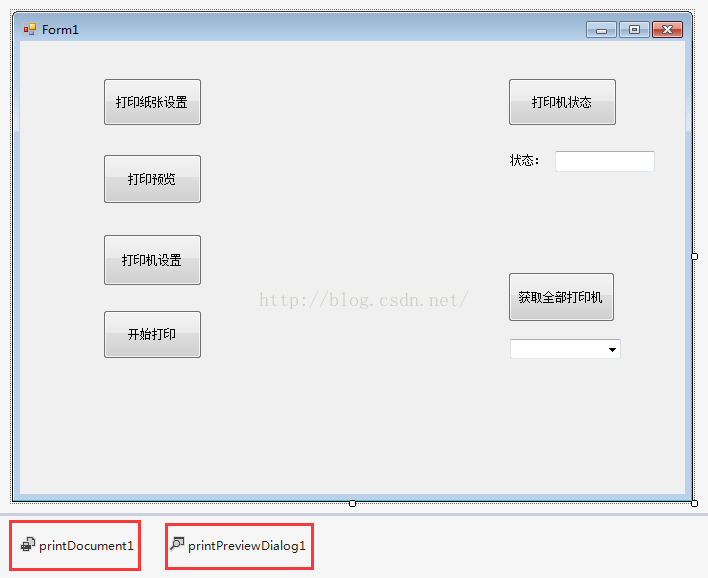
 26         // 1、打印页面设置
 27         private void btnSetting_Click(object sender, EventArgs e)
 28         {
 29             // 打印页面设置对话框
 30             PageSetupDialog page = new PageSetupDialog();
 31
 32             page.Document = printDocument1;
 33             page.AllowMargins = true;
 34             page.AllowOrientation = true;
 35             page.AllowPaper = true;
 36             page.AllowPrinter = true;
 37             page.ShowHelp = true;
 38             if (page.ShowDialog() == DialogResult.OK)
 39             {
 40                 // 将设置好的打印页 用作 PrintDocument进行打印。
 41                 printDocument1.DefaultPageSettings = page.PageSettings;
 42             }
 43         }
 44
 45         // 2、打印机设置
 46         private void btnPrint_Click(object sender, EventArgs e)
 47         {
 48             // 打印机设置对话框
 49             PrintDialog print = new PrintDialog();
 50
 51             print.Document = printDocument1;
 52             print.AllowCurrentPage = true;
 53             print.AllowPrintToFile = true;
 54             print.AllowSelection = true;
 55             print.AllowSomePages = true;
 56             print.ShowHelp = true;
 57             if (print.ShowDialog() == DialogResult.OK)
 58             {
 59                 // 将设置好的打印机 用作 PrinDocument进行打印。
 60                 printDocument1.PrinterSettings = print.PrinterSettings;
 61             }
 62         }
 63
 64         // 3、打印预览
 65         private void btnPreview_Click(object sender, EventArgs e)
 66         {
 67             if (MessageBox.Show("是否要预览打印文件?", "打印预览", MessageBoxButtons.OKCancel, MessageBoxIcon.Exclamation) == DialogResult.OK)
 68             {
 69                 // 设置要预览的文档
 70                 printPreviewDialog1.Document = printDocument1;
 71                 // 开启操作系统的抗锯齿功能
 72                 printPreviewDialog1.UseAntiAlias = true;
 73
 74                 // 打开预览窗口
 75                 if (printPreviewDialog1.ShowDialog() == DialogResult.OK)
 76                 {
 77                     // 如果选择的是系统默认打印机,点击“打印”按钮之后,会跳出“文件另存为”窗口;
 78                     // 如果选择别的打印机,点击“打印”之后,会直接打印,不会返回“OK”。
 79                     MessageBox.Show("开始打印");
 80                 }
 81                 else
 82                 {
 83                     MessageBox.Show("关闭预览");
 84                 }
 85             }
 86         }
 87
 88         // 4、开始打印
 89         private void btnStart_Click(object sender, EventArgs e)
 90         {
 91             // PrintController:控制一个PrintDocument是如何打印的。
 92             PrintController printController = new StandardPrintController();
 93             printDocument1.PrintController = printController;
 94             printDocument1.DocumentName = "社保样卡";
 95             printDocument1.PrinterSettings.PrinterName = "XID8600 U1";
 96             printDocument1.Print(); // 触发Print_Page事件。
 97         }
 98
 99
100         // PrintDocument 三个事件中的第二个参数 e 有如下属性:
101         // e.Cancel:设置为true,将取消这次打印作业。
102         // e.Griphics:所使用打印机的设备环境。
103         // e.HasMorePages:PrintPage事件打印一页后,如果仍有数据未打印,退出事件前设置
104         // HasMorePages=true;退出事件之后将再次出发PrintPage事件,打印下一页。
105         // e.MarginBounds:打印区域的大小,是Rectangle结构,元素包括左上角坐标(Left和Top),
106         //                 宽和高(Width和Height),单位为1/100英寸。
107         // e.PageSettings:PageSettings类对象,包含用对话框PageSetupDialog设置的页面打印方式的
108         //                全部信息,
109
110         // 在调用 Print 方法后,在打印文档的第一页之前发生。
111         private void printDocument1_BeginPrint(object sender, System.Drawing.Printing.PrintEventArgs e)
112         {
113         }
114
115         // 需要打印新的一页时发生,负责打印一页所需要的数据
116         // 打印预览会调用该事件,预览的内容就是此处设置好的内容。
117         private void printDocument1_PrintPage(object sender, System.Drawing.Printing.PrintPageEventArgs e)
118         {
119             Image iamge = Image.FromFile(@"D:\photo\test.jpg");
120
121             e.Graphics.DrawString("社保卡样卡", new Font("黑体", 35), Brushes.Black, new Point(400, 120));
122
123             e.Graphics.DrawString("姓名 张三", new Font("黑体", 25), Brushes.Black, new Point(480, 270));
124             e.Graphics.DrawString("社会保障号码 32032032302030230", new Font("黑体", 25), Brushes.Black, new Point(480, 360));
125             e.Graphics.DrawString("社会保障卡号 JS2018098", new Font("黑体", 25), Brushes.Black, new Point(480, 450));
126             e.Graphics.DrawString("制卡日期 2016年5月", new Font("黑体", 25), Brushes.Black, new Point(480, 540));
127             e.Graphics.DrawImage(iamge, new Point(100, 240));
128         }
129
130         // 在打印完最后一页文档时发生。
131         private void printDocument1_EndPrint(object sender, System.Drawing.Printing.PrintEventArgs e)
132         {
133         }
134
135         /// <summary>
136         /// 打印机状态值
137         /// </summary>
138         public enum PrinterStatus
139         {
140             其他状态 = 1,
141             未知,
142             空闲,
143             正在打印,
144             预热,
145             停止打印,
146             打印中,
147             离线
148         }
149
150         // 获取指定打印机的状态
151         private void btnState_Click(object sender, EventArgs e)
152         {
153             string strPrinter = "win32_printer.DeviceId='XID8300 U1'";
154
155             // 用指定的打印机实例化一个打印机对象。
156             ManagementObject printer = new ManagementObject(strPrinter);
157
158             // 获取打印机信息。
159             printer.Get();
160
161             // 获取打印机状态属性
162             string str = printer.Properties["PrinterStatus"].Value.ToString();
163             textBox1.Text = str;
164         }
165
166         // 获取本地所有打印机信息
167         private void button1_Click(object sender, EventArgs e)
168         {
169             string strPrinter = "win32_printer";
170
171             // 获取本地所有打印机
172             ManagementClass mc = new ManagementClass(strPrinter);
173
174             // 获取所有打印机实例的集合
175             ManagementObjectCollection moc = mc.GetInstances();
176
177             // 遍历本地所有打印机
178             foreach (ManagementObject printer in moc)
179             {
180                 // 打印机名字
181                 string strName = printer.Properties["DeviceId"].Value.ToString();
182                 // 打印机状态
183                 string strState = printer.Properties["PrinterStatus"].Value.ToString();
184                 comboBox1.Items.Add(strName);
185             }
186         }
187     }
188 }




 浙公网安备 33010602011771号