

C# HttpWebRequest实现basic身份认证
原文链接:
c# HttpClient和HttpWebRequest添加Basic类型的Authentication认证
需求:webApi 对接 使用 Basic类型的Authentication认证



 1                 string serviceUrl = saleURL;
 2                 string Username = ParameterService.GetSapUsername();
 3                 string Password = ParameterService.GetSapPassword();
 4                 ServicePointManager.Expect100Continue = true;
 5                 ServicePointManager.SecurityProtocol = SecurityProtocolType.Tls12 | SecurityProtocolType.Tls11 | SecurityProtocolType.Tls;
 6                 ServicePointManager.ServerCertificateValidationCallback = (sender, certificate, chain, errors) => true;
 7                 HttpWebRequest myRequest = (HttpWebRequest)WebRequest.Create(serviceUrl);
 8                 string strJson = JsonConvert.SerializeObject(saleSapZhu);
 9                 SysLog.SetSAPLog("【销售上传】:" + strJson);
10                 byte[] buf = System.Text.Encoding.GetEncoding("UTF-8").GetBytes(strJson);
11                 myRequest.Method = "POST";
12                 myRequest.ContentLength = buf.Length;
13                 myRequest.ContentType = "application/json";
14                 //Basic 身份验证
15                 //(1)设置请求Credentials
16                 CredentialCache credentialCache = new CredentialCache();
17                 credentialCache.Add(new Uri(serviceUrl), "Basic", new NetworkCredential(Username, Password));
18                 myRequest.Credentials = credentialCache;
19                 //(2)设置Headers Authorization
20                 myRequest.Headers.Add("Authorization", "Basic " + Convert.ToBase64String(Encoding.UTF8.GetBytes($"{Username}:{Password}")));
21
22                 myRequest.Timeout = 60000;
23                 Stream stream = myRequest.GetRequestStream();
24                 stream.Write(buf, 0, buf.Length);
25                 stream.Close();
26                 HttpWebResponse myResponse = (HttpWebResponse)myRequest.GetResponse();
27                 StreamReader reader = new StreamReader(myResponse.GetResponseStream(), Encoding.UTF8);
28                 string returnXml = reader.ReadToEnd();
29                 reader.Close();
30                 myResponse.Close();
第二种:需要添加BearerToken
myRequest.Headers.Add("Authorization", "Bearer " +token);
第三种: Body 里面使用 form表单提交
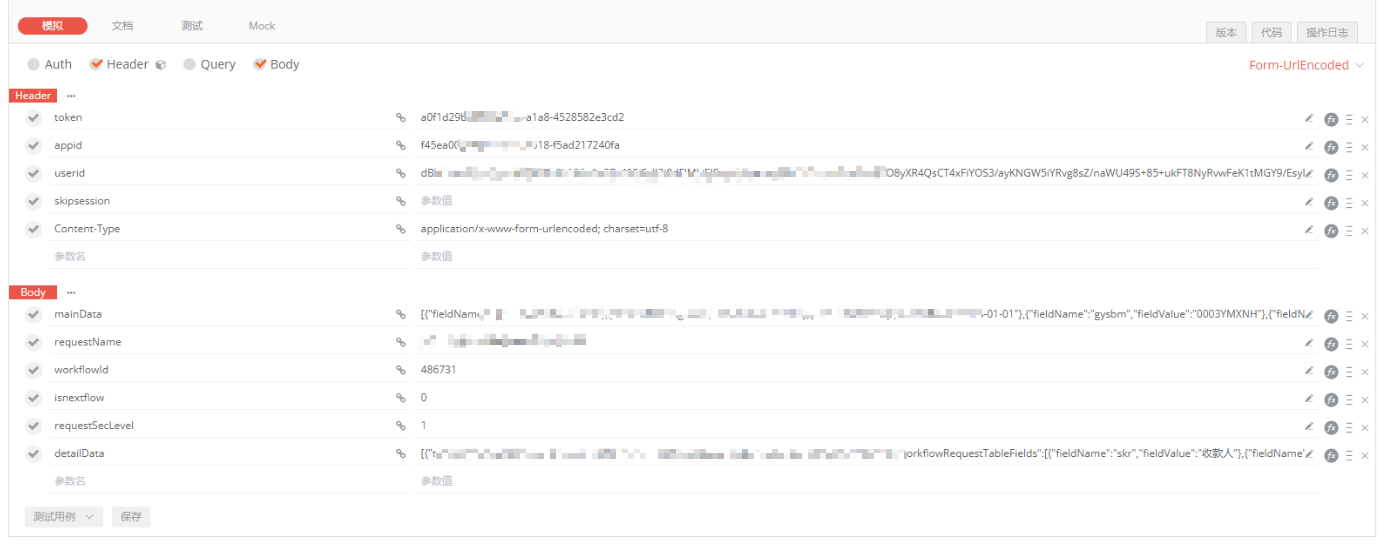
Dictionary<string, string> dic_param = new Dictionary<string, string>(); //参数列表
dic_param.Add("paraName", "paraValue");
HttpWebRequest myRequest = (HttpWebRequest)WebRequest.Create(serviceUrl);

                myRequest.Method = "POST";
                //myRequest.ContentLength = buf.Length;
                myRequest.ContentType = "application/x-www-form-urlencoded;charset=utf-8";
                myRequest.Headers.Add("appid", appid);
                myRequest.Timeout = 60000;

                string param = string.Join("&", dic_param.Select(s => $"{s.Key}={HttpUtility.UrlEncode(s.Value, Encoding.UTF8)}"));

                byte[] postData = Encoding.UTF8.GetBytes(param); //使用utf-8格式组装post参数  BuildQuery(dic_param, "utf8")

                Stream stream = myRequest.GetRequestStream();
                stream = myRequest.GetRequestStream();
                stream.Write(postData, 0, postData.Length);
                stream.Close();
                HttpWebResponse myResponse = (HttpWebResponse)myRequest.GetResponse();
                StreamReader reader = new StreamReader(myResponse.GetResponseStream(), Encoding.UTF8);
                string returnXml = reader.ReadToEnd();
                reader.Close();
                myResponse.Close();

 浙公网安备 33010602011771号