微信、抖音、app支付
uniapp微信小程序支付(微信、抖音)
1.微信支付
调用前需在小程序微信公众平台 -功能 - 微信支付入口申请接入微信支付
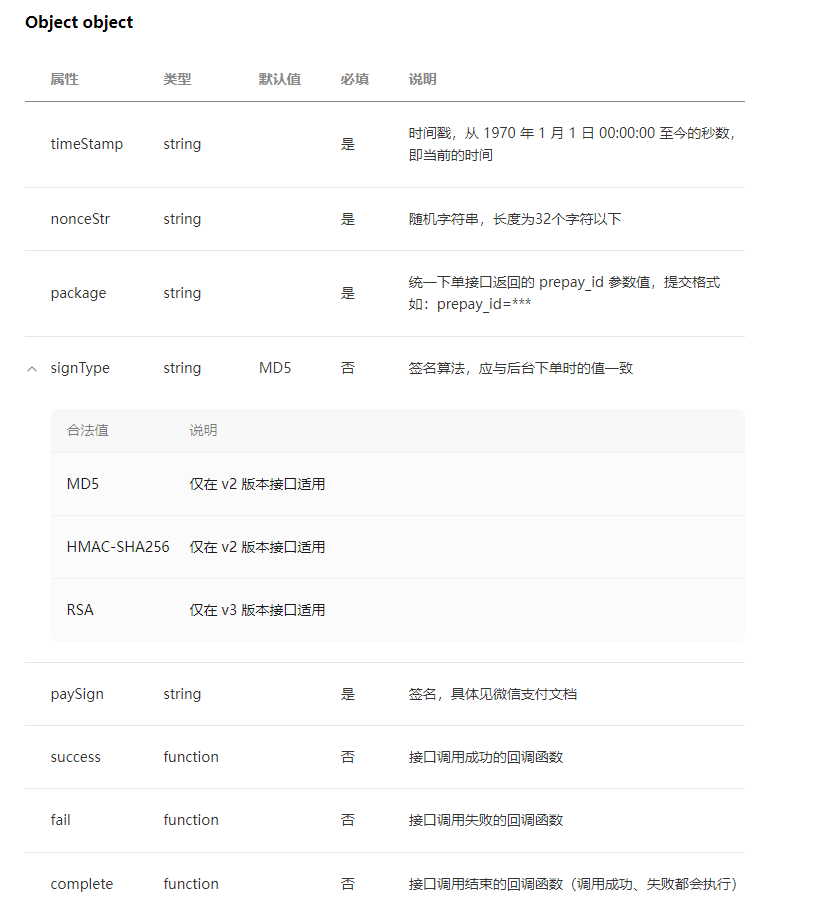
wx.requestPayment({
//后台返回数据
timeStamp: res.data.timeStamp,
nonceStr: res.data.nonceStr,
package: res.data.package,
signType: 'MD5',
paySign: res.data.paySign,
success: response => {
//订阅公众号模板
tmplIds: ['cDSShU3iMm3qMMUNTRo4XYfgxQRF6Vlth3kLWiMn4JQ'],
success: () => {}
}
})
2.抖音支付
开发接入之前,请先完成商户入驻流程
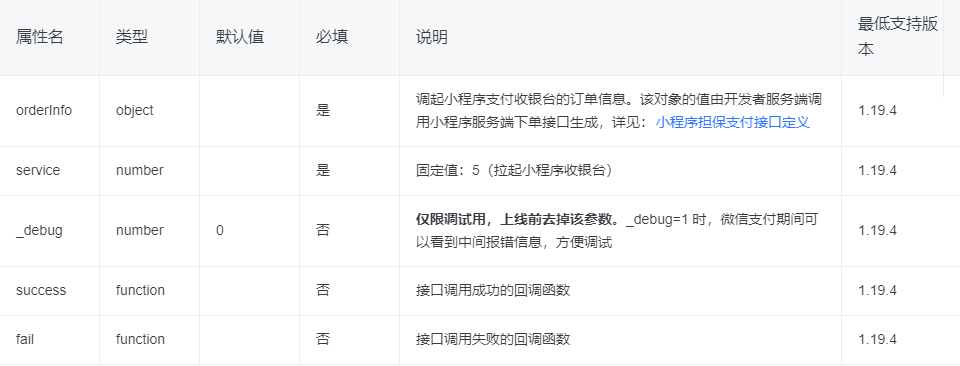
tt.pay({
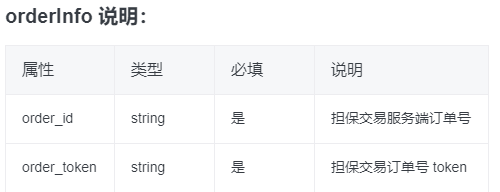
orderInfo: {
order_id: res.data.data.order_id,
order_token: res.data.data.order_token
},
service: 5,
success: response => {
if(response.code == 0){
//抖音订阅模板
tt.requestSubscribeMessage({
tmplIds: ['MSG11886451bef72279e17bf95939130ba90cb00ea14497'],
success: () => {}
})
}
}
})
需要注意的是,抖音支付和微信支付所需要的参数是不一样的
出了使用各子平台的的api外,uniapp还有一个统一各平台的客户端支付API uni.requestPayment 但是配置回填仍然需要看各个平台本身的支付文档
https://uniapp.dcloud.io/api/plugins/payment.html#requestpayment
3.app支付
uni.requestPayment({
provider: 'wxpay',
orderInfo: {
appid: this.appId, //微信开放平台-应用-AppId,注意和微信小程序、公众号 AppId 可能不一致
noncestr: res.data.nonceStr, // 随机字符串
package: res.data.package, // 固定值
partnerid: res.data.partnerid, // 微信支付商户号
prepayid: res.data.prepay_id, // 统一下单订单号
timestamp: res.data.timeStamp, // 时间戳(单位:秒)
sign: res.data.paySign // 签名,这里用的 MD5 签名
},
success: res => {
this.getDetail()
}
})
以上支付所需要的参数都是后台返回的

 浙公网安备 33010602011771号