

报错
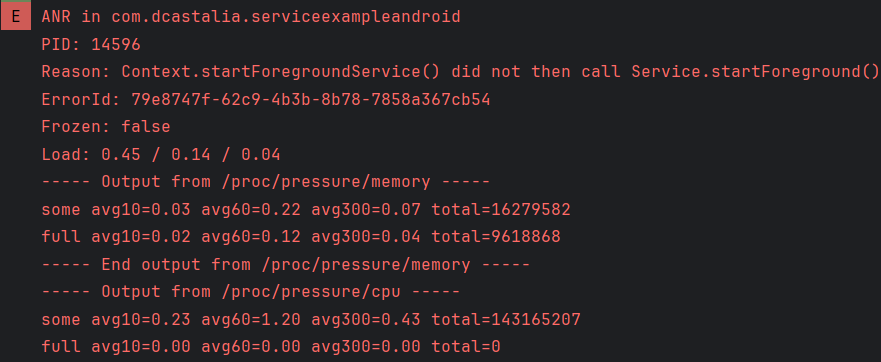
分析:
在Activity中调用startForegroundService()方法来启动一个前台服务(Foreground Service)时必须确保在服务的onCreate()或onStartCommand()方法中调用服务的startForeground()方法
这是因为从Android Oreo(API 26)开始,后台服务必须在前台运行,如,播放音频或显示通知。
为什么需要startForeground()?
主要有两个主要作用:
1、显示通知:前台服务必须显示一个通知;用户将在状态栏上看到该通知
2、提升优先级:前台服务的优先级高于后台服务,尽可能避免被系统杀死。
实现:
Activity中
    Intent myIntent = new Intent(MainActivity.this, PlayService.class);
    if (Build.VERSION.SDK_INT >= Build.VERSION_CODES.O) {
        this.startForegroundService(myIntent);
    } else {
        this.startService(myIntent);
    }
Service中onStartCommand方法中
        int NOTIFICATION_ID = 1;

        // 创建一个通知渠道(仅在API 26及以上版本需要)
        if (android.os.Build.VERSION.SDK_INT >= android.os.Build.VERSION_CODES.O) {
            CharSequence name = "My Channel";
            String description = "Channel description";
            int importance = NotificationManager.IMPORTANCE_DEFAULT;
            NotificationChannel channel = new NotificationChannel("my_channel_id", name, importance);
            channel.setDescription(description);
            NotificationManager notificationManager = getSystemService(NotificationManager.class);
            notificationManager.createNotificationChannel(channel);
        }

        // 创建通知内容
        Intent notificationIntent = new Intent(this, MainActivity.class);
        PendingIntent pendingIntent = PendingIntent.getActivity(this, 0, notificationIntent, 0);
        Notification notification = new NotificationCompat.Builder(this, "my_channel_id")
                .setContentTitle("My service is running")
                .setContentText("Click to return")
                .setSmallIcon(R.mipmap.ic_launcher)
                .setContentIntent(pendingIntent)
                .build();

        // 开始前台服务,并显示通知
        startForeground(NOTIFICATION_ID, notification);
le.li

 浙公网安备 33010602011771号