
如何解决hangfire使用redis存储时,如果采用了prefix报“Key has MOVED from Endpoint”的错
当我们使用redis作为hangfire的存储时,如果使用了下面红色字体的配置
|
GlobalConfiguration.Configuration.UseRedisStorage(@"192.168.0.3:7002", new Hangfire.Redis.RedisStorageOptions { Prefix = "{hangfire-A}:", // Db =2 }); app.UseHangfireDashboard(); |
则你很有可能会看到下面的错误
|
Key has MOVED from Endpoint 127.0.0.1:7001 and hashslot 6991 but CommandFlags.NoRedirect was specified - redirect not followed for MGET. IOCP: (Busy=0,Free=1000,Min=4,Max=1000), WORKER: (Busy=1,Free=32766,Min=4,Max=32767), Local-CPU: n/a |
在Hangfire的官网,对这种现象有一个说明,但常常被我们忽略掉。具体说明如下
|
Redis Cluster support¶ You can use a single endpoint to connect to a Redis cluster, Hangfire will detect other instances automatically by querying the node configuration. However, it’s better to pass multiple endpoints in order to mitigate connectivity issues, when some of endpoints aren’t available, e.g. during the failover process. Since Hangfire requires transactions, and Redis doesn’t support ones that span multiple hash slots, you also need to configure the prefix to assign it to the same hash tag: GlobalConfiguration.Configuration.UseRedisStorage( This will bind all the keys to a single Redis instance. To be able to fully utilize your Redis cluster, consider using multiple JobStorage instances and leveraging some load-balancing technique (round-robin is enough for the most cases). To do so, pick different hash tags for different storages and ensure they are using hash slots that live on different masters by using commands CLUSTER NODES and CLUSTER KEYSLOT.
来自 <http://docs.hangfire.io/en/latest/configuration/using-redis.html>
|
文章中明确说明,这种操作会让hangfire的key被绑定到一个单独的redis实例上。这个实例就是我们需要配置的连接地址(注:这里如果配置集群的地址,一样会出错,只能配置绑定的那个地址)。但怎么找到这个地址呢?
首先,我们使用CLUSTER NODES命令查看每个节点的hash slots分布情况,效果如下:
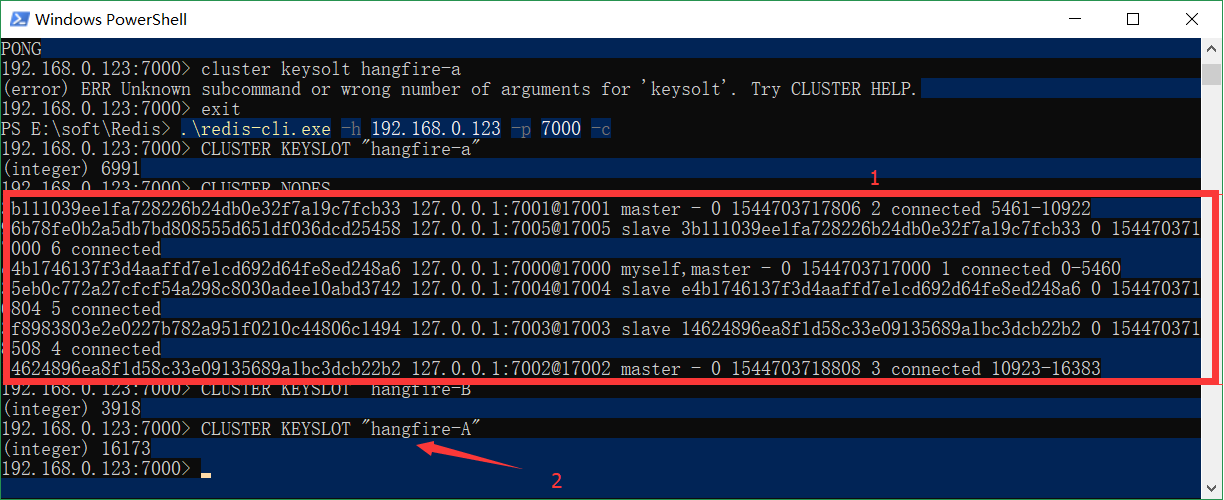
上图显示了每个节点的分布情况,然后我们需要使用CLUSTER KEYSLOT 命令找出我们需要做为key的值会hash成什么值,然后找到对应值分配 的服务器。 如上“hangfire-A" hash后对应的slor是16173, 对应的是7200端口对应的节点。
所以在代码中,我们配置服务器地址时就要使用这个端口。具体如下:
|
GlobalConfiguration.Configuration.UseRedisStorage(@"192.168.0.3:7002", new Hangfire.Redis.RedisStorageOptions { Prefix = "{hangfire-A}:", // Db =2 }); |
然后我们的服务就可以正常起动了

 浙公网安备 33010602011771号