es 基础概念总结 —— 映射
索引 index
创建索引
PUT test/_doc/1

{ "count": 5, "date": "2015/09/02" }
查看索引
GET _cat/indices?v
发现当前索引状态为 yellow, 副本数 rep是 1。这是由于单机状态不需要设置副本,因此将其改成 0 就正常了。
PUT test/_settings
{ "number_of_replicas": 0}
删除索引
DELETE test
查看映射
GET test/_mapping
映射 mapping
作用:
- 定义字段名称与数据类型
- 定义索引规则(是否被索引,采用的 analyzer
示例
PUT data/_doc/1
{ "count": 5, "date": "2015/09/02" }

GET data/_mapping
创建了 data 索引,映射类型为 _doc, 字段 count 的数据类型为 long
{
  "data" : {
    "mappings" : {
      "properties" : {
        "count" : {
          "type" : "long"
        },
        "date" : {
          "type" : "date",
          "format" : "yyyy/MM/dd HH:mm:ss||yyyy/MM/dd||epoch_millis"
        }
      }
    }
  }
}
1.数据类型如何动态映射?
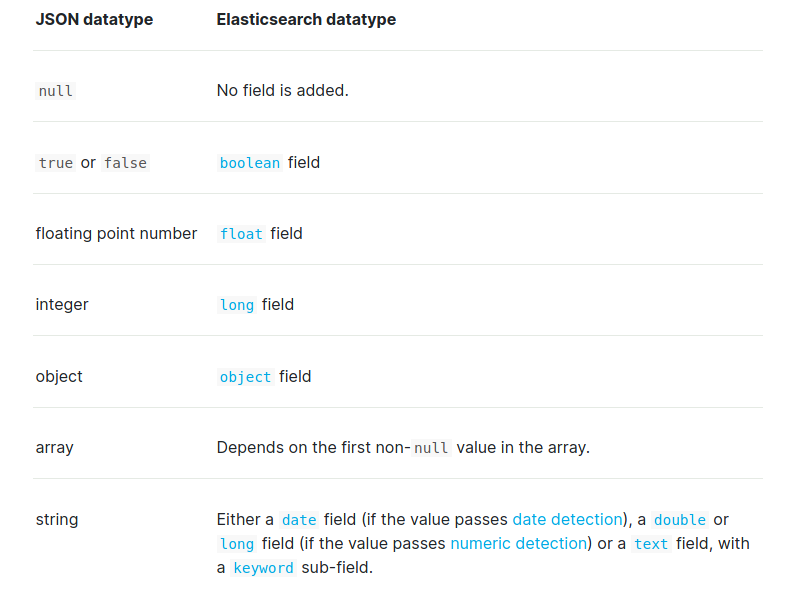
日期检测(默认启用)
禁用
PUT my_index
{
  "mappings": {
    "date_detection": false
  }
}
自定义映射格式
PUT my_index
{
  "mappings": {
    "dynamic_date_formats": ["MM/dd/yyyy"]
  }
}
数字检测(默认禁用)
PUT my_index
{
  "mappings": {
    "numeric_detection": true
  }
}

PUT my_index/_doc/1
{
  "my_float":   "1.0",
  "my_integer": "1"
}
新增字段的处理
可设为 true false strict

PUT dynamic_mapping_test/_mapping
{
  "dynamic": false
}

其中,false 不可被检索, strict 不可插入新值
2.索引具体字段的规则?
index 为 false
PUT users
{
  "mappings": {
    "properties": {
      "firstName": {
        "type": "text"
      },
      "lastName": {
        "type": "text"
      },
      "mobile": {
        "type": "text",
        "index": false
      }
    }
  }
}
null_value
PUT users
{
  "mappings": {
    "properties": {
      "firstName": {
        "type": "text"
      },
      "lastName": {
        "type": "text"
      },
      "mobile": {
        "type": "keyword",
        "null_value": "NULL"
      }
    }
  }
}

PUT users/_doc/1
{
  "firtName": "si",
  "lastName": "li",
  "mobile": null
}

POST users/_search
{
  "query": {
    "match": {
      "mobile": "NULL"
    }
  }
}
copy_to
PUT users
{
  "mappings": {
    "properties": {
      "firstName": {
        "type": "text",
        "copy_to": "fullName"
      },
      "lastName": {
        "type": "text",
        "copy_to": "fullName"
      }
    }
  }
}

PUT users/_doc/1
{
  "firtName": "si",
  "lastName": "li"
}

GET users/_search?q=fullName:(li si)

POST users/_search
{
  "query": {
    "match": {
      "fullName": {
        "query": "li si",
        "operator": "and"
      }
    }
  }
}
233
参考资料
https://www.elastic.co/guide/en/elasticsearch/reference/7.6/dynamic-mapping.html

 浙公网安备 33010602011771号