


安装eslworking
首先解压eslworking。
用户配置文件有两个,分别是:config/config.properties 和 config/jdbc.properties 。
config.properties下修改为:

只需要修改api.uplink.url=http://127.0.0.1:8080/prismart/ogi/ew/httpHandler?customerCode=hanshow
hanshow为客户号
jdbc.properties修改为:
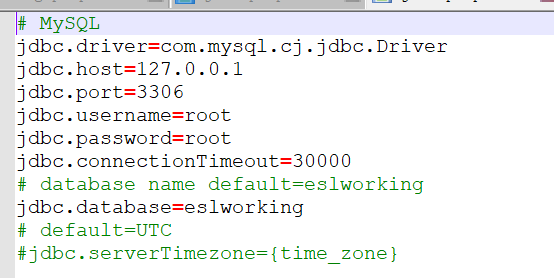
参考上面配置即可
最后在eslworking 下bin目录下鼠标右键加Shift打开权限命令,输入.\ service.bat install安装服务。
关闭防火墙,启动服务即可。

 浙公网安备 33010602011771号