

从零到一k8s(十)ipv4,ipv6 双网卡部署k8s
主机拓扑
| hostname | ipv4 | ipv6 |
|---|---|---|
| master01 | 10.250.0.5 | fdef:ffff:ffff:ffff::4 |
| master02 | 10.250.0.7 | fdef:ffff:ffff:ffff::5 |
| master03 | 10.250.0.9 | fdef:ffff:ffff:ffff::6 |
双栈配置
由于目前版本advertiseAddress 不支持双栈配置,当启用ipv4svc 时一定要配置为ipv4 地址
localAPIEndpoint:
advertiseAddress: 10.250.0.5
podSubnet: 192.168.0.0/16,fdec:ffff:ffff:ffff::/64
dnsDomain: lovexlq.com
serviceSubnet: 10.96.0.0/16,fdee:ffff:ffff:ffff::/112
只开启ipv6配置
podSubnet: fdec:ffff:ffff:ffff::/64
dnsDomain: lovexlq.com
serviceSubnet: fdee:ffff:ffff:ffff::/112
必要的内核模块和sysctl 参数
点击查看代码
cat <<EOF | sudo tee /etc/modules-load.d/k8s.conf
br_netfilter
EOF
cat <<EOF | sudo tee /etc/sysctl.d/k8s.conf
net.bridge.bridge-nf-call-ip6tables = 1
net.bridge.bridge-nf-call-iptables = 1
EOF

开启ip转发
net.ipv4.conf.all.forwarding=1
net.ipv6.conf.all.forwarding=1
配置calico 只开启ipv6
点击查看代码
下载配置文件yml 修改以下部分
  cni_network_config: |-
    {
      "name": "k8s-pod-network",
      "cniVersion": "0.3.1",
      "plugins": [
        {
          "type": "calico",
          "log_level": "info",
          "log_file_path": "/var/log/calico/cni/cni.log",
          "datastore_type": "kubernetes",
          "nodename": "__KUBERNETES_NODE_NAME__",
          "mtu": __CNI_MTU__,
		  #这里加入ipam 控制规则
          "ipam": {
              "type": "calico-ipam",
              "assign_ipv4": "false",
              "assign_ipv6": "true"
          },
          "policy": {
              "type": "k8s"
          },
          "kubernetes": {
              "kubeconfig": "__KUBECONFIG_FILEPATH__"
          }
        },
        {
          "type": "portmap",
          "snat": true,
          "capabilities": {"portMappings": true}
        },
        {
          "type": "bandwidth",
          "capabilities": {"bandwidth": true}
        }
      ]
    }
-----
## 修改env 部分
- name: CLUSTER_TYPE
              value: "k8s,bgp"
            # Auto-detect the BGP IP address.
            - name: IP
              value: "none"
            - name: IP6
              value: "autodetect"
            # Enable IPIP
            - name: CALICO_IPV4POOL_IPIP
              value: "Never"
            - name: CALICO_IPV6POOL_IPIP
              value: "Never"
            # Enable or Disable VXLAN on the default IP pool.
            - name: CALICO_IPV6POOL_VXLAN
              value: "Never"
            - name: CALICO_IPV4POOL_VXLAN
              value: "Never"
            - name: CALICO_ROUTER_ID
              value: "hash"
            - name: CALICO_IPV6POOL_CIDR
              value: "fdec:ffff:ffff:ffff::/64"
            - name: CALICO_IPV6POOL_NAT_OUTGOING
              value: "true"
            - name: FELIX_IPV6SUPPORT
              value: "true"
            # Set MTU for tunnel device used if ipip is enabled
            - name: FELIX_IPINIPMTU
              valueFrom:
                configMapKeyRef:
                  name: calico-config
                  key: veth_mtu
            # Set MTU for the VXLAN tunnel device.
            - name: FELIX_VXLANMTU
              valueFrom:
                configMapKeyRef:
                  name: calico-config
                  key: veth_mtu

----
### 创建ipv6 ippool
apiVersion: crd.projectcalico.org/v1
kind: IPPool
metadata:
  name: default-ipv6-ippool
spec:
  cidr: "fdec:ffff:ffff:ffff::/64"
  ipipMode: Never
  natOutgoing: true
  nodeSelector: all()
  vxlanMode: Never
配置calico 开启双栈
点击查看代码
只需再ipv6 only 的基础上打开 ipv4 相关配置即可


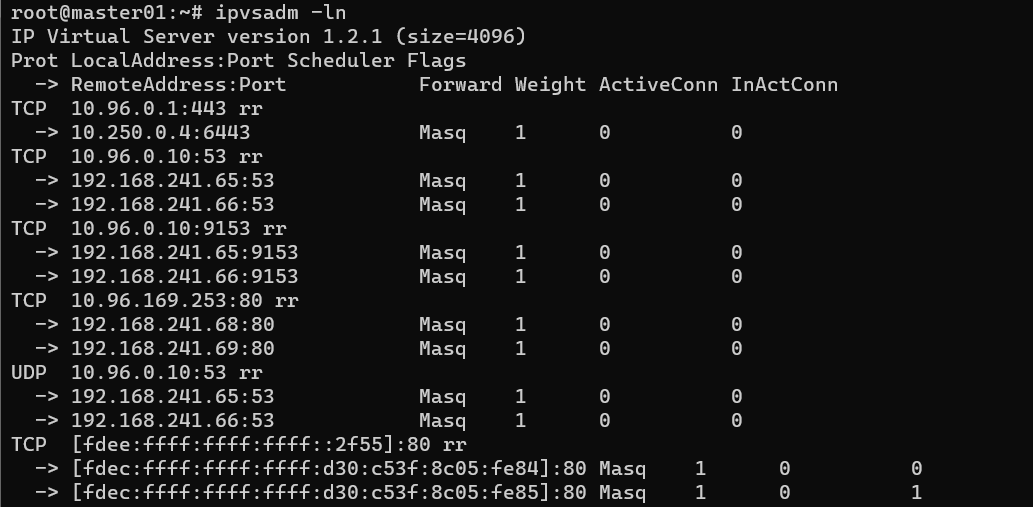
直接上效果图
本文来自博客园,作者:萱乐庆foreverlove,转载请注明原文链接:https://www.cnblogs.com/leleyao/p/16212565.html

 浙公网安备 33010602011771号