
前端微服务+React解决方案。
因为项目有很多互不依赖的模块,但每次发版却要一次打包都发上去,所以项目组决定进行分模块发版,看了一篇微服务前端的解决方案,还不错,但是还是不那么全面,试着用了一下,并且发布了一下,没什么太大问题,可能需要继续优化一下,简单介绍一下。
首先就是搭建主要的架构:
1.webpack.config.js的初始化
const path = require('path');
const CleanWebpackPlugin = require('clean-webpack-plugin');
const CopyWebpackPlugin = require('copy-webpack-plugin');
const WebpackBar = require('webpackbar');
const autoprefixer = require('autoprefixer')
const { resolve } = path;
module.exports = {
    devtool: 'source-map',
    entry: path.resolve(__dirname, '../src/index.js'),
    output: {
        filename: 'output.js',
        library: 'output',
        libraryTarget: 'amd',
        path: resolve(__dirname, '../public')
    },
    mode: 'production',
    externals: {
        react: 'React',
        'react-dom': 'ReactDOM',
        jquery: 'jQuery'
    },
    module: {
        rules: [
            { parser: { System: false } },
            {
                test: /\.js?$/,
                exclude: [path.resolve(__dirname, 'node_modules')],
                loader: 'babel-loader',
            },
            {
                test: /\.less$/,
                use: [
                    //MiniCssExtractPlugin.loader,
                    {
                        loader: 'css-loader',
                        options: {
                            sourceMap: true,
                        },
                    },
                    {
                        loader: 'postcss-loader',
                        options: Object.assign({}, autoprefixer({ overrideBrowserslist: ['last 2 versions', 'Firefox ESR', '> 1%', 'ie >= 9'] }), { sourceMap: true }),
                    },
                    {
                        loader: 'less-loader',
                        options: {
                            javascriptEnabled: true,
                            sourceMap: true,
                        },
                    },
                ],
            },
            {
                test: /\.css$/,
                exclude: [path.resolve(__dirname, 'node_modules'), /\.krem.css$/],
                use: [
                    'style-loader',
                    {
                        loader: 'css-loader',
                        options: {
                            localIdentName: '[path][name]__[local]',
                        },
                    },
                    {
                        loader: 'postcss-loader',
                        options: {
                            plugins() {
                                return [
                                    require('autoprefixer')
                                ];
                            },
                        },
                    },
                ],
            },
            {
                test: /\.(gif|jpg|png|woff|svg|eot|ttf)\??.*$/,
                loader: 'url-loader?limit=8192&name=images/[hash:8].[name].[ext]'
            }
        ],
    },
    resolve: {
        modules: [
            __dirname, 'node_modules'
        ],
    },
    plugins: [
        new CleanWebpackPlugin(['build'], { root: path.resolve(__dirname, '../') }),
        CopyWebpackPlugin([{ from: path.resolve(__dirname, '../public/index.html') }]),
        new WebpackBar({
            name: '🐶 主模块:',
            color: '#2f54eb',
        })
    ]
}
配置基本上一样,主要是出口那里要选择amd。
下面配置开发和上产两套启动方式:
开发环境:
/* eslint-env node */
const config = require('./webpack.config.js');
const clearConsole = require('react-dev-utils/clearConsole');
const WebpackDevServer = require('webpack-dev-server');
const webpack = require('webpack');
const path = require('path');
config.mode = 'development';

config.plugins.push(new webpack.NamedModulesPlugin());
config.plugins.push(new webpack.HotModuleReplacementPlugin());

const webpackConfig = webpack(config);
const devServer = new WebpackDevServer(webpackConfig, {

    contentBase: path.resolve(__dirname, '../build'),
    compress: true,
    port: 3000,
    stats:{
        warnings: true,
        errors: true,
        children:false
    },
    historyApiFallback:true,
    clientLogLevel: 'none',
    proxy: {
        '/': {
            header: { "Access-Control-Allow-Origin": "*" },
            target:'http://srvbot-core-gat-bx-stg1-padis.paic.com.cn',//'http://srvbot-dev.szd-caas.paic.com.cn',
            changeOrigin: true,
            bypass: function (req) {
                if (/\.(gif|jpg|png|woff|svg|eot|ttf|js|jsx|json|css|pdf)$/.test(req.url)) {
                    return req.url;
                }
            }
        }
    }
});

devServer.listen(3000, process.env.HOST || '0.0.0.0', (err) => {
    if (err) {
        return console.log(err);
    }
    clearConsole();
});
生产环境:
process.env.NODE_ENV = 'production';
process.env.BABEL_ENV = 'production';


const webpack = require('webpack');
const path = require('path');
const chalk = require('chalk');
const webpackConfig = require('./webpack.config');
const util = require('./util');
webpackConfig.mode = 'production';
const {emptyFolder,createFolder,copyFolder,notice,isCurrentTime,copyFile} = util;

createFolder();
emptyFolder('../build')

webpack(webpackConfig).run((err, options) => {
    if (err) {
        console.error('错误信息:', err);
        return;
    }
    if (err || options.hasErrors()) {
        if (options.compilation.warnings) {
            options.compilation.warnings.forEach(item => {
                console.log(chalk.green('⚠️ 警告:', item.message.replace('Module Warning (from ./node_modules/happypack/loader.js):','').replace('(Emitted value instead of an instance of Error)','')), '\n');
            })
        }
        console.log(chalk.red('❌ 错误信息:'));
        console.log(chalk.yellow(options.compilation.errors[0].error.message.replace('(Emitted value instead of an instance of Error)','')), '\n');
        notice('⚠️ 警告:' + options.compilation.errors[0].error.message)
        return;
    }

    copyFolder(path.resolve(__dirname, '../public'), path.resolve(__dirname, '../build'));


    const { startTime, endTime } = options;
    const times = (endTime - startTime) / 1e3 / 60;
    console.log(chalk.bgGreen('开始时间:', isCurrentTime(new Date(startTime))), '\n');
    console.log(chalk.bgGreen('结束时间:', isCurrentTime(new Date(endTime))), '\n');
    console.log(chalk.yellowBright('总共用时:', `${parseFloat(times).toFixed(2)}分钟`), '\n');
})
这里是打包完成后,将打包过后的放进build文件夹。顺便贴一下node的文件夹方法,拿起即用:
const notifier = require('node-notifier');
const fs = require('fs');
const fe = require('fs-extra');
const path = require('path');
/**
 * Author:zhanglei185
 *
 * @param {String} str
 * @returns {void}
 */
function emptyFolder (str){
    fe.emptyDirSync(path.resolve(__dirname, str))
}

/**
 * Author:zhanglei185
 *
 * @param {String} message
 * @returns {void}
 */
function notice(message) {
    notifier.notify({
        title: 'ServiceBot',
        message,
        icon: path.join(__dirname, '../public/img/8.jpg'),
        sound: true,
        wait: true
    });
}

notifier.on('click', function (notifierObject, options) {
    // Triggers if `wait: true` and user clicks notification
});

notifier.on('timeout', function (notifierObject, options) {
    notice()
});

/**
 * Author:zhanglei185
 *
 * @param {String} src
 * @param {String} tar
 * @returns {void}
 */
function copyFolder(src, tar) {
    fs.readdirSync(src).forEach(path => {
        const newSrc = `${src}/${path}`;
        const newTar = `${tar}/${path}`
        const st = fs.statSync(newSrc);
        console.log(newTar)
        if (st.isDirectory()) {
            fs.mkdirSync(newTar)
            return copyFolder(newSrc, newTar)
        }
        if (st.isFile()) {
            fs.writeFileSync(newTar, fs.readFileSync(newSrc))
        }
    })
}

/**
 * Author:zhanglei185
 *
 * @returns {void}
 */
function createFolder() {
    if (!fs.existsSync(path.resolve(__dirname, '../build'))) {
        fs.mkdirSync(path.resolve(__dirname, '../build'))
    }
}

/**
 * Author:zhanglei185
 *
 * @param {Date} time
 * @returns {void}
 */
function isCurrentTime(time) {
    const y = time.getFullYear();
    const month = time.getMonth() + 1;
    const hour = time.getHours();
    const min = time.getMinutes();
    const sec = time.getSeconds();
    const day = time.getDate();
    const m = month < 10 ? `0${month}` : month;
    const h = hour < 10 ? `0${hour}` : hour;
    const mins = min < 10 ? `0${min}` : min;
    const s = sec < 10 ? `0${sec}` : sec;
    const d = day < 10 ? `0${day}` : day;
    return `${y}-${m}-${d} ${h}:${mins}:${s}`
}

module.exports={
    isCurrentTime,
    emptyFolder,
    createFolder,
    copyFolder,
    notice,
}
2.接下来经过运行上面的开发环境,会生成一个output.js。现在增加一个html页面用来加载js
<!DOCTYPE html>
<html>

<head>
  <meta charset="utf-8" />
  <meta name="viewport" content="width=device-width" />
  <title>Servicebot</title>
  <link rel="stylesheet" href="./css/antd.css">
</head>

<body>
  <div id="root"></div>
  <div id="login"></div>
  <div id="base">
    <divid="uioc"></div>
  </div>
  <script type="systemjs-importmap">
      {"imports": {
        "output!sofe": "./output.js",
      }}
  </script>
  <!-- <script src='./react-dom.production.min.js'></script>
  <script src='./react.production.min.js'></script> -->
  <script src='./common/system.js'></script>
  <script src='./common/amd.js'></script>
  <script src='./common/named-exports.js'></script>
  <script src="./common/common-deps.js"></script>
  <script>
    System.import('output!sofe')
  </script>
</body>

</html>
主要是引入打包过后的js,摒弃引入几个必要的js。那么主要模块启动就完成了。
3.现在开发每个单独模块
webpack的搭建,仿照上面的就可以,但是端口号需要切换成不同的以方便,主模块加载各个模块的js,另外还需要将代理设置为跨域的,不然是不允许访问的
headers: { "Access-Control-Allow-Origin": "*" },
出口换成不同名,比如单独打包了登陆,那么出口为login.js。

那么我们在主模块怎么加载这个js呢

我们知道,主模块的入口文件是index.js

那么我们看一下这个index.js都做了什么
import * as isActive from './activityFns'
import * as singleSpa from 'single-spa'
import { registerApp } from './Register'
import { projects } from './project.config'
const env = process.env.NODE_ENV;

function domElementGetterCss({name,host}) {
    const getEnv = (env) => {
        if (env === 'development') {
            return `http://localhost:${host}/${name}.css`
        } else if (env === 'production') {
            return `./css/${name}.css`
        }
    }
    let el = document.getElementsByTagName("head")[0];
    const link = document.createElement('link');
    link.rel = "stylesheet"
    link.href = getEnv(env)
    el.appendChild(link);
    return el
}

function createCss(){
    const arr = [
        {
            name:'login',
            host:3100,
        },
        {
            name:'base',
            host:3200,
        },
        {
            name:'uioc',
            host:3300,
        }
    ]

    arr.forEach(item =>{
        domElementGetterCss(item)
    })
}


async function bootstrap() {
    createCss()
    const SystemJS = window.System;

    projects.forEach(element => {
        registerApp({
            name: element.name,
            main: element.main,
            url: element.prefix,
            store: element.store,
            base: element.base,
            path: element.path
        });
    });

    singleSpa.start();
}

bootstrap()


//singleSpa.start()
里边有system和spa两个js的方法,我们在bootstarp这个方法里 加入不同服务下的css和js。
project.config.js
const env = process.env.NODE_ENV;
console.log(env)
const getEnv = (name,env) =>{
    if(env === 'development'){
        return `http://localhost:${host(name)}/${name}.js`
    }else if(env === 'production'){
        console.log(env)
        return `./js/${name}.js`
    }
}

function host(name){
    switch(name){
        case'login':return '3100';
        case'base':return '3200';
        case'uioc':return '3300';
    }
}

export const projects = [
    {
        "name": "login", //模块名称
        "path": "/", //模块url前缀
        "store": getEnv('login',env),//模块对外接口
    },
    {
        "name": "base", //模块名称
        "path": "/app", //模块url前缀
        "store": getEnv('base',env),//模块对外接口
    },
    {
        "name": "uioc", //模块名称
        "path": ["/app/uiocmanage/newuioc","/app/uiocmanage/myuioc","/app/uiocmanage/alluioc"], //模块url前缀
        "store": getEnv('uioc',env),//模块对外接口
    },
]
引入js和css都需要判断当前的环境,因为生产环境不需要本地服务
registry.js
import * as singleSpa from 'single-spa';

import { GlobalEventDistributor } from './GlobalEventDistributor'
const globalEventDistributor = new GlobalEventDistributor();
const SystemJS = window.System
// 应用注册
const arr = [];
export async function registerApp(params) {
    let storeModule = {}, customProps = { globalEventDistributor: globalEventDistributor };
    try {
        storeModule = params.store ? await SystemJS.import(params.store) : { storeInstance: null };
    } catch (e) {
        console.log(`Could not load store of app ${params.name}.`, e);
        return
    }

    if (storeModule.storeInstance && globalEventDistributor) {
        customProps.store = storeModule.storeInstance;
        globalEventDistributor.registerStore(storeModule.storeInstance);
    }

    customProps = {
        store: storeModule,
        globalEventDistributor: globalEventDistributor
    };
    window.globalEventDistributor = globalEventDistributor
    singleSpa.registerApplication(
        params.name,
        () => SystemJS.import(params.store),
        (pathPrefix(params)),
        customProps
    );
}


function pathPrefix(params) {
    return function () {
        let hash = window.location.hash.replace('#', '');
        let isShow = false;
        if (!(hash.startsWith('/'))) {
            hash = `/${hash}`
        }
        //多个地址共用的情况
        if (isArray(params.path)) {
            isShow = params.path.some(element => {
                return element!=='/app' &&  hash.includes(element)
            });
        }
        if (hash === params.path) {
            isShow = true
        }
        if (params.name === 'base' && hash !== '/') {
            isShow = true
        }
        // console.log('【localtion.hash】: ', hash)
        // console.log('【params.path】: ', params.path)
        // console.log('【isShow】: ', isShow)
        // console.log(' ')
        return isShow;
    }
}

function isArray(arr) {
    return Object.prototype.toString.call(arr) === "[object Array]"
}
在将每一个模块注册进的时候,将路由用到的history也注入。并且将redux注册为全局的,
不知道其他人怎么用的,不过我用了一个方法就是替换原来的connect,从新包装一个:
import * as React from 'react'

export function connect(fnState, dispatch) {
    const getGlobal = window.globalEventDistributor.getState();
    const obj = {
        login: getGlobal.login && getGlobal.login.user,
        sider: {},
        serviceCatalog: {}
    }
    //获取
    const app = fnState(obj)
    //发送
    const disProps = function () {
        return typeof dispatch === 'function' && dispatch.call(getGlobal.dispatch,getGlobal.dispatch);
    }

    return function (WrappedComponent) {
        return class UserUM extends React.Component {
            render() {
                return (
                    <WrappedComponent {...disProps()} {...app} {...this.props} />
                )
            }
        }
    }
}
通过全局,先拿到每个模块的 storeInstance,通过全局获取到,然后写一个高阶组件包含两个方法state,和dispatch,以保持connect原样,以方便不要修改太多地方。
然后通过props传递到组件内部,组件依然可以像原来一样拿到state和方法。
4.每个模块需要一个单独的入口文件
import React from 'react'
import ReactDOM from 'react-dom'
import singleSpaReact from 'single-spa-react'
import { Route, Switch, HashRouter } from 'react-router-dom';
import { LocaleProvider } from 'antd';
import zh_CN from 'antd/lib/locale-provider/zh_CN';
import { Provider } from 'react-redux'
const createHistory = require("history").createHashHistory
const history = createHistory()


import NewUioc from '../src/uiocManage/startUioc'
import MyUioc from '../src/uiocManage/myUioc/myuioc.js'
import AllUioc from '../src/uiocManage/allUioc/alluioc.js'
import UiocTicket from '../src/uiocManage/components'
import UiocTaskTicket from '../src/uiocManage/components/taskTicket.js'
import NewUiocIt from '../src/itManage/startUioc'


const reactLifecycles = singleSpaReact({
  React,
  ReactDOM,
  rootComponent: (spa) => {
    return (
      <Provider store={spa.store.storeInstance} globalEventDistributor={spa.globalEventDistributor}>
        <HashRouter history={spa.store.history}>
          <Switch>
            <Route exact path="/app/uiocmanage/newuioc" component={NewUioc} />
            <Route exact path="/app/uiocmanage/myuioc" component={MyUioc} />
            <Route exact path="/app/uiocmanage/alluioc" component={AllUioc} />
            <Route exact path="/app/uiocmanage/alluioc/:ticketId" component={UiocTicket} />
            <Route exact path="/app/uiocmanage/alluioc/:ticketId/:taskId" component={UiocTaskTicket} />
          </Switch>
        </HashRouter>
      </Provider>
    )
  },
  domElementGetter
})

export const bootstrap = [
  reactLifecycles.bootstrap,
]

export const mount = [
  reactLifecycles.mount,
]

export const unmount = [
  reactLifecycles.unmount,
]

export const unload = [
  reactLifecycles.unload,
]

function domElementGetter() {
  let el = document.getElementById("uioc");
  if (!el) {
    el = document.createElement('div');
    el.id = 'uioc';
    document.getElementById('base').querySelector('.zl-myContent').appendChild(el);
  }

  return el;
}

import { createStore, combineReducers } from 'redux'

const initialState = {
  refresh: 20
}

function render(state = initialState, action) {
  switch (action.type) {
    case 'REFRESH':
      return {
        ...state,
        refresh: state.refresh + 1
      }
    default:
      return state
  }
}

export const storeInstance = createStore(combineReducers({ namespace: () => 'uioc', render, history }))
export { history }
在这个页面需要生成一个id ,去渲染这个模块的js,并且将这个模块的storeInstance传出,一个单独的模块就打包完了。
完事之后,在单独模块打包完成后需要将这个模块的js和css复制到主模块的build文件夹相应的位置,这样,直接全部发布的时候不需要再自己移动。
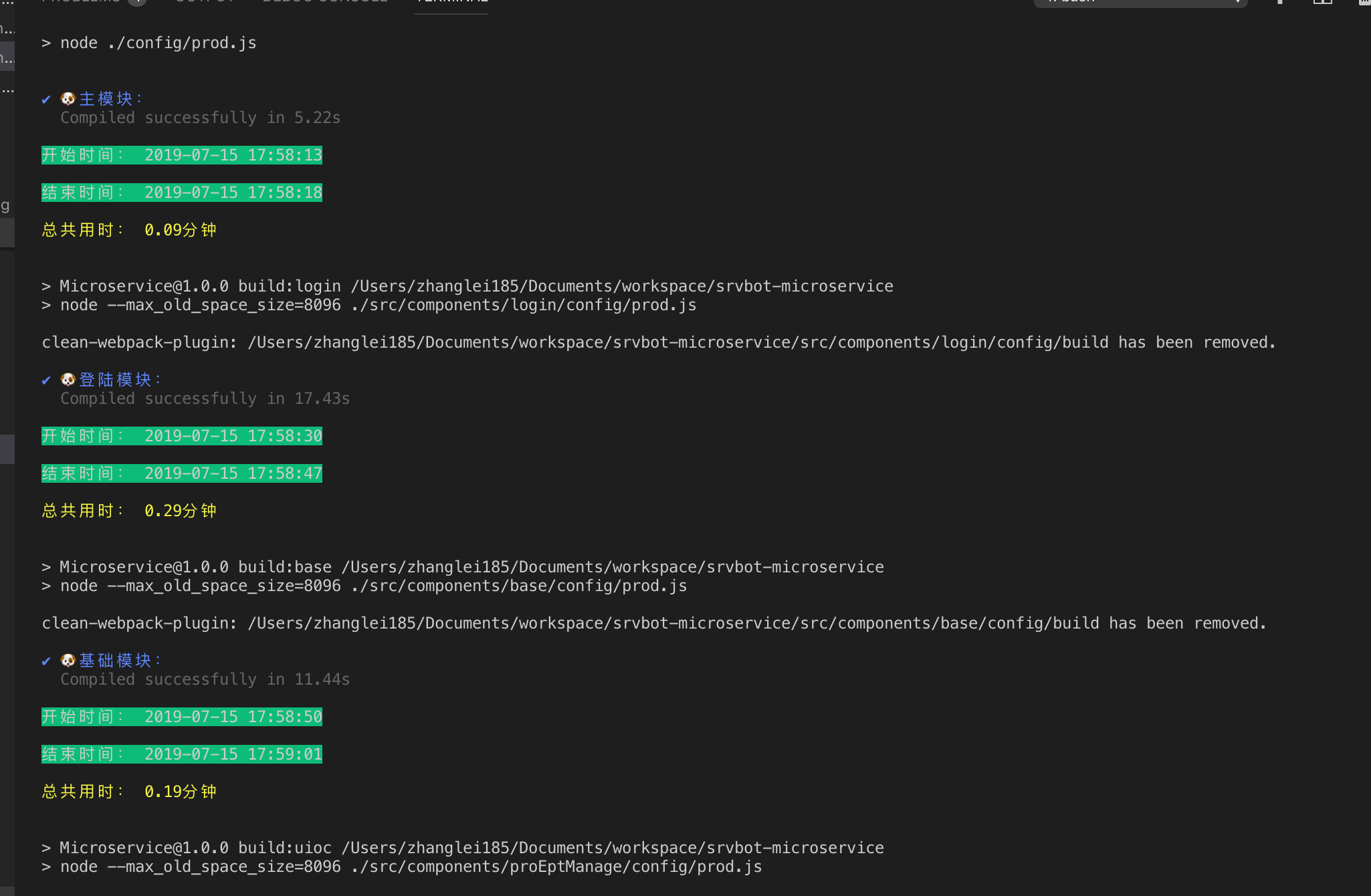
当然,再加上happypack会更快一下打包。之后会将eslint加上,目前发现新版的eslint不支持箭头函数,不知道谁有好的办法,

 浙公网安备 33010602011771号