
win10家庭版安装Docker
1、新建Hyper-V.bat文件
2、在文件中输入以下内容:
pushd "%~dp0"
dir /b %SystemRoot%\servicing\Packages\*Hyper-V*.mum >hyper-v.txt
for /f %%i in ('findstr /i . hyper-v.txt 2^>nul') do dism /online /norestart /add-package:"%SystemRoot%\servicing\Packages\%%i"
del hyper-v.txt
Dism /online /enable-feature /featurename:Microsoft-Hyper-V-All /LimitAccess /ALL
3、使用管理员右键执行,完成hyper-V安装
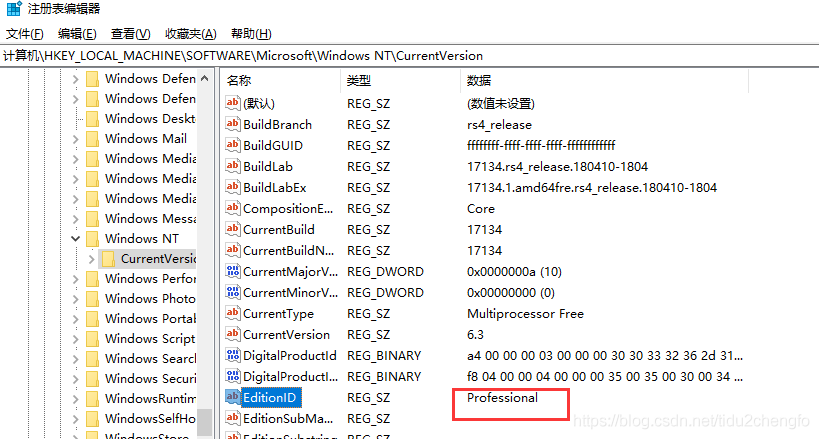
4、系统检查项会报错误,系统版本不对:
Docker for Windows requires Windows 10 Pro or Enterprise version 14393, or Windows server 2016 RTM
此时可以通过修改注册表,如下图:

 浙公网安备 33010602011771号