
21-10 重载括号运算符(todo)
迄今为止你所见的所有重载运算符都允许你定义运算符参数的类型,但无法改变参数数量(参数数量由运算符类型决定)。例如,operator==始终接受两个参数,而operator!始终只接受一个参数。括号运算符parenthesis operator(operator())尤为特殊,它既允许你改变参数类型,又能改变参数数量。
需注意两点:首先,括号运算符必须作为成员函数实现;其次,在非面向对象的C++中,()运算符用于调用函数。而在类中,operator()只是一个普通运算符,它像其他重载运算符一样调用名为operator()的函数。
一个示例
让我们看一个适合重载此运算符的示例:
class Matrix
{
private:
    double data[4][4]{};
};
矩阵是线性代数的核心组成部分,常用于几何建模和三维计算机图形处理。在此场景下,您只需理解Matrix类是一个4×4的双精度二维数组即可。
在关于重载下标运算符的课程中,你已了解到可重载operator[]运算符以直接访问私有的一维数组。但本例中需要访问私有的二维数组。在C++23之前,operator[]仅支持单参数形式,因此无法直接对二维数组进行索引操作。
但由于()运算符可接受任意数量参数,我们可声明一个接受两个整数索引参数的operator()版本,以此访问二维数组。示例如下:
#include <cassert> // for assert()

class Matrix
{
private:
    double m_data[4][4]{};

public:
    double& operator()(int row, int col);
    double operator()(int row, int col) const; // for const objects
};

double& Matrix::operator()(int row, int col)
{
    assert(row >= 0 && row < 4);
    assert(col >= 0 && col < 4);

    return m_data[row][col];
}

double Matrix::operator()(int row, int col) const
{
    assert(row >= 0 && row < 4);
    assert(col >= 0 && col < 4);

    return m_data[row][col];
}
现在我们可以声明一个矩阵并像这样访问其元素:
#include <iostream>

int main()
{
    Matrix matrix;
    matrix(1, 2) = 4.5;
    std::cout << matrix(1, 2) << '\n';

    return 0;
}
这产生了以下结果:
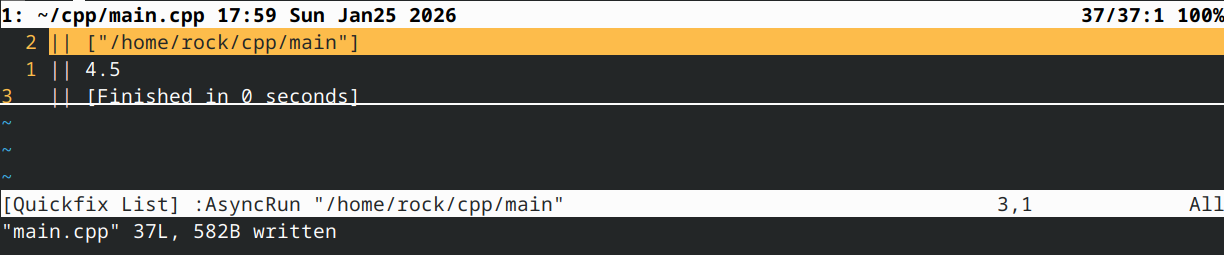
现在,让我们再次重载()运算符,这次以完全不带参数的方式实现:
#include <cassert> // for assert()
class Matrix
{
private:
    double m_data[4][4]{};

public:
    double& operator()(int row, int col);
    double operator()(int row, int col) const;
    void operator()();
};

double& Matrix::operator()(int row, int col)
{
    assert(row >= 0 && row < 4);
    assert(col >= 0 && col < 4);

    return m_data[row][col];
}

double Matrix::operator()(int row, int col) const
{
    assert(row >= 0 && row < 4);
    assert(col >= 0 && col < 4);

    return m_data[row][col];
}

void Matrix::operator()()
{
    // reset all elements of the matrix to 0.0
    for (int row{ 0 }; row < 4; ++row)
    {
        for (int col{ 0 }; col < 4; ++col)
        {
            m_data[row][col] = 0.0;
        }
    }
}
下面是我们的新示例:
#include <iostream>

int main()
{
    Matrix matrix{};
    matrix(1, 2) = 4.5;
    matrix(); // erase matrix
    std::cout << matrix(1, 2) << '\n';

    return 0;
}
这产生了以下结果:
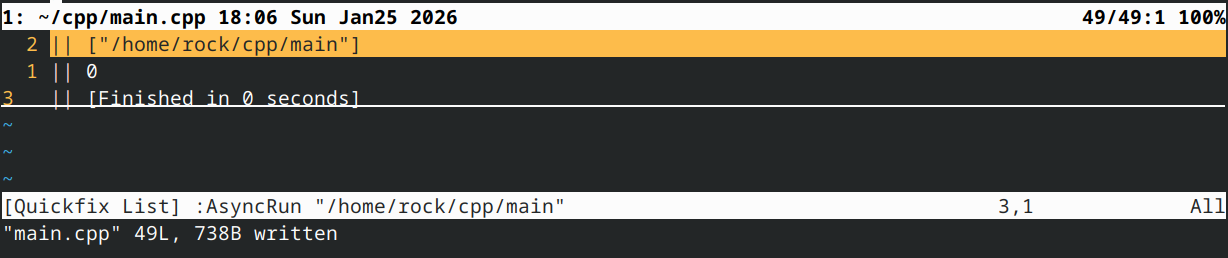
由于()运算符具有高度灵活性,人们往往会将其用于多种不同场景。然而这种做法强烈不推荐,因为()符号本身无法清晰表明运算符的具体功能。在上文示例中,将擦除功能封装为clear()或erase()函数更为合理——matrix.erase()的含义远比matrix()(可能执行任意操作!)更易理解。
注:自C++23起,可使用带多个下标的operator[]。其工作原理与上述operator()完全相同。
玩转函子
Operator()常被重载以实现函子functors(或函数对象function object),这类类能像函数一样运作。函子相较于普通函数的优势在于,函子能将数据存储在成员变量中(因其本质是类)。
以下是一个简单的函子示例:
#include <iostream>

class Accumulator
{
private:
    int m_counter{ 0 };

public:
    int operator() (int i) { return (m_counter += i); }

    void reset() { m_counter = 0; } // optional
};

int main()
{
    Accumulator acc{};
    std::cout << acc(1) << '\n'; // prints 1
    std::cout << acc(3) << '\n'; // prints 4

    Accumulator acc2{};
    std::cout << acc2(10) << '\n'; // prints 10
    std::cout << acc2(20) << '\n'; // prints 30

    return 0;
}
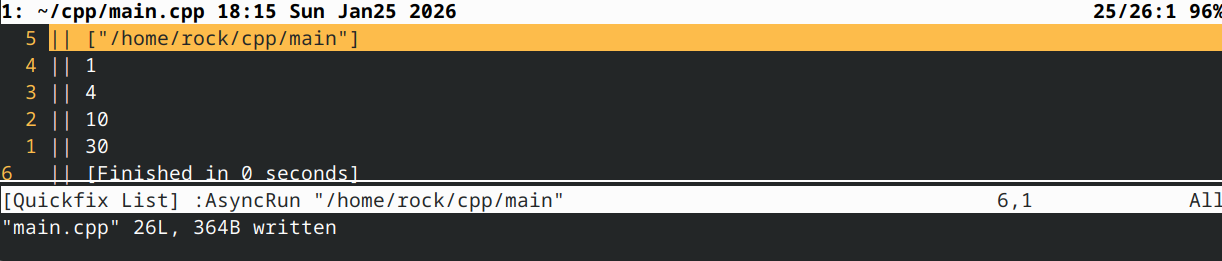
请注意,使用我们的累加器看起来就像调用普通函数,但累加器对象实际存储的是累积值。
函子(functor)的妙处在于,我们可以根据需要实例化任意多个独立的函子对象,并同时使用它们。函子还可以拥有其他成员函数(例如重置函数 reset()),这些函数能实现各种便捷操作。
结论
Operator() 有时会被重载为两个参数的形式,用于索引多维数组,或从一维数组中提取子集(两个参数定义要返回的子集)。其他情况最好用更具描述性的成员函数来实现。
Operator() 还常被重载用于创建函子。尽管简单函子(如上例所示)易于理解,但函子通常应用于更高级的编程主题,值得单独成课讲解。
测验时间
问题 #1
编写一个名为 MyString 的类,用于存储 std::string。重载 operator<< 以输出字符串。重载 operator() 以返回从第一个参数索引处开始的子字符串(作为 MyString)。子字符串的长度应由第二个参数定义。
以下代码应能运行:
int main()
{
    MyString s { "Hello, world!" };
    std::cout << s(7, 5) << '\n'; // start at index 7 and return 5 characters

    return 0;
}
这应该打印
world
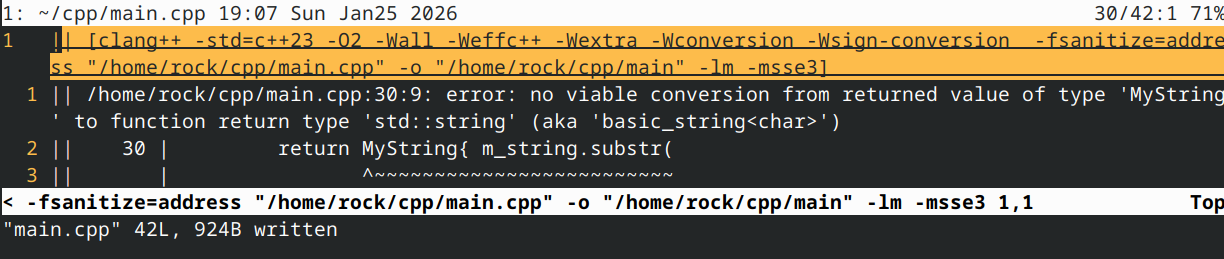
这里我测试通不过
提示:你可以使用 std::string::substr 来获取 std::string 的子字符串。
显示方案:
#include <cassert>
#include <iostream>
#include <string>
#include <string_view>

class MyString
{
private:
	std::string m_string{};

public:
	MyString(std::string_view string = {})
		:m_string{ string }
	{
	}

	MyString operator()(int start, int length)
	{
		assert(start >= 0);
		assert(start + length <= static_cast<int>(m_string.length()) && "MyString::operator(int, int): Substring is out of range");

		return MyString { m_string.substr(
			static_cast<std::string::size_type>(start),
			static_cast<std::string::size_type>(length)
			)};
	}

	friend std::ostream& operator<<(std::ostream& out, const MyString& s)
	{
		out << s.m_string;

		return out;
	}
};

int main()
{
	MyString s{ "Hello, world!" };
	std::cout << s(7, 5) << '\n'; // start at index 7 and return 5 characters

	return 0;
}
问题 #2
本测验题为额外加分题。
步骤 #1
若无需修改返回的子字符串,为何上述实现效率低下?
显示解答
在我们的 operator() 内部,std::string::substr 返回的是 std::string 类型,这意味着调用时会复制源字符串的一部分。重载的 operator() 利用此结果构造新的 MyString 对象,该对象包含 std::string 成员,从而产生第三份副本。最后将此 MyString 返回给调用方,形成第四份副本。编译器可能会优化掉其中部分复制操作,但至少需要保留一个包含子字符串结果的 std::string。

我们仅在需要修改子字符串或子字符串生命周期超过原始字符串时才需要复制子字符串。这种情况并不常见,因此我们通常在不需要的情况下进行了代价高昂的复制操作。
步骤 #2
我们可采取何种替代方案?
显示解答
std::string_view 能够查看现有字符串的子字符串而不进行复制。如果我们的 operator() 返回 std::string_view,那么调用方在满足需求时可直接使用该 std::string_view,若需修改或持久化子字符串,则可将其转换为 std::string 或 MyString。
步骤 #3
更新先前测验答案中的 operator() 函数,使其改为返回 std::string_view 类型的子字符串。
提示:std::string::substr() 返回 std::string,而 std::string_view::substr() 返回 std::string_view。务必避免返回悬空的 std::string_view!
显示提示
提示:不要创建任何 std::string 临时对象,因为这些对象将在函数结束时被销毁,而这些 std::string 的 std::string_view 将成为悬空引用。
显示提示
提示:创建 std::string_view 临时对象是可以的,只要它们是 m_string 的视图即可。
显示解答
#include <cassert>
#include <iostream>
#include <string>
#include <string_view>

class MyString
{
private:
	std::string m_string{};

public:
	MyString(std::string_view string = {})
		:m_string{ string }
	{
	}

	std::string_view operator()(int start, int length)
	{
		assert(start >= 0);
		assert(start + length <= static_cast<int>(m_string.length()) && "MyString::operator(int, int): Substring is out of range");

		// Create a std::string_view of m_string, so we can use std::string_view::substr() instead of std::string::substr()
		return std::string_view{ m_string }.substr(
			static_cast<std::string_view::size_type>(start),
			static_cast<std::string_view::size_type>(length)
		);
	}

	friend std::ostream& operator<<(std::ostream& out, const MyString& s)
	{
		out << s.m_string;

		return out;
	}
};

int main()
{
	MyString s{ "Hello, world!" };
	std::cout << s(7, 5) << '\n'; // start at index 7 and return 5 characters

	return 0;
}

 浙公网安备 33010602011771号