
20-1 函数指针
在第12.7节——指针介绍中,你了解到指针是一种存储其他变量地址的变量。函数指针与此类似,只不过它们指向的不是变量,而是函数!
请看以下函数:
int foo()
{
    return 5;
}
标识符 foo() 是函数的名称。但函数属于什么类型?函数拥有专属的函数类型——在此例中,该函数类型返回整数且不带参数。与变量类似,函数存在于内存中分配的地址处(使其成为左值)。
当函数被调用(通过 operator())时,执行流程将跳转至被调用函数的地址:
int foo() // code for foo starts at memory address 0x002717f0
{
    return 5;
}

int main()
{
    foo(); // jump to address 0x002717f0

    return 0;
}
在你的编程生涯中某个时刻(如果你还没犯过的话),你很可能会犯一个简单的错误:
#include <iostream>

int foo() // code starts at memory address 0x002717f0
{
    return 5;
}

int main()
{
    std::cout << foo << '\n'; // we meant to call foo(), but instead we're printing foo itself!

    return 0;
}
我们本应调用函数 foo() 并打印其返回值,却无意中将函数 foo 直接传递给了 std::cout。这种情况下会发生什么?
当函数以名称形式引用(不带括号)时,C++ 会将其转换为函数指针(存储函数地址)。此时<<运算符试图打印函数指针,但因其不具备打印函数指针的能力而失败。标准规定此时应将foo转换为bool类型(<<运算符可处理该类型)。由于foo的函数指针为非空指针,其值始终应为布尔真值。因此实际输出应为:

提示
某些编译器(如 Visual Studio)提供编译器扩展功能,可直接打印函数地址:
0x002717f0
若您的平台未打印函数地址但需要此信息,可尝试将函数转换为 void 指针后打印该指针:#include <iostream> int foo() // code starts at memory address 0x002717f0 { return 5; } int main() { std::cout << reinterpret_cast<void*>(foo) << '\n'; // Tell C++ to interpret function foo as a void pointer (implementation-defined behavior) return 0; }
这是实现定义的行为,因此可能无法在所有平台上正常工作。

正如可以声明指向普通变量的非常量指针一样,也可以声明指向函数的非常量指针。在本节剩余内容中,我们将探讨这些函数指针及其应用场景。函数指针属于较为高级的主题,仅需掌握C++基础知识的读者可安全跳过或略读本节后续内容。
函数指针
创建非常量函数指针的语法堪称C++中最丑陋的表达之一:
// fcnPtr is a pointer to a function that takes no arguments and returns an integer
int (*fcnPtr)();
括号围绕fcnPtr是必要的,这是出于运算优先级的考虑,因为int fcnPtr()会被解释为对名为fcnPtr的函数的前向声明,该函数不带参数且返回整数指针。
要创建常量函数指针,需将const置于星号之后:
int (*const fcnPtr)();
如果将 const 放在 int 之前,则表示被指向的函数将返回 const int 类型。
提示:
函数指针语法可能难以理解。以下文章演示了一种解析此类声明的方法:
将函数赋值给函数指针
函数指针可通过函数初始化(非const函数指针可被赋值函数)。如同变量指针,我们也可使用 &foo 获取指向函数 foo 的函数指针。
int foo()
{
    return 5;
}

int goo()
{
    return 6;
}

int main()
{
    int (*fcnPtr)(){ &foo }; // fcnPtr points to function foo
    fcnPtr = &goo; // fcnPtr now points to function goo

    return 0;
}
一个常见的错误是这样做:
fcnPtr = goo();
此处试图将函数goo()的返回值(类型为int)赋值给fcnPtr(预期接收类型为int(*)()的值),这并非我们所期望的结果。我们希望fcnPtr被赋予函数goo的地址,而非函数goo()的返回值。因此无需使用括号。
请注意,函数指针的类型(参数类型和返回类型)必须与函数类型匹配。以下是相关示例:
// function prototypes
int foo();
double goo();
int hoo(int x);

// function pointer initializers
int (*fcnPtr1)(){ &foo };    // okay
int (*fcnPtr2)(){ &goo };    // wrong -- return types don't match!
double (*fcnPtr4)(){ &goo }; // okay
fcnPtr1 = &hoo;              // wrong -- fcnPtr1 has no parameters, but hoo() does
int (*fcnPtr3)(int){ &hoo }; // okay
与基本类型不同,C++会在需要时将函数隐式转换为函数指针(因此无需使用取地址运算符(&)获取函数地址)。但函数指针不会转换为void指针,反之亦然(尽管某些编译器如Visual Studio仍可能允许这种转换)。
// function prototypes
int foo();

// function initializations
int (*fcnPtr5)() { foo }; // okay, foo implicitly converts to function pointer to foo
void* vPtr { foo };       // not okay, though some compilers may allow
函数指针也可以初始化或赋值为nullptr:
int (*fcnptr)() { nullptr }; // okay
使用函数指针调用函数
函数指针的另一项主要用途是实际调用函数。实现方式有两种:第一种是通过显式解引用:
int foo(int x)
{
    return x;
}

int main()
{
    int (*fcnPtr)(int){ &foo }; // Initialize fcnPtr with function foo
    (*fcnPtr)(5); // call function foo(5) through fcnPtr.

    return 0;
}

第二种方式是通过隐式解引用:
int foo(int x)
{
    return x;
}

int main()
{
    int (*fcnPtr)(int){ &foo }; // Initialize fcnPtr with function foo
    fcnPtr(5); // call function foo(5) through fcnPtr.

    return 0;
}

如您所见,隐式解引用方法看起来就像普通函数调用——这完全符合预期,毕竟普通函数名本身就是指向函数的指针!不过某些老旧编译器可能不支持隐式解引用方法,但所有现代编译器都应支持。
另请注意,由于函数指针可被赋为空指针,在调用前通过断言或条件检测确认函数指针是否为空是明智的做法。与普通指针相同,对空函数指针进行解引用将导致未定义行为。
int foo(int x)
{
    return x;
}

int main()
{
    int (*fcnPtr)(int){ &foo }; // Initialize fcnPtr with function foo
    if (fcnPtr) // make sure fcnPtr isn't a null pointer
        fcnPtr(5); // otherwise this will lead to undefined behavior

    return 0;
}

默认参数不适用于通过函数指针调用的函数(高级)
当编译器遇到对具有一个或多个默认参数的函数的常规调用时,它会重写函数调用以包含默认参数。此过程发生在编译时,因此仅适用于可在编译时解析的函数。
然而,当通过函数指针调用函数时,解析发生在运行时。这种情况下不会重写函数调用以包含默认参数。
关键洞见:
由于解析发生在运行时,通过函数指针调用时默认参数不会被解析。
这意味着我们可以利用函数指针消除因默认参数导致的调用歧义。下例展示了两种实现方式:
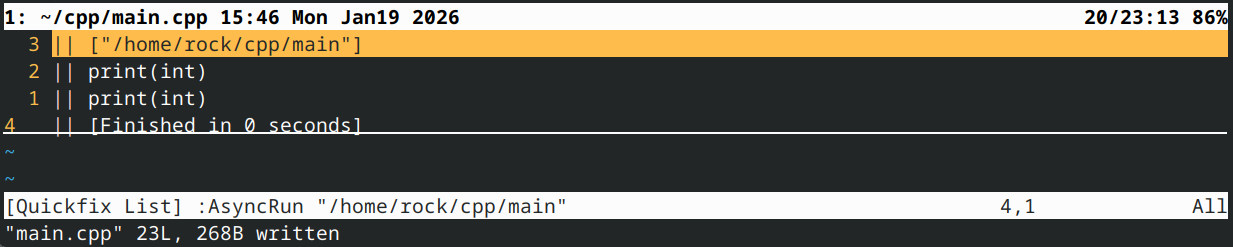
#include <iostream>

void print(int x)
{
    std::cout << "print(int)\n";
}

void print(int x, int y = 10)
{
    std::cout << "print(int, int)\n";
}

int main()
{
//    print(1); // ambiguous function call

    // Deconstructed method
    using vnptr = void(*)(int); // define a type alias for a function pointer to a void(int) function
    vnptr pi { print }; // initialize our function pointer with function print
    pi(1); // call the print(int) function through the function pointer

    // Concise method
    static_cast<void(*)(int)>(print)(1); // call void(int) version of print with argument 1

    return 0;
}
将函数作为参数传递给其他函数
函数指针最实用的功能之一就是将函数作为参数传递给另一个函数。作为参数传递的函数有时被称为回调函数callback functions。
假设你正在编写一个执行特定任务的函数(例如排序数组),但希望用户能定义该任务的某个环节(如数组升序或降序排序)。让我们以排序为例深入探讨这个问题,该示例可推广至其他类似场景。
许多基于比较的排序算法遵循相似原理:算法遍历数字列表,对数字对进行比较,并根据比较结果重新排序。因此,通过改变比较逻辑,我们能在不影响排序代码主体的前提下改变算法的排序方式。
以下是前课中选用的选择排序例程:
#include <utility> // for std::swap

void SelectionSort(int* array, int size)
{
    if (!array)
        return;

    // Step through each element of the array
    for (int startIndex{ 0 }; startIndex < (size - 1); ++startIndex)
    {
        // smallestIndex is the index of the smallest element we've encountered so far.
        int smallestIndex{ startIndex };

        // Look for smallest element remaining in the array (starting at startIndex+1)
        for (int currentIndex{ startIndex + 1 }; currentIndex < size; ++currentIndex)
        {
            // If the current element is smaller than our previously found smallest
            if (array[smallestIndex] > array[currentIndex]) // COMPARISON DONE HERE
            {
                // This is the new smallest number for this iteration
                smallestIndex = currentIndex;
            }
        }

        // Swap our start element with our smallest element
        std::swap(array[startIndex], array[smallestIndex]);
    }
}
让我们用一个比较函数来替代这种比较方式。由于我们的比较函数需要比较两个整数并返回一个布尔值来指示元素是否需要交换,因此它大致如下所示:
bool ascending(int x, int y)
{
    return x > y; // swap if the first element is greater than the second
}
以下是我们使用ascending()函数进行比较的排序例程:
#include <utility> // for std::swap

void SelectionSort(int* array, int size)
{
    if (!array)
        return;

    // Step through each element of the array
    for (int startIndex{ 0 }; startIndex < (size - 1); ++startIndex)
    {
        // smallestIndex is the index of the smallest element we've encountered so far.
        int smallestIndex{ startIndex };

        // Look for smallest element remaining in the array (starting at startIndex+1)
        for (int currentIndex{ startIndex + 1 }; currentIndex < size; ++currentIndex)
        {
            // If the current element is smaller than our previously found smallest
            if (ascending(array[smallestIndex], array[currentIndex])) // COMPARISON DONE HERE
            {
                // This is the new smallest number for this iteration
                smallestIndex = currentIndex;
            }
        }

        // Swap our start element with our smallest element
        std::swap(array[startIndex], array[smallestIndex]);
    }
}
现在,为了让调用方决定排序方式,而不是使用我们自己硬编码的比较函数,我们将允许调用方提供自己的排序函数!这通过函数指针实现。
由于调用方的比较函数将比较两个整数并返回布尔值,指向此类函数的指针将类似于:
bool (*comparisonFcn)(int, int);
因此,我们将允许调用方将指向其指定比较函数的指针作为第三个参数传递给排序例程,然后使用调用方的函数进行比较。
以下是一个使用函数指针参数实现用户自定义比较的选择排序完整示例,以及调用该函数的示例:
#include <utility> // for std::swap
#include <iostream>

// Note our user-defined comparison is the third parameter
void selectionSort(int* array, int size, bool (*comparisonFcn)(int, int))
{
    if (!array || !comparisonFcn)
        return;

    // Step through each element of the array
    for (int startIndex{ 0 }; startIndex < (size - 1); ++startIndex)
    {
        // bestIndex is the index of the smallest/largest element we've encountered so far.
        int bestIndex{ startIndex };

        // Look for smallest/largest element remaining in the array (starting at startIndex+1)
        for (int currentIndex{ startIndex + 1 }; currentIndex < size; ++currentIndex)
        {
            // If the current element is smaller/larger than our previously found smallest
            if (comparisonFcn(array[bestIndex], array[currentIndex])) // COMPARISON DONE HERE
            {
                // This is the new smallest/largest number for this iteration
                bestIndex = currentIndex;
            }
        }

        // Swap our start element with our smallest/largest element
        std::swap(array[startIndex], array[bestIndex]);
    }
}

// Here is a comparison function that sorts in ascending order
// (Note: it's exactly the same as the previous ascending() function)
bool ascending(int x, int y)
{
    return x > y; // swap if the first element is greater than the second
}

// Here is a comparison function that sorts in descending order
bool descending(int x, int y)
{
    return x < y; // swap if the second element is greater than the first
}

// This function prints out the values in the array
void printArray(int* array, int size)
{
    if (!array)
        return;

    for (int index{ 0 }; index < size; ++index)
    {
        std::cout << array[index] << ' ';
    }

    std::cout << '\n';
}

int main()
{
    int array[9]{ 3, 7, 9, 5, 6, 1, 8, 2, 4 };

    // Sort the array in descending order using the descending() function
    selectionSort(array, 9, descending);
    printArray(array, 9);

    // Sort the array in ascending order using the ascending() function
    selectionSort(array, 9, ascending);
    printArray(array, 9);

    return 0;
}
该程序输出结果:
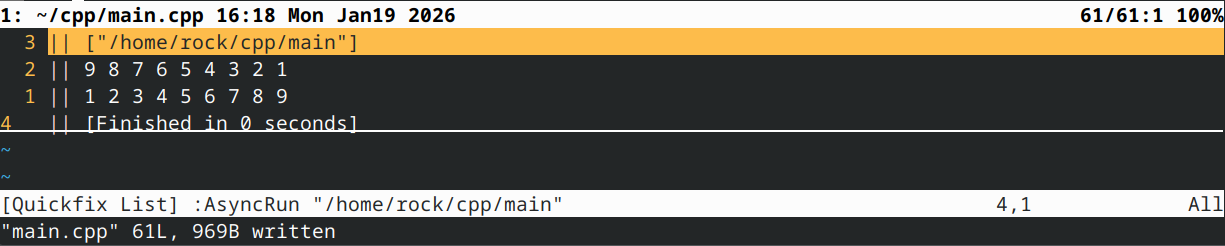
这很酷吧?我们赋予了调用者控制选择排序执行方式的能力。
调用者甚至可以定义自己的“奇特”比较函数:
bool evensFirst(int x, int y)
{
	// if x is even and y is odd, x goes first (no swap needed)
	if ((x % 2 == 0) && !(y % 2 == 0))
		return false;

	// if x is odd and y is even, y goes first (swap needed)
	if (!(x % 2 == 0) && (y % 2 == 0))
		return true;

        // otherwise sort in ascending order
	return ascending(x, y);
}

int main()
{
    int array[9]{ 3, 7, 9, 5, 6, 1, 8, 2, 4 };

    selectionSort(array, 9, evensFirst);
    printArray(array, 9);

    return 0;
}
上述代码片段产生以下结果:

如您所见,在此情境下使用函数指针为调用方提供了一种便捷方式,使其能够将自身功能“挂载”到您先前编写并测试过的代码上,从而促进代码复用!此前若需对一个数组降序排序、另一个升序排序,您必须编写多个排序例程版本。如今仅需一个版本,即可按调用方的任意要求进行排序!
注:若函数参数为函数类型,则会被转换为指向该函数类型的指针。这意味着:
void selectionSort(int* array, int size, bool (*comparisonFcn)(int, int))
可等效地写为:
void selectionSort(int* array, int size, bool comparisonFcn(int, int))
这仅适用于函数参数,因此用途有限。在非函数参数中,后者会被解释为前向声明:
bool (*ptr)(int, int); // definition of function pointer ptr
bool fcn(int, int);    // forward declaration of function fcn
提供默认函数
若允许调用方将函数作为参数传递,通常为其提供若干标准函数会更便捷。例如在上文选择排序示例中,若在selectionSort()函数之外同时提供ascending()和descending()函数,将极大简化调用者的操作——他们无需每次使用时都重新编写这些函数。
你甚至可以将其中一个函数设为默认参数:
// Default the sort to ascending sort
void selectionSort(int* array, int size, bool (*comparisonFcn)(int, int) = ascending);
在此情况下,只要用户正常调用 selectionSort(而非通过函数指针调用),comparisonFcn 参数将默认采用升序排序。您需要确保升序函数在此之前已被声明,否则编译器会报错,指出无法识别 ascending 函数。
使用类型别名让函数指针更美观
我们必须承认——函数指针的语法确实不够美观。不过,通过类型别名可以让函数指针看起来更像普通变量:
using ValidateFunction = bool(*)(int, int);
这定义了一个名为“ValidateFunction”的类型别名,该别名指向一个函数指针,该函数接受两个整数参数并返回一个布尔值。
现在,无需再这样做:
bool validate(int x, int y, bool (*fcnPtr)(int, int)); // ugly
你可以做到:
bool validate(int x, int y, ValidateFunction pfcn) // clean
使用 std::function
定义和存储函数指针的另一种方法是使用 std::function,它属于标准库
#include <functional>
bool validate(int x, int y, std::function<bool(int, int)> fcn); // std::function method that returns a bool and takes two int parameters
如你所见,返回类型和参数都放在尖括号内,参数则位于圆括号中。若无参数,圆括号可留空。
更新我们之前使用 std::function 的示例:
#include <functional>
#include <iostream>

int foo()
{
    return 5;
}

int goo()
{
    return 6;
}

int main()
{
    std::function<int()> fcnPtr{ &foo }; // declare function pointer that returns an int and takes no parameters
    fcnPtr = &goo; // fcnPtr now points to function goo
    std::cout << fcnPtr() << '\n'; // call the function just like normal

    std::function fcnPtr2{ &foo }; // can also use CTAD to infer template arguments

    return 0;
}
将 std::function 进行类型别名定义有助于提高代码可读性:
using ValidateFunctionRaw = bool(*)(int, int); // type alias to raw function pointer
using ValidateFunction = std::function<bool(int, int)>; // type alias to std::function
另请注意,std::function 仅允许通过隐式解引用(例如 fcnPtr())调用函数,而不能通过显式解引用(例如 (*fcnPtr)())调用。
定义类型别名时,必须显式指定所有模板参数。此处无法使用 CTAD(隐式模板推导),因为没有初始化器可用于推导模板参数。
函数指针的类型推断
与 auto 关键字可用于推断普通变量的类型类似,auto 关键字同样能推断函数指针的类型。
#include <iostream>

int foo(int x)
{
	return x;
}

int main()
{
	auto fcnPtr{ &foo };
	std::cout << fcnPtr(5) << '\n';

	return 0;
}

这完全符合预期,语法也非常简洁。当然,缺点在于函数参数类型和返回类型的所有细节都被隐藏了,因此在调用函数或使用其返回值时更容易出错。
结论
函数指针主要在以下场景中发挥作用:需要将函数存储在数组(或其他结构体)中,或需要将函数传递给另一个函数时。由于原生声明函数指针的语法既笨拙又容易出错,我们建议使用 std::function。在函数指针类型仅使用一次的场景(例如单个参数或返回值),可以直接使用 std::function。若函数指针类型需多次使用,则采用std::function的别名类型更为优选(以避免重复定义)。
测验时间
1.本次测验中,我们将使用函数指针实现基础计算器功能。
1a) 编写简短程序,要求用户输入两个整数及运算符(‘+’、'-‘、’*'、‘/’)。确保用户输入有效运算符。
显示答案
#include <iostream>

int getInteger()
{
    std::cout << "Enter an integer: ";
    int x{};
    std::cin >> x;
    return x;
}

char getOperation()
{
    char op{};

    do
    {
        std::cout << "Enter an operation ('+', '-', '*', '/'): ";
        std::cin >> op;
    }
    while (op!='+' && op!='-' && op!='*' && op!='/');

    return op;
}

int main()
{
    int x{ getInteger() };
    char op{ getOperation() };
    int y{ getInteger() };

    return 0;
}
1b) 编写名为 add()、subtract()、multiply() 和 divide() 的函数。这些函数应接受两个整数参数并返回整数。
显示答案
int add(int x, int y)
{
    return x + y;
}

int subtract(int x, int y)
{
    return x - y;
}

int multiply(int x, int y)
{
    return x * y;
}

int divide(int x, int y)
{
    return x / y;
}
1c) 为接受两个整数参数并返回整数的函数指针创建名为 ArithmeticFunction 的类型别名。使用 std::function 并包含相应头文件。
显示解决方案
#include <functional>
using ArithmeticFunction = std::function<int(int, int)>;
1d) 编写名为 getArithmeticFunction() 的函数,该函数接受一个运算符字符作为参数,并返回对应函数的指针。
显示解决方案
ArithmeticFunction getArithmeticFunction(char op)
{
    switch (op)
    {
    case '+': return &add;
    case '-': return &subtract;
    case '*': return &multiply;
    case '/': return ÷
    }

    return nullptr;
}
1e) 修改 main() 函数以调用 getArithmeticFunction()。调用该函数的返回值处理输入数据,并打印结果。
显示解决方案
#include <iostream>

int main()
{
    int x{ getInteger() };
    char op{ getOperation() };
    int y{ getInteger() };

    ArithmeticFunction fcn{ getArithmeticFunction(op) };
    if (fcn)
        std::cout << x << ' ' << op << ' ' << y << " = " << fcn(x, y) << '\n';

    return 0;
}
完整程序如下:
显示解决方案
#include <iostream>
#include <functional>
int getInteger()
{
std::cout << "Enter an integer: ";
int x{};
std::cin >> x;
return x;
}
char getOperation()
{
char op{};
do
{
std::cout << "Enter an operation ('+', '-', '*', '/'): ";
std::cin >> op;
}
while (op!='+' && op!='-' && op!='*' && op!='/');
return op;
}
int add(int x, int y)
{
return x + y;
}
int subtract(int x, int y)
{
return x - y;
}
int multiply(int x, int y)
{
return x * y;
}
int divide(int x, int y)
{
return x / y;
}
using ArithmeticFunction = std::function<int(int, int)>;
ArithmeticFunction getArithmeticFunction(char op)
{
switch (op)
{
case '+': return &add;
case '-': return &subtract;
case '*': return &multiply;
case '/': return ÷
}
return nullptr;
}
int main()
{
int x{ getInteger() };
char op{ getOperation() };
int y{ getInteger() };
ArithmeticFunction fcn{ getArithmeticFunction(op) };
if (fcn)
std::cout << x << ' ' << op << ' ' << y << " = " << fcn(x, y) << '\n';
return 0;
}

 浙公网安备 33010602011771号