
vim+cpp/c(1.00)
我的是OS:Fedora Linux 44 (KDE Plasma Desktop Edition) x86_64,Kernel: Linux 6.19.12-200.fc44.x86_64, 使用(vim+clang+lldb)作为集成开发环境(IDE)作为构建、运行、和调试cpp、c的工具。
本文章围绕Alex的LearnCpp和其中文笔记learncpp网站,根据0-6 安装集成开发环境(IDE),要使得(vim+clang+lldb)成为集成开发环境的要求。
典型的现代IDE通常包含以下功能:
- 便捷的代码文件加载与保存机制(vim编辑器)
- 具备编程友好特性的代码编辑器,例如行号显示、语法高亮、集成帮助、名称补全及自动代码格式化(vim,以及vim插件)
- 基础构建系统:可将程序编译链接为可执行文件并运行(vim插件)。
- 集成调试器:便于定位和修复软件缺陷(lldb)。
- 插件安装机制:支持扩展IDE功能或添加版本控制等特性(Cmake暂未学, Git)。
目录
- 1 下载工具
- 2 基础配置(.vimrc)
- 3 编译运行(Hello World)
- 4 调试基础(lldb 单步执行)
- 5 安装 vim-plug 插件管理器
- 6 异步构建运行(asyncrun + asynctasks)
- 7 目录树(NERDTree)
- 8 智能代码补全(coc.nvim)
- 9 模糊查找(fzf.vim)
- 10 代码格式化(vim-clang-format)
- 11 其他插件(可选)
- 附录:完整配置代码
最终环境概览
完成本教程后,你的目录结构如下:
~/
├── .vimrc                  # Vim 主配置文件
├── .vim/
│   ├── tasks.ini           # AsyncTask 任务定义
│   ├── autoload/plug.vim   # vim-plug 插件管理器
│   └── plugged/            # 已安装插件
│       ├── asyncrun.vim    # 异步运行
│       ├── asynctasks.vim  # 异步任务
│       ├── coc.nvim        # 代码补全引擎
│       ├── fzf + fzf.vim   # 模糊查找
│       ├── nerdtree        # 目录树
│       ├── vim-clang-format # 代码格式化
│       ├── cpp_doxygen     # Doxygen 注释
│       ├── nerdcommenter   # 快速注释
│       ├── vim-surround    # 括号/引号操作
│       ├── vim-translator  # 翻译
│       └── vim-easy-align  # 对齐工具
└── cpp/                    # C++ 项目目录
    ├── include/            # 头文件
    └── src/                # 源文件
1 下载工具
sudo dnf update
sudo dnf install vim-enhanced #我的系统下vim是这个名字
sudo dnf install clang clangd lldb lld make  #有时候linux没有提供C++标准库libcxx,此时需要下载
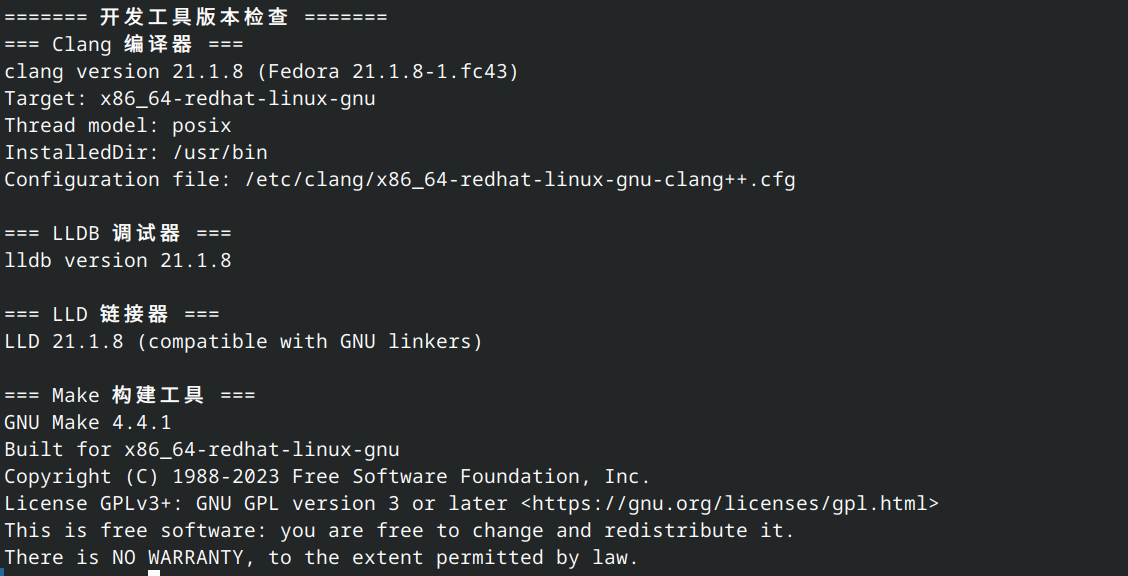
命令行终端检查
echo "======= 开发工具版本检查 =======" && \
echo "=== Clang 编译器 ===" && clang++ --version && \
echo -e "\n=== LLDB 调试器 ===" && lldb --version && \
echo -e "\n=== LLD 链接器 ===" && ld.lld --version && \
echo -e "\n=== Make 构建工具 ===" && make --version
2 基础配置(.vimrc)
为了使得vim写起来更舒服点, 我们会在$HOME(即~) 目录下新建(如果没有的话)一个vim的配置文件.vimrc, 下面是我的基本配置
.vimrc
let mapleader = " "
syntax on
set tabstop=4
set shiftwidth=4
set softtabstop=4
set nopaste
set smartindent
set autoindent
set number
set relativenumber
set cursorline
set showcmd
set wildmenu
set hlsearch
set incsearch
set ignorecase
set smartcase
nnoremap <silent> <Space><CR> :nohlsearch<CR>
noremap n nzz
noremap N Nzz


nnoremap sk :set nosplitbelow<CR>:split<CR>
nnoremap sj :set splitbelow<CR>:split<CR>
nnoremap sh :set nosplitright<CR>:vsplit<CR>
nnoremap sl :set splitright<CR>:vsplit<CR>

nnoremap tk :set nosplitbelow<CR>:terminal<CR>
nnoremap tj :set splitbelow<CR>:terminal<CR>
nnoremap th :set nosplitright<CR>:vertical terminal<CR>
nnoremap tl :set splitright<CR>:vertical terminal<CR>

map <Tab>k <C-w>k
map <Tab>j <C-w>j
map <Tab>h <C-w>h
map <Tab>l <C-w>l

set laststatus=2
set statusline=%n:\ %<%F%m%r\ %{strftime(\"%H:%M\ %a\ %b\%d\ %Y\")}\ %=\ %l/%L:%c\ %p%%

filetype on
filetype plugin on
filetype indent on
filetype plugin indent on
| 类别 | 配置 | 作用 |
|---|---|---|
| 基础 | let mapleader = " " |
Leader 键设为空格,非常顺手 |
| 缩进 | tabstop=4 shiftwidth=4 softtabstop=4 |
统一 4 空格缩进 |
| 编辑 | smartindent autoindent |
智能自动缩进 |
| 显示 | number relativenumber cursorline |
行号 + 相对行号 + 当前行高亮 |
| 搜索 | hlsearch incsearch ignorecase smartcase |
高亮、实时、忽略大小写(但大写敏感) |
| Leader+回车 | 取消搜索高亮 | 非常实用的快捷键 |
| 分屏 | sk/sj/sh/sl |
上下左右分屏,逻辑清晰 |
| 终端 | tk/tj/th/tl |
在分屏中打开终端 |
| 窗口跳转 | Tab+k/j/h/l |
Tab+方向键切换窗口 |
| 状态栏 | 自定义 statusline |
显示文件名、修改状态、时间、行列信息 |
行号显示相关
set number, set relativenumber, set cursorline、语法高亮syntax on、查找搜索set hlsearch, set incsearch, set ignorecase, set smartcase, 命令相关set showcmd, set wildmenu
1-8 空白与基本格式::基本格式
采纳制表符tab设置为4个空格
set tabstop=4set shiftwidth=4set softtabstop=4
关于自动格式化和风格指南有一个插件vim-clang-format,见后面安装。
3 编译运行(Hello World)
现在我们可以使用vim写cpp(c)代码了,我们首先创建一个main.cpp的文件
$ vim main.cpp
#include <iostream>
int main()
{
    std::cout << "Hello, world!\n";
    return 0;
}
然后vim里面使用:wq来保存退出这段代码。
执行下列命令就可以用clang编译运行
$ clang main.cpp -o main
$ ./main
便会输出
Hello, world!
使用lldb调试也容易
$ clang -g -std=c++23 main.cpp -o main
$ lldb ./main
$ b main
$ run
....
4 调试基础(lldb 单步执行)
在Alex的Learn C++学习笔记3.6——使用集成调试器:单步执行步入引入了程序的调试环节,这一节基本上是单步执行。
提到单步执行,Alex解释说单步执行(stepping)是一组相关调试器功能的统称,它允许我们逐条执行(逐步遍历)代码语句。单步执行应该包括步入,步过,步出和传统调试器lldb和gdb未支持的步退。我总结如下表格,对于它们各自的演示详见笔记3.6——使用集成调试器:单步执行,这里我们专注于传统的调试器(gdb,和lldb)如何调试程序, 主要是步入,步过,步出三个, 步退暂不演示。
| 命令 (Command) | 说明 (Description) | LLDB 命令 | GDB 命令 |
|---|---|---|---|
| 步入 (Step Into) | 可理解为进入函数,执行下一条语句;若包含函数调用,则跳转到被调用函数的顶部并暂停 | step 或 s |
step 或 s |
| 步过 (Step Over) | 可理解为跳过函数,又称执行下一条语句;若包含函数调用,则不间断地执行整个函数,在函数返回后暂停 | next 或 n |
next 或 n |
| 步出 (Step Out) | 可理解为跳出函数,执行当前函数中所有剩余代码,直到函数返回 | finish 或 fin |
finish 或 fin |
main.cpp
#include <iostream>

void printValue(int value)
{
    std::cout << value << '\n';
}

int main()
{
    printValue(5);

    return 0;
}
在我的Konsole(KDE 的终端模拟器)上, 我们将上面的程序写在main.cpp里面。
rock@192:~/cpp$ ls
main.cpp
rock@192:~/cpp$ cat main.cpp
#include <iostream>

void printValue(int value)
{
    std::cout << value << '\n';
}

int main()
{
    printValue(5);

    return 0;
}
要调试main这个程序, 需要先使用clang++生产可调试程序, 在编译的时候需要带参数-g,才会生成可调试程序, 下面main.cpp是源程序, main是生成的可调试程序(注意:clang和lldb一对,gcc和gdb一对,他们配套使用)。
rock@192:~/cpp$ clang++ -g main.cpp -o main
rock@192:~/cpp$ ls
main  main.cpp
lldb和gdb调试大差不差,这里使用lldb来调试,只需要它们命令后面跟可调试程序名字就行。 前面出现(lldb)字样就说明已经进入lldb调试状态。
rock@192:~/cpp$ lldb main
(lldb) target create "main"
Current executable set to '/home/rock/cpp/main' (x86_64).
(lldb)
在gdb中, 只需要使用start命令,该命令会在 main 函数的开头自动设置一个临时断点并运行程序, 而lldb需要在main函数处设置断点b main(全称breakpoint set --name main)然后使用run命令启动调试(gdb:start == lldb:b main && run)。
(lldb) b main
Breakpoint 1: where = main`main + 15 at main.cpp:10:5, address = 0x00000000004004bf
(lldb) run
Process 34356 launched: '/home/rock/cpp/main' (x86_64)
Process 34356 stopped
* thread #1, name = 'main', stop reason = breakpoint 1.1
    frame #0: 0x00000000004004bf main`main at main.cpp:10:5
   7
   8    int main()
   9    {
-> 10       printValue(5);
   11
   12       return 0;
   13   }
(lldb)
main │ main.cpp:1
这样程序来到了main函数里面printValue函数的调用处,此时如果选择步入s,该程序就会进入printValue函数里面, 然后执行printValue里面的语句std::cout << value << '\n';。
(lldb) s
Process 35199 stopped
* thread #1, name = 'main', stop reason = step in
    frame #0: 0x000000000040048b main`printValue(value=5) at main.cpp:5:18
   2
   3    void printValue(int value)
   4   {
-> 5        std::cout << value << '\n';
   6    }
   7
   8    int main()
(lldb) p value
(int) 5
(lldb)
我们可以使用p value(p全称print)打印变量value的值,发现value的值正是在main函数里面传入的实参5, 也可以看它执行该语句后的结果,然后回到调用printValue处。
(lldb) s
5
Process 35199 stopped
* thread #1, name = 'main', stop reason = step in
    frame #0: 0x00000000004004aa main`printValue(value=5) at main.cpp:6:1
   3    void printValue(int value)
   4   {
   5        std::cout << value << '\n';
-> 6    }
   7
   8    int main()
   9   {
(lldb)
我们发现该语句输出5, 继续使用步入命令,发现它会回到printValue的调用处, 然后指向下一步。
(lldb) s
Process 35199 stopped
* thread #1, name = 'main', stop reason = step in
    frame #0: 0x00000000004004c9 main`main at main.cpp:12:5
   9    {
  10       printValue(5);
   11
-> 12       return 0;
   13   }
(lldb)
然后我不小心又执行了步入s操作,会发现进入了不像是C++的代码。
(lldb) s
Process 35199 stopped
* thread #1, name = 'main', stop reason = step in
    frame #0: 0x00007ffff7a105b5 libc.so.6`__libc_start_call_main + 117
libc.so.6`__libc_start_call_main:
->  0x7ffff7a105b5 <+117>: movl   %eax, %edi
    0x7ffff7a105b7 <+119>: callq  0x7ffff7a29aa0 ; exit
    0x7ffff7a105bc <+124>: callq  0x7ffff7a7c840 ; __GI___nptl_deallocate_tsd
    0x7ffff7a105c1 <+129>: lock
(lldb)
通过查询,其实libc.so.6__libc_start_call_main是glibc(C标准库)的内部函数, 而C标准库是用低级语言汇编编写的, 并不是我们要调试的目标, 而且我们也不知道后面还有多少代码执行, 碰到这种我们不想执行的程序我们怎么办呢? 就是使用步出fin(全称finish)跳出glibc的内部函数。
(lldb) fin
Process 35199 exited with status = 0 (0x00000000)
(lldb)
这样我们就调试完了,接下来如何结束调试,使用q(全称quit)或者exit, 有的系统会询问你是否结束, 输入y确认结束。
(lldb) q
rock@192:~/cpp$
然后我们再次使用lldb运行调试程序,回到我们之前的printValue函数调用处。
rock@192:~/cpp$ lldb main
(lldb) target create "main"
Current executable set to '/home/rock/cpp/main' (x86_64).
(lldb) b main
Breakpoint 1: where = main`main + 15 at main.cpp:10:5, address = 0x00000000004004bf
(lldb) run
Process 36044 launched: '/home/rock/cpp/main' (x86_64)
Process 36044 stopped
* thread #1, name = 'main', stop reason = breakpoint 1.1
    frame #0: 0x00000000004004bf main`main at main.cpp:10:5
   7
   8    int main()
   9    {
-> 10       printValue(5);
   11
   12       return 0;
   13   }
(lldb)
有了前一次进入prinValue函数, 我们知道它输出5。 所以这次我们打算跳过prinValue函数, 如何做呢,就是使用步过n, 让我们实际看看效果;
(lldb) n
5
Process 36044 stopped
* thread #1, name = 'main', stop reason = step over
    frame #0: 0x00000000004004c9 main`main at main.cpp:12:5
   9    {
  10       printValue(5);
   11
-> 12       return 0;
   13   }
(lldb)
我们发现它却是直接输出了printValue函数的结果, 跳到下一个return 0;语句了, 并没有进入printValue函数里面。
(lldb) q
Quitting LLDB will kill one or more processes. Do you really want to proceed: [Y/n] y
我们来总结一下,单步执行是一组相关调试器功能的统称,它包括步入、步过、步出和步退,允许我们逐条执行代码语句。遇到函数调用时,步入s会进入函数内部,步过n会执行完整个函数后停在下一行,步出fin会执行完当前函数剩余语句后返回。需要注意的是,步过并非"跳过"了函数——函数内部的代码仍然执行了,只是调试器没有逐行暂停;步出也并非"跳过"了剩余代码——剩余语句仍然逐步执行。三者的区别在于调试器暂停的位置不同。
上面我们是先在命令行界面进入vim里面,然后写完代码后返回到命令行界面,编译我们刚刚写好的程序并且运行。 但是如果遇到错误,我们得再次进入vim 然后回到命令行界面,如此往复。这仅仅是单个文件, 如果是多个文件呢?我们需要在多个文件中来回穿梭,而依然是那些重复的命令, 非常麻烦。
我们会想, 能不能不退出vim就可以完成这些操作呢?所幸以vim辅佐为编译器, 它支持扩展————vim插件, 而许多热心的开发者贡献了很多实用的vim插件, 这使得编写代码变得更容易。 林佬写的[异步插件asyncrun.vim]就解决了这个问题。但是在说下载异步插件前,我们先介绍一下vim-plug管理器。 以后我们会接触更多的vim插件,而插件多了, 那个需要更新,那个不需要了要卸载, 那个需要下载, 这就需要管理, 这就是vim-plug拿手的事情。
5 安装vim-plug插件管理器
安装:
下载 plug.vim 会将其放入 “autoload” 目录。
curl -fLo ~/.vim/autoload/plug.vim --create-dirs \
    https://raw.githubusercontent.com/junegunn/vim-plug/master/plug.vim
此时我们会在~/.vim/autoload/看到plug.vim,这就表示下载成功了,如果没有可以自己新建这些目录, 再尝试下载。

用法
现在我们可以将其他插件(后续的插件)通过使用vim-plug来安装。 在您的 ~/.vimrc(或 Neovim 的 ~/.config/nvim/init.vim)中添加一个 vim-plug 部分
- 以 call plug#begin() 开头
- 使用 Plug 命令列出插件
- 以 call plug#end() 结束该部分
例如:
call plug#begin('~/.vim/plugged')

" List your plugins here
Plug 'skywind3000/asyncrun.vim'

call plug#end()
注意:
实例中我使用的异步插件asyncrun.vim,它的下载路径是 https://github.com/skywind3000/asyncrun.vim.git , vim-plug插件可省略前缀‘https://github.com/’和后缀'.git', 简写为skywind3000/asyncrun.vim
.vimrc里面使用:source ~/.vimrc重新加载该配置文件或者重启vim后,即可执行:
:PlugInstall 安装插件
:PlugUpdate 安装或更新插件
:PlugDiff 查看上次更新后的变更
:PlugClean 移除列表中已不存在的插件
6 异步构建运行(asyncrun.vim + asynctasks.vim)
我们想要在不离开vim,在里面就可以编辑,编译,测试,这需要这个asyncrun.vim异步运行插件。
基于异步运行插件,要更方便的调度building, testing 和 deploying 的任务,我们得使用 AsyncRun 的助手——asynctasks.vim异步任务
安装:
使用 vim-plug 进行安装:
call plug#begin('~/.vim/plugged')

Plug 'skywind3000/asynctasks.vim'
Plug 'skywind3000/asyncrun.vim'

call plug#end()
重新加载文件或重启Vim后,即可执行:
:PlugInstall 安装插件

使用:
提示:
在安装asynctasks.vim和asyncrun.vim后,在.vimrc里面添加
let g:asyncrun_open = 6
告诉 asyncrun 运行时自动打开高度为 6 的 quickfix 窗口,不然你看不到任何输出,除非你自己手动用 :copen 打开它。
如果输出内容比较多可以使用:clist展开quickfix 窗口内容。
然后在我们给它设置快捷键:
- 按下f6进行多文件调试
- 按下f7进行多文件构建, 默认执行文件为统一为a.out
- 按下f8进行多文件运行
- 按下f9进行单文件构建, 默认执行文件为当前文件名字(不带扩展名)
- 按下f10进行单文件运行
在.vimrc里面追加如下命令
.vimrc
noremap <silent><f6> :AsyncTask project-debug<cr>
noremap <silent><f7> :AsyncTask project-build<cr>
noremap <silent><f8> :AsyncTask project-run<cr>
noremap <silent><f9> :AsyncTask file-build<cr>
noremap <silent><f10> :AsyncTask file-run<cr>
在~/.vim/下创建.tasks.ini文件
.tasks.ini
[project-debug]
command:cpp=clang++ -std=c++23 -g -pedantic-errors -Wall -Weffc++ -Wextra -Wconversion -Wsign-conversion -Werror -Wshadow -fuse-ld=lld *.cpp -o a.out -lm -msse3 && lldb a.out
command:c=clang -std=c17 -g -pedantic-errors -Wall -Weffc++ -Wextra -Wconversion -Wsign-conversion -Werror -Wshadow -fuse-ld=lld *.c -o a.out -lm && lldb a.out
output=terminal
cwd=$(VIM_FILEDIR)
save=2

[project-build]
command:cpp=clang++ -std=c++23 -O2 -pedantic-errors -Wall -Weffc++ -Wextra -Wconversion -Wsign-conversion -Werror -Wshadow *.cpp -o a.out -lm -msse3
command:c=clang -std=c17 -O2 -pedantic-errors -Wall -Weffc++ -Wextra -Wconversion -Wsign-conversion -Werror -Wshadow *.c -o a.out -lm
command:make=make -f "$(VIM_FILEPATH)"
errorformat=%f:%l:%c: %m
output=quickfix
cwd=$(VIM_FILEDIR)
save=2

[project-run]
command=./a.out
errorformat=
output=quickfix
cwd=$(VIM_FILEDIR)
save=2

[file-build]
command:cpp=clang++ -std=c++23 -O2 -pedantic-errors -Wall -Weffc++ -Wextra -Wconversion -Wsign-conversion -Werror -Wshadow -fsanitize=address "$(VIM_FILEPATH)" -o "$(VIM_PATHNOEXT)" -lm -msse3
command:c=clang -std=c17 -O2 -pedantic-errors -Wall -Weffc++ -Wextra -Wconversion -Wsign-conversion -Werror -Wshadow "$(VIM_FILEPATH)" -o "$(VIM_PATHNOEXT)" -lm
command:make=make -f "$(VIM_FILEPATH)"
output=quickfix
errorformat=
cwd=$(VIM_FILEDIR)
save=2

[file-run]
command="$(VIM_FILEPATH)"
command:c,cpp="$(VIM_PATHNOEXT)"
output=quickfix
errorformat=
cwd=$(VIM_FILEDIR)
save=2
注解:参考Alex中文翻译版0-9 配置编译器:构建配置,0-10 配置编译器:编译器扩展,0-11 配置编译器:警告和错误级别,0-12 配置编译器:选择语言标准
- 控制优化设置:-O0 是调试构建的推荐优化级别;-O2 是发布构建推荐的优化级别;-O3 添加额外优化;优化选项
- 禁用编译器扩展
-pedantic-errors- 提高警告级别
-Wall -Weffc++ -Wextra -Wconversion -Wsign-conversion- 将警告视为错误
-Werror- 设置语言标准
-std=c++23
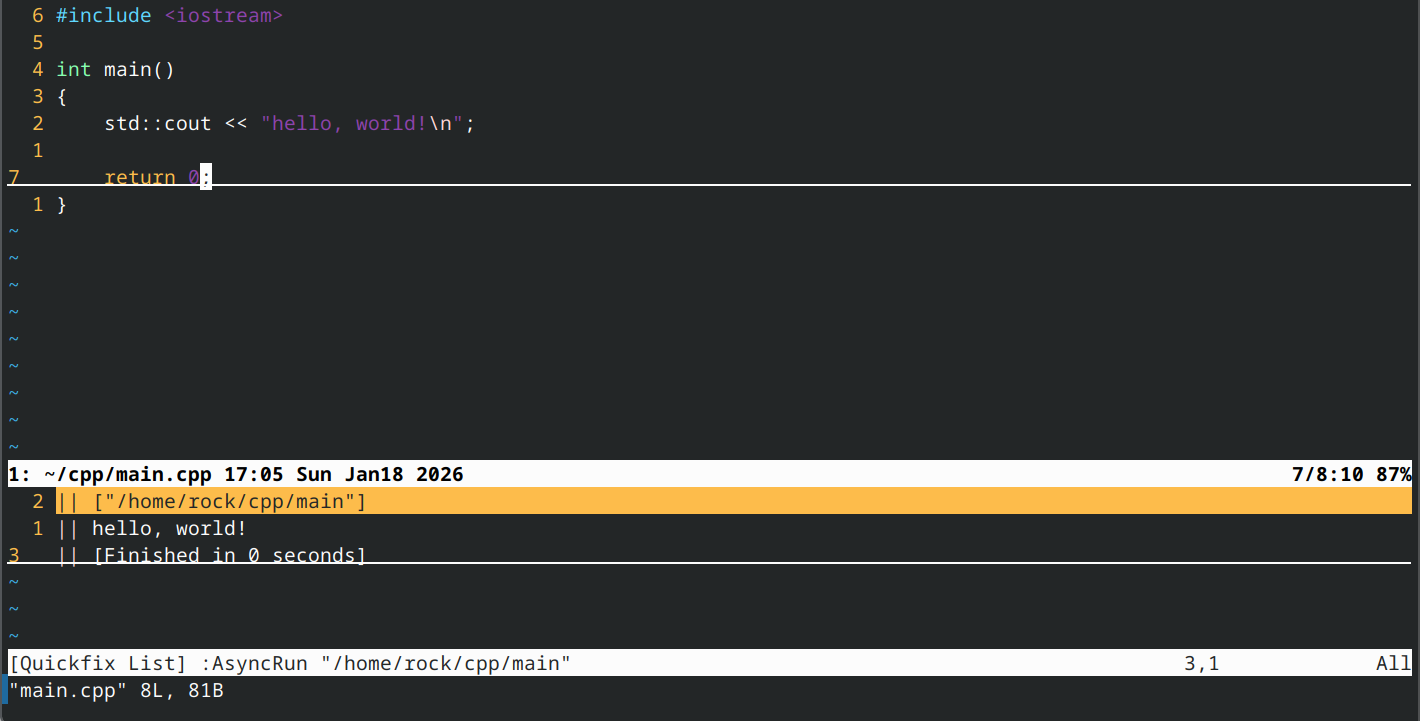
对于单文件,现在我们可以在vim里面直接构建运行了, 比如使用vim打开在~/cpp/main.cpp写的代码
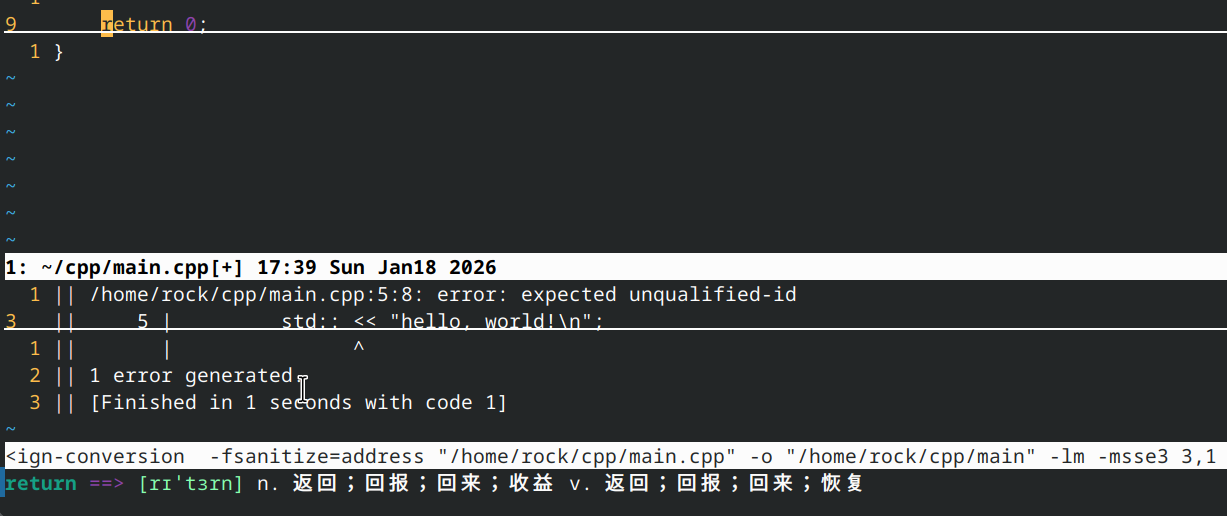
可以使用f9去构建main.cpp源码, f10运行由main.cpp生成的main执行文件。
对于多文件同但文件原理,只是在主文件(带main函数)按下f7构建(默认生成a.out执行文件),f8运行, 可是修改比较麻烦,我们后面配合目录树详细演示, 目录树部分。
好了总结一下:.tasks.ini是一个辅助异步运行插件和异步任务插件的文件,它使得clang编译器和vim编辑器结合起来, 在vim里面使用调用clang对cpp代码进行构建,运行。
回归这两个插件本身的安装和配置是都是在.vimrc里面:
- 将插件放在vim-plug插件配置列表里面{在call plug#begin和call plug#end()之间}。
- 将对应的配置使用
" AsyncRun:注释一下说明是此插件的配置, 接着后面紧跟它的配置文件。
注意:当我们提及使用vim-plug插件下载往往会看到如下代码:
~/.vimrc
Plug 'skywind3000/asynctasks.vim'
Plug 'skywind3000/asyncrun.vim'

" AsyncRun:
    " automatically open quickfix
    let g:asyncrun_open = 6

    noremap <silent><f6> :AsyncTask project-debug<cr>
    noremap <silent><f7> :AsyncTask project-build<cr>
    noremap <silent><f8> :AsyncTask project-run<cr>
    noremap <silent><f9> :AsyncTask file-build<cr>
    noremap <silent><f10> :AsyncTask file-run<cr>
当我们提及如下代码:
Plug 'skywind3000/asynctasks.vim'
Plug 'skywind3000/asyncrun.vim'
实际就是代表的是放在vim-plug插件列表中的, 即call plug#begin和call plug#end()之间.
call plug#begin('~/.vim/plugged')

Plug 'skywind3000/asynctasks.vim'
Plug 'skywind3000/asyncrun.vim'

call plug#end()
- 重新加载文件或重启Vim后,即可执行::PlugInstall 安装插件
但这些可能远远不够,如果是涉及到同一目录下多个文件呢?甚至是不同目录下的多个文件?如果需要修改其中的一个文件,我们就需要返回到命令行界面,然后查看所在目录下文件的名字,然后再次打开该文件修改并保存,再回到主文件(带main函数的)的vim界面再次构建运行,非常麻烦,但是如果我们像vscode那样有一个左侧栏有一个目录树呢,可以在各个文件之间游走切换,所幸vim真的有这样的功能nerdtree.vim插件。

7 目录树(NERDTree.vim)安装与配置
Plug 'preservim/nerdtree'

" NERDTree
    noremap ff :NERDTreeToggle<CR>

    " Exit Vim if NERDTree is the only window remaining in the only tab.
    autocmd BufEnter * if tabpagenr('$') == 1 && winnr('$') == 1 && exists('b:NERDTree') && b:NERDTree.isTabTree() | call feedkeys(":quit\<CR>:\<BS>") | endif

    " If another buffer tries to replace NERDTree, put it in the other window, and bring back NERDTree.
    autocmd BufEnter * if winnr() == winnr('h') && bufname('#') =~ 'NERD_tree_\d\+' && bufname('%') !~ 'NERD_tree_\d\+' && winnr('$') > 1 |
        \ let buf=bufnr() | buffer# | execute "normal! \<C-W>w" | execute 'buffer'.buf | endif

    " Open the existing NERDTree on each new tab.
    autocmd BufWinEnter * if &buftype != 'quickfix' && getcmdwintype() == '' | silent NERDTreeMirror | endif
对于目录树的使用我比较简单,按下ff后在左侧打开/关闭目录树,按下默认的o打开光标所在文件或者展开目录。
| 操作类型 | 按键 | 说明 |
|---|---|---|
| 创建窗口 | ||
| 在左侧创建新窗口 | sh |
垂直分割,新窗口在左侧 |
| 在下方创建新窗口 | sj |
水平分割,新窗口在下方 |
| 在上方创建新窗口 | sk |
水平分割,新窗口在上方 |
| 在右侧创建新窗口 | sl |
垂直分割,新窗口在右侧 |
| 创建终端 | ||
| 在左侧打开终端 | th |
垂直终端,在左侧 |
| 在下方打开终端 | tj |
水平终端,在下方 |
| 在上方打开终端 | tk |
水平终端,在上方 |
| 在右侧打开终端 | tl |
垂直终端,在右侧 |
| 切换窗口 | 先按住 Tab,然后按方向键 |
|
| 切换到左侧窗口 | Tab + h |
移动到左边窗口 |
| 切换到下方窗口 | Tab + j |
移动到下方窗口 |
| 切换到上方窗口 | Tab + k |
移动到上方窗口 |
| 切换到右侧窗口 | Tab + l |
移动到右边窗口 |
使用目录树插件实践2-8 具有多个代码文件的程序就会容易很多, 左侧的目录为我们提供视图, 然后创建窗口搭配切换窗口就可以生成如下界面:

修改main.cpp, 添加add函数的向前声明之后,在main.cpp(带有main函数)的主文件按下f7开始构建, f8运行多文件程序.
而创建终端搭配切换窗口可以通过lldb来调试程序,先使用f6生成可调式文件也是a.out, 然后通过lldb开始调试.(注意:因为这里是Tab+方向键是对vim设置的,所以回到bash界面将不起作用,可以采用Ctrl+w+w切换)

在 NERDTree 窗口中:
- 按 r 刷新当前目录
- 按 R 刷新根目录
基本上集成开发环境的大部分功能我们都实现了,但如果我们想要代码写得更快,代码补全单靠vim基本的设置还不够, 我们还需要一个功能强大的插件--智能代码补全引擎,它能自动补全,代码诊断,跳转到定义,查看文档,代码格式化, 代码片段等功能。
8 智能代码补全引擎(coc.nvim)的安装与配置
安装和配置
Plug 'neoclide/coc.nvim', {'branch': 'release'}

" coc full code
     " https://raw.githubusercontent.com/neoclide/coc.nvim/master/doc/coc-example-config.vim

      " May need for Vim (not Neovim) since coc.nvim calculates byte offset by count
      " utf-8 byte sequence
      set encoding=utf-8
      " Some servers have issues with backup files, see #649
      set nobackup
      set nowritebackup

      " Having longer updatetime (default is 4000 ms = 4s) leads to noticeable
      " delays and poor user experience
      set updatetime=300

      " Always show the signcolumn, otherwise it would shift the text each time
      " diagnostics appear/become resolved
      set signcolumn=yes

      " Use tab for trigger completion with characters ahead and navigate
      " NOTE: There's always complete item selected by default, you may want to enable
      " no select by `"suggest.noselect": true` in your configuration file
      " NOTE: Use command ':verbose imap <tab>' to make sure tab is not mapped by
      " other plugin before putting this into your config
      inoremap <silent><expr> <TAB>
            \ coc#pum#visible() ? coc#pum#next(1) :
            \ CheckBackspace() ? "\<Tab>" :
            \ coc#refresh()
      inoremap <expr><S-TAB> coc#pum#visible() ? coc#pum#prev(1) : "\<C-h>"

      " Make <CR> to accept selected completion item or notify coc.nvim to format
      " <C-g>u breaks current undo, please make your own choice
      inoremap <silent><expr> <CR> coc#pum#visible() ? coc#pum#confirm()
                                    \: "\<C-g>u\<CR>\<c-r>=coc#on_enter()\<CR>"

      function! CheckBackspace() abort
        let col = col('.') - 1
        return !col || getline('.')[col - 1]  =~# '\s'
      endfunction

      " Use `[g` and `]g` to navigate diagnostics
      " Use `:CocDiagnostics` to get all diagnostics of current buffer in location list
      nmap <silent><nowait> [g <Plug>(coc-diagnostic-prev)
      nmap <silent><nowait> ]g <Plug>(coc-diagnostic-next)

      " GoTo code navigation
      nmap <silent><nowait> gd <Plug>(coc-definition)
      nmap <silent><nowait> gy <Plug>(coc-type-definition)
      nmap <silent><nowait> gi <Plug>(coc-implementation)
      nmap <silent><nowait> gr <Plug>(coc-references)

      " Use K to show documentation in preview window
      nnoremap <silent> K :call ShowDocumentation()<CR>

      function! ShowDocumentation()
        if CocAction('hasProvider', 'hover')
          call CocActionAsync('doHover')
        else
          call feedkeys('K', 'in')
        endif
      endfunction

      " Highlight the symbol and its references when holding the cursor
      autocmd CursorHold * silent call CocActionAsync('highlight')

      " Symbol renaming
      nmap <leader>rn <Plug>(coc-rename)

      " Formatting selected code
      xmap <leader>f  <Plug>(coc-format-selected)
      nmap <leader>f  <Plug>(coc-format-selected)

      augroup mygroup
        autocmd!
        " Setup formatexpr specified filetype(s)
        autocmd FileType typescript,json setl formatexpr=CocAction('formatSelected')
      augroup end

      " Applying code actions to the selected code block
      " Example: `<leader>aap` for current paragraph
      xmap <leader>a  <Plug>(coc-codeaction-selected)
      nmap <leader>a  <Plug>(coc-codeaction-selected)

      " Remap keys for applying code actions at the cursor position
      nmap <leader>ac  <Plug>(coc-codeaction-cursor)
      " Remap keys for apply code actions affect whole buffer
      nmap <leader>as  <Plug>(coc-codeaction-source)
      " Apply the most preferred quickfix action to fix diagnostic on the current line
      nmap <leader>qf  <Plug>(coc-fix-current)

      " Remap keys for applying refactor code actions
      nmap <silent> <leader>re <Plug>(coc-codeaction-refactor)
      xmap <silent> <leader>r  <Plug>(coc-codeaction-refactor-selected)
      nmap <silent> <leader>r  <Plug>(coc-codeaction-refactor-selected)

      " Run the Code Lens action on the current line
      nmap <leader>cl  <Plug>(coc-codelens-action)

      " Map function and class text objects
      " NOTE: Requires 'textDocument.documentSymbol' support from the language server
      xmap if <Plug>(coc-funcobj-i)
      omap if <Plug>(coc-funcobj-i)
      xmap af <Plug>(coc-funcobj-a)
      omap af <Plug>(coc-funcobj-a)
      xmap ic <Plug>(coc-classobj-i)
      omap ic <Plug>(coc-classobj-i)
      xmap ac <Plug>(coc-classobj-a)
      omap ac <Plug>(coc-classobj-a)

      " Use CTRL-S for selections ranges
      " Requires 'textDocument/selectionRange' support of language server
      nmap <silent> <C-s> <Plug>(coc-range-select)
      xmap <silent> <C-s> <Plug>(coc-range-select)

      " Add `:Format` command to format current buffer
      command! -nargs=0 Format :call CocActionAsync('format')

      " Add `:Fold` command to fold current buffer
      command! -nargs=? Fold :call     CocAction('fold', <f-args>)

      " Add `:OR` command for organize imports of the current buffer
      command! -nargs=0 OR   :call     CocActionAsync('runCommand', 'editor.action.organizeImport')

      " Add (Neo)Vim's native statusline support
      " NOTE: Please see `:h coc-status` for integrations with external plugins that
      " provide custom statusline: lightline.vim, vim-airline
      set statusline^=%{coc#status()}%{get(b:,'coc_current_function','')}

      " Mappings for CoCList
      " Show all diagnostics
      nnoremap <silent><nowait> <space>a  :<C-u>CocList diagnostics<cr>
      " Manage extensions
      nnoremap <silent><nowait> <space>e  :<C-u>CocList extensions<cr>
      " Show commands
      nnoremap <silent><nowait> <space>c  :<C-u>CocList commands<cr>
      " Find symbol of current document
      nnoremap <silent><nowait> <space>o  :<C-u>CocList outline<cr>
      " Search workspace symbols
      nnoremap <silent><nowait> <space>s  :<C-u>CocList -I symbols<cr>
      " Do default action for next item
      nnoremap <silent><nowait> <space>j  :<C-u>CocNext<CR>
      " Do default action for previous item
      nnoremap <silent><nowait> <space>k  :<C-u>CocPrev<CR>
      " Resume latest coc list
      nnoremap <silent><nowait> <space>p  :<C-u>CocListResume<CR>
使用:
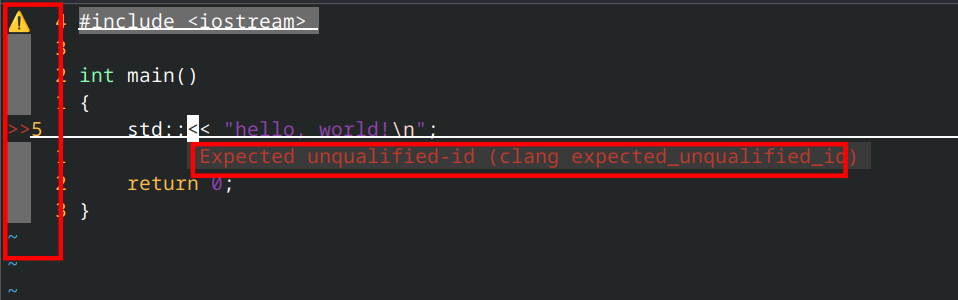
对于补全代码:coc.nvim 是一个基于 Language Server Protocol (LSP) 的智能代码补全和代码分析插件。需要下载coc-clangd,
使用 Coc 命令(推荐)
:CocInstall coc-clangd 下载扩展
:CocList extensions 查看已安装的扩展
:CocUninstall coc-clangd 卸载扩展
按下Tab进行补全,Shft+Tab进行选择,enter确认,space取消(Shft+Tab第二次)。
9 模糊查找(fzf.vim)安装与配置
安装和配置
Plug 'junegunn/fzf', { 'do': { -> fzf#install() } }
Plug 'junegunn/fzf.vim'

" fzf
    let g:fzf_vim = {}
    let g:fzf_vim.preview_window = ['hidden,right,50%,<70(up,40%)', 'ctrl-/']
    let g:fzf_vim.buffers_jump = 1
    let g:fzf_vim.grep_multi_line = 1
    let g:fzf_vim.commits_log_options = '--graph --color=always --format="%C(auto)%h%d %s %C(black)%C(bold)%cr"'

    nnoremap <C-p> :Files<CR>
    nnoremap <leader>f :GFiles<CR>
    nnoremap <leader>r :Rg<CR>
    nnoremap <leader>b :Buffers<CR>

    augroup fzf_settings
      autocmd!
      autocmd FileType fzf set laststatus=0 noshowmode noruler
      autocmd BufLeave <buffer> set laststatus=2 showmode ruler
    augroup END
使用
| 命令 | 列表 |
|---|---|
| :Files [PATH] | 文件($FZF_DEFAULT_COMMAND如果已定义则运行) |
| :GFiles [OPTS] | Git 文件(git ls-files) |
| :GFiles? | Git 文件(git status) |
| :Buffers | 打开缓冲区 |
| :Colors | 配色方案 |
| :Ag [PATTERN] | Ag搜索结果(ALT-A全选,ALT-D全选) |
| :Rg [PATTERN] | Rg搜索结果(ALT-A全选,ALT-D全选) |
| :RG [PATTERN] | RG搜索结果;每次按键都重新启动 ripgrep |
| :Lines [QUERY] | 已加载缓冲区中的行 |
| :BLines [QUERY] | 当前缓冲区中的行数 |
| :Tags [PREFIX] | 项目标签(ctags -R) |
| :BTags [QUERY] | 当前缓冲区中的标签 |
| :Changes | 所有打开缓冲区中的变更列表 |
| :Marks | 分数 |
| :BMarks | 当前缓冲区中的标记 |
| :Jumps | 跳跃 |
| :Windows | 视窗 |
| :Locate PATTERN | locate命令输出 |
| :History | v:oldfiles并打开缓冲区 |
| :History: | 命令历史记录 |
| :History/ | 搜索历史 |
| :Snippets | 代码片段(UltiSnips) |
| :Commits [LOG_OPTS] | Git 提交(需要fugitive.vim) |
| :BCommits [LOG_OPTS] | 当前缓冲区的 Git 提交;可视化选择行以跟踪范围内的更改 |
| :Commands | 命令 |
| :Maps | 普通模式映射 |
| :Helptags | 帮助标签1 |
| :Filetypes | 文件类型 |
fzf的快捷键已经在上面的配置中设置好了(Ctrl-p 查找文件、空格+f Git文件、空格+r Ripgrep搜索、空格+b 缓冲区),这里演示一下查找文件,比如add.out,在vim命令行模式下输入:Files,然后按下Enter键就可以搜索了, 它会显示文件内容,按下Esc键退出搜索.

10 代码格式化(vim-clang-format)安装与配置
安装
Plug 'rhysd/vim-clang-format'
使用
| 命令 | 说明 |
|---|---|
:ClangFormat |
格式化整个文件 |
:ClangFormatAuto |
开启/关闭保存时自动格式化 |
clang-format的格式化规则由项目根目录下的.clang-format文件控制。如果没有该文件,会使用默认的 LLVM 风格。可以创建.clang-format文件自定义格式化规则,例如:BasedOnStyle: LLVM IndentWidth: 4 ColumnLimit: 100 AllowShortFunctionsOnASingleLine: All BreakBeforeBraces: Linux也可以通过
clang-format -style=Google -dump-config > .clang-format导出预设风格作为基础修改。
11 其他插件(可选)
Plug 'junegunn/vim-easy-align'
Plug 'vim-scripts/cpp_doxygen'
Plug 'preservim/nerdcommenter'
Plug 'tpope/vim-surround'
Plug 'voldikss/vim-translator'

" nerdcommenter
    nmap gcc <leader>cc
    nmap gcu <leader>cu
    nmap gc<Space> <leader>c<Space>
    nmap gcm <leader>cm
    nmap gcs <leader>cs
    nmap gc$ <leader>c$

    vmap gcc <leader>cc
    vmap gcu <leader>cu
    vmap gc<Space> <leader>c<Space>

" vim-translator
    nnoremap <silent> <Leader>t viw:Translate<CR>
NERDCommenter — 快速注释
功能:快速添加、切换、取消代码注释,支持几乎所有编程语言。
核心用法
| 快捷键 | 功能 |
|---|---|
| 注释当前行或选中行(// 或 # 等) | |
| 取消注释 | |
| 切换注释状态(注释↔取消) | |
| 用最简符号注释(如 /* */ 变 //) | |
| 使用块注释(/* */ 风格) | |
| 从光标位置注释到行尾 |
vim-surround — 括号/引号操作神器
功能:快速添加、修改、删除包围符号(括号、引号、HTML 标签等)。
核心用法
| 命令 | 功能 | 示例 |
|---|---|---|
| ys{motion} | 添加包围 | ysiw" → |"word" → "word" |
| ds | 删除包围 | ds" → "word" → word |
| cs{old} | 修改包围 | cs"' → "word" → 'word' |
| yss | 整行添加 | yss) → print(x) → (print(x)) |
| yS{motion} | 添加+换行 | yS{ → { 在新行,内容缩进 |
对于翻译:移动到不认识的词内,按下space+t就会对词翻译,对于没有收入其库的词不能翻译。
附录:完整配置代码
~/
├── .vimrc              # Vim 主配置文件
├── .vim/               # Vim 配置目录
│   ├── tasks.ini       # AsyncTask 任务定义
│   ├── autoload/       # vim-plug 插件管理器自动加载目录
│   │   └── plug.vim    # vim-plug 插件管理器
│   └── plugged/        # vim-plug 下载的插件目录
│       ├── asyncrun.vim    # 异步运行插件
│       ├── asynctasks.vim  # 异步任务插件
│       ├── coc.nvim        # 代码补全引擎
│       ├── fzf             # 模糊查找引擎
│       ├── fzf.vim         # fzf 的 Vim 接口
│       ├── nerdtree        # 目录树
│       ├── vim-clang-format # 代码格式化
│       ├── cpp_doxygen     # Doxygen 注释生成
│       ├── nerdcommenter   # 快速注释
│       ├── vim-surround    # 括号/引号操作
│       ├── vim-translator  # 翻译
│       └── vim-easy-align  # 对齐工具
├── cpp/                # C++ 项目主目录
│   ├── include/        # 头文件目录
│   │   └── xxx.h       # 头文件
│   ├── src/            # 源文件目录
│   │   ├── xxx.cpp     # 实现文件
│   │   └── main.cpp    # 主程序文件
tasks.ini
[project-debug]
command:cpp=clang++ -std=c++23 -g -pedantic-errors -Wall -Weffc++ -Wextra -Wconversion -Wsign-conversion -Werror -Wshadow -fuse-ld=lld *.cpp -o a.out -lm -msse3 && lldb a.out
command:c=clang -std=c17 -g -pedantic-errors -Wall -Weffc++ -Wextra -Wconversion -Wsign-conversion -Werror -Wshadow -fuse-ld=lld *.c -o a.out -lm && lldb a.out
output=terminal
cwd=$(VIM_FILEDIR)
save=2

[project-build]
command:cpp=clang++ -std=c++23 -O2 -pedantic-errors -Wall -Weffc++ -Wextra -Wconversion -Wsign-conversion -Werror -Wshadow *.cpp -o a.out -lm -msse3
command:c=clang -std=c17 -O2 -pedantic-errors -Wall -Weffc++ -Wextra -Wconversion -Wsign-conversion -Werror -Wshadow *.c -o a.out -lm
command:make=make -f "$(VIM_FILEPATH)"
errorformat=%f:%l:%c: %m
output=quickfix
cwd=$(VIM_FILEDIR)
save=2

[project-run]
command=./a.out
output=quickfix
errorformat=
cwd=$(VIM_FILEDIR)
save=2

[file-build]
command:cpp=clang++ -std=c++23 -O2 -pedantic-errors -Wall -Weffc++ -Wextra -Wconversion -Wsign-conversion -Werror -Wshadow -fsanitize=address "$(VIM_FILEPATH)" -o "$(VIM_PATHNOEXT)" -lm -msse3
command:c=clang -std=c17 -O2 -pedantic-errors -Wall -Weffc++ -Wextra -Wconversion -Wsign-conversion -Werror -Wshadow "$(VIM_FILEPATH)" -o "$(VIM_PATHNOEXT)" -lm
command:make=make -f "$(VIM_FILEPATH)"
output=quickfix
errorformat=
cwd=$(VIM_FILEDIR)
save=2

[file-run]
command="$(VIM_FILEPATH)"
command:c,cpp="$(VIM_PATHNOEXT)"
output=quickfix
errorformat=
cwd=$(VIM_FILEDIR)
save=2
.vimrc
let mapleader = " "
syntax on
set tabstop=4
set shiftwidth=4
set softtabstop=4
set nopaste
set smartindent
set autoindent
set number
set relativenumber
set cursorline
set showcmd
set wildmenu
set hlsearch
set incsearch
set ignorecase
set smartcase
nnoremap <silent> <Space><CR> :nohlsearch<CR>
noremap n nzz
noremap N Nzz


nnoremap sk :set nosplitbelow<CR>:split<CR>
nnoremap sj :set splitbelow<CR>:split<CR>
nnoremap sh :set nosplitright<CR>:vsplit<CR>
nnoremap sl :set splitright<CR>:vsplit<CR>

nnoremap tk :set nosplitbelow<CR>:terminal<CR>
nnoremap tj :set splitbelow<CR>:terminal<CR>
nnoremap th :set nosplitright<CR>:vertical terminal<CR>
nnoremap tl :set splitright<CR>:vertical terminal<CR>

map <Tab>k <C-w>k
map <Tab>j <C-w>j
map <Tab>h <C-w>h
map <Tab>l <C-w>l

map <Leader>k <C-w>k
map <Leader>j <C-w>j
map <Leader>h <C-w>h
map <Leader>l <C-w>l

set laststatus=2
set statusline=%n:\ %<%F%m%r\ %{strftime(\"%H:%M\ %a\ %b\%d\ %Y\")}\ %=\ %l/%L:%c\ %p%%

filetype on
filetype plugin on
filetype indent on
filetype plugin indent on

noremap <silent><f6> :AsyncTask project-debug<cr>
noremap <silent><f7> :AsyncTask project-build<cr>
noremap <silent><f8> :AsyncTask project-run<cr>
noremap <silent><f9> :AsyncTask file-build<cr>
noremap <silent><f10> :AsyncTask file-run<cr>

" vim-plug
call plug#begin('~/.vim/plugged')
    Plug 'skywind3000/asynctasks.vim'
    Plug 'skywind3000/asyncrun.vim'
    Plug 'neoclide/coc.nvim', {'branch': 'release'}
    Plug 'junegunn/fzf', { 'do': { -> fzf#install() } }
    Plug 'junegunn/fzf.vim'
    Plug 'preservim/nerdtree'
    Plug 'vim-scripts/cpp_doxygen'
    Plug 'preservim/nerdcommenter'
    Plug 'tpope/vim-surround'
    Plug 'voldikss/vim-translator'
    Plug 'rhysd/vim-clang-format'
call plug#end()

" AsyncRun: automatically open quickfix
    let g:asyncrun_open = 6

" NERDTree
    noremap ff :NERDTreeToggle<CR>

    " Exit Vim if NERDTree is the only window remaining in the only tab.
    autocmd BufEnter * if tabpagenr('$') == 1 && winnr('$') == 1 && exists('b:NERDTree') && b:NERDTree.isTabTree() | call feedkeys(":quit\<CR>:\<BS>") | endif

    " If another buffer tries to replace NERDTree, put it in the other window, and bring back NERDTree.
    autocmd BufEnter * if winnr() == winnr('h') && bufname('#') =~ 'NERD_tree_\d\+' && bufname('%') !~ 'NERD_tree_\d\+' && winnr('$') > 1 |
        \ let buf=bufnr() | buffer# | execute "normal! \<C-W>w" | execute 'buffer'.buf | endif

    " Open the existing NERDTree on each new tab.
    autocmd BufWinEnter * if &buftype != 'quickfix' && getcmdwintype() == '' | silent NERDTreeMirror | endif

" coc full code
     " https://raw.githubusercontent.com/neoclide/coc.nvim/master/doc/coc-example-config.vim

      " May need for Vim (not Neovim) since coc.nvim calculates byte offset by count
      " utf-8 byte sequence
      set encoding=utf-8
      " Some servers have issues with backup files, see #649
      set nobackup
      set nowritebackup

      " Having longer updatetime (default is 4000 ms = 4s) leads to noticeable
      " delays and poor user experience
      set updatetime=300

      " Always show the signcolumn, otherwise it would shift the text each time
      " diagnostics appear/become resolved
      set signcolumn=yes

      " Use tab for trigger completion with characters ahead and navigate
      " NOTE: There's always complete item selected by default, you may want to enable
      " no select by `"suggest.noselect": true` in your configuration file
      " NOTE: Use command ':verbose imap <tab>' to make sure tab is not mapped by
      " other plugin before putting this into your config
      inoremap <silent><expr> <TAB>
            \ coc#pum#visible() ? coc#pum#next(1) :
            \ CheckBackspace() ? "\<Tab>" :
            \ coc#refresh()
      inoremap <expr><S-TAB> coc#pum#visible() ? coc#pum#prev(1) : "\<C-h>"

      " Make <CR> to accept selected completion item or notify coc.nvim to format
      " <C-g>u breaks current undo, please make your own choice
      inoremap <silent><expr> <CR> coc#pum#visible() ? coc#pum#confirm()
                                    \: "\<C-g>u\<CR>\<c-r>=coc#on_enter()\<CR>"

      function! CheckBackspace() abort
        let col = col('.') - 1
        return !col || getline('.')[col - 1]  =~# '\s'
      endfunction

      " Use `[g` and `]g` to navigate diagnostics
      " Use `:CocDiagnostics` to get all diagnostics of current buffer in location list
      nmap <silent><nowait> [g <Plug>(coc-diagnostic-prev)
      nmap <silent><nowait> ]g <Plug>(coc-diagnostic-next)

      " GoTo code navigation
      nmap <silent><nowait> gd <Plug>(coc-definition)
      nmap <silent><nowait> gy <Plug>(coc-type-definition)
      nmap <silent><nowait> gi <Plug>(coc-implementation)
      nmap <silent><nowait> gr <Plug>(coc-references)

      " Use K to show documentation in preview window
      nnoremap <silent> K :call ShowDocumentation()<CR>

      function! ShowDocumentation()
        if CocAction('hasProvider', 'hover')
          call CocActionAsync('doHover')
        else
          call feedkeys('K', 'in')
        endif
      endfunction

      " Highlight the symbol and its references when holding the cursor
      autocmd CursorHold * silent call CocActionAsync('highlight')

      " Symbol renaming
      nmap <leader>rn <Plug>(coc-rename)

      " Formatting selected code
      xmap <leader>f  <Plug>(coc-format-selected)
      nmap <leader>f  <Plug>(coc-format-selected)

      augroup mygroup
        autocmd!
        " Setup formatexpr specified filetype(s)
        autocmd FileType typescript,json setl formatexpr=CocAction('formatSelected')
      augroup end

      " Applying code actions to the selected code block
      " Example: `<leader>aap` for current paragraph
      xmap <leader>a  <Plug>(coc-codeaction-selected)
      nmap <leader>a  <Plug>(coc-codeaction-selected)

      " Remap keys for applying code actions at the cursor position
      nmap <leader>ac  <Plug>(coc-codeaction-cursor)
      " Remap keys for apply code actions affect whole buffer
      nmap <leader>as  <Plug>(coc-codeaction-source)
      " Apply the most preferred quickfix action to fix diagnostic on the current line
      nmap <leader>qf  <Plug>(coc-fix-current)

      " Remap keys for applying refactor code actions
      nmap <silent> <leader>re <Plug>(coc-codeaction-refactor)
      xmap <silent> <leader>r  <Plug>(coc-codeaction-refactor-selected)
      nmap <silent> <leader>r  <Plug>(coc-codeaction-refactor-selected)

      " Run the Code Lens action on the current line
      nmap <leader>cl  <Plug>(coc-codelens-action)

      " Map function and class text objects
      " NOTE: Requires 'textDocument.documentSymbol' support from the language server
      xmap if <Plug>(coc-funcobj-i)
      omap if <Plug>(coc-funcobj-i)
      xmap af <Plug>(coc-funcobj-a)
      omap af <Plug>(coc-funcobj-a)
      xmap ic <Plug>(coc-classobj-i)
      omap ic <Plug>(coc-classobj-i)
      xmap ac <Plug>(coc-classobj-a)
      omap ac <Plug>(coc-classobj-a)

      " Use CTRL-S for selections ranges
      " Requires 'textDocument/selectionRange' support of language server
      nmap <silent> <C-s> <Plug>(coc-range-select)
      xmap <silent> <C-s> <Plug>(coc-range-select)

      " Add `:Format` command to format current buffer
      command! -nargs=0 Format :call CocActionAsync('format')

      " Add `:Fold` command to fold current buffer
      command! -nargs=? Fold :call     CocAction('fold', <f-args>)

      " Add `:OR` command for organize imports of the current buffer
      command! -nargs=0 OR   :call     CocActionAsync('runCommand', 'editor.action.organizeImport')

      " Add (Neo)Vim's native statusline support
      " NOTE: Please see `:h coc-status` for integrations with external plugins that
      " provide custom statusline: lightline.vim, vim-airline
      set statusline^=%{coc#status()}%{get(b:,'coc_current_function','')}

      " Mappings for CoCList
      " Show all diagnostics
      nnoremap <silent><nowait> <space>a  :<C-u>CocList diagnostics<cr>
      " Manage extensions
      nnoremap <silent><nowait> <space>e  :<C-u>CocList extensions<cr>
      " Show commands
      nnoremap <silent><nowait> <space>c  :<C-u>CocList commands<cr>
      " Find symbol of current document
      nnoremap <silent><nowait> <space>o  :<C-u>CocList outline<cr>
      " Search workspace symbols
      nnoremap <silent><nowait> <space>s  :<C-u>CocList -I symbols<cr>
      " Do default action for next item
      nnoremap <silent><nowait> <space>j  :<C-u>CocNext<CR>
      " Do default action for previous item
      nnoremap <silent><nowait> <space>k  :<C-u>CocPrev<CR>
      " Resume latest coc list
      nnoremap <silent><nowait> <space>p  :<C-u>CocListResume<CR>

" fzf
    let g:fzf_vim = {}
    let g:fzf_vim.preview_window = ['hidden,right,50%,<70(up,40%)', 'ctrl-/']
    let g:fzf_vim.buffers_jump = 1
    let g:fzf_vim.grep_multi_line = 1
    let g:fzf_vim.commits_log_options = '--graph --color=always --format="%C(auto)%h%d %s %C(black)%C(bold)%cr"'

    nnoremap <C-p> :Files<CR>
    nnoremap <leader>f :GFiles<CR>
    nnoremap <leader>r :Rg<CR>
    nnoremap <leader>b :Buffers<CR>

    augroup fzf_settings
      autocmd!
      autocmd FileType fzf set laststatus=0 noshowmode noruler
      autocmd BufLeave <buffer> set laststatus=2 showmode ruler
    augroup END

" nerdcommenter
    nmap gcc <leader>cc
    nmap gcu <leader>cu
    nmap gc<Space> <leader>c<Space>
    nmap gcm <leader>cm
    nmap gcs <leader>cs
    nmap gc$ <leader>c$

    vmap gcc <leader>cc
    vmap gcu <leader>cu
    vmap gc<Space> <leader>c<Space>

" vim-translator
    nnoremap <silent> <Leader>t viw:Translate<CR>
更新日志:
04/22/2026: 系统信息更新至Fedora 44, 修正安装命令, 移除vim-ai插件部分, 补充vim-clang-format, 修正内容错误
03/18/2026: 增加调试程序的单步执行部分, 3.6完毕。
02/26/2026: 8.6出现贯穿警告,可设置-Werror=implicit-fallthrough,本编译器未设置。
02/23/2026: 增添目录树刷新问题(按下当前r或者根目录R), 多文件构建不能使用:clist展开quickfix([project-build]添加errorformat=)
02/22/2026: 增添变量遮蔽 -Wshadow 警告
02/07/2026: 增添fzf,NERDCommenter,nerdcommenter配置,和使用用法
02/05/2026: 更新tasks.ini: 禁止扩展-pedantic-errors, 将警告视为错误-Werror

 浙公网安备 33010602011771号