
uniapp实现左滑显示编辑删除按钮
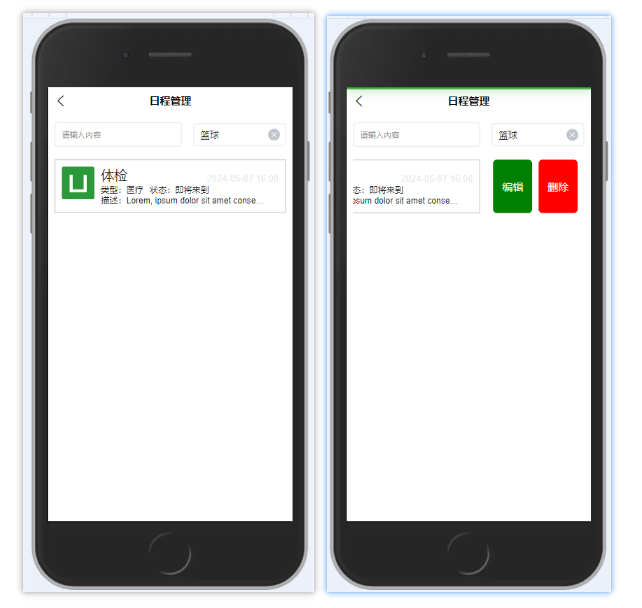
【使用时可删除不必要的内容,我就是记录一下】
方法一:详细借鉴(app):http://www.aliyue.net/10130.html
方法二:详细借鉴(微信小程序):https://blog.csdn.net/weixin_41579185/article/details/117747252?spm=1001.2101.3001.6650.2&utm_medium=distribute.pc_relevant.none-task-blog-2%7Edefault%7ECTRLIST%7Edefault-2-117747252-blog-123702049.pc_relevant_aa&depth_1-utm_source=distribute.pc_relevant.none-task-blog-2%7Edefault%7ECTRLIST%7Edefault-2-117747252-blog-123702049.pc_relevant_aa&utm_relevant_index=3
<template>
    <view class="padding-sm">
        <view class=" flex justify-between margin-bottom-sm">
            <uni-easyinput style="flex:0.55" class="uni-mt-5" trim="all" placeholder="请输入内容"></uni-easyinput>
            <uni-data-select style="flex:0.4" v-model="value" :localdata="range" placeholder="请选择类型"></uni-data-select>
        </view>
        <view class="main">
            <view v-for="(item, index) in csListArrl" :key="index" :data-index="index" class="order-item"
                @touchstart="drawStart" @touchmove="drawMove" @touchend="drawEnd" :style="'right:'+item.right+'px'">
                <view class="content">
                    <view class="alarm_box1 flex flex-direction">
                        <view class="flex">
                            <image src="../../static/logo.png" mode="" class="alarm_iamge"></image>
                            <view class="flex flex-direction justify-between" style="flex: 1;">
                                <view class="flex justify-between align-end">
                                    <span class="alarm_name">体检</span>
                                    <span class="alarm_time">2024-05-07 16:00</span>
                                </view>
                                <view class="flex  align-end">
                                    <span class="alarm_phone margin-right-sm">类型:医疗</span>
                                    <span class="alarm_phone">状态:即将来到</span>
                                </view>
                                <view class="flex  align-end" style="width: 68vw;">
                                    <view class="alarm_phone Personnel_description">描述:Lorem, ipsum dolor sit amet
                                        consectetur adipisicing elit. Molestias, beatae quasi quidem doloribus ducimus
                                        possimus. Saepe consequatur, neque a molestias commodi deserunt sequi labore
                                        tenetur omnis ipsam ipsum molestiae voluptates.</view>
                                </view>
                            </view>
                        </view>
                    </view>
                </view>
                <view class="remove" @click="delData(item)">删除</view>
                <view class="edit" @click="editData(item)">编辑</view>
            </view>
        </view>

    </view>
</template>

<script>
    export default {
        data() {
            return { //列表数据,可根据自己的业务获取
                //列表数据,可根据自己的业务获取
                csListArrl: [{
                    name: '小A',
                    age: '18',
                    right: 0
                }],
                //左滑默认宽度
                delBtnWidth: 80,

                value: 0,
                range: [{
                        value: 0,
                        text: "篮球"
                    },
                    {
                        value: 1,
                        text: "足球"
                    },
                    {
                        value: 2,
                        text: "游泳"
                    },
                ],

            }
        },
        methods: {
            /* input(e) {
                console.log('输入内容:', e);
            },
            change(e) {
                console.log("e:", e);
            }, */ //开始触摸滑动
            //开始触摸滑动
            drawStart(e) {
                console.log("开始触发");
                var touch = e.touches[0];
                this.startX = touch.clientX;
            },
            //触摸滑动
            drawMove(e) {
                console.log("滑动");
                for (var index in this.csListArrl) {
                    this.$set(this.csListArrl[index], 'right', 0);
                }
                var touch = e.touches[0];
                var item = this.csListArrl[e.currentTarget.dataset.index];
                var disX = this.startX - touch.clientX;
                if (disX >= 20) {
                    if (disX > this.delBtnWidth) {
                        disX = this.delBtnWidth;
                    }
                    this.$set(this.csListArrl[e.currentTarget.dataset.index], 'right', disX);
                } else {
                    this.$set(this.csListArrl[e.currentTarget.dataset.index], 'right', 0);
                }
            },
            //触摸滑动结束
            drawEnd(e) {
                console.log("滑动结束");
                var item = this.csListArrl[e.currentTarget.dataset.index];
                if (item.right >= this.delBtnWidth / 2) {
                    this.$set(this.csListArrl[e.currentTarget.dataset.index], 'right', this.delBtnWidth*2);
                } else {
                    this.$set(this.csListArrl[e.currentTarget.dataset.index], 'right', 0);
                }
            },
            //删除方法
            delData(item) {
                console.log("删除")
                uni.showModal({
                    title: '提示',
                    content: "确认删除该日程?",
                    success: function(res) {
                        if (res.confirm) {
                            console.log('用户点击确定');
                        } else if (res.cancel) {
                            console.log('用户点击取消');
                        }
                    }
                });
            },
            editData(item) {
                uni.showModal({
                    title: '提示',
                    content: "确认编辑该日程?",
                    success: function(res) {
                        if (res.confirm) {
                            console.log('用户点击确定');
                        } else if (res.cancel) {
                            console.log('用户点击取消');
                        }
                    }
                });
            }
        }
    }
</script>

<style lang="scss" scoped>
    .main {
        width: 100%;
        height: auto;
        margin: 10px auto;
        overflow: hidden
    }

    .order-item {
        width: 100%;
        display: flex;
        position: relative;
        margin: 10px auto;
        align-items: right;
        flex-direction: row;
    }

    .content {
        width: 100%;
        // height: 100px;
        margin: 0 auto;
        border: 1px solid #C0C0C0;
    }

    .remove {
        width: 60px;
        right: -150px;
        margin-left: -5%;
        height: 100%;
        background-color: red;
        color: #FFFFFF;
        position: absolute;
        top: 0;

        display: flex;
        justify-content: center;
        align-items: center;
        font-size: 16px;
        border-radius: 12rpx;
    }

    .edit {
        height: 100%;
        background-color: green;
        color: white;
        position: absolute;
        top: 0;
        width:60px;
        right: -80px;

        display: flex;
        justify-content: center;
        align-items: center;
        font-size: 16px;
        border-radius: 12rpx;
    }
</style>

 浙公网安备 33010602011771号