
开发VS2005下ComboBoxTreeView(下拉列表框弹出树) 与ToolStripComboBoxTreeView(下拉列表框工具条弹出树)
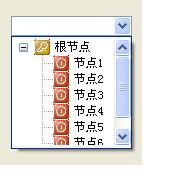
最进在使用VS2005开发时,发现有很多新东西,比如,我们常用的ToolBar ,MainMenu,StatusBar,变成了功能强大,样式新颖的,ToolStrip,MenuStrip,StatusStrip,等.不过还是有些不足,比如,ComboBox 变化不大,下拉框里面只能是文本的,很不方便,我的想法是在下拉ComboBox时会出现TreeView 控件,这也是我今天要做的控件ComboBoxTreeView
开始写了一个,关键点是弹出TreeView 控件,但是把TreeView 做成一个窗体,弹出,还是有什么办法,一查VS2005有一个类窗体弹出类(很强大的对象)ToolStripDropDown, 在使用此类的时候需要传递一个ToolStripControlHost类型的对象,还有个问题就是,TreeView 弹出了,会在它的上方出现了一条小白条,这个问题很棘手,不过如果你懂Win32那就一切OK了,好,我们看看这个类吧.
一:ComboBoxTreeView
附图:
 using System;
using System.Windows;
using System.Windows.Forms;
using System.ComponentModel;
using System.Drawing;
using System.Drawing.Design;
using System.Windows.Forms.Design;
namespace WindowsApplication14
 {
{
 [DefaultProperty("Items")]
[ToolStripItemDesignerAvailability(ToolStripItemDesignerAvailability.ContextMenuStrip | (ToolStripItemDesignerAvailability.MenuStrip | ToolStripItemDesignerAvailability.ToolStrip))]
public class ToolStripComboBoxTreeView : ToolStripControlHost
 {
{
 ToolStripComboBoxTreeViewControl
public ToolStripComboBoxTreeView()
: base(ToolStripComboBoxTreeView.CreateControlInstance())
{
ToolStripComboBoxTreeView.ToolStripComboBoxTreeViewControl control =
base.Control as ToolStripComboBoxTreeView.ToolStripComboBoxTreeViewControl;
control.Owner = this;
 }
}
private static Control CreateControlInstance()
{
ComboBox comboBox = new ToolStripComboBoxTreeViewControl();
return comboBox;
}
属性
方法
事件
}
 }
}
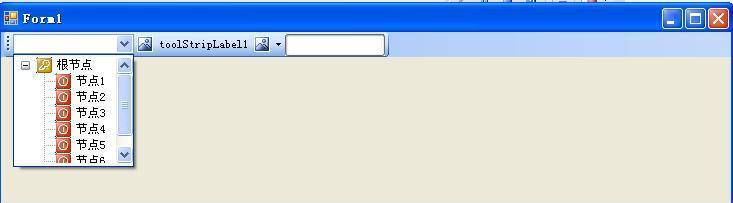
附图:
客户端调用方法:
public static void Main(){
toolStripComboBoxTreeView1.TreeView.ImageList = this.imageList1;
TreeNode root = new TreeNode("根节点",1,2);
root.Nodes.Add("节点1");
root.Nodes.Add("节点2");
root.Nodes.Add("节点3");
root.Nodes.Add("节点4");
root.Nodes.Add("节点5");
root.Nodes.Add("节点6");
toolStripComboBoxTreeView1.TreeView.Nodes.Add(root);
}
开始写了一个,关键点是弹出TreeView 控件,但是把TreeView 做成一个窗体,弹出,还是有什么办法,一查VS2005有一个类窗体弹出类(很强大的对象)ToolStripDropDown, 在使用此类的时候需要传递一个ToolStripControlHost类型的对象,还有个问题就是,TreeView 弹出了,会在它的上方出现了一条小白条,这个问题很棘手,不过如果你懂Win32那就一切OK了,好,我们看看这个类吧.
一:ComboBoxTreeView
1 using System.Data;
2 using System.Text;
3 using System.Windows.Forms;
4 namespace WindowsApplication14
5 {
6 public class ComboBoxTreeView : ComboBox
7 {
8 private const int WM_LBUTTONDOWN = 0x201, WM_LBUTTONDBLCLK = 0x203;
9 ToolStripControlHost treeViewHost;
10 ToolStripDropDown dropDown;
11 public ComboBoxTreeView()
12 {
13 TreeView treeView = new TreeView();
14 treeView.AfterSelect+=new TreeViewEventHandler(treeView_AfterSelect);
15 treeView.BorderStyle = BorderStyle.None;
16
17 treeViewHost = new ToolStripControlHost(treeView);
18 dropDown = new ToolStripDropDown();
19 dropDown.Width = this.Width;
20 dropDown.Items.Add(treeViewHost);
21 }
22 public void treeView_AfterSelect(object sender, TreeViewEventArgs e)
23 {
24 this.Text=TreeView.SelectedNode.Text;
25 dropDown.Close();
26 }
27 public TreeView TreeView
28 {
29 get { return treeViewHost.Control as TreeView; }
30 }
31 private void ShowDropDown()
32 {
33 if (dropDown != null)
34 {
35 treeViewHost.Size =new Size(DropDownWidth-2,DropDownHeight);
36 dropDown.Show(this, 0, this.Height);
37 }
38 }
39 protected override void WndProc(ref Message m)
40 {
41 if (m.Msg == WM_LBUTTONDBLCLK || m.Msg == WM_LBUTTONDOWN)
42 {
43 ShowDropDown();
44 return;
45 }
46 base.WndProc(ref m);
47 }
48 protected override void Dispose(bool disposing)
49 {
50 if (disposing)
51 {
52 if (dropDown != null)
53 {
54 dropDown.Dispose();
55 dropDown = null;
56 }
57 }
58 base.Dispose(disposing);
59 }
60 }
61
62 }
63
2 using System.Text;
3 using System.Windows.Forms;
4 namespace WindowsApplication14
5 {
6 public class ComboBoxTreeView : ComboBox
7 {
8 private const int WM_LBUTTONDOWN = 0x201, WM_LBUTTONDBLCLK = 0x203;
9 ToolStripControlHost treeViewHost;
10 ToolStripDropDown dropDown;
11 public ComboBoxTreeView()
12 {
13 TreeView treeView = new TreeView();
14 treeView.AfterSelect+=new TreeViewEventHandler(treeView_AfterSelect);
15 treeView.BorderStyle = BorderStyle.None;
16
17 treeViewHost = new ToolStripControlHost(treeView);
18 dropDown = new ToolStripDropDown();
19 dropDown.Width = this.Width;
20 dropDown.Items.Add(treeViewHost);
21 }
22 public void treeView_AfterSelect(object sender, TreeViewEventArgs e)
23 {
24 this.Text=TreeView.SelectedNode.Text;
25 dropDown.Close();
26 }
27 public TreeView TreeView
28 {
29 get { return treeViewHost.Control as TreeView; }
30 }
31 private void ShowDropDown()
32 {
33 if (dropDown != null)
34 {
35 treeViewHost.Size =new Size(DropDownWidth-2,DropDownHeight);
36 dropDown.Show(this, 0, this.Height);
37 }
38 }
39 protected override void WndProc(ref Message m)
40 {
41 if (m.Msg == WM_LBUTTONDBLCLK || m.Msg == WM_LBUTTONDOWN)
42 {
43 ShowDropDown();
44 return;
45 }
46 base.WndProc(ref m);
47 }
48 protected override void Dispose(bool disposing)
49 {
50 if (disposing)
51 {
52 if (dropDown != null)
53 {
54 dropDown.Dispose();
55 dropDown = null;
56 }
57 }
58 base.Dispose(disposing);
59 }
60 }
61
62 }
63
附图:
二:
ToolStrip
工具条中可以插入文本,下拉框,等,如果要插入下拉树的列表框但不可以直接插入ComboBoxTreeView,必须继承上面提到的ToolStripControlHost类,
using System;using System.Windows;using System.Windows.Forms;using System.ComponentModel;using System.Drawing;using System.Drawing.Design;using System.Windows.Forms.Design;namespace WindowsApplication14{
 [DefaultProperty("Items")] [ToolStripItemDesignerAvailability(ToolStripItemDesignerAvailability.ContextMenuStrip | (ToolStripItemDesignerAvailability.MenuStrip | ToolStripItemDesignerAvailability.ToolStrip))] public class ToolStripComboBoxTreeView : ToolStripControlHost { ToolStripComboBoxTreeViewControl public ToolStripComboBoxTreeView() : base(ToolStripComboBoxTreeView.CreateControlInstance()) { ToolStripComboBoxTreeView.ToolStripComboBoxTreeViewControl control = base.Control as ToolStripComboBoxTreeView.ToolStripComboBoxTreeViewControl; control.Owner = this; } private static Control CreateControlInstance() { ComboBox comboBox = new ToolStripComboBoxTreeViewControl(); return comboBox; } 属性 方法 事件 }}
客户端调用方法:
public static void Main(){
toolStripComboBoxTreeView1.TreeView.ImageList = this.imageList1;
TreeNode root = new TreeNode("根节点",1,2);
root.Nodes.Add("节点1");
root.Nodes.Add("节点2");
root.Nodes.Add("节点3");
root.Nodes.Add("节点4");
root.Nodes.Add("节点5");
root.Nodes.Add("节点6");
toolStripComboBoxTreeView1.TreeView.Nodes.Add(root);
}

 浙公网安备 33010602011771号