
java 生成二维码
首先导入POM依赖包
1         <!-- zxing 二维码生成 -->
2         <dependency>
3             <groupId>com.google.zxing</groupId>
4             <artifactId>javase</artifactId>
5             <version>3.2.1</version>
6         </dependency>
代码
 1     public static String createQr(String link, Boolean isRemoveSide) {
 2         if (link == null || link.length() <= 0) {
 3             System.err.println("链接地址不能为空");
 4             return "";
 5         }
 6
 7         try {
 8             Map<EncodeHintType, Object> hints = new HashMap<EncodeHintType, Object>();
 9             // 指定编码格式
10             hints.put(EncodeHintType.CHARACTER_SET, "UTF-8");
11             // 指定纠错级别(L--7%,M--15%,Q--25%,H--30%)
12             hints.put(EncodeHintType.ERROR_CORRECTION, ErrorCorrectionLevel.H);
13             // 编码内容,编码类型(这里指定为二维码),生成图片宽度,生成图片高度,设置参数
14             BitMatrix bitMatrix = new MultiFormatWriter().encode(link, BarcodeFormat.QR_CODE, 350, 350, hints);
15
16             //去除白边
17             if (isRemoveSide) {
18                 bitMatrix = deleteWhite(bitMatrix);
19             }
20
21             //以我的电脑为例
22             String path = "D://qr" + System.currentTimeMillis() + ".png";
23
24             //设置请求头
25             FileOutputStream fileOutputStream = new FileOutputStream(path);
26             MatrixToImageWriter.writeToStream(bitMatrix, "png", fileOutputStream);
27             fileOutputStream.close();
28
29             return path;
30         } catch (Exception e) {
31             e.printStackTrace();
32         }
33         return "";
34     }
35
36     //去除二维码白边
37     private static BitMatrix deleteWhite(BitMatrix matrix) {
38         int[] rec = matrix.getEnclosingRectangle();
39         int resWidth = rec[2] + 1;
40         int resHeight = rec[3] + 1;
41
42         BitMatrix resMatrix = new BitMatrix(resWidth, resHeight);
43         resMatrix.clear();
44         for (int i = 0; i < resWidth; i++) {
45             for (int j = 0; j < resHeight; j++) {
46                 if (matrix.get(i + rec[0], j + rec[1])) resMatrix.set(i, j);
47             }
48         }
49         return resMatrix;
50     }
代码执行
 1     public static void main(String[] args) {
 2
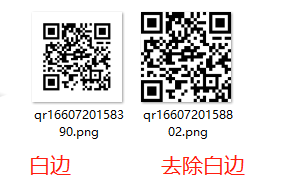
 3         //存在白边
 4         String qr = createQr("https://www.baidu.com", false);
 5         //去除白边
 6         String qr1 = createQr("https://www.baidu.com", true);
 7
 8         System.err.println(qr);
 9         System.err.println(qr1);
10     }

示例:

本文来自博客园,作者:lanwf,转载请注明原文链接:https://www.cnblogs.com/lccsdncnblogs/p/16595312.html

 浙公网安备 33010602011771号