WPF自定义控件_抽屉效果
刚好有需求要用WPF实现抽屉效果功能,查找网上的效果都不太符合自己的需求,于是决定自己写一个。
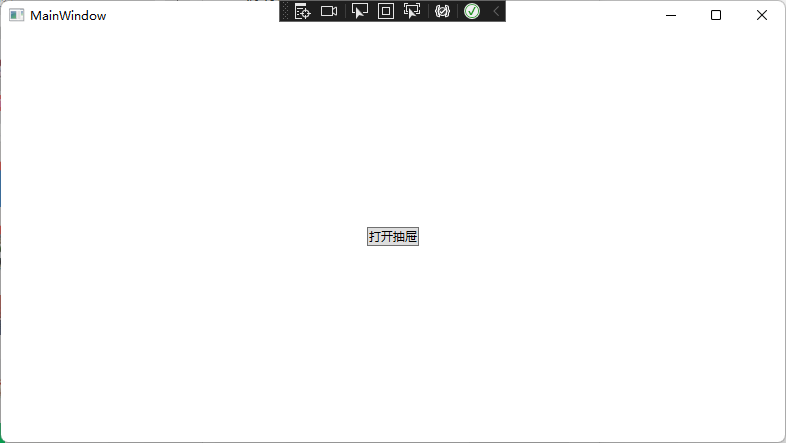
废话不多说,先看界面效果图:
展开抽屉前:
展开抽屉后:
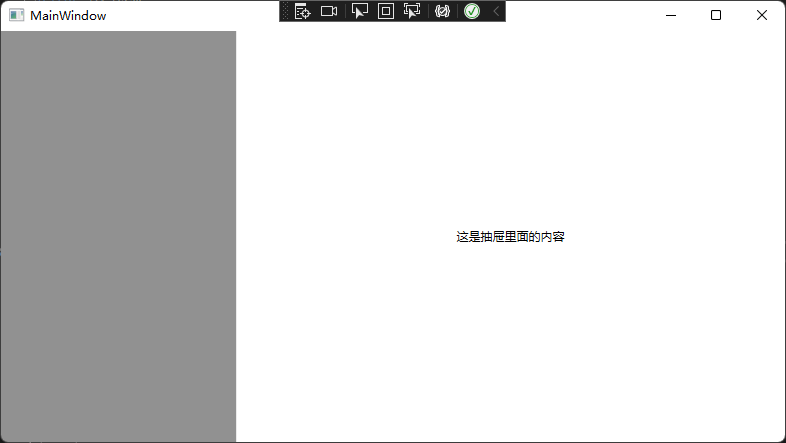
具体功能:可以通过依赖属性设置抽屉的开关,抽屉宽度百分比,关闭抽屉时是否询问等属性。
1.抽屉控件使用代码
xaml代码
 1 <Window x:Class="Drawer.MainWindow"
 2         xmlns="http://schemas.microsoft.com/winfx/2006/xaml/presentation"
 3         xmlns:x="http://schemas.microsoft.com/winfx/2006/xaml"
 4         xmlns:d="http://schemas.microsoft.com/expression/blend/2008"
 5         xmlns:mc="http://schemas.openxmlformats.org/markup-compatibility/2006"
 6         xmlns:ucs="clr-namespace:Drawer.UserControls"
 7         xmlns:local="clr-namespace:Drawer"
 8         mc:Ignorable="d"
 9         Title="MainWindow" Height="450" Width="800">
10     <ucs:NomalDrawer IsDrawerOpen="{Binding IsDrawerOpen,Mode=TwoWay}" DrawerWidthPercent="70">
11         <ucs:NomalDrawer.Content>
12             <Grid>
13                 <Button Content="打开抽屉" HorizontalAlignment="Center" VerticalAlignment="Center" Click="Button_Click"/>
14             </Grid>
15         </ucs:NomalDrawer.Content>
16         <ucs:NomalDrawer.Drawer>
17             <TextBlock Text="这是抽屉里面的内容" HorizontalAlignment="Center" VerticalAlignment="Center" />
18         </ucs:NomalDrawer.Drawer>
19     </ucs:NomalDrawer>
20 </Window>
cs代码
 1 using System.ComponentModel;
 2 using System.Runtime.CompilerServices;
 3 using System.Windows;
 4
 5 namespace Drawer
 6 {
 7     /// <summary>
 8     /// Interaction logic for MainWindow.xaml
 9     /// </summary>
10     public partial class MainWindow : Window, INotifyPropertyChanged
11     {
12         public event PropertyChangedEventHandler PropertyChanged;
13
14         private bool isDrawerOpen;
15         /// <summary>
16         /// 是否打开抽屉
17         /// </summary>
18         public bool IsDrawerOpen
19         {
20             get { return isDrawerOpen; }
21             set { isDrawerOpen = value; Notify(); }
22         }
23
24         private void Notify([CallerMemberName] string obj = "")
25         {
26             if (PropertyChanged != null)
27             {
28                 this.PropertyChanged(this, new PropertyChangedEventArgs(obj));
29             }
30         }
31
32         public MainWindow()
33         {
34             InitializeComponent();
35             DataContext = this;
36         }
37
38         private void Button_Click(object sender, RoutedEventArgs e)
39         {
40             IsDrawerOpen = true;
41         }
42     }
43 }
2.抽屉控件代码
cs


  1 using System;
  2 using System.Windows;
  3 using System.Windows.Controls;
  4 using System.Windows.Input;
  5
  6 namespace Drawer.UserControls
  7 {
  8     /// <summary>
  9     /// 普通抽屉
 10     /// </summary>
 11     public class NomalDrawer : Control
 12     {
 13         /*
 14             说明:两个容器
 15             一个抽屉容器,一个正常容器
 16             抽屉容器弹出显示需要以抽屉形式显示的内容
 17             正常容器显示未显示抽屉时的内容
 18
 19             通过修改依赖属性的信息,以达到控制抽屉展开和闭合的效果
 20          */
 21
 22         static NomalDrawer()
 23         {
 24             DefaultStyleKeyProperty.OverrideMetadata(typeof(NomalDrawer), new FrameworkPropertyMetadata(typeof(NomalDrawer)));
 25         }
 26
 27         #region 内容
 28
 29         /// <summary>
 30         /// 内容
 31         /// </summary>
 32         public object Content
 33         {
 34             get { return GetValue(ContentProperty); }
 35             set { SetValue(ContentProperty, value); }
 36         }
 37         public static readonly DependencyProperty ContentProperty = DependencyProperty.Register(
 38             "Content", typeof(object), typeof(NomalDrawer), new PropertyMetadata(default(object)));
 39
 40         #endregion
 41
 42         #region 抽屉
 43
 44         /// <summary>
 45         /// 抽屉
 46         /// </summary>
 47         public object Drawer
 48         {
 49             get { return GetValue(DrawerProperty); }
 50             set { SetValue(DrawerProperty, value); }
 51         }
 52         public static readonly DependencyProperty DrawerProperty = DependencyProperty.Register(
 53             "Drawer", typeof(object), typeof(NomalDrawer), new PropertyMetadata(default(object)));
 54
 55         #endregion
 56
 57         #region 抽屉方法(左右)
 58
 59         public static readonly DependencyProperty DirectionProperty = DependencyProperty.Register(
 60             "Direction", typeof(HorizontalAlignment), typeof(NomalDrawer), new PropertyMetadata(HorizontalAlignment.Right));
 61
 62         public HorizontalAlignment Direction
 63         {
 64             get { return (HorizontalAlignment)GetValue(DirectionProperty); }
 65             set { SetValue(DirectionProperty, value); }
 66         }
 67
 68         #endregion
 69
 70         #region 抽屉宽度
 71
 72         public double DrawerWidth { get; set; }
 73
 74         public double DrawerWidthPercent { get; set; }
 75
 76         public double DrawerWidthBind
 77         {
 78             get { return (double)GetValue(DrawerWidthBindProperty); }
 79             set { SetValue(DrawerWidthBindProperty, value); }
 80         }
 81
 82         public static readonly DependencyProperty DrawerWidthBindProperty = DependencyProperty.Register(
 83             "DrawerWidthBind", typeof(double), typeof(NomalDrawer), new PropertyMetadata(default(double)));
 84
 85         #endregion
 86
 87         #region 抽屉是否展开
 88
 89         /// <summary>
 90         /// 抽屉是否展开
 91         /// </summary>
 92         public bool IsDrawerOpen
 93         {
 94             get { return (bool)GetValue(IsDrawerOpenProperty); }
 95             set { SetValue(IsDrawerOpenProperty, value); }
 96         }
 97
 98         public static readonly DependencyProperty IsDrawerOpenProperty = DependencyProperty.Register(
 99             "IsDrawerOpen", typeof(bool), typeof(NomalDrawer), new PropertyMetadata(false, IsDrawerOpenCallBack));
100
101         private static void IsDrawerOpenCallBack(DependencyObject d, DependencyPropertyChangedEventArgs e)
102         {
103             var nomal = d as NomalDrawer;
104             if (!nomal.IsDrawerOpen)
105             {
106                 VisualStateManager.GoToState(nomal, "Normal", false);
107             }
108             else
109             {
110                 if (nomal.DrawerWidthPercent != default)
111                 {
112                     nomal.DrawerWidthBind = nomal.ActualWidth * nomal.DrawerWidthPercent / 100;
113                 }
114                 else
115                 {
116                     nomal.DrawerWidthBind = nomal.DrawerWidth;
117                 }
118                 VisualStateManager.GoToState(nomal, "Open", false);
119             }
120         }
121
122         #endregion
123
124         #region 关闭抽屉是否提示
125
126         /// <summary>
127         /// 是否显示关闭提示
128         /// </summary>
129         public bool ShowCloseTip
130         {
131             get { return (bool)GetValue(ShowCloseTipProperty); }
132             set { SetValue(ShowCloseTipProperty, value); }
133         }
134
135         public static readonly DependencyProperty ShowCloseTipProperty = DependencyProperty.Register(
136             "ShowCloseTip", typeof(bool), typeof(NomalDrawer), new PropertyMetadata(default(bool)));
137
138         #endregion
139
140         #region 关闭提示文本
141
142         /// <summary>
143         /// 关闭提示文本
144         /// </summary>
145         public string CloseTipText
146         {
147             get { return (string)GetValue(CloseTipTextProperty); }
148             set { SetValue(CloseTipTextProperty, value); }
149         }
150
151         public static readonly DependencyProperty CloseTipTextProperty = DependencyProperty.Register(
152             "CloseTipText", typeof(string), typeof(NomalDrawer), new PropertyMetadata("是否关闭!"));
153
154         #endregion
155
156         public override void OnApplyTemplate()
157         {
158             base.OnApplyTemplate();
159             var darkSurface = GetTemplateChild("PART_DarkSurface") as Border;
160
161             if (darkSurface != null)
162             {
163                 darkSurface.MouseDown += DarkSurface_MouseDown;
164             }
165         }
166
167         private void DarkSurface_MouseDown(object sender, MouseButtonEventArgs e)
168         {
169             if (ShowCloseTip)
170             {
171                 MessageBoxResult dr = MessageBox.Show(CloseTipText, "提示", MessageBoxButton.OKCancel, MessageBoxImage.Question);
172                 if (dr == MessageBoxResult.OK)
173                 {
174                     IsDrawerOpen = false;
175                 }
176             }
177             else
178                 IsDrawerOpen = false;
179         }
180     }
181 }
xaml
 1 <ResourceDictionary
 2     xmlns="http://schemas.microsoft.com/winfx/2006/xaml/presentation"
 3     xmlns:x="http://schemas.microsoft.com/winfx/2006/xaml"
 4     xmlns:ucs="clr-namespace:Drawer.UserControls">
 5
 6     <Style TargetType="{x:Type ucs:NomalDrawer}">
 7         <Setter Property="Template">
 8             <Setter.Value>
 9                 <ControlTemplate TargetType="{x:Type ucs:NomalDrawer}">
10                     <Grid>
11                         <!--  内容  -->
12                         <Border Panel.ZIndex="0">
13                             <ContentPresenter Content="{TemplateBinding Content}" />
14                         </Border>
15                         <!--  遮罩  -->
16                         <Border
17                             x:Name="PART_DarkSurface"
18                             Panel.ZIndex="1"
19                             Background="Transparent"
20                             IsHitTestVisible="False" />
21                         <!--  弹出内容  -->
22                         <Border
23                             x:Name="PART_Drawer"
24                             Width="{TemplateBinding DrawerWidthBind}"
25                             HorizontalAlignment="{TemplateBinding Direction}"
26                             Panel.ZIndex="2"
27                             Background="White">
28                             <ContentPresenter Content="{TemplateBinding Drawer}" />
29                         </Border>
30
31
32                         <!--  状态改变  -->
33                         <VisualStateManager.VisualStateGroups>
34                             <VisualStateGroup x:Name="ViewStates">
35                                 <VisualStateGroup.Transitions>
36                                     <VisualTransition GeneratedDuration="0:0:0.2" />
37                                 </VisualStateGroup.Transitions>
38                                 <VisualState x:Name="Normal">
39                                     <Storyboard>
40                                         <DoubleAnimation
41                                             Storyboard.TargetName="PART_Drawer"
42                                             Storyboard.TargetProperty="Width"
43                                             From="{TemplateBinding DrawerWidthBind}"
44                                             To="0"
45                                             Duration="0:0:0.2" />
46                                         <ColorAnimation
47                                             Storyboard.TargetName="PART_DarkSurface"
48                                             Storyboard.TargetProperty="Background.Color"
49                                             To="Transparent"
50                                             Duration="0:0:0.1" />
51                                         <BooleanAnimationUsingKeyFrames
52                                             BeginTime="0:0:0.1"
53                                             Storyboard.TargetName="PART_DarkSurface"
54                                             Storyboard.TargetProperty="IsHitTestVisible">
55                                             <DiscreteBooleanKeyFrame KeyTime="0:0:0" Value="False" />
56                                         </BooleanAnimationUsingKeyFrames>
57                                     </Storyboard>
58                                 </VisualState>
59                                 <VisualState x:Name="Open">
60                                     <Storyboard>
61                                         <DoubleAnimation
62                                             Storyboard.TargetName="PART_Drawer"
63                                             Storyboard.TargetProperty="Width"
64                                             From="0"
65                                             To="{TemplateBinding DrawerWidthBind}"
66                                             Duration="0:0:0.1" />
67                                         <ColorAnimation
68                                             Storyboard.TargetName="PART_DarkSurface"
69                                             Storyboard.TargetProperty="Background.Color"
70                                             To="#7F222222"
71                                             Duration="0:0:0.1" />
72                                         <BooleanAnimationUsingKeyFrames
73                                             BeginTime="0:0:0.1"
74                                             Storyboard.TargetName="PART_DarkSurface"
75                                             Storyboard.TargetProperty="IsHitTestVisible">
76                                             <DiscreteBooleanKeyFrame KeyTime="0:0:0" Value="True" />
77                                         </BooleanAnimationUsingKeyFrames>
78                                     </Storyboard>
79                                 </VisualState>
80                             </VisualStateGroup>
81                         </VisualStateManager.VisualStateGroups>
82                     </Grid>
83                 </ControlTemplate>
84             </Setter.Value>
85         </Setter>
86     </Style>
87 </ResourceDictionary>
3.引入抽屉控件
 1 <Application x:Class="Drawer.App"
 2              xmlns="http://schemas.microsoft.com/winfx/2006/xaml/presentation"
 3              xmlns:x="http://schemas.microsoft.com/winfx/2006/xaml"
 4              xmlns:local="clr-namespace:Drawer"
 5              StartupUri="MainWindow.xaml">
 6     <Application.Resources>
 7         <ResourceDictionary>
 8             <ResourceDictionary.MergedDictionaries>
 9                 <ResourceDictionary Source="pack://application:,,,/Drawer;component/UserControls/NomalDrawer/NomalDrawer.xaml" />
10             </ResourceDictionary.MergedDictionaries>
11         </ResourceDictionary>
12     </Application.Resources>
13 </Application>
说明:此控件是参考其他抽屉功能修改而成,有需求的可以自己再添加一些属性,实现自己需要的功能。
参考代码地址:GitHub - Redouane64/WPFNavigationDrawer: Navigation drawer control for WPF.
抽屉源码地址:


 浙公网安备 33010602011771号