
高可用集群综合实践
-
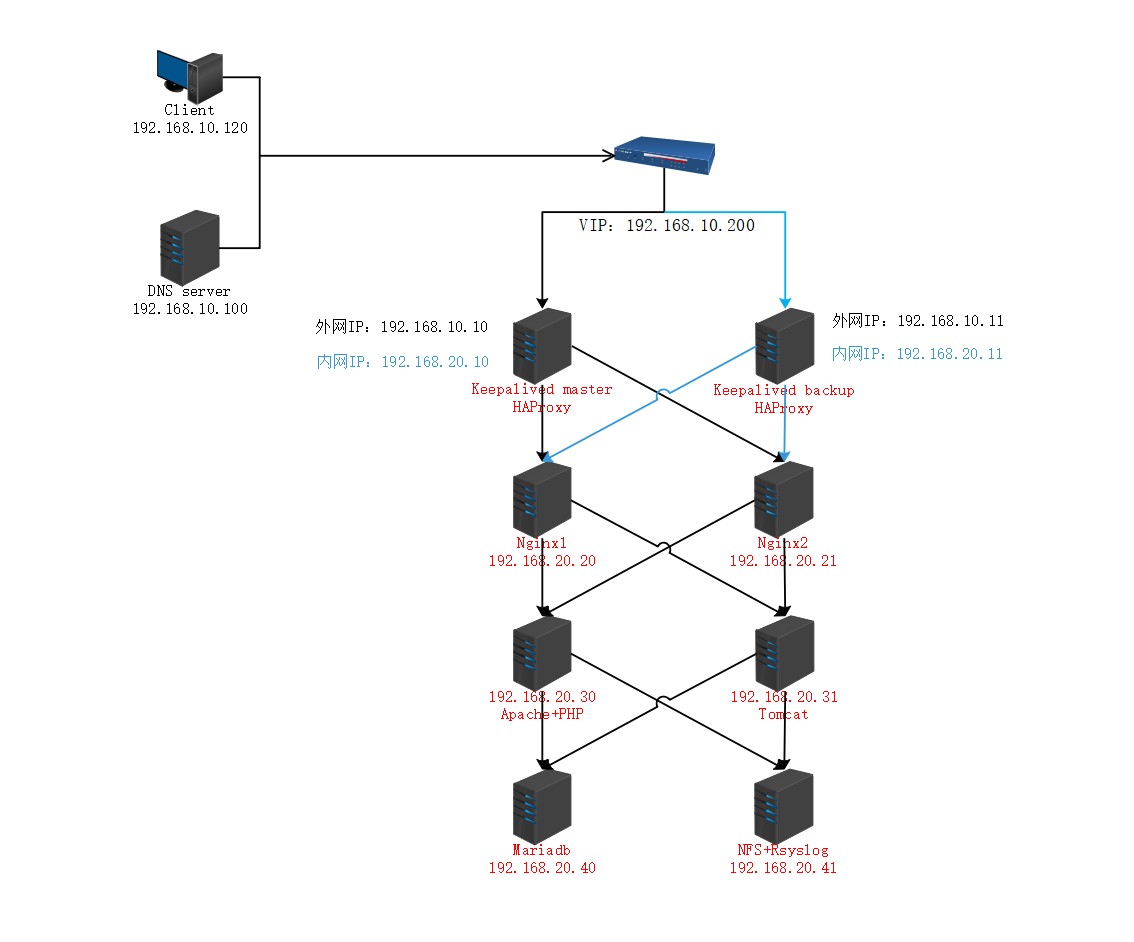
主要功能
- HAProxy服务搭建负载均衡服务器,将请求派发不同的后端服务
- Keepalived服务实现主从热备,提高服务的可用性
- Nginx服务器负责处理.heml静态web请求,并将动态的请求重定向给指定的服务器
- Tomcat服务器负责处理.jsp动态web请求
- Apache服务器负责.php动态web请求
- Mariadb服务器提供数据存储功能,存储用户注册信息
- NFS服务器提供各个站点的数据,保证数据的一致性
- Rsyslog服务器记录存储各个服务器的日志
- DNS服务器负责各个web站点域名解析
-
拓扑图
![image-20191121150023519]()
-
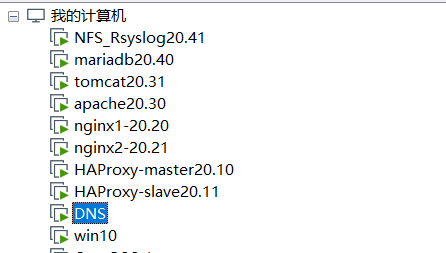
实验环境
![image-20191120202040643]()
- haproxy-master server:centos7
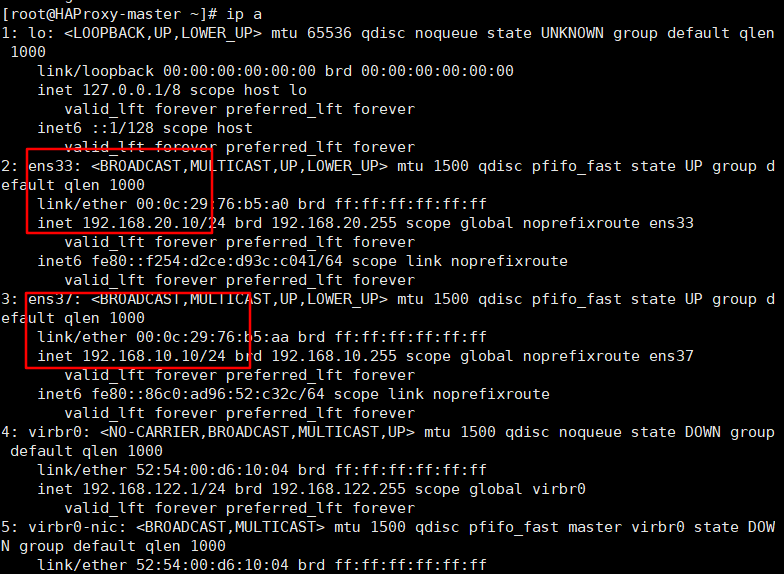
- 192.168.20.10(内网)
- 192.168.10.10(外网)
- 192.168.10.200(VIP)
- haproxy-slave server:centos7
- 192.168.20.11(内网)
- 192.168.10.11(外网)
- 192.168.10.200(VIP)
- nginx server:centos7 192.168.20.20
- nginx server:centos7 192.168.20.21
- apache server:centos7 192.168.20.30
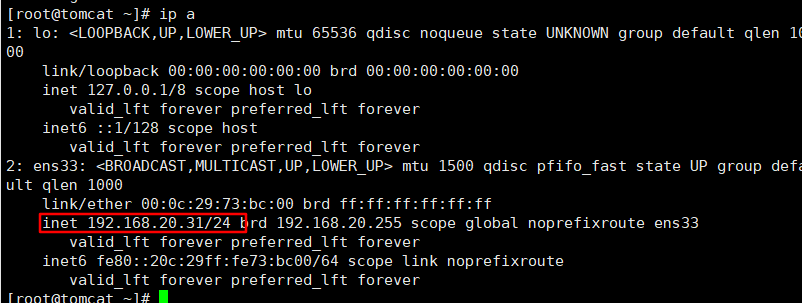
- tomcat server:centos7 192.168.20.31
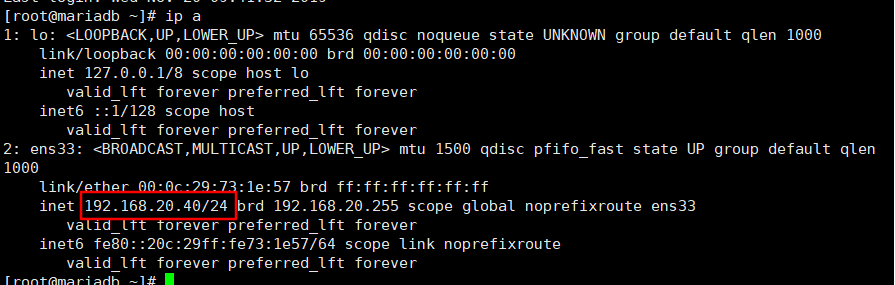
- mariadb server:centos7 192.168.20.40
- nfs server:centos7 192.168.20.41
- dns server:centos7 192.168.10.100
- client server:centos7 192.168.10.120
- haproxy-master server:centos7
NFS_Rsyslog服务器搭建
-
配置环境
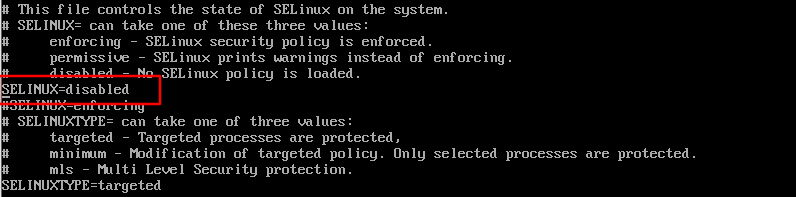
- 关闭防火墙与selinux
![image-20191120090008245]()
![image-20191120090036202]()
- 修改主机名
![image-20191120090446388]()
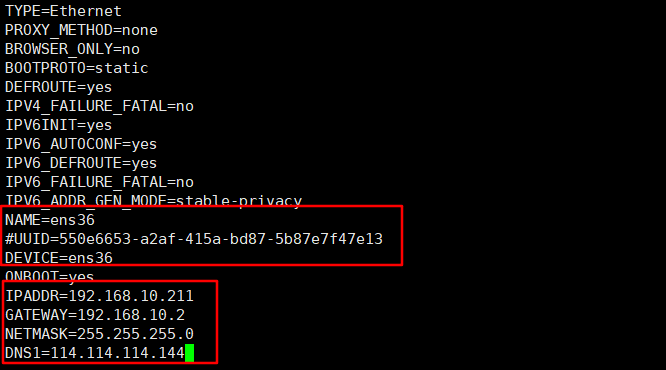
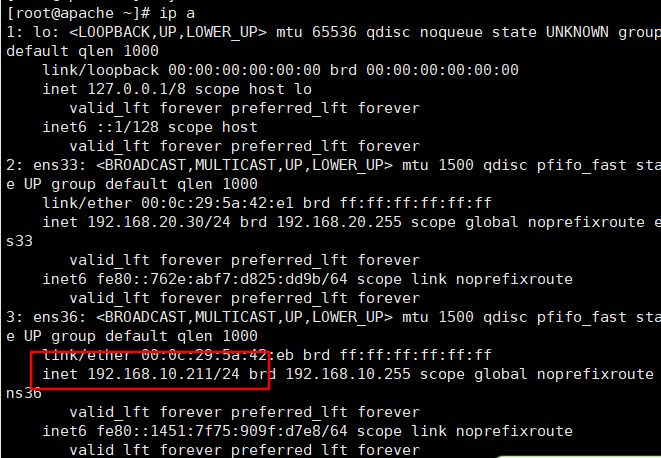
- 修改IP地址
![image-20191120090138410]()
![image-20191120090153321]()
注:其余主机均做相同配置
- 关闭防火墙与selinux
-
安装服务
![image-20191120091238227]()
-
启动服务
![image-20191120091330572]()
-
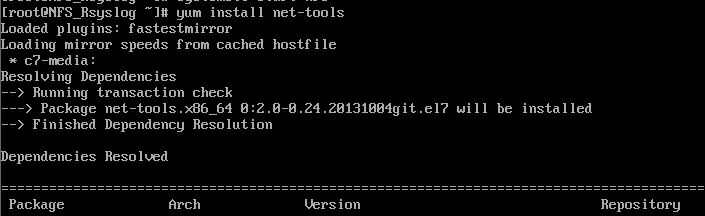
查看监听端口(需要安装net-tools工具)
![image-20191120091425280]()
![image-20191120091455222]()
-
修改nfs共享配置
![image-20191120091623042]()
![image-20191120091917562]()
-
创建共享目录并存放测试文件
![image-20191120092055123]()
![image-20191120203930140]()
![image-20191120092318708]()
![image-20191120092406200]()
![image-20191120092655170]()
![image-20191120092828557]()
![image-20191120092812902]()
-
上传discuz至共享目录
![image-20191120204152757]()
![image-20191120204259044]()
![image-20191120210332883]()
-
修改共享目录权限
![image-20191120093059221]()
-
重启服务并设置开机自启
![image-20191120092932233]()
![image-20191121085535535]()
-
安装rsyslog服务(默认安装)
![image-20191120093204766]()
未安装则可使用 yum install rsyslog命令进行安装 -
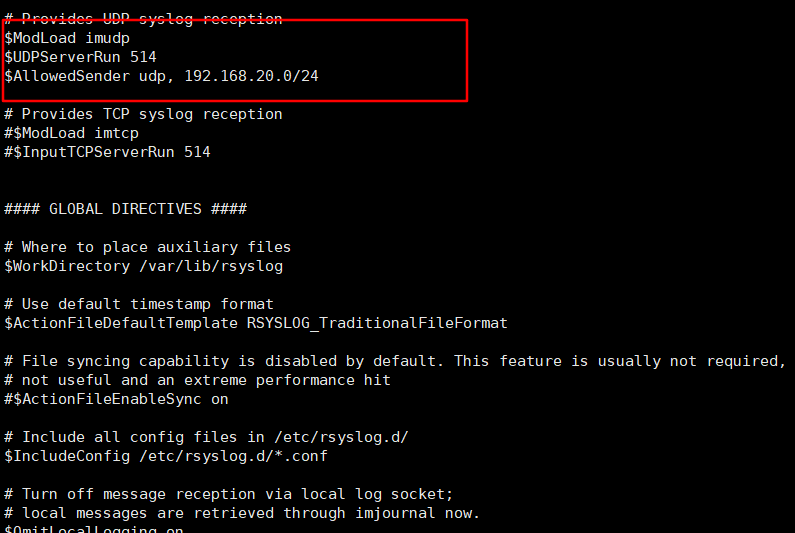
修改主配置文件如下
![image-20191120093308950]()
![image-20191120093437255]()
$ModLoad imudp $UDPServerRun 514 $AllowedSender udp, 192.168.20.0/24 -
开启监听端口
![image-20191120093522714]()
![image-20191120093601845]()
SYSLOGD_OPTIONS="-r514 -c2" -
重启服务并查看监听端口
![image-20191120093811553]()
![image-20191120093824748]()



























Mariadb服务器搭建
-
环境配置如上台服务器相同
![image-20191120094701056]()
-
安装mariadb服务
![image-20191120095040572]()
-
启动服务
![image-20191120095409451]()
![image-20191121085948697]()
![image-20191120095335845]()
-
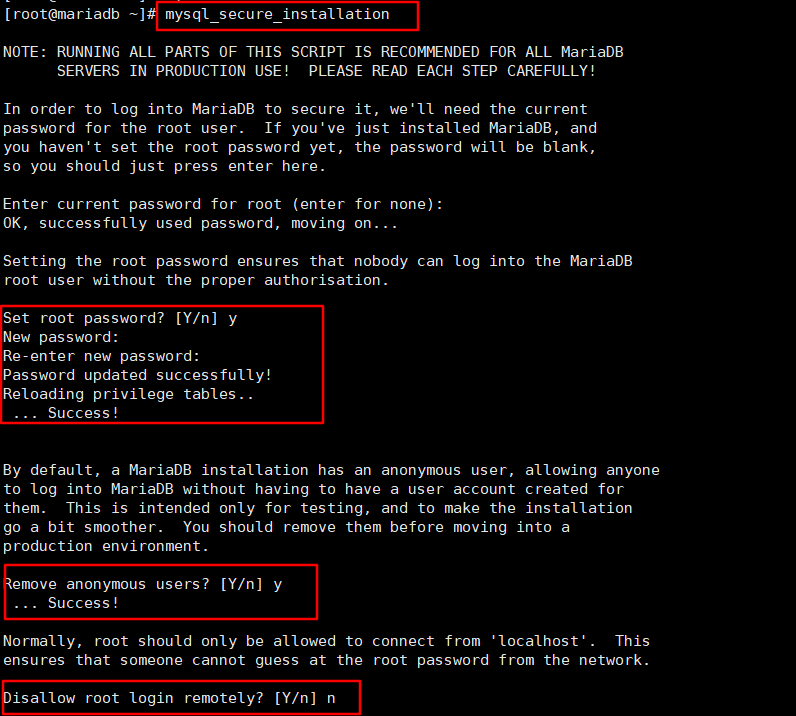
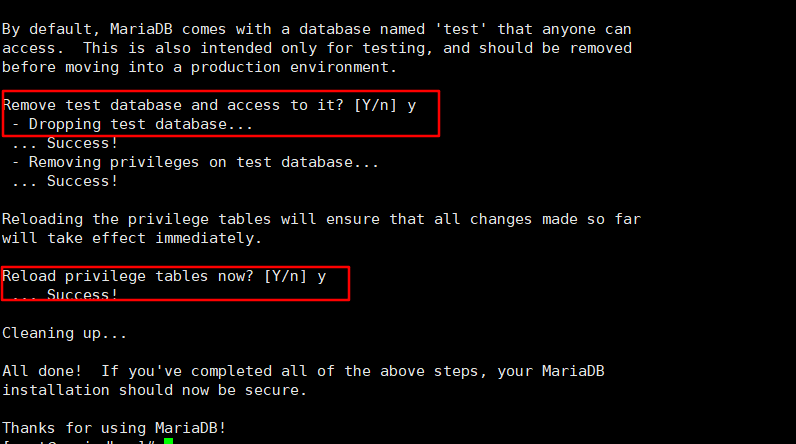
初始化数据库
![image-20191120095613959]()
![image-20191120095646330]()
-
为php创建数据库及用户
![image-20191120203430175]()
-
将日志传送至日志服务器
![image-20191120102944807]()
![image-20191120103020021]()
*.* @192.168.20.41:514 -
重启服务
![image-20191120203156678]()
-
测试
![image-20191120203224545]()
![image-20191120203239841]()









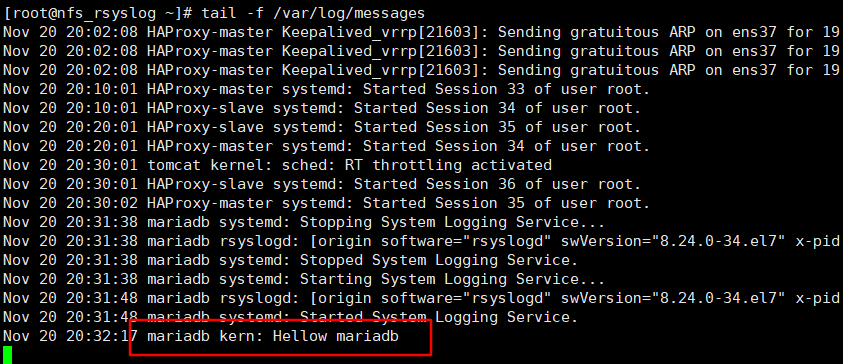
Tomcat服务器搭建
-
环境配置如上相同
![image-20191120095923972]()
-
下载JDK rpm包
官网下载
jdk-8u191-linux-x64.rpm -
上传至服务器
![image-20191120100631897]()
-
rpm命令进行安装
![image-20191120100735070]()
-
添加环境变量
![image-20191120101014305]()
![image-20191120101101930]()
export JAVA_HOME=/usr/java/default export PATH=$PATH:$JAVA_HOME/bin CLASSPATH=.:$JAVA_HOME/jre/lib:$JAVA_HOME/lib:$JAVA_HOME/lib/tools.jar -
使配置立即生效并查看结果
![image-20191120101214772]()
-
安装tomcat
-
下载源码包
-
上传至服务器
![image-20191120112523637]()
-
解压缩
![image-20191120112601446]()
-
创建运行目录并将解压文件复制过去
![image-20191120112702873]()
-
创建运行用户
![image-20191120112900152]()
-
添加环境变量
![image-20191120112923304]()
![image-20191120113024778]()
![image-20191120132234725]()
-
修改权限
![image-20191120112820901]()
-
-
启动服务
![image-20191120132325649]()
-
挂载nfs共享目录
![image-20191120101847774]()
![image-20191120210638396]()
![image-20191120135329549]()
![image-20191120135352713]()
![image-20191120135308918]()
![image-20191120102557647]()
192.168.20.41:/var/share/java /usr/tomcat/webapps/ROOT nfs rw,tcp,intr 0 1 -
修改tomcat配置
![image-20191120110359925]()
![image-20191120110449910]()
![image-20191120145209106]()
<Connector port="80" protocol="HTTP/1.1" connectionTimeout="20000" redirectPort="8443" /> ... <Host name="192.168.20.31" appBase="webapps" unpackWARs="true" autoDeploy="true"> <Contest path="/" docBase="ROOT" reloadable="true" /> <Valve className="org.apache.catalina.valves.AccessLogValve" directory="logs" prefix="www.lg_access_log." suffix=".txt" pattern="%h %l %u %t "%r" %s %b" /> </Host> -
重启服务
![image-20191120132805260]()
-
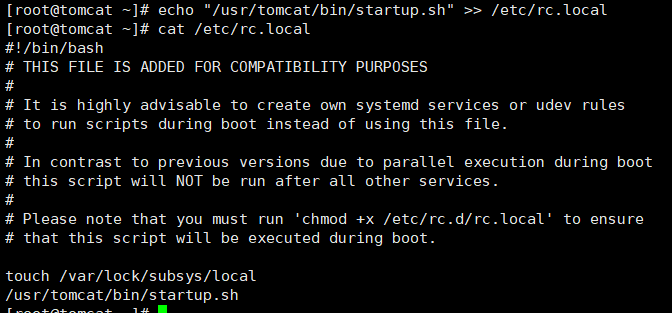
设置开机启动
![image-20191121090649063]()
-
本地测试访问
![image-20191120145255643]()
-
将本地日志传送至日志服务器
![image-20191120102643331]()
![image-20191120102748215]()
*.*@192.168.20.41:514 -
重启日志服务
![image-20191120102838473]()
-
测试
![image-20191120133710889]()
![image-20191120133701024]()




























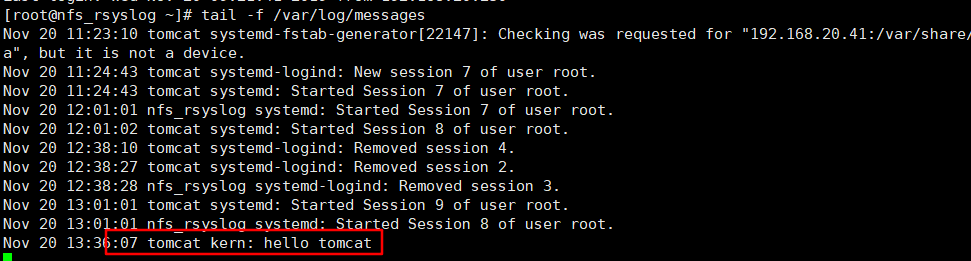
Apache服务器搭建
-
环境配置同上
![image-20191120103455183]()
-
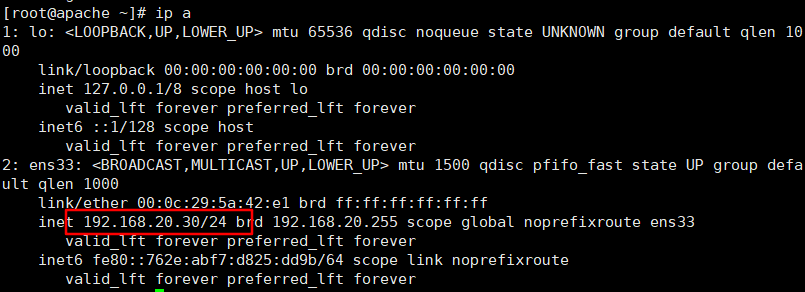
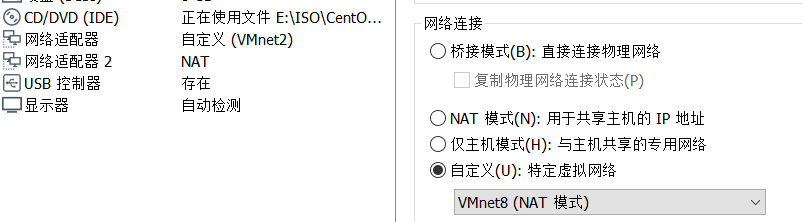
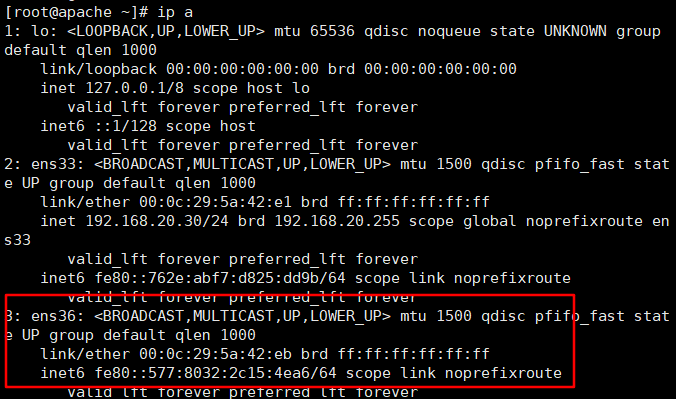
加装一块网卡用于连接外网(需要使用epel源安装软件)
![image-20191120104632730]()
![image-20191120104716932]()
![image-20191120104753275]()
![image-20191120104843050]()
![image-20191120104904938]()
-
若新加入的网卡无法连接外网需要将ens33网卡暂时停用
![image-20191120133959443]()
![image-20191120134015234]()
-
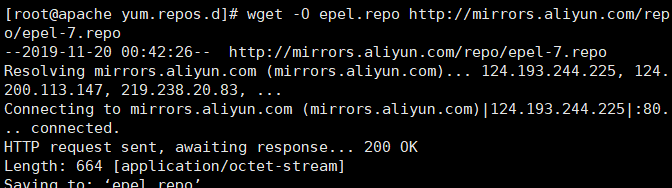
配置epel源
![image-20191120110145204]()
![image-20191120134158174]()
![image-20191120134300664]()
![image-20191120134339878]()
wget -O CentOS-Base.repo http://mirrors.aliyun.com/repo/Centos-7.repo wget -O epel.repo http://mirrors.aliyun.com/repo/epel-7.repo yum clean all yum makecache -
安装服务和依赖
![image-20191120134503194]()
![image-20191120134605328]()
![image-20191120134715093]()
yum install httpd -y yum install php php-mysql -y yum install -y php-gd libjpeg* php-imap php-ldap php-odbc php-pear php-xml php-xmlrpc php-mbstring php-mcrypt php-bcmath php-mhash libmcrypt -
检测是否加载php模块
![image-20191120134812891]()
-
修改主配置文件
![image-20191120135437288]()
![image-20191120134925216]()
![image-20191120134955003]()
-
安装完成服务后重新启动ens33网卡
![image-20191120135724143]()
-
挂载nfs共享目录
![image-20191120135536512]()
![image-20191120210704275]()
![image-20191120135741541]()
![image-20191120145641946]()
![image-20191120210740939]()
![image-20191120145924755]()
-
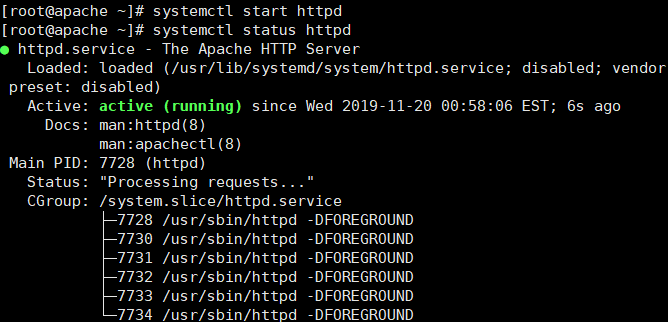
启动服务
![image-20191120135822937]()
-
设置开机自启
![image-20191121090959476]()
-
测试
![image-20191120135902886]()
-
将日志传送至日志服务器
![image-20191120135956504]()
![image-20191120140059902]()
-
重启本地日志服务
![image-20191120140140191]()
-
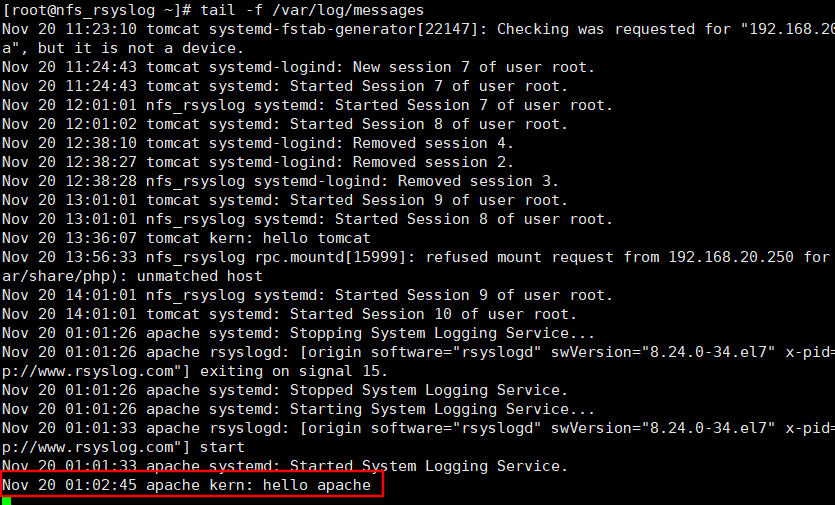
测试
![image-20191120140325310]()
![image-20191120140308302]()


























nginx 服务器配置
-
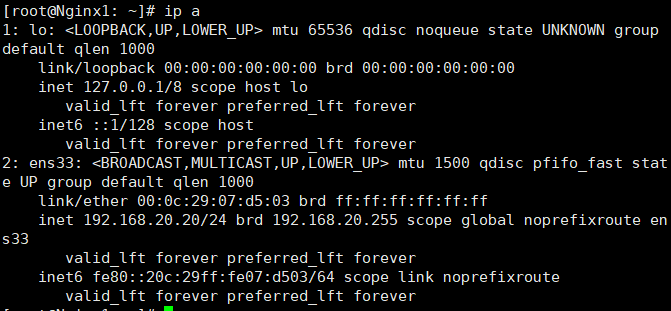
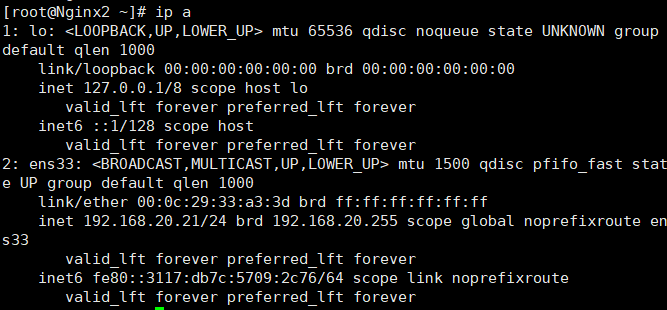
环境同上
![image-20191120140930783]()
![image-20191120140948699]()
-
安装nginx服务
-
下载以源码包
官网 -
上传服务器
![image-20191120141721477]()
-
解压缩
![image-20191120141743035]()
-
安装依赖包
![image-20191120141923854]()
yum install gcc pcre-devel zlib-devel openssl-devel -
为nginx创建系统用户
![image-20191120142100052]()
-
编译安装
![image-20191120141808608]()
![image-20191120142140583]()
![image-20191120142243144]()
./configure --prefix=/usr/local/nginx --conf-path=/etc/nginx/nginx.conf --error-log-path=/var/log/nginx/error.log --http-log-path=/var/log/nginx/aaccess.log --pid-path=/var/run/nginx.pid --lock-path=/var/lock/nginx.lock --user=nginx --group=nginx --with-http_ssl_module --with-http_v2_module --with-http_dav_module --with-http_stub_status_module --with-threads --with-file-aio make && make install -
修改环境变量
![image-20191120142343010]()
![image-20191120142429933]()
![image-20191120142458780]()
export PATH=$PATH:/usr/local/nginx/sbin
-
-
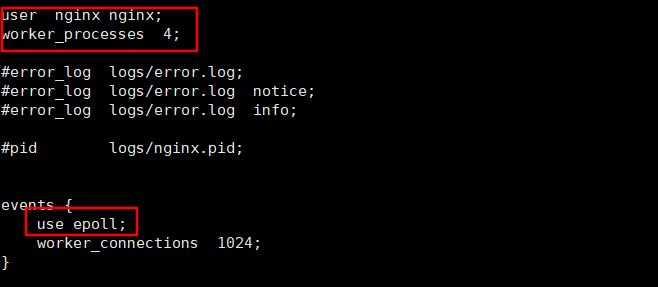
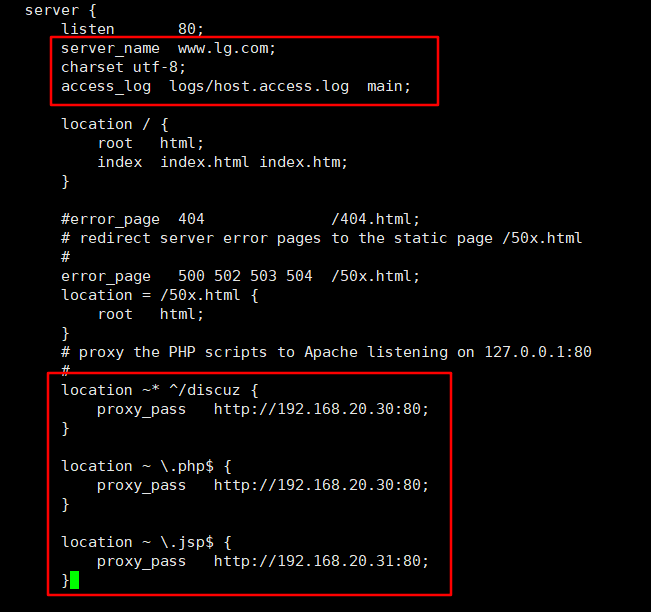
修改配置文件
![image-20191120142624774]()
![image-20191120142833094]()
![image-20191120142905465]()
![image-20191121092812294]()
user nginx nginx; worker_processes 4; events { use epoll; worker_connections 1024; } http { include mime.types; default_type application/octet-stream; log_format main '$remote_addr - $remote_user [$time_local] "$request" ' '$status $body_bytes_sent "$http_referer" ' '"$http_user_agent" "$http_x_forwarded_for"'; access_log logs/access.log main; sendfile on; keepalive_timeout 65; server { listen 80; server_name www.lg.com; charset utf-8; access_log logs/host.access.log main; location / { root html; index index.html index.htm; } #error_page 404 /404.html; # redirect server error pages to the static page /50x.html # error_page 500 502 503 504 /50x.html; location = /50x.html { root html; } # proxy the PHP scripts to Apache listening on 127.0.0.1:80 # location ~* ^/discuz { proxy_pass http://192.168.20.30:80; } location ~ \.php$ { proxy_pass http://192.168.20.30:80; } location ~ \.jsp$ { proxy_pass http://192.168.20.31:80; } } -
创建日志文件夹
![image-20191120143523982]()
-
启动服务
![image-20191120143645302]()
-
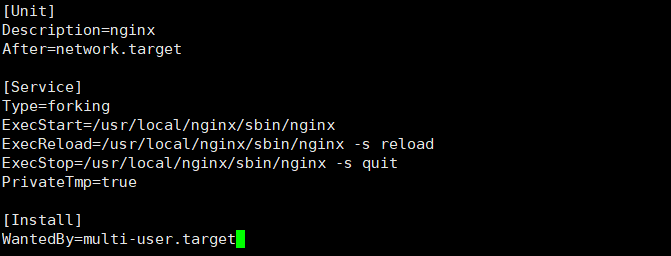
为nginx创建启停脚本并设置开机自启
![image-20191121091251806]()
![image-20191121091339763]()
[Unit] Description=nginx After=network.target [Service] Type=forking ExecStart=/usr/local/nginx/sbin/nginx ExecReload=/usr/local/nginx/sbin/nginx -s reload ExecStop=/usr/local/nginx/sbin/nginx -s quit PrivateTmp=true [Install] WantedBy=multi-user.target![image-20191121091359019]()
-
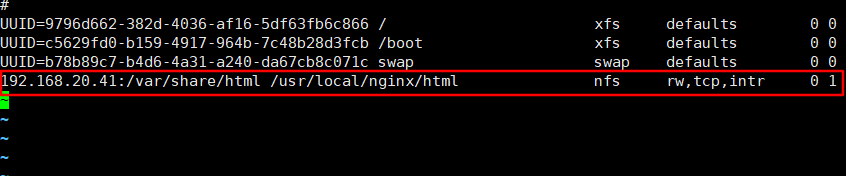
挂载nfs
![image-20191120143849809]()
![image-20191120144010323]()
![image-20191120145602515]()
![image-20191120145548576]()
![image-20191120145942843]()
-
访问测试
![image-20191120144128651]()
![image-20191120144158861]()
![image-20191120145131833]()
-
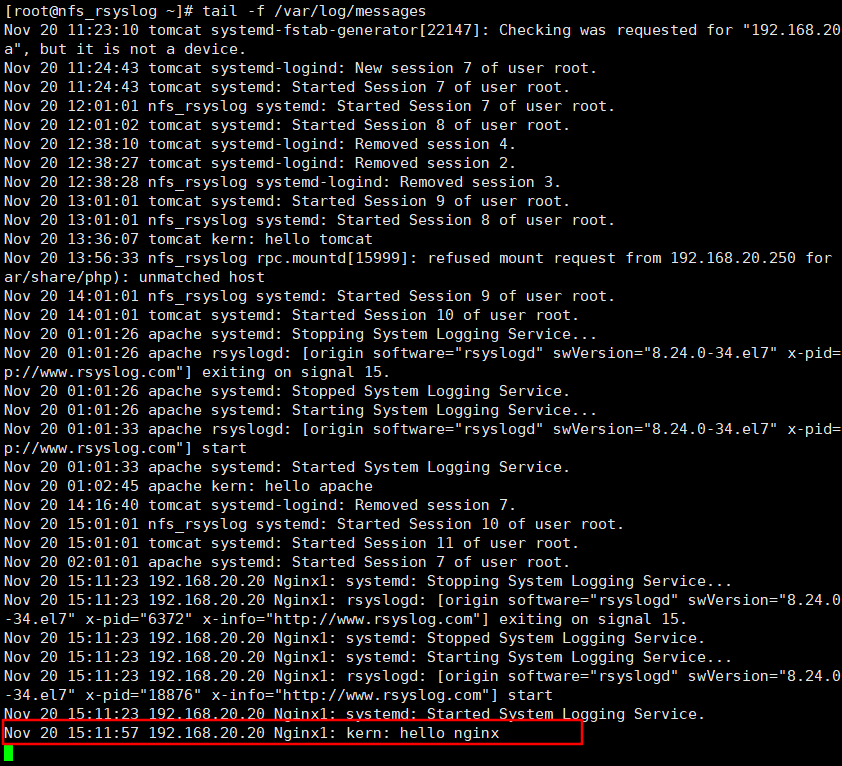
将日志上传至日志服务器
![image-20191120151033636]()
![image-20191120151113228]()
-
测试日志服务
![image-20191120151232552]()
![image-20191120151301273]()
-
另一台Nginx服务器做相同配置


























HAProxy负载均衡服务器搭建
-
环境配置如上相同
-
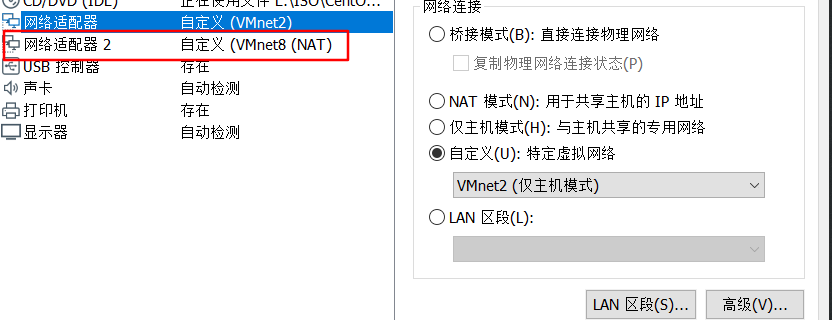
为haproxy服务器添加外网网卡,并设置IP
![image-20191120155835705]()
![image-20191120160226996]()
-
安装服务
![image-20191120160337235]()
-
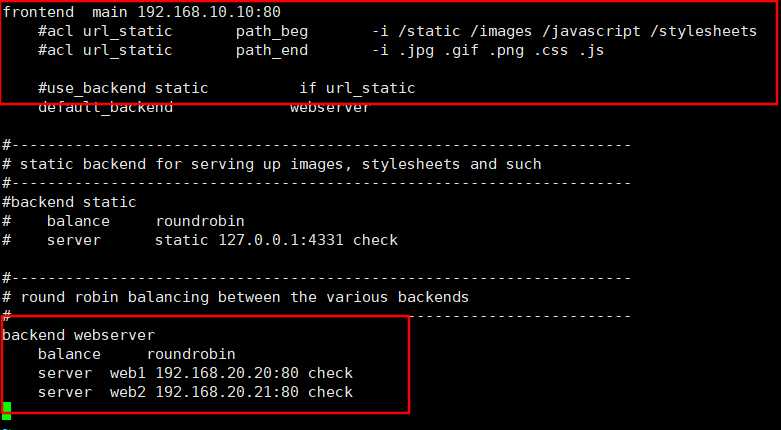
修改配置
![image-20191120160451317]()
![image-20191120161113271]()
frontend main 192.168.10.10:80 #acl url_static path_beg -i /static /images /javascript /stylesheets #acl url_static path_end -i .jpg .gif .png .css .js #use_backend static if url_static default_backend webserver #--------------------------------------------------------------------- # static backend for serving up images, stylesheets and such #--------------------------------------------------------------------- #backend static # balance roundrobin # server static 127.0.0.1:4331 check #--------------------------------------------------------------------- # round robin balancing between the various backends #--------------------------------------------------------------------- backend webserver balance roundrobin server web1 192.168.20.20:80 check server web2 192.168.20.21:80 check -
启动服务并设置开机自启
![image-20191120161218965]()
![image-20191121095626725]()
-
测试(测试时为了看出区别暂时将nginx服务器挂载的nfs取消,并创建不同的主页)
![image-20191120162315632]()
![image-20191120162256191]()
![image-20191120162056192]()
![image-20191120162158365]()
![image-20191120162340228]()
-
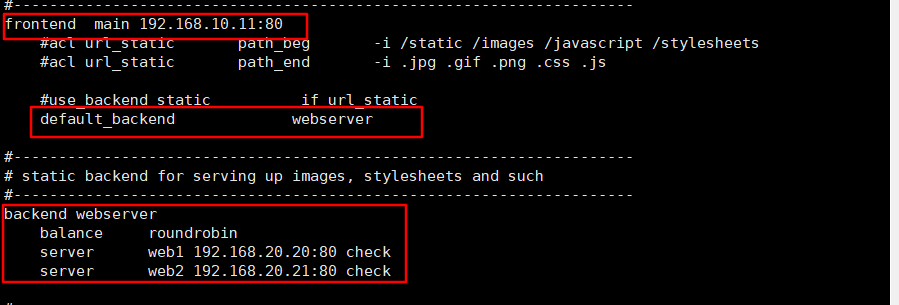
配置另一台haproxy服务器(配置过程相同,配置文件不同,从服务器主配置文件如下)
![image-20191120163214978]()
frontend main 192.168.10.11:80 #acl url_static path_beg -i /static /images /javascript /stylesheets #acl url_static path_end -i .jpg .gif .png .css .js #use_backend static if url_static default_backend webserver #--------------------------------------------------------------------- # static backend for serving up images, stylesheets and such #--------------------------------------------------------------------- backend webserver balance roundrobin server web1 192.168.20.20:80 check server web2 192.168.20.21:80 check -
测试从负载均衡服务器
![image-20191120163243254]()
-
使用keepalived为这两台负载均衡服务器做主从
-
下载源码包
官网下载 -
上传至服务器
![image-20191120164630715]()
-
安装依赖包
![image-20191120165157300]()
-
解压安装
![image-20191120165325970]()
![image-20191120165621104]()
-
修改配置文件
![image-20191120170038703]()
![image-20191120170425002]()
! Configuration File for keepalived global_defs { router_id HA_A1 } vrrp_instance VI_1 { state MASTER interface ens37 virtual_router_id 51 priority 100 advert_int 1 authentication { auth_type PASS auth_pass 123456 } virtual_ipaddress { 192.168.10.200 } } -
按照相同步骤安装从负载均衡服务器上的keepalive服务,并进行如下配置
![image-20191120170744172]()
global_defs { router_id HA_A2 } vrrp_instance VI_1 { state BACKUP interface eth1 virtual_router_id 51 priority 90 advert_int 1 authentication { auth_type PASS auth_pass 123456 } virtual_ipaddress { 192.168.10.200 } } ~ -
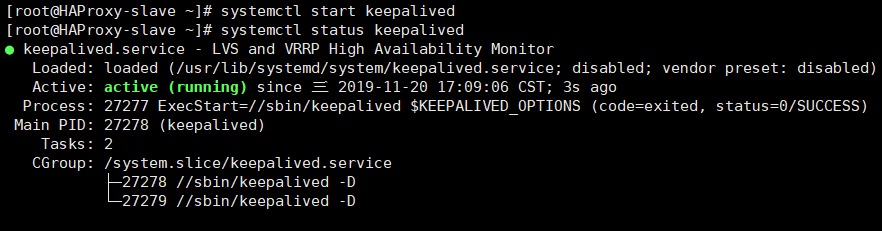
启动服务
![image-20191120170853711]()
![image-20191120170917197]()
-
设置开机自启
![image-20191121095739284]()
-
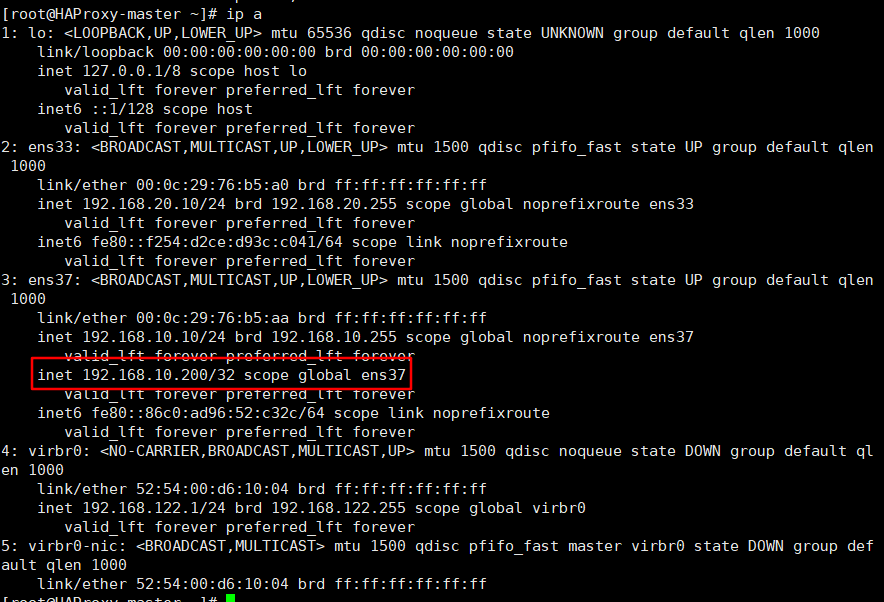
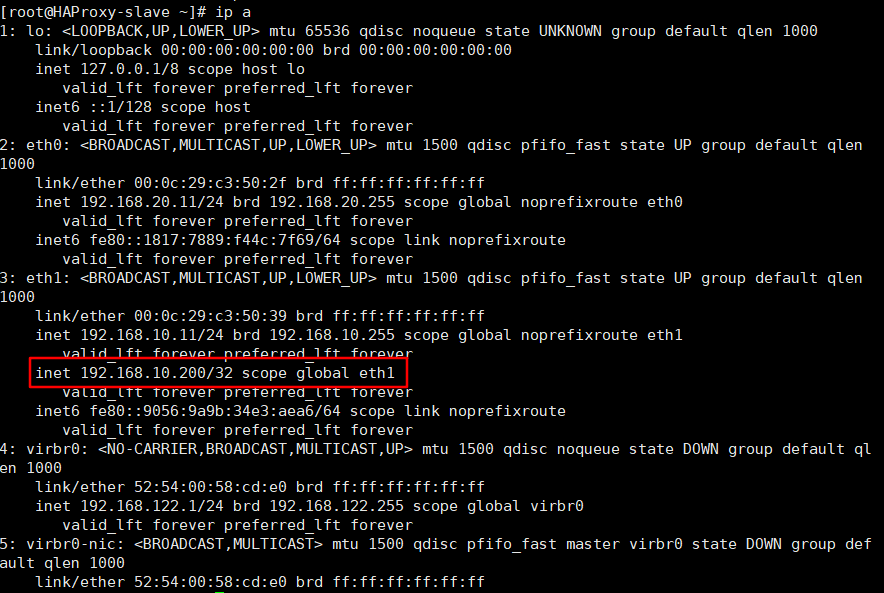
查看漂移地址
![image-20191120170958699]()
-
测试
![image-20191120171022145]()
![image-20191120171043027]()
-
-
修改haproxy配置(两台haproxy都做相同修改)
![image-20191120171133583]()
![image-20191120171157793]()
frontend main 192.168.10.200:80 #acl url_static path_beg -i /static /images /javascript /stylesheets #acl url_static path_end -i .jpg .gif .png .css .js #use_backend static if url_static default_backend webserver #--------------------------------------------------------------------- # static backend for serving up images, stylesheets and such #--------------------------------------------------------------------- #backend static # balance roundrobin # server static 127.0.0.1:4331 check #--------------------------------------------------------------------- # round robin balancing between the various backends #--------------------------------------------------------------------- backend webserver balance roundrobin server web1 192.168.20.20:80 check server web2 192.168.20.21:80 check![image-20191120171401702]()
![image-20191120171221789]()
![image-20191120171258280]()
![image-20191120171417394]()
-
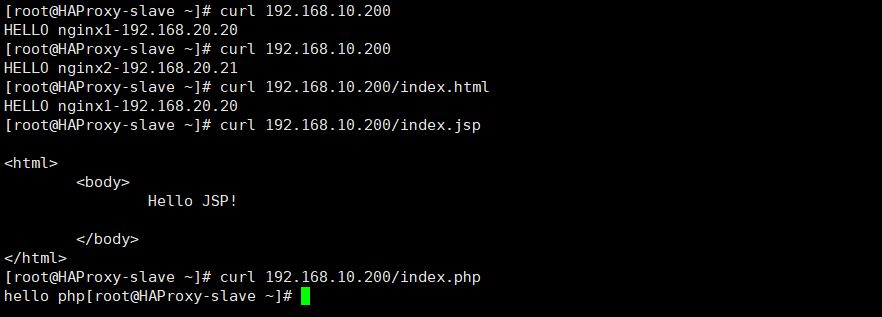
测试
![image-20191120171510946]()
-
将日志上传日志服务器
![image-20191120171643930]()
![image-20191120171711727]()
![image-20191120171845716]()
-
测试
![image-20191120171917797]()
![image-20191120172004197]()
为haproxy-slave做相同配置
-
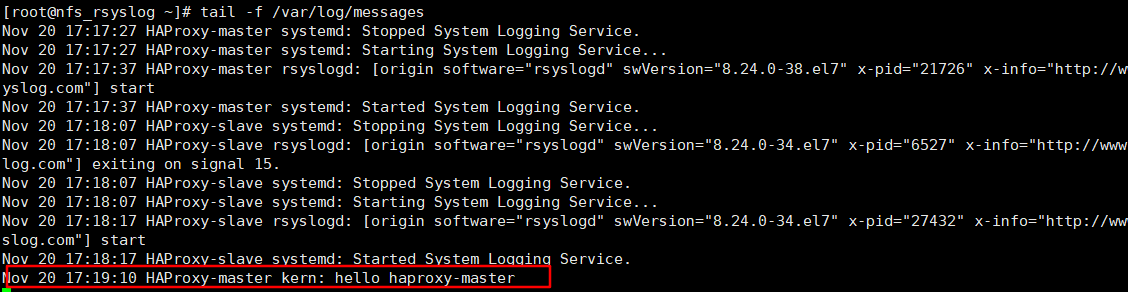
为两台haproxy服务器修改内核参数,使其能够监听到另一台haproxy服务器上的漂移地址,解决服务器重启无法自动启动haproxy的问题(有安全隐患,慎用)
![image-20191121190818139]()
![image-20191121190744718]()
![image-20191121190732039]()
echo 1 > /proc/sys/net/ipv4/ip_nonlocal_bind
vi /etc/sysctl.conf
net.ipv4.ip_nonlocal_bind=1

































搭建DNS服务器
-
安装服务
![image-20191120192139591]()
-
修改配置文件
![image-20191120192258769]()
![image-20191120200309840]()
![image-20191120194548238]()
options { listen-on port 53 { any; }; // listen-on-v6 port 53 { ::1; }; directory "/var/named"; dump-file "/var/named/data/cache_dump.db"; statistics-file "/var/named/data/named_stats.txt"; memstatistics-file "/var/named/data/named_mem_stats.txt"; recursing-file "/var/named/data/named.recursing"; secroots-file "/var/named/data/named.secroots"; allow-query { any; }; zone "lg.com" IN { type master; file "lg.com.zone"; }; zone "10.168.192.in-addr.arpa" IN { type master; file "10.168.192.arpa"; }; -
使用提供的模板文件修改区域配置
![image-20191120193644951]()
![image-20191120193937410]()
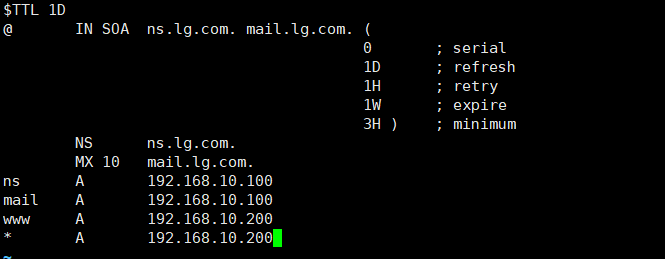
$TTL 1D @ IN SOA ns.lg.com. mail.lg.com. ( 0 ; serial 1D ; refresh 1H ; retry 1W ; expire 3H ) ; minimum NS ns.lg.com. MX 10 mail.lg.com. ns A 192.168.10.100 mail A 192.168.10.100 www A 192.168.10.200 * A 192.168.10.200![image-20191120194007666]()
![image-20191120194222970]()
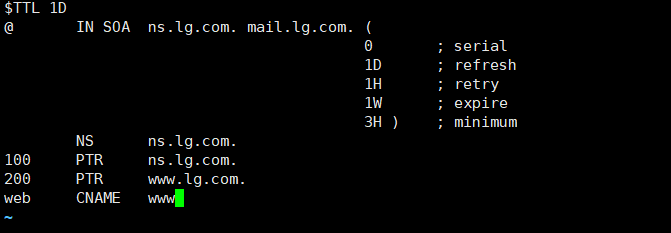
$TTL 1D @ IN SOA ns.lg.com. mail.lg.com. ( 0 ; serial 1D ; refresh 1H ; retry 1W ; expire 3H ) ; minimum NS ns.lg.com. 100 PTR ns.lg.com. 200 PTR www.lg.com. web CNAME www -
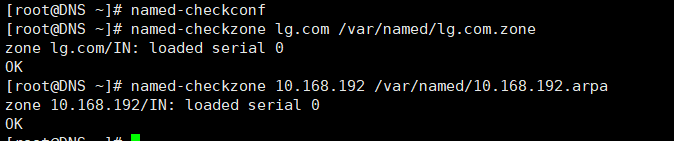
检查配置文件语法
![image-20191120194711032]()
-
修改区域配置文件属主
![image-20191120201320583]()
-
启动服务
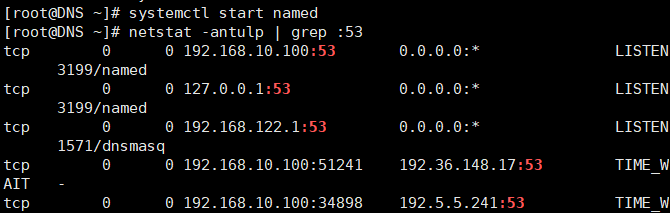
![image-20191120195039700]()
-
设置开机自启
![image-20191121100138120]()
-
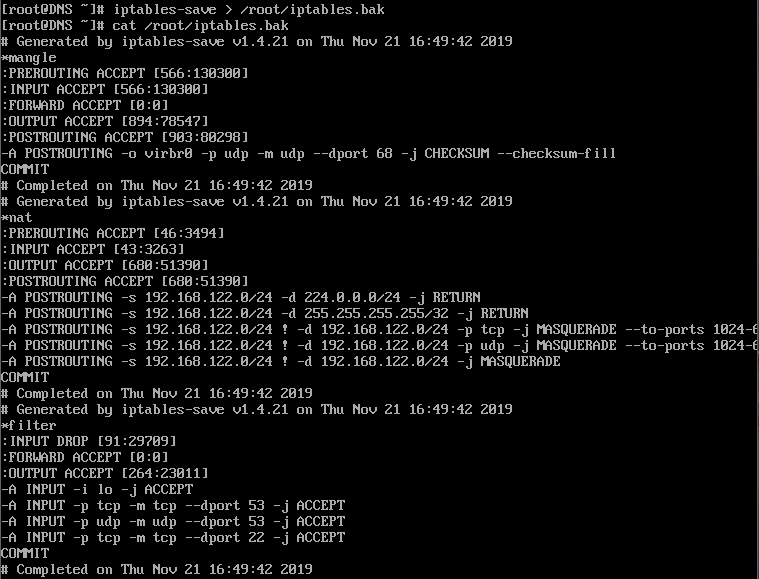
防火墙配置(可选)
![image-20191121164835216]()
![image-20191121165007488]()
iptables -F
iptables -X
iptables -Z
iptables -P INPUT DROP
iptables -P OUTPUT ACCEPT
iptables -P FORWARD ACCEPT
iptables -A INPUT -i lo -j ACCEPT
iptables -A INPUT -p tcp --dport 53 -j ACCEPT
iptables -A INPUT -p udp --dport 53 -j ACCEPT
iptables -A INPUT -p udp --dport 22 -j ACCEPT
iptables -A INPUT -p tcp --dport 22 -j ACCEPT
iptables-save > /root/iptables.bak
cat /root/iptables.bak









客户机测试
-
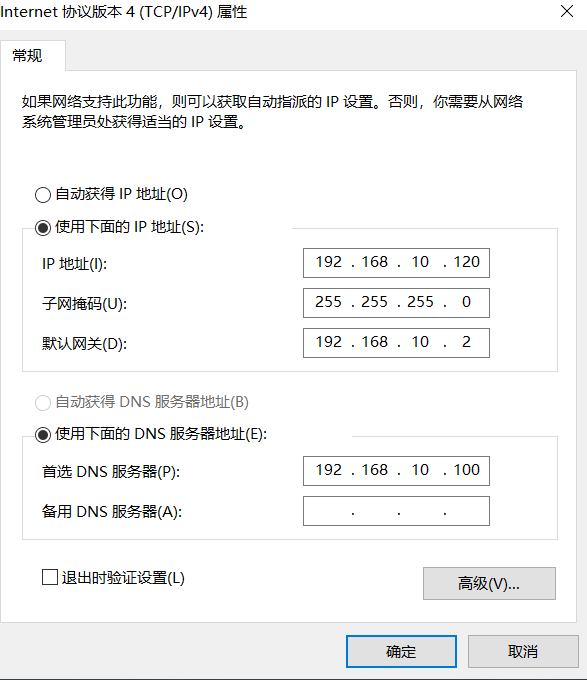
修改客户机网络配置
![image-20191120195637679]()
-
测试DNS服务
![image-20191120201511576]()
![image-20191120201635758]()
-
浏览器访问测试
![image-20191120201941842]()
![image-20191120201930328]()
![image-20191120201839219]()
![image-20191120201857137]()
-
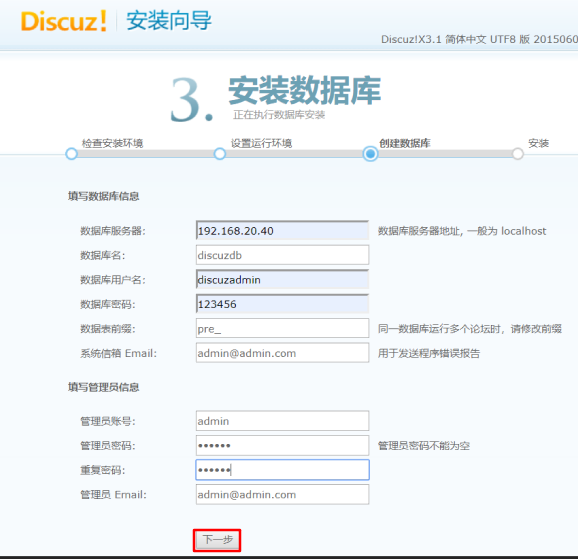
安装discuz论坛
![image-20191121093217506]()
![image-20191121094534941]()
![image-20191121094600747]()
![image-20191121094734561]()
![image-20191121094803871]()
![image-20191121094904317]()
(由于使用自己搭建的dns,未指定图片所在域名的ip所以链接图片无法获取显示) -
![image-20191120213214642]()













 浙公网安备 33010602011771号