今日内容:

python基础:
一 python的安装与使用
    1.安装python解释器
    2.安装pycharm编辑器
    3.编写python代码,并输出打印hello world!


二 变量
    变量,可变化的量。
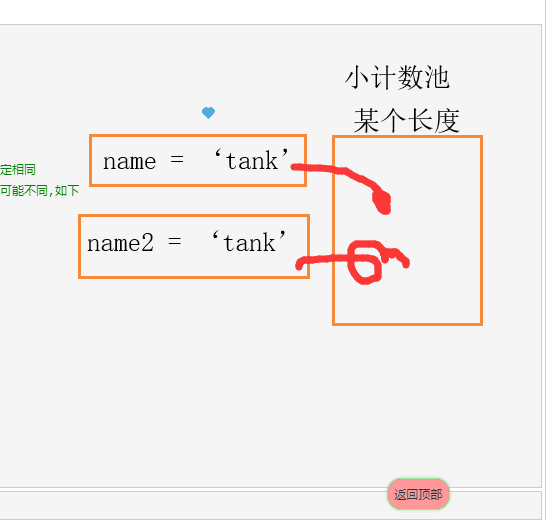
    #变量值: 'tank' ,会在内存中产生-份内存地址。
    #变量名:相当于一个门]牌号,用于与变量进行绑定。
    # =:用来把变量值绑定给变量。
    变量的命名规范:
      驼峰命名法: AgeofTank

      # python强烈推荐使用
      下划线命名: age_of_tank

    变量名定义规范:
      1.要以英文字母或下划线开头命名
        al #英文字母开头
        _a #下划线开头

      2.不能以数字开头命名
        1a  # 错误!!!

      3.关键字不能命名:
        'and', 'as', 'assert', 'break', ’class',’continue',
        'def’, 'de1',’elif', 'else', 'except', 'exec' ,
        'finally', 'for','from','global', 'if', 'import'
        'in','is', 'lambda', 'not',or’, 'pass','print',
        ’raise',’return',’try', while', 'with','yield'

    定义变量名不好的方式:

      1.不要以中文命名
      2.变量名过长
      3.变量名词不达意

    定义变量的三大特征
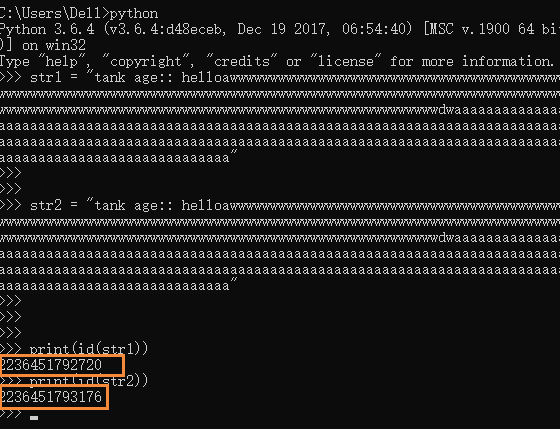
      id # 用来表示变量的值在内存中唯一的一份内存地址。
      type   # 变量值的类型
      value  # 变量的值

三 常量
    常量:
      指的是不变的量。
      常量本质上也是变量,在python不会有任何机制限制你不能修改常量。
      而是python程序员人为去限制自己,凡是遇见大写的变量都不能对其进行修改。
    命名规范:
      变量名全大写。
      SCHOOL =’合肥学院’

四 用户与程序交互
    输入:
        input()

    输出:
        print()
    # 让用户输入用户名
    # name = input('请输入名字:')

    # 输出用户名
    # print(name)

    # 在python3中,input内输入的任何数据类型都是字符串
    # print(type(name))

五 格式化输出
    尊敬的用户,你好!您本月的话费扣除99元,还剩0元。

    # 通过某种占位符,用于替换字符串中某个位置的字符。

    占位符:
        %s: 可以替换任意类型
        %d: 可以替换数字类型

    示例:
        尊敬的用户,你好!您本月的话费扣除%s元,还剩%d元。
        '''
        字符串格式化输出
        %s
        %d
        '''
        # 把100替换给了%s
        # str1 = '尊敬的用户,你好!您本月的话费扣除%s元,还剩0元。' % 100
        # 把一百替换给了%s, 把50替换给了%d
        # str1 = '尊敬的用户,你好!您本月的话费扣除%s元,还剩%d元。' % ('一百', 50)
        # print(str1)
        # 报错
        # str1 = '尊敬的用户,你好!您本月的话费扣除%s元,还剩%d元。' % ('一百', '50')
        # print(str1)


六 注释
    单行注释: #
        快捷键: ctrl + /

    多行注释:三引号  '''  """
        快捷键:
            ''' + 回车键
            """ + 回车键

六 基本数据类型
    1.数字类型:
        整型: int

        浮点型: float
        # int
        # age = int(18)
        # print (age)
        # print(type(age))

        # age2 = 19
        # print(age2)
        # print (type(age2))

        # float
        # sal = 1.01
        # print(sal)
        # print(type(sal))

    2.字符串类型
        作用:名字,性别,国籍,地址等描述信息

        定义:在单引号\双引号\三引号内,由一串字符组成
            name='tank'

        优先掌握的操作:
            1、按索引取值(正向取+反向取) :只能取
            # 正向取
            str1 = 'hello tank!'
            print(str1[0])  # h
            print(str1[9])  # k

            # 反向取
            print(str1[-2])  # k

            2、切片(顾头不顾尾,步长)
            str1 = 'hello tank!'
            # 0 -- (5 - 1)
            print(str1[0:5])  # hello

            # 步长
            print(str1[0:11])  # hello tank!
            print(str1[0:11:2])  # hlotn!
            3、长度len
            print(len(str1))  # 11
            4、成员运算in和not in
            print('h' in str1)  # True
            print('h' not in str1)  # False
            5、移除空白strip
            # 会移除字符串中左右两边的空格
            str1 = '  hello tank!'
            print(str1)
            str1 = '  hello tank!  '
            print(str1)
            print(str1.strip())
            # 去除指定字符串
            str2 = '!tank!'
            print(str2.strip('!'))
            6、切分split
            str1 = 'hello tank!'
            # 根据str1内的空格进行切分
            # 切分出来的值会存放在[]列表中。
            print(str1.split(' '))  # ['hello','tank!']
            7、循环
            # 对str1字符串进行遍历,打印每一个字符
            for line in str1:
                print(line)

        需要掌握的:
            1、strip,lstrip,rstrip
               # 1、strip,lstrip,rstrip
               # str1 = '  hello wuyuefeng   '
               # print(str1)
               # # 去掉两边空格
               # print(str1.strip())
               # # 去掉左边空格
               # print(str1.lstrip())
               # # 去掉右边空格
               # print(str1.rstrip())
            2、lower,upper
               # 2、lower,upper
               # str1 = 'hello WuYueFeng'
               # # 转换成小写
               # print(str1.lower())
               # # 转换成大写
               # print(str1.upper())
            3、startswith,endswith
               # 3、startswith,endswith
               # str1 = 'hello WuYueFeng'
               # # # 判断str1字符开头是否等于hello
               # print(str1.startswith('hello'))  # True
               # # # 判断str1字符末尾是否等于WuYueFeng
               # print(str1.endswith('WuYueFeng'))  # True
            4、format的三种玩法
               # # 4、format(格式化输出)的三种玩法
               # # str1 = 'my name is %s, my age %s!' % ('tank', 18)
               # # print(str1)
               #
               # # 方式一:  根据位置顺序格式化
               # print('my name is {}, my age {}!'.format('tank', 18))
               #
               # # 方式二:  根据索引格式化
               # print('my name is {0}, my age {1}!'.format('tank', 18))
               #
               # # 方式三:  指名道姓地格式化
               # print('my name is {name}, my age {age}!'.format(age=18, name='tank'))
            5、split,rsplit
               # 5、split 切分# strl = 'hello tank!'
               # 根据strl内的空格进行切分
               # 切分出来的值会存放在[]列表中。
               # print(strl.split(' '))  # ['hello', 'tank!']
            6、join
               # 6、join 字符串拼接
               # 报错,只允许字符串拼接
               # print(' '.join(['tank', 18]))
               # # 根据空格,把列表中的每一个字符串进行拼接
               # print(' '.join(['tank', '18', 'from GZ']))
               # # 根据_,把列表中的每一个字符串进行拼接
               # print('_'.join(['tank', '18', 'from GZ']))
            7、replace
               # 7、replace:字符串替换
               # str1 = 'my name is WangWei, my age 73!'
               # print(str1)
               # str2 = str1.replace('WangWei', 'sb')
               # print(str2)
            8、isdigit
               # 8、isdigit:判断字符串是否是数字
               # choice = input('请选择功能[0, 1, 2]: ')
               # 判断用户输入的选择是否是数字
               # print(choice.isdigit())


 浙公网安备 33010602011771号