

java简单打字游戏
该程序实现简单的打字游戏功能
效果:
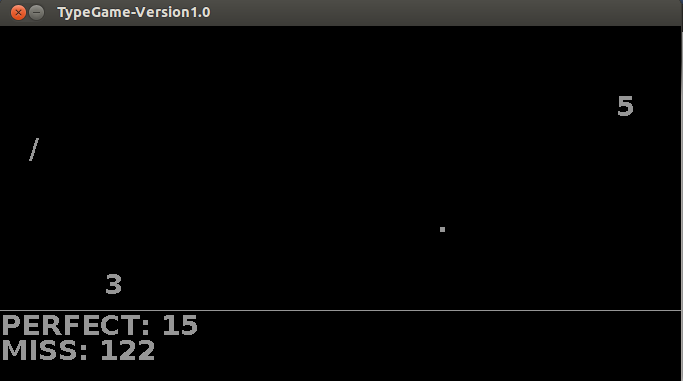
代码:
import java.awt.Color;
import java.awt.Container;
import java.awt.Font;
import java.awt.Graphics;
import java.awt.Toolkit;
import java.awt.event.KeyAdapter;
import java.awt.event.KeyEvent;
import java.util.ArrayList;
import java.util.List;
import java.util.Random;
import javax.swing.JFrame;
import javax.swing.JLabel;
/**
 *
 * @author 拢唔北伊
 *
 */
public class MyTypeGame {
 JFrame jf;
 final int screenHeight=Toolkit.getDefaultToolkit().getScreenSize().height;//屏幕高度
 final int screenWidth=Toolkit.getDefaultToolkit().getScreenSize().width;//屏幕宽度
 int x,y;//窗口距左距右的距离
 int winWidth,winHeight;//窗口的宽度和高度
 int back=-50;//使字符在窗口的上方多长的距离     使其不会一开始就下来了
 Container cp;
 Random random;
 char[]allChar=new char[94];//要打的字符数组
 List<onChar> chars;//在屏幕中显示的字符的集合
 int perfect=0;//击中字符计数器
 int miss=0;//错过字符计数器
 int welcomeY=200;//欢迎界面的Y坐标
 public MyTypeGame()
 {
  jf = new JFrame("TypeGame-Version1.0");
  winWidth=screenWidth/2;
  winHeight=screenHeight/2;
  x=(screenWidth-winWidth)/2;
  y=(screenHeight-winHeight)/2;
  jf.setSize(winWidth,winHeight);
  jf.setLocation(x, y);
  jf.setResizable(false);
  cp=jf.getContentPane();
  DrawStr drawstr = new DrawStr();//描绘字符的面板
  cp.setBackground(Color.black);
  drawstr.setSize(winWidth, winHeight);
  cp.add(drawstr);
  jf.setVisible(true);
  Thread thread = new Thread(drawstr);
  thread.start();
  for(int i=0;i<94;i++)
  {
   allChar[i]=(char) (i+33);
  }
  chars = new ArrayList<onChar>();
  jf.addKeyListener(new KeyAdapter()
  {
   public void keyTyped(KeyEvent g) {
    // TODO Auto-generated method stub
   // int escape = g.getID();
    char c = g.getKeyChar();
    for(int i = 0;i<chars.size();i++)
    {
     if(chars.get(i).getC()==c)
     {
      chars.remove(i);
      perfect++;
     }
    }
   }

  });
 }
 class DrawStr extends JLabel implements Runnable{
  public synchronized void paint(Graphics g) {
   // TODO Auto-generated method stub
   super.paint(g);
   g.setFont(new Font("times new roman",Font.BOLD,28));
   g.setColor(new Color(150,150,150));
   random = new Random();
   onChar temp = new onChar();//一个新的字符
   if(back<-500)
    back=-130;
   temp.setC(allChar[random.nextInt(26)]);
   temp.setX(random.nextInt(winWidth-50));
   temp.setY(back-=50);
   if(chars.size()<12)//每次最多画12个字符
   {
    if(chars.size()==0)//如果里面没有字符   直接加入
     chars.add(temp);
    else//避免加入的字符重复
    {
     int i=0;
     int size =chars.size();
     for(;i<size;i++)
     {
      if(chars.get(i).getC()==temp.getC())
       break;
     }
     if(i==size)
      chars.add(temp);
    }
   }

   if(chars.size()!=0)
   {
    for(int i=0;i<chars.size();i++)
    {
     onChar charq = chars.get(i);
     if(charq.getY()+30>winHeight-100)
     {
      chars.remove(charq);
      miss++;
     }
     else
     {
      g.drawString(String.valueOf(charq.getC()), charq.getX(), charq.getY()+30);
      charq.setY(charq.getY()+2);
     }
    }
   }
   if(welcomeY>winHeight-100);
   else
   g.drawString("Thank You For Play! Ok Let's Go",winWidth/2-250,welcomeY+=2);
   g.drawLine(0, winHeight-100, winWidth, winHeight-100);
   g.drawString("PERFECT: "+perfect, 0, winHeight-75);
   g.drawString("MISS: "+miss,0,winHeight-50  );
  }

  @Override
  public void run() {
   // TODO Auto-generated method stub
    while(true)
    {
     try {
      Thread.sleep(30);
     } catch (InterruptedException e) {
      // TODO Auto-generated catch block
      e.printStackTrace();
     }
     repaint();//刷新画面
    }

  }

 }
public static void main(String[] args) {new MyTypeGame();}
}
class onChar
{
 char c;
 int x;
 int y;
 public void setXY(int x,int y)
 {
  this.x=x;this.y=y;
 }
 public char getC() {
  return c;
 }
 public void setC(char c) {
  this.c = c;
 }
 public int getX() {
  return x;
 }
 public void setX(int x) {
  this.x = x;
 }
 public int getY() {
  return y;
 }
 public void setY(int y) {
  this.y = y;
 }
 @Override
 public String toString() {
  // TODO Auto-generated method stub
  return "Char: "+this.c+" x: "+this.x+" y: "+this.y;
 }

}

 浙公网安备 33010602011771号