
C#锁屏
今天来讲讲如何实现C#锁屏
界面设计
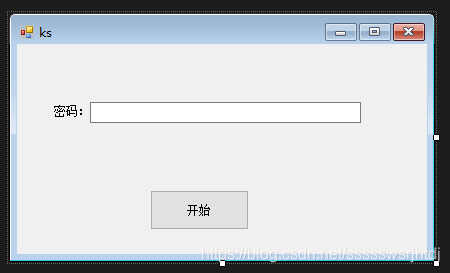
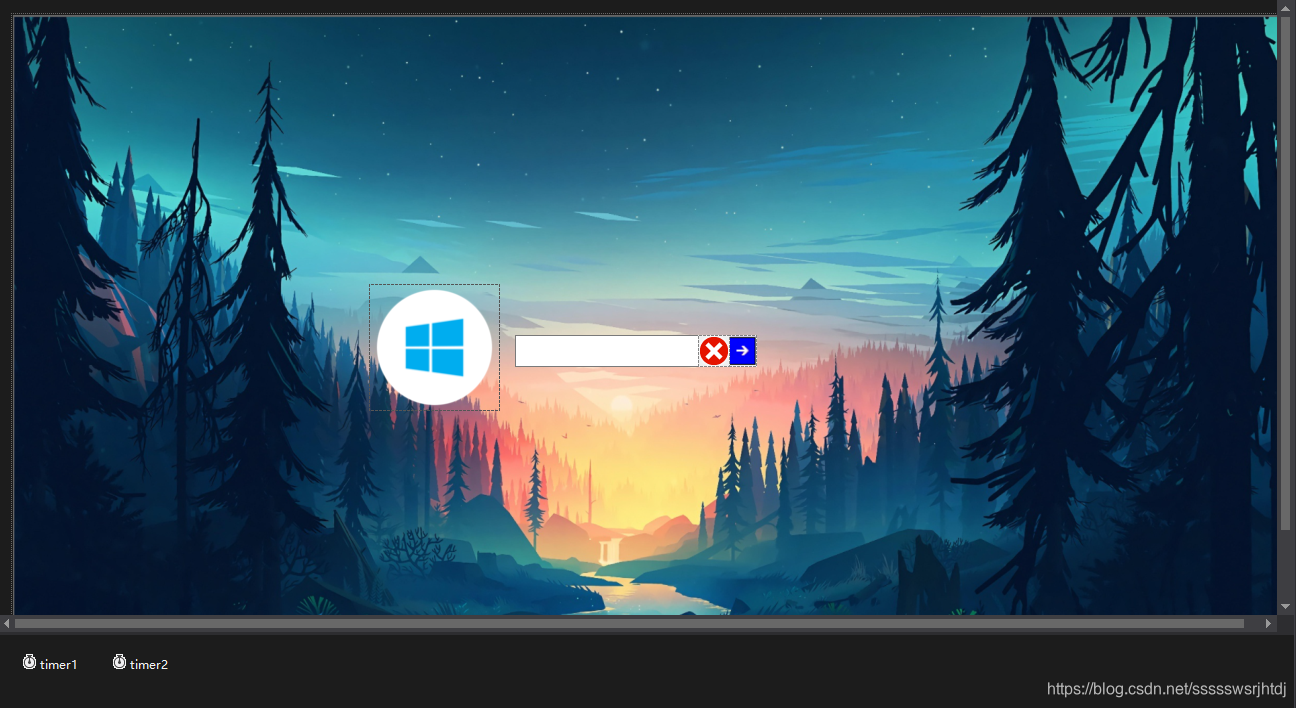
(注意添加两个计时器)
核心代码
Program.cs
static class Program
    {
        /// <summary>
        /// 应用程序的主入口点。
        /// </summary>
        [STAThread]
        static void Main()
        {
            Application.EnableVisualStyles();
            Application.SetCompatibleTextRenderingDefault(false);
            Application.Run(new ks());//重点,吧Form1改成ks
        }
    }
ks.cs
 public partial class ks : Form
    {
        public ks()
        {
            InitializeComponent();
        }
        public static string mm = "";
        private void button1_Click(object sender, EventArgs e)
        {
            if(textBox1.Text=="")
            {
                MessageBox.Show("请输入密码");
                return;
            }
            mm = textBox1.Text;
            Form1 form1 = new Form1();
            form1.Show();
            this.Hide();
        }

        private void ks_Load(object sender, EventArgs e)
        {

        }
    }
Form1中timer1_Tick
private void timer1_Tick(object sender, EventArgs e)
        {
            if (this.Opacity > 0.1)
            {
                this.Opacity = this.Opacity - 0.05;//窗体以0.05的速度渐变
            }
            else
            {
                Application.ExitThread();
            }
        }
Form1里textBox1_KeyDown
private void textBox1_KeyDown(object sender, KeyEventArgs e)
        {
            if(e.KeyCode == Keys.Control || e.KeyCode == Keys.Enter)
            {
                pictureBox2_Click(sender, e);

            }

        }
Form1中timer2_Tick
private void timer2_Tick(object sender, EventArgs e)
        {
            if (this.Opacity < 1)
            {
                this.Opacity = this.Opacity +0.05;//窗体以0.05的速度渐变
            }
            else
            {
                timer2.Stop();
            }
        }
Form1窗体加载代码
private void Form1_Load(object sender, EventArgs e)
        {
            pictureBox3.Visible = false;
            Rectangle ScreenArea = System.Windows.Forms.Screen.GetBounds(this);
            int width = ScreenArea.Width; //屏幕宽度
            int height = ScreenArea.Height;

            pictureBox1.Location = new Point((width - 480) / 2, (height - 200) / 2);
            textBox1.Text = string.Empty;
            ...//由于代码较长,所以此处省略
            if (File.Exists(@"C:\Windows\System32\Face.bmp"))
            {
                pictureBox1.ImageLocation = @"C:\Windows\System32\Face.bmp";
            }
            this.Opacity = 0;
            timer2.Start();


        }
Form1解锁图片按钮
 pictureBox2.Image = 老刘锁屏.Properties.Resources.屏幕截图_2021_02_25_184218__3_;
            pictureBox3.Visible = false;
            if(textBox1.Text!=ks.mm)
            {

                textBox1.Location = new Point(textBox1.Location.X - 10, textBox1.Location.Y);
                Thread.Sleep(80);
                textBox1.Location = new Point(textBox1.Location.X - 20, textBox1.Location.Y);
                Thread.Sleep(80);
                textBox1.Location = new Point(textBox1.Location.X - 30, textBox1.Location.Y);
                Thread.Sleep(80);
                textBox1.Location = new Point(textBox1.Location.X - 20, textBox1.Location.Y);
                Thread.Sleep(80);
                textBox1.Location = new Point(textBox1.Location.X - 10, textBox1.Location.Y);
                Thread.Sleep(80);
                textBox1.Location = new Point(textBox1.Location.X - 0, textBox1.Location.Y);
                Thread.Sleep(80);
                textBox1.Location = new Point(textBox1.Location.X+10, textBox1.Location.Y);
                Thread.Sleep(80);
                textBox1.Location = new Point(textBox1.Location.X + 20, textBox1.Location.Y);
                Thread.Sleep(80);
                textBox1.Location = new Point(textBox1.Location.X +30, textBox1.Location.Y);
                Thread.Sleep(80);
                ...//由于代码较长,所以此处省略
            }
            else
            {
                this.Close();
            }
Form1窗体关闭事件
private void Form1_FormClosing(object sender, FormClosingEventArgs e)
        {
            pictureBox2.Image = 老刘锁屏.Properties.Resources.屏幕截图_2021_02_25_184218__3_;
            pictureBox3.Visible = false;
            if (textBox1.Text != ks.mm)
            {

                textBox1.Location = new Point(textBox1.Location.X - 10, textBox1.Location.Y);
                Thread.Sleep(80);
                textBox1.Location = new Point(textBox1.Location.X - 20, textBox1.Location.Y);
                ...//由于代码较长,所以此处省略
            }
            else
            {
                timer1.Start();
                e.Cancel = true;
            }
        }
由于具体代码较长,所以完整代码请下载
最终效果
锁屏效果:

输入错误效果:

错误时文本滑动:

渐变关闭锁屏窗口

源码下载
点击下载
地址:https://download.csdn.net/download/ssssswsrjhtdj/15468680
感谢阅读
希望可以帮到你

 浙公网安备 33010602011771号