
python-GUI-tkinter之excel密码破解工具
python gui 之熟悉tkinter部分控件使用。一个简单的excel暴力密码破解,核心很简单,基本就是一个函数外面加了GUI,写的很啰嗦,希望大家可以在优化改良下,主要是为了再熟悉下tkinter的部分控件怎么使用,tk打包后的文件比较小。仅限于个人忘记密码时使用,请勿用于其它用途。如想转载,请联系本人,或贴上本博客地址。
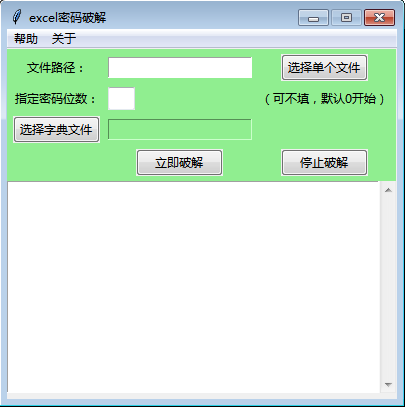
程序截图如下:
import os,sys,subprocess
from tkinter import *
import socket
import threading
import time
import queue
import tkinter.messagebox as msgbox
import win32com.client
#多线程调用win32com模块打开excel,报错,加下面
import pythoncom
import tkinter as tk
from tkinter import ttk
from tkinter import *
from tkinter import scrolledtext
#选择文件
from tkinter import filedialog

#窗体居中
def center_window(root, width, height):
    screenwidth = root.winfo_screenwidth()
    screenheight = root.winfo_screenheight()
    size = '%dx%d+%d+%d' % (width, height, (screenwidth - width)/2, (screenheight - height)/2)
    #print(size)
    root.geometry(size)

class MyGui():
    def __init__(self, init_window_name):
        self.init_window_name = init_window_name

    def set_init_window(self):              #初始化窗口
        self.k = 0
        self.init_window_name.title("excel密码破解")
        self.window_center(390, 350)
        self.init_window_name.resizable(0,0)    #固定窗口,禁止拖拉

        #参数是父级控件
        self.menubar = Menu(self.init_window_name)
        #新增2个级联菜单
        self.cascadehelp=Menu(self.menubar,tearoff=False)#tearoff=False 表示这个菜单不可以被拖出来
        self.cascadeabout=Menu(self.menubar,tearoff=False)#tearoff=False 表示这个菜单不可以被拖出来
        #向父控件添加help级联菜单
        self.menubar.add_cascade(label='帮助', menu = self.cascadehelp)
        #级联菜单增加选项
        self.cascadehelp.add_command(label='使用说明',command = self.howuse)
        self.menubar.add_cascade(label='关于', menu = self.cascadeabout)
        self.cascadeabout.add_command(label='关于本工具',command = self.about)
        self.init_window_name.config(menu = self.menubar)

        self.frame_top = Frame(self.init_window_name, width=390, height=350,borderwidth = 1,bd=2,bg='lightgreen')
        self.frame_top.grid(row=0, column=0)
        self.PortScan = ttk.Button(self.frame_top, text="立即破解", command= self.runing).grid(row=4, column=1)
        #停止
        self.StopScan = ttk.Button(self.frame_top, text="停止破解",command=self.stop).grid(row=4, column=2)
        self.select_path = tk.StringVar()
        # 初始化Label控件的textvariable属性值
        self.select_dic_path = tk.StringVar()
        # 布局控件
        tk.Label(self.frame_top, text="文件路径:",bg='lightgreen').grid(column=0, row=0)#columnspan和rowspan分别可以设置控件在行和列方向的合并数量
        tk.Entry(self.frame_top, textvariable = self.select_path).grid(column=1, row=0)
        ttk.Button(self.frame_top, text="选择单个文件", command=self.select_file).grid(row=0, column=2)
        #指定数字位数
        tk.Label(self.frame_top, text="指定密码位数:",bg='lightgreen').grid(column=0, row=1)
        self.feet = StringVar()
        feet_entry = ttk.Entry(self.frame_top, width=3, textvariable=self.feet).grid(column=1, row=1,sticky=(W))#sticky=(W)左对齐, sticky=(W, E))左右对齐,控件占满行列
        #feet_entry.bind('', self.keyPress)
        tk.Label(self.frame_top, text="(可不填,默认0开始)",bg='lightgreen').grid(column=2, row=1,sticky=(W))
        #选择字典文件
        ttk.Button(self.frame_top, text="选择字典文件", command=self.select_dic).grid(row=3, column=0)
        tk.Entry(self.frame_top, textvariable = self.select_dic_path,bg='lightgreen').grid(column=1, row=3)
        #历史记录
        scrolW  = 30; scrolH  =  16
        scr = scrolledtext.ScrolledText(width=scrolW, height=scrolH, wrap=tk.WORD) #monty,
        scr.grid(column=0, row=1, sticky='WE', columnspan=1)
        scr.config(state=DISABLED)
        for child in self.frame_top.winfo_children(): child.grid_configure(padx=3, pady=3) # padx表示在x轴方向上的边距,一般用法是padx=10,表示距离左右两边组件的长度都为10

    def about(self):
        messagebox.showinfo('关于','欢迎使用本工具,本工具开源免费,仅限于个人忘记密码时使用,请勿用于商业用途。')
    def close_handler(self):
        # 在colse_handler函数中,使得父窗口重新变得可用
        self.init_window_name.attributes('-disabled', 0)
    def howuse(self):
        help_text1 = '1、破解数字密码,可直接选择文件,点击 “立即破解”,如果直接数字密码大概是几位,可以指定密码位数,可加快破解效率。'
        help_text2 = '2、如有常用密码的txt字典,可选择文件,再选择字典文件,点击“立即破解”。'
        top = Toplevel()
        top.title('使用帮助')
        #顶级窗口也屏幕居中显示
        center_window(top,700,60)
        #窗口置顶
        top.wm_attributes('-topmost',1)
        top.resizable(0,0)    #固定窗口,禁止拖拉
        tk.Label(top, text=help_text1).grid(row=1,column=1,padx=1,pady=1)
        tk.Label(top, text=help_text2).grid(row=2,column=1,padx=1,pady=1,sticky=(W))  #左对齐

    # 窗口居中
    def window_center(self, width, height):
        screenwidth = self.init_window_name.winfo_screenwidth()
        screenheight = self.init_window_name.winfo_screenheight()
        size = '%dx%d+%d+%d' % (width, height, (screenwidth - width) / 2, (screenheight - height) / 2)
        self.init_window_name.geometry(size)

    # 获取当前时间
    def get_current_time(self):
        current_time = time.strftime('%Y-%m-%d %H:%M:%S', time.localtime(time.time()))
        return current_time

    # 单个文件选择
    #指定文件类型
    def select_file(self):
        # 使用askopenfilename函数选择单个文件
        selected_file_path = filedialog.askopenfilename(title='选择表格文件',
                                filetypes=[('All Files', '*'),
                                            ('表格', '*.xlsx')])
        self.select_path.set(selected_file_path)

    #选择字典文件
    def select_dic(self):
        selected_dic = filedialog.askopenfilename(title='选择字典文件',
                                filetypes=[('All Files', '*'),
                                            ('txt', '*.txt')])
        self.select_dic_path.set(selected_dic)


    class MyThread(threading.Thread):
        def __init__(self, func, *args):
            super().__init__()

            self.func = func
            self.args = args

            self.setDaemon(True)
            self.start()  #开始

        def run(self):
            self.func(*self.args)

    def stop(self):
        self.k = 0
        msgbox.showinfo(title='提示', message='停止破解。')
        ttk.Button(self.frame_top, text="立即破解", command= self.runing).grid(row=4, column=1)

    def runing(self):
        pythoncom.CoInitialize()
        if self.select_path.get() =='':
            msgbox.showinfo(title="提示", message="请先选择文件!")
        else:
            ttk.Button(self.frame_top, text="立即破解", command= self.runing, state=tk.DISABLED).grid(row=4, column=1)#, padx=15, pady=20)
            self.k = 1
            self.MyThread(self.get_sheetpw)

    def get_sheetpw(self):
        pythoncom.CoInitialize()
        cmdwps ='taskkill /F /IM wps.exe'
        cmdexcel = 'taskkill /F /IM EXCEL.exe'
        p = subprocess.Popen(cmdwps)
        p.wait()
        p2 = subprocess.Popen(cmdexcel)
        p2.wait()

        #历史记录
        scrolW  = 30; scrolH  =  16
        scr = scrolledtext.ScrolledText(width=scrolW, height=scrolH, wrap=tk.WORD) #monty,
        scr.grid(column=0, row=1, sticky='WE', columnspan=1)
        scr.config(state=DISABLED)
        for child in self.frame_top.winfo_children(): child.grid_configure(padx=3, pady=3)
        file_path =  self.select_path.get()
        dic_path = self.select_dic_path.get()
        print(file_path)
        try:
            xls = win32com.client.Dispatch("Excel.Application")
        except:
            xls = win32com.client.Dispatch("ket.Application")
        xls.DisplayAlerts=0

        if dic_path!='':
            with open(dic_path,'r',encoding='utf-8') as f:
                flag=0
                for i in f.readlines():
                    print('破解中......')
                    start_time = time.time()
                    if self.k == 1:
                        try:
                            xlsheet = xls.Workbooks.Open(file_path, False, True, None, Password=i.strip())
                            print('破解成功!')
                            print("文档密码是:{}".format(i.strip()))
                            xlsheet.Close()
                            end_time = time.time()
                            use_time = end_time - start_time
                            use_time = round(use_time,2)
                            print('共耗时:' + str(use_time) +'秒')
                            flag=1
                            msgbox.showinfo(title="提示", message="破解成功!excel密码是:%s。共耗时: %s秒" %(i.strip(),use_time))
                            ttk.Button(self.frame_top, text="立即破解", command= self.runing).grid(row=4, column=1)
                            break
                            #return True
                        except Exception as e:
                            print('完成一次,'+'当前测试的密码是'+ str(i.strip()))
                            info = '完成一次,当前测试的密码是'+ str(i.strip())
                            scr.config(state=NORMAL)
                            value = info
                            value=value.replace("'\n'","")
                            oldvalue=scr.get(0.0,tk.END)
                            delvalue=scr.delete(0.0,tk.END)
                            scr.insert(tk.INSERT,value +'\n'+oldvalue)
                            scr.config(state=DISABLED)
                if flag==0:
                    msgbox.showinfo(title="提示", message='破解失败,此字典未破解出密码!')
                    ttk.Button(self.frame_top, text="立即破解", command= self.runing).grid(row=4, column=1)
        else:
            num = int(self.feet.get()) if self.feet.get()!='' else 0
            #num = int(self.feet.get())
            if num!='':
                if int(num)==1:
                    p=0
                elif int(num)==2:
                    p=10
                elif int(num)==3:
                    p=100
                elif int(num)==4:
                    p=1000
                elif int(num)==5:
                    p=10000
                elif int(num)==6:
                    p=100000
                elif int(num)==7:
                    p=1000000
                elif int(num)==8:
                    p=10000000
                elif int(num)==9:
                    p=100000000
                elif int(num)==10:
                    p=1000000000
                elif int(num)==11:
                    p=10000000000
                elif int(num)==11:
                    p=100000000000
                elif int(num)==12:
                    p=1000000000000
                else:
                    p=0
            else:
                p=0
            print('破解中......')
            start_time = time.time()
            while True:
                if self.k == 1:
                    try:
                        xlsheet = xls.Workbooks.Open(file_path, False, True, None, Password=p)
                        print('破解成功!')
                        print("文档密码是:{}".format(p))
                        xlsheet.Close()
                        end_time = time.time()
                        use_time = end_time - start_time
                        use_time = round(use_time,2)
                        print('共耗时:' + str(use_time) +'秒')
                        msgbox.showinfo(title="提示", message="破解成功!excel密码是:%s。共耗时: %s秒" %(p,use_time))
                        ttk.Button(self.frame_top, text="立即破解", command= self.runing).grid(row=4, column=1)#, padx=15, pady=20)
                        break
                        #return True
                    except Exception as e:
                        print('完成一次,'+'当前测试的密码是'+ str(p))
                        info = '完成一次,当前测试的密码是'+ str(p)
                        scr.config(state=NORMAL)
                        value = info
                        value=value.replace("'\n'","")
                        oldvalue=scr.get(0.0,tk.END)
                        delvalue=scr.delete(0.0,tk.END)
                        scr.insert(tk.INSERT,value +'\n'+oldvalue)
                        scr.config(state=DISABLED)
                        p=p+1
                else:
                    breakpoint


if __name__ == "__main__":
    pygui=Tk()
    #窗口置顶
    pygui.wm_attributes('-topmost',1)
    init_window = MyGui(pygui)
    init_window.set_init_window()
    pygui.mainloop()

 浙公网安备 33010602011771号