
verilog 和system verilog 文件操作
1. 文件操作
Verilog具有系统任务和功能,可以打开文件、将值输出到文件、从文件中读取值并加 载到其他变量和关闭文件。
1.1 Verilog文件操作
1.1.1 打开和关闭文件
module tb;
// 声明一个变量存储 file handler
integer fd;
initial begin
// 以写权限打开一个文件名为 "my_file.txt" 的新文件,并将文件柄指针存储在变量"fd"中
    fd = $fopen("my_file.txt", "w");
// 关闭指向 "fd"的文件柄
    $fclose(fd);
end
endmodule
文件操作选项:
|
Argument |
Description |
|
"r" or "rb" |
可读方式打开 |
|
"w" or "wb" |
创建用于写入的新文件。如果文件存在,则将其截断为零长度并覆盖 |
|
"a" or "ab" |
如果文件存在,追加(在EOF时打开以写入),否则创建一个新文件 |
|
"r+", "r+b" or "rb+" |
可读可写方式打开 |
|
"w+", "w+b" or "wb+" |
截断或创建以进行更新 |
|
"a+", "a+b", or "ab+" |
在EOF处追加或创建新文件进行更新 |
1.1.2写文件
|
Function |
Description |
|
$fdisplay |
Similar to $display, writes out to file instead |
|
$fwrite |
Similar to $write, writes out to file instead |
|
$fstrobe |
Similar to $strobe, writes out to file instead |
|
$fmonitor |
Similar to $monitor, writes out to file instead |
上述每个系统函数都以基数十进制打印值。它们还有其他三个版本,可以以二进制、八进制 和十六进制打印值。
|
Function |
Description |
|
$fdisplay() |
Prints in decimal by default |
|
$fdisplayb() |
Prints in binary |
|
$fdisplayo() |
Prints in octal |
|
$fdisplayh() |
Prints in hexadecimal |
integer handle1;
initial begin
handel1=$fopen("picture_out.txt","w");
forever @(posedge clk) begin
    if(PicInHEnd &PicInVEnd) begin
        $fclose(handle1);
        $finish;
    end
end
end
always@(posedge clk) begin
    if(  PicOutVld  ) begin
        if(PicInHEnd)
            $fwrite(handle1,"%h",PicInData,"\n");
        else
            $fwrite(handle1,"%h",PicInData,"\n");
    end
end
使用方法如下:
module tb;
integer fd;
integer i;
reg [7:0] my_var;
initial begin
  // Create a new file
  fd = $fopen("my_file.txt", "w");
  my_var = 0;
   $fdisplay(fd, "Value displayed with $fdisplay");
  #10 my_var = 8'h1A;
  $fdisplay(fd, my_var); // Displays in decimal
  $fdisplayb(fd, my_var); // Displays in binary
  $fdisplayo(fd, my_var); // Displays in octal
  $fdisplayh(fd, my_var); // Displays in hex
  // $fwrite does not print the newline char '' automatically at
   // the end of each line; So we can predict all the values printed
   // below to appear on the same line
   $fdisplay(fd, "Value displayed with $fwrite");
  #10 my_var = 8'h2B;
  $fwrite(fd, my_var);
  $fwriteb(fd, my_var);
  $fwriteo(fd, my_var);
  $fwriteh(fd, my_var);
   // Jump to new line with '', and print with strobe which takes
   // the final value of the variable after non-blocking assignments
   // are done
   $fdisplay(fd, "Value displayed with $fstrobe");
  #10 my_var <= 8'h3C;
  $fstrobe(fd, my_var);
  $fstrobeb(fd, my_var);
  $fstrobeo(fd, my_var);
  $fstrobeh(fd, my_var);
   #10 $fdisplay(fd, "Value displayed with $fmonitor");
   $fmonitor(fd, my_var);
  for(i = 0; i < 5; i= i+1) begin
    #5 my_var <= i;
  end
   #10 $fclose(fd);
end
endmodule

1.1.3 读取文件
1.文件读取:$fscanf和 $readmemh,其中$readmemh的作用是件文件中的数据一次性的读入某个数组中,然后依次从数组中取出1个数据进行处理;而$fscanf的作用是从文件中读出一行的数据。
在 Verilog 中,$fscanf 函数用于从文件中读取格式化的数据。它的语法如下:
$fscanf(file, format, variable);
其中:
file是一个整数变量,表示要读取的文件句柄。format是一个字符串,指定读取数据的格式。variable是一个变量,用于存储从文件中读取的数据。
$fscanf 函数将根据指定的格式从文件中读取数据,并将其存储在变量中。以下是一些常见的格式说明符:
%h: 十六进制表示的整数。%d: 十进制表示的整数。%b: 二进制表示的整数。%f: 浮点数。
以下是一个示例,演示如何使用 $fscanf 函数从文件中读取十六进制数:
module file_reader;
  reg [7:0] data;
  reg clk;
  integer file;
  initial begin
    // 打开文件
    file = $fopen("input.txt", "r");
    if (file == 0) begin
      $display("无法打开文件");
      $finish;
    end
    // 模拟时钟
    clk = 0;
    forever #5 clk = ~clk;
  end

  always @(posedge clk) begin
    // 读取文件中的数据
    if (!$feof(file)) begin
      $fscanf(file, "%h", data);
      $display("读取数据:%h", data);
    end
    else begin
      $display("文件读取完毕");
      $fclose(file);
      $finish;
    end
  end

endmodule
在此例中,Verilog 模块 file_reader 使用 $fopen 函数打开名为 "input.txt" 的文件,并按照每个时钟周期读取文件中的数据。使用 $fscanf 函数从文件中读取十六进制数,并使用 $display 函数打印读取到的数据。每当读取到一个数据时,它将使用 $display 函数打印出来。当文件读取完毕时,它将关闭文件并结束仿真。 请确保在使用此代码之前,将文件 "input.txt" 放在与 Verilog 源代码相同的目录中,并在文件中包含要读取的数据。
2. $readmemh
在 Verilog 中,$readmemh 是一个系统任务,用于从文件中读取十六进制数据并将其加载到内存中。它的语法如下:


$readmemh(filename, memory);
其中:

filename 是一个字符串,表示要读取的文件名。
memory 是一个内存数组或寄存器数组,用于存储从文件中读取的数据。
$readmemh 任务会打开指定的文件,并按行读取文件中的十六进制数据。它会将数据加载到 memory 数组中,每行数据对应数组的一个元素。

以下是一个示例,演示如何使用 $readmemh 任务从文件中读取十六进制数据:


module file_reader;

  reg [7:0] memory [0:9]; // 定义一个包含10个元素的内存数组

  initial begin
    $readmemh("input.txt", memory); // 从文件中读取数据并加载到内存数组中

    // 打印内存数组中的数据
    for (integer i = 0; i < 10; i = i + 1) begin
      $display("memory[%0d] = %h", i, memory[i]);
    end

    $finish;
  end

endmodule
在此示例中,我们通过 $readmemh 任务从文件 "input.txt" 中读取数据,并将其加载到内存数组 memory 中。然后,我们使用循环打印出 memory 数组中的数据。 "input.txt" 需要放在与 Verilog 源代码相同的目录中,并在文件中包含要读取的十六进制数据(每行一个)。
3.使用 Verilog 的fget函数输入文件读取功能,逐行读取文件内容并将其存储在寄存器或内存中。
4.读取一行:系统函数 $fgets 从 [hl]fd[/hd] 指定的文件中将字符读入变量 str 直到 str 被填满,或者读取换行符并传输到 str,或者遇到 EOF 条件。如果在读取过程中发生错误,则返回代码零。否则返回读取的字符数。以下是一个示例代码,演示如何逐行读取文件并将其存储在寄存器中:
module file_reader;

  reg [7:0] data [0:9]; // 定义一个包含10个元素的寄存器数组
  reg [7:0] temp;
  integer file;
  integer line_num;
  initial begin
    // 打开文件
    file = $fopen("input.txt", "r");
    if (file == 0) begin
      $display("无法打开文件");
      $finish;
    end
    line_num = 0;
    // 逐行读取文件
    while (!$feof(file)) begin
      $fgets(temp, file);
      data[line_num] = temp; // 将读取到的数据存储在寄存器中
      line_num = line_num + 1;
    end
    $fclose(file);
    // 打印寄存器中的数据
    for (integer i = 0; i < 10; i = i + 1) begin
      $display("data[%0d] = %h", i, data[i]);
    end
    $finish;
  end
endmodule
在此示例中,我们定义了一个包含10个元素的寄存器数组 data,用于存储从文件中读取的每一行数据。我们使用 $fgets 函数逐行读取文件,并将读取到的数据存储在 temp 变量中。然后,将 temp 的值存储在 data 数组的相应索引位置上。最后,我们使用循环打印出 data 数组中的数据。
请确保在使用此代码之前,将文件 "input.txt" 放在与 Verilog 源代码相同的目录中,并在文件中包含要读取的数据。
1.1.3.1 检测 EOF
当找到 EOF 时,系统函数 $feof 返回一个非零值,否则对于给定的文件描述符作为参数返回零。
module tb;
reg[8*45:1] str;
integer fd;
initial begin
 fd = $fopen("my_file.txt", "r");
 // Keep reading lines until EOF is found
 while (! $feof(fd)) begin
 // Get current line into the variable 'str'
 $fgets(str, fd);
 // Display contents of the variable
 $display("%0s", str);
 end
 $fclose(fd);
end
endmodule
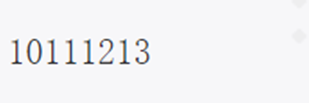
1.1.3.2 fdisplay 的多个参数
当给$fdisplay多个变量时,它只是按给定的顺序一个接一个地打印所有变量,没有空格。
module tb;

 reg [3:0] a, b, c, d;
 reg [8*30:0] str;
 integer fd;
 initial begin
 a = 4'ha;
 b = 4'hb;
 c = 4'hc;
 d = 4'hd;
 fd = $fopen("my_file.txt", "w");
 $fdisplay(fd, a, b, c, d);
 $fclose(fd);
 end
endmodule
1.1.4 将数据格式化为字符串
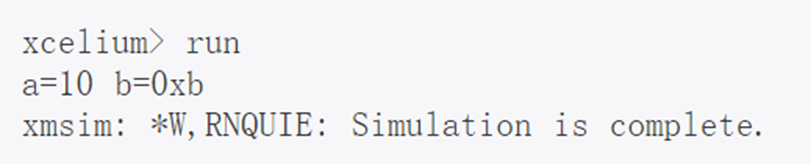
系统函数中的第一个参数 $sformat 是放置结果的变量名。第二个参数是format_string,它告诉如何将以下参数格式化为字符串。
module tb;
reg [8*19:0] str;
reg [3:0] a, b;
initial begin
a = 4'hA;
b = 4'hB;
// Format 'a' and 'b' into a string given
// by the format, and store into 'str' variable
$sformat(str, "a=%0d b=0x%0h", a, b);
$display("%0s", str);
end
endmodule
1.2 sv文件操作
System Verilog 允许我们读取和写入磁盘中的文件。
1.2.1 打开关闭文件
可以使用 $fopen() 系统任务打开文件进行读取或写入。该任务将返回一个称为文件描述符的 32位整数句柄。这个句柄应该用于读取和写入该文件,直到它被关闭。文件描述符可以用$fclose() 系统任务关闭。一旦文件描述符关闭,就不允许进一步读取或写入文件描述符。
例子:在下面显示的代码中,我们将声明一个名为 fd的int变量来保存文件描述符。 fd 最初为零,并从$fopen()中获取有效值,可以检查文件是否成功打开。该文件最终在执行$fclose()时关闭。
module tb;
 initial begin
 // 1. Declare an integer variable to hold the file descriptor
   int fd;
 // 2. Open a file called "note.txt" in the current folder with a "read permission
 // If the file does not exist, then fd will be zero
   fd = $fopen ("./note.txt", "r");
     if (fd) $display("File was opened successfully : %0d", fd);
     else $display("File was NOT opened successfully : %0d", fd);
 // 2. Open a file called "note.txt" in the current folder with a "write permission
 // "fd" now points to the same file, but in write mode
     fd = $fopen ("./note.txt", "w");
     if (fd) $display("File was opened successfully : %0d", fd);
     else $display("File was NOT opened successfully : %0d", fd);
 // 3. Close the file descriptor
     $fclose(fd);
 end
endmodule
在仿真结束之前关闭所有打开的文件以将内容完全写入文件很重要。

1.2.2 以读取和附加模式打开
默认情况下,文件以写入 w 模式打开。通过提供正确的模式类型,也可以在其他模式下打开文件。下表显示了可以打开文件的所有不同模式。
例子:在下面的代码中,我们将看到如何使用上表中描述的不同文件访问模式。
module tb;
 initial begin
 int fd_w, fd_r, fd_a, fd_wp, fd_rp, fd_ap;
 fd_w = $fopen ("./todo.txt", "w"); // Open a new file in write mode a
 fd_r = $fopen ("./todo.txt", "r"); // Open in read mode
 fd_a = $fopen ("./todo.txt", "a"); // Open in append mode
 if (fd_w) $display("File was opened successfully : %0d", fd_w);
 else $display("File was NOT opened successfully : %0d", fd_w)
 if (fd_r) $display("File was opened successfully : %0d", fd_r);
 else $display("File was NOT opened successfully : %0d", fd_r)
 if (fd_a) $display("File was opened successfully : %0d", fd_a);
 else $display("File was NOT opened successfully : %0d", fd_a)
 // Close the file descriptor
 $fclose(fd_w);
 $fclose(fd_r);
 $fclose(fd_a);
 end
endmodule
从下面的日志可以看出,这三个变量都有不同的值,每个变量都指向同一个文件,但访问权限不同。

1.2.3 读取和写入文件
文件应以写入 w 模式或附加 a 模式打开。系统任务如 $fdisplay() 和 $fwrite() 可用于将格式化字符串写入文件。这些任务的第一个参数是文件描述符句柄,第二个参数是要存储的数据。 要读取文件,必须以读取 r 模式或读写 r+ 模式打开它。 $fgets() 是一个系统任务,它 将从文件中读取一行。如果这个任务被调用 10 次,那么它将读取 10 行。
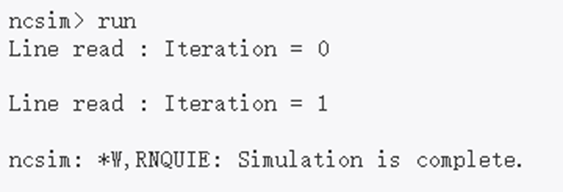
例子:下面显示的代码演示了如何使用 $fdisplay() . 然后以读取模式打开文件,并使用 $fgets() 本地变量将内容读回。然后使用标准显示任务$display()打印出来。
module tb;
 int fd; // Variable for file descriptor handle
 string line; // String value read from the file
 initial begin
 // 1. Lets first open a new file and write some contents into it
 fd = $fopen ("trial", "w");
 // Write each index in the for loop to the file using $fdisplay
 // File handle should be the first argument
 for (int i = 0; i < 5; i++) begin
 $fdisplay (fd, "Iteration = %0d", i);
 end
 // Close this file handle
 $fclose(fd);
 // 2. Let us now read back the data we wrote in the previous step
 fd = $fopen ("trial", "r");
 // Use $fgets to read a single line into variable "line"
 $fgets(line, fd);
 $display ("Line read : %s", line);
 // Get the next line and display
 $fgets(line, fd);
 $display ("Line read : %s", line);
 // Close this file handle
 $fclose(fd);
 end
endmodule
1.2.4 阅读直到文件结束
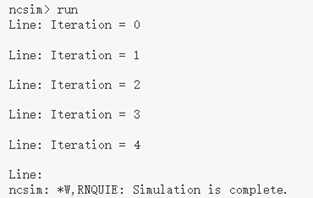
在前面的示例中,我们 $fgets() 两次使用系统任务从文件中读取两行。SystemVerilog 有 另一个任务调用 $feof() ,当到达文件末尾时返回 true。这可以在循环中使用,如下所示以读取文件的全部内容。
例子
module tb;
 int fd; // Variable for file descriptor handle
 string line; // String value read from the file
 initial begin
 // 1. Lets first open a new file and write some contents into it
 fd = $fopen ("trial", "w");
 for (int i = 0; i < 5; i++) begin
 $fdisplay (fd, "Iteration = %0d", i);
 end
 $fclose(fd);
 // 2. Let us now read back the data we wrote in the previous step
 fd = $fopen ("trial", "r");
 while (!$feof(fd)) begin
 $fgets(line, fd);
 $display ("Line: %s", line);
 end
 // Close this file handle
 $fclose(fd);
 end
endmodule
1.2.5 解析值的行
SystemVerilog 有另一个名为的系统任务 $fscanf() ,它允许我们扫描并获取某些值。
例子
module tb;
 int fd; // Variable for file descriptor handle
 int idx;
 string str;
 initial begin
 // 1. Lets first open a new file and write some contents into it
 fd = $fopen ("trial", "w");
 for (int i = 0; i < 5; i++)
 $fdisplay (fd, "Iteration = %0d", i);
 $fclose(fd);
 // 2. Let us now read back the data we wrote in the previous step
 fd = $fopen ("trial", "r");
 // fscanf returns the number of matches
 while ($fscanf (fd, "%s = %0d", str, idx) == 2) begin
 $display ("Line: %s = %0d", str, idx);
 end
 // Close this file handle
 $fclose(fd);
 end
endmodule
1.2.6 多通道文件描述符
mcd是一个 32 位压缩数组值,其中设置了一个位,指示打开哪个文件。mcd 的 LSB 总是指 标准输出。输出被定向到使用多通道描述符打开的两个或多个文件,方法是将它们的mcd按 位或运算在一起,并写入结果值。
1.3 范围解析运算符::
范围解析运算符 :: 用于引用类范围内的标识符。 范围解析运算符 :: 的左侧应该是类类型名称、包名称、覆盖组类型名称、覆盖点或交叉名称、 typedef 名称。运算符的右侧应该是一个标识符,如变量或方法名称。
1.3.1 使用范围解析运算符原因
类和其他作用域可以具有相同的标识符名称,并且如果在未指定作用域的情况下被引用,则可能会产生命名空间冲突。范围解析运算符 :: 唯一标识给定类的成员或参数。 它们还用于从类外部访问类的静态变量和方法、参数和局部参数。它还允许从子类中访问基类的公共和受保护成员。
1.3.2 例子
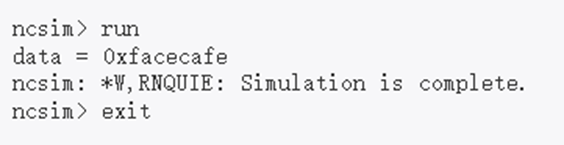
1.3.2.1 定义外部函数
class ABC;
int data;
extern virtual function void display();
endclass
// Definition of an external function using scope
// resolution operator
function void ABC::display();
$display("data = 0x%0h", data);
endfunction
module tb;
initial begin
ABC abc = new();
abc.data = 32'hface_cafe;
abc.display();
end
endmodule
1.3.2.2 访问静态方法和函数
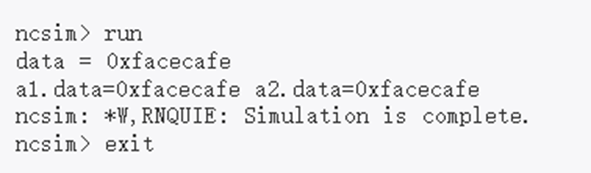
class ABC;

static int data;

static function void display();

$display("data = 0x%0h", data);

endfunction

endclass

module tb;
initial begin
 ABC a1, a2;
 // Assign to static variable before creating
 // class objects, and display using class_type and
 // scope resolution operator
ABC::data = 32'hface_cafe;
ABC::display();
 a1 = new();
 a2 = new();
 $display ("a1.data=0x%0h a2.data=0x%0h", a1.data, a2.data);
end
endmodule
1.3.2.3 使用包
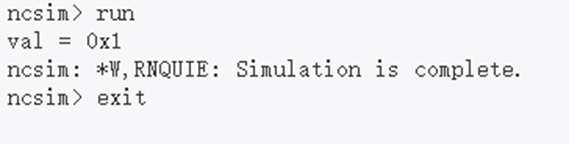
package my_pkg;
typedef enum bit {FALSE, TRUE} e_bool;
endpackage
module tb;
 bit val;
 initial begin
 // Refer to types that have been declared
 // in a package. Note that package has to
 // be included in compilation but not
 // necessarily "imported"
 val = my_pkg::TRUE;
 $display("val = 0x%0h", val);
 end
endmodule
1.3.2.4 避免命名空间冲突
package my_pkg;
typedef enum bit {FALSE, TRUE} e_bool;
endpackage
import my_pkg::*;
module tb;
 typedef enum bit {TRUE, FALSE} e_bool;
 initial begin
 e_bool val;
// Be explicit and say that TRUE from my_pkg
 // should be assigned to val
 val = my_pkg::TRUE;
 $display("val = 0x%0h", val);
 // TRUE from current scope will be assigned to
 // val
 val = TRUE;
 $display("val = 0x%0h", val);
 end
endmodule


 浙公网安备 33010602011771号