

Scrapy爬虫框架(一)
Scrapy爬虫框架
一、创建爬虫:scrapy startproject SpiderName
建议创建完成后,将最外层的文件夹名称改名,否则后续操作导入settings或items文件时会出错
运行爬虫:scrapy crawl name
运行爬虫并保存为json文件:scrapy crawl name -o xxx.json
二、框架结构:
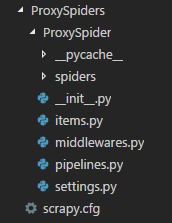
spiders文件夹:其中为爬虫py文件存放处
items.py文件:定义公共输出数据格式,Scrapy会将提取的数据作为dict返回
middlewares.py:中间件
pipelines.py:管道,爬虫提取出的数据会推送到pipelines.py进行后续处理,如存入数据库,清理html数据,验证数据,检查重复项等
settings.py:设置,进行自定义所有Scrapy组件的行为
三、文件简单用法:
(一)、items.py:
设置需要提取的信息字段,使用Field类,提取多少种就设置多少种,比如例子中,title为提取数据得到的dict中的key值
1 class LianjiaspiderItem(scrapy.Item):
2     title = scrapy.Field()
3     total_price = scrapy.Field()
4     unit_price = scrapy.Field()
5     houseInfo = scrapy.Field()
6     positionInfo = scrapy.Field()
7     url = scrapy.Field()
(二)、settings.py
在设置文件中,一般可以设置:
1、USER-AGENT = " ... " :请求头中User-Agent的信息,进行伪装
2、DOWNLOAD_DELAY = num :下载延迟,区间为0.5*num ~ 1.5*num随机数,
3、ITEM_PIPELINES :启用pipelines文件管道,数字代表优先级一般在0-1000,数值越小越优先
(三)、pipelines.py
例如:保存数据到redis数据库中:
 1 import redis
 2 import requests
 3
 4 class ProxyspiderPipeline(object):
 5     def __init__(self):
 6         self.db = redis.StrictRedis(host="localhost",port=6379,db=15,password="123456")
 7
 8     def process_item(self, item, spider):
 9         try:
10             url = "http://ip.chinaz.com/getip.aspx"
11             ip = "http://" + item["proxy"]
12             proxy = {"http": ip}
13             headers = {
14                 "User-Agent": "Mozilla/5.0 (Windows NT 10.0; Win64; x64) AppleWebKit/537.36 (KHTML, like Gecko) Chrome/58.0.3029.110 Safari/537.36"
15             }
16             requests.get(url, headers=headers, proxies=proxy, timeout=3)  # 此处进行判断爬取到的代理IP是否可用,进行测试
17             self.db.sadd("usable_proxy", item["proxy"]) # redis的sadd方法,将数据存入到数据库set集合中
18             print("已存入" + item["proxy"])
19         except Exception:
20             print(item["proxy"] + "无法使用")
21         return item
(四)、middlewares.py
占坑
四、写爬虫代码
在spiders文件夹中,创建py文件
Scrapy提供了五种爬虫类,Spider及其子类CrawlSpider、XMLFeedSpider、CSVFeedSpider、SitemapSpider
Spider爬虫 1、需要继承Scrapy.Spider类
2、name属性:爬虫唯一性名称,在运行命令中的name,在此定义
3、start_urls = [url]:设置起始网页,效果等同于start_requests函数,函数中callback指定将请求的结果传递给parse函数处理,即回调函数
4、allowed_domains = [] :设定允许爬虫抓取的网页,可设定域名
5、创建parse函数,进行数据处理,接受参数response进行解析,解析使用response.css(" ")或response.xpath(" ")
通过css()或xpath()方法得到的结果具备提取方法:
(1) extract():提取符合筛选条件的结果的集合 返回值为unicode字符串列表
(2) extract_first():提取符合筛选条件的第一个结果 返回值为unicode字符串
6、导入items.py中之前定义的Item类
在parse()函数中,将提取出的结果组合成字典,最后yield item
例如:获取郑州链家二手房信息
 1 from scrapy import Spider, Request
 2 from LianJiaSpider.items import LianjiaspiderItem
 3
 4
 5 class LianJiaSpider(Spider):
 6
 7     name = "ershoufang"
 8     allowed_domains = ["lianjia.com"]
 9     start_urls = ["https://zz.lianjia.com/ershoufang/"]
10
11     def parse(self, response):
12
13         for li in response.css("ul.sellListContent li.clear"):
14             item = LianjiaspiderItem()
15
16             item["title"]: li.css("div.title a::text").extract_first(),
17             item["total_price"]: li.css("div.totalPrice span::text").extract_first() + "万",
18             item["unit_price"]: li.css("div.unitPrice span::text").extract_first(),
19             item["houseInfo"]: li.css("div.houseInfo::text").extract_first(),
20             item["positionInfo"]: li.css("div.positionInfo::text").extract_first(),
21             item["url"]: li.css("a::attr(href)").extract_first(),
22             yield item
23
24         nums = response.css("div.house-lst-page-box::attr(page-data)").extract_first().split(",")[0].split(":")[1]  # 获取二手房信息一共有多少页
25         for num in range(2, int(nums) + 1):
26             next_page = "https://zz.lianjia.com/ershoufang/" + "pg" + str(num)
27             yield Request(next_page, self.parse)
至此,一个简单的Scrapy框架爬虫流程就写好了,配合pipelines文件中保存数据的代码,写入文件或者数据库可以将爬取到的信息进行持久化
CrawlSpider爬虫:继承该类制作的爬虫,适用于全站爬取,在起始网页筛选符合定义好的 rules 的链接,进行爬取
相较于Spider类,需要多定义一个rules,来对url进行筛选
LinkExtractor():url提取链接器,根据参数进行提取url
allow:使用正则表达式设置筛选条件,
callback:设置回调函数,CrawlSpider使用parse函数进行实现逻辑,如果重写parse,该爬虫不会起作用,需要新建一个回调函数
follow:是否遵循allow进行提取每条响应中的url,如果没有callback,则默认为True,否则其他为False
 1 from scrapy.linkextractor import LinkExtractor
 2 from scrapy.spider import Rule, CrawlSpider

 3 class xxxxx(CrawlSpider):
 4     rules = (
 5         Rule(LinkExtractor(allow=r'/tag/((\d+)|([\u4e00-\u9fa5]+)|(\w+))$')),
 6         Rule(LinkExtractor(
 7             allow=r"/tag/((\d+)|([\u4e00-\u9fa5]+)|(\w+))\?start=\d+\&type=T$")),
 8         Rule(LinkExtractor(allow=r"/subject/\d+/reviews$")),
 9         Rule(LinkExtractor(allow=r"/subject/\d+/reviews\?start=\d+$")),
10         Rule(LinkExtractor(allow=r'/subject/\d+/$'), callback="parse_book", follow=True),
11         Rule(LinkExtractor(allow=r'/review/\d+/$'), callback="parse_review", follow=True),
12     )
附上个人理解:如上图例子所示,从起始网页start_urls开始,得到所有符合allowed_domains的链接,
根据Rule进行筛选,符合具有callback的Rule规则时,进行下一步的数据提取,
如果是符合前面四条Rule的url,会请求该url搜寻其中的urls,再进行一次筛选,循环往复,直到全站中没有未提取符合的url了,爬虫结束
关于follow参数,只有我们对每个response需要进一步提取时,才使用follow,它会过滤一次response的urls,再进一步得到新的response
同时也需要注意不要滥用follow,只要为True,每次的response就会被下载,造成资源浪费
至于写多少个Rule,需要看目标网站中,关于我们需要的数据相关的网站域名有多少种是相关联的
Scrapy.spider.CrawlSpider的文档中,关于rules:
Which is a list of one (or more) Rule objects. Each Rule defines a certain behaviour for crawling the site.
它是一个或多个规则对象的列表,每个规则都定义了爬行站点的规则。
Rules objects are described below. If multiple rules match the same link, the first one will be used, according to the order they’re defined in this attribute.
规则对象描述如下。如果多个规则匹配相同的链接,则将根据该属性(rules)中定义的顺序使用第一个规则(Rule)

 浙公网安备 33010602011771号