

102302149赖翊煊数据采集与融合技术第四次作业
作业一
代码及其结果展示
点击查看代码
from selenium import webdriver
from selenium.webdriver.firefox.service import Service
from selenium.webdriver.firefox.options import Options
from selenium.webdriver.common.by import By
from selenium.webdriver.support.ui import WebDriverWait
from selenium.webdriver.support import expected_conditions as EC
import pymysql
import time
import re
import os
from datetime import datetime
import json

# 1. 定义数值解析逻辑
def parse_value(text):
    if not text or text.strip() in ['-', '--', '']:
        return 0.00

    text = text.strip()

    if '万' in text:
        cleaned = re.sub(r'[^\d.-]', '', text)
        num = float(cleaned)
        return round(num / 10000, 4)

    elif '亿' in text:
        cleaned = re.sub(r'[^\d.-]', '', text)
        num = float(cleaned)
        return round(num, 4)

    elif '%' in text:
        cleaned = re.sub(r'[^\d.-]', '', text)
        num = float(cleaned)
        return round(num, 2)

    else:
        cleaned = re.sub(r'[^\d.-]', '', text)
        if cleaned:
            num = float(cleaned)
            return round(num / 10000, 4)
        else:
            return 0.00

# 2. 初始化数据库
# 获取数据库连接
conn = pymysql.connect(
    host='localhost',
    port=3306,
    user='root',
    password='123456',
    database='stock_db',
    charset='utf8mb4',
    cursorclass=pymysql.cursors.DictCursor
)
cursor = conn.cursor()

# 创建股票信息表
cursor.execute("""
CREATE TABLE IF NOT EXISTS stock_info (
    id BIGINT AUTO_INCREMENT PRIMARY KEY,
    stock_code VARCHAR(20) NOT NULL,
    stock_name VARCHAR(100) NOT NULL,
    latest_price DECIMAL(20,6),
    price_change_rate DECIMAL(15,6),
    price_change_amount DECIMAL(20,6),
    volume DECIMAL(25,6),
    turnover DECIMAL(25,6),
    amplitude DECIMAL(15,6),
    highest_price DECIMAL(20,6),
    lowest_price DECIMAL(20,6),
    opening_price DECIMAL(20,6),
    previous_close DECIMAL(20,6),
    plate VARCHAR(50),
    crawl_time DATETIME DEFAULT CURRENT_TIMESTAMP,
    update_time DATETIME DEFAULT CURRENT_TIMESTAMP ON UPDATE CURRENT_TIMESTAMP,
    UNIQUE KEY uk_stock_plate (stock_code, plate)
) ENGINE=InnoDB DEFAULT CHARSET=utf8mb4;
""")

# 创建日志表
cursor.execute("""
CREATE TABLE IF NOT EXISTS crawl_log (
    id INT AUTO_INCREMENT PRIMARY KEY,
    plate VARCHAR(50) NOT NULL,
    crawl_date DATETIME DEFAULT CURRENT_TIMESTAMP,
    data_count INT NOT NULL,
    status VARCHAR(20) DEFAULT 'success',
    error_msg TEXT
) ENGINE=InnoDB DEFAULT CHARSET=utf8mb4;
""")
conn.commit()
cursor.close()
conn.close()

# 3. 配置Firefox浏览器
options = Options()
firefox_paths = [
    r'C:\Program Files\Mozilla Firefox\firefox.exe',
    r'C:\Program Files (x86)\Mozilla Firefox\firefox.exe'
]
for path in firefox_paths:
    if os.path.exists(path):
        options.binary_location = path
        break

options.add_argument("--start-maximized")

driver_path = r'C:\Users\27387\PycharmProjects\PythonProject\.venv\Scripts\geckodriver.exe'
if not os.path.exists(driver_path):
    driver_path = './geckodriver.exe'

driver = webdriver.Firefox(
    service=Service(driver_path),
    options=options
)
driver.set_page_load_timeout(60)

# 4. 爬取各板块数据
plates = [
    {"url": "http://quote.eastmoney.com/center/gridlist.html#hs_a_board", "name": "沪深京A股"},
    {"url": "http://quote.eastmoney.com/center/gridlist.html#sh_a_board", "name": "上证A股"},
    {"url": "http://quote.eastmoney.com/center/gridlist.html#sz_a_board", "name": "深证A股"}
]

for plate in plates:
    print(f"\n爬取【{plate['name']}】...")
    driver.get(plate["url"])
    time.sleep(8)

    # 提取股票数据
    stock_list = []
    WebDriverWait(driver, 20).until(
        EC.presence_of_element_located((By.XPATH, "//div[@class='quotetable']//table"))
    )

    rows = driver.find_elements(By.XPATH, "//div[@class='quotetable']//table//tbody/tr")

    for row in rows:
        cols = row.find_elements(By.TAG_NAME, "td")
        col_texts = [col.text.strip() for col in cols if col.text.strip()]

        if len(col_texts) < 13:
            continue

        stock_info = {
            "stock_code": col_texts[1],
            "stock_name": col_texts[2],
            "latest_price": parse_value(col_texts[4]),
            "price_change_rate": parse_value(col_texts[5]),
            "price_change_amount": parse_value(col_texts[6]),
            "volume": parse_value(col_texts[7]),
            "turnover": parse_value(col_texts[8]),
            "amplitude": parse_value(col_texts[9]),
            "highest_price": parse_value(col_texts[10]),
            "lowest_price": parse_value(col_texts[11]),
            "opening_price": parse_value(col_texts[12]),
            "previous_close": parse_value(col_texts[13]),
            "plate": plate_name
        }

        if stock_info["stock_code"] and len(stock_info["stock_code"]) >= 6:
            stock_list.append(stock_info)

    # 保存数据到数据库(原save_stock_data_to_db函数内容)
    if stock_list:
        conn = pymysql.connect(
            host='localhost',
            port=3306,
            user='root',
            password='123456',
            database='stock_db',
            charset='utf8mb4',
            cursorclass=pymysql.cursors.DictCursor
        )
        cursor = conn.cursor()

        insert_sql = """
        INSERT INTO stock_info (
            stock_code, stock_name, latest_price, price_change_rate,
            price_change_amount, volume, turnover, amplitude,
            highest_price, lowest_price, opening_price, previous_close, plate
        ) VALUES (%s, %s, %s, %s, %s, %s, %s, %s, %s, %s, %s, %s, %s)
        ON DUPLICATE KEY UPDATE
            stock_name = VALUES(stock_name),
            latest_price = VALUES(latest_price),
            price_change_rate = VALUES(price_change_rate),
            price_change_amount = VALUES(price_change_amount),
            volume = VALUES(volume),
            turnover = VALUES(turnover),
            amplitude = VALUES(amplitude),
            highest_price = VALUES(highest_price),
            lowest_price = VALUES(lowest_price),
            opening_price = VALUES(opening_price),
            previous_close = VALUES(previous_close),
            update_time = CURRENT_TIMESTAMP
        """

        data_list = [(
            s['stock_code'], s['stock_name'], s['latest_price'], s['price_change_rate'],
            s['price_change_amount'], s['volume'], s['turnover'], s['amplitude'],
            s['highest_price'], s['lowest_price'], s['opening_price'], s['previous_close'], s['plate']
        ) for s in stock_list]

        cursor.executemany(insert_sql, data_list)

        cursor.execute("INSERT INTO crawl_log (plate, data_count) VALUES (%s, %s)",
                       (plate['name'], len(stock_list)))

        conn.commit()
        cursor.close()
        conn.close()
        print(f"成功爬取 {len(stock_data)} 条数据")
    else:
        print("未提取到任何数据")

# 5. 关闭浏览器
driver.quit()
print("\n所有板块爬取完成!")

心得体会
Selenium 在处理 Ajax 动态加载的网页时展现出独特优势。相较于传统爬虫库,它能模拟浏览器渲染页面,解决了股票数据异步加载难以直接抓取的问题,而合理运用显式等待(WebDriverWait)则有效避免了元素未加载完成导致的定位失败,让我深刻体会到 “等待” 在动态网页爬取中的核心作用。
此次实践让我将理论知识落地,既掌握了 Selenium 处理动态页面的核心技巧,也理解了数据爬取到存储全流程的逻辑,更认识到编程实践中严谨和复盘的重要性,为后续处理更复杂的爬虫场景积累了宝贵经验。
作业二
代码及其结果展示
点击查看代码
from selenium import webdriver
from selenium.webdriver.common.by import By
from selenium.webdriver.firefox.service import Service
from selenium.webdriver.support.wait import WebDriverWait
from selenium.webdriver.support import expected_conditions as EC
import time
import pymysql

options = webdriver.FirefoxOptions()
# 反爬配置
options.set_preference("dom.webdriver.enabled", False)
options.add_argument('--disable-blink-features=AutomationControlled')
options.add_argument("--disable-blink-features=AutomationControlled")
options.add_argument('--no-sandbox')
# 指定geckodriver路径
service = Service(r"C:\Users\27387\PycharmProjects\PythonProject\.venv\Scripts\geckodriver.exe")
driver = webdriver.Firefox(service=service, options=options)
driver.maximize_window()

# 数据库连接
db = pymysql.connect(host='127.0.0.1', user='root', password='123456', port=3306, database='mooc_db')
cursor = db.cursor()
cursor.execute('DROP TABLE IF EXISTS courseMessage')
sql = '''CREATE TABLE courseMessage(cCourse varchar(64),cCollege varchar(64),cTeacher varchar(16),cTeam varchar(256),cCount varchar(16),
cProcess varchar(32),cBrief varchar(2048))'''
cursor.execute(sql)

def spiderOnePage():
    time.sleep(3)
    courses = driver.find_elements(By.XPATH, '//*[@id="channel-course-list"]/div/div/div[2]/div[1]/div')
    current_window_handle = driver.current_window_handle
    for course in courses:
        cCourse = course.find_element(By.XPATH, './/h3').text  # 提取课程名称
        cCollege = course.find_element(By.XPATH, './/p[@class="_2lZi3"]').text  # 提取院校
        cTeacher = course.find_element(By.XPATH, './/div[@class="_1Zkj9"]').text  # 提取老师
        cCount = course.find_element(By.XPATH, './/div[@class="jvxcQ"]/span').text  # 提取学校人数
        cProcess = course.find_element(By.XPATH, './/div[@class="jvxcQ"]/div').text  # 提取课程进度

        course.click()
        Handles = driver.window_handles
        if len(Handles) < 2:
            continue
        driver.switch_to.window(Handles[1])
        time.sleep(3)

        # 提取课程详情
        cBrief = driver.find_element(By.XPATH, '//*[@id="j-rectxt2"]').text  # 先通过固定ID找简介
        if len(cBrief) == 0:
            cBriefs = driver.find_elements(By.XPATH, '//*[@id="content-section"]/div[4]/div//*')  # 获取简介区块下的所有子元素
            cBrief = ""
            for c in cBriefs:
                cBrief += c.text
        cBrief = cBrief.replace('"', r'\"').replace("'", r"\'")
        cBrief = cBrief.strip()
        nameList = []
        cTeachers = driver.find_elements(By.XPATH, '//div[@class="um-list-slider_con_item"]')  # 提取授课团队
        for Teacher in cTeachers:
            name = Teacher.find_element(By.XPATH, './/h3[@class="f-fc3"]').text.strip()
            nameList.append(name)
        nextButton = driver.find_elements(By.XPATH, '//div[@class="um-list-slider_next f-pa"]')  # 提取下一页按钮
        while len(nextButton) != 0:
            nextButton[0].click()
            time.sleep(3)
            cTeachers = driver.find_elements(By.XPATH, '//div[@class="um-list-slider_con_item"]')
            for Teacher in cTeachers:
                name = Teacher.find_element(By.XPATH, './/h3[@class="f-fc3"]').text.strip()
                nameList.append(name)
            nextButton = driver.find_elements(By.XPATH, '//div[@class="um-list-slider_next f-pa"]')
        cTeam = ','.join(nameList)

        # 关闭详情页
        driver.close()
        driver.switch_to.window(current_window_handle)

        # 插入数据库
        cursor.execute('INSERT INTO courseMessage VALUES ("%s","%s","%s","%s","%s","%s","%s")' % (
        cCourse, cCollege, cTeacher, cTeam, cCount, cProcess, cBrief))
        db.commit()

driver.get('https://www.icourse163.org/')
driver.get(WebDriverWait(driver, 10, 0.48).until(EC.presence_of_element_located((By.XPATH, '//*[@id="app"]/div/div/div[1]/div[1]/div[1]/span[1]/a'))).get_attribute('href'))
spiderOnePage()
count = 1
# 翻页逻辑
next_page = driver.find_element(By.XPATH, '//*[@id="channel-course-list"]/div/div/div[2]/div[2]/div/a[10]')
while next_page.get_attribute('class') == '_3YiUU ':
    if count == 2:
        break
    count += 1
    next_page.click()
    spiderOnePage()
    next_page = driver.find_element(By.XPATH, '//*[@id="channel-course-list"]/div/div/div[2]/div[2]/div/a[10]')

# 关闭数据库连接
cursor.close()
db.close()

time.sleep(3)
driver.quit()

心得体会
在爬取过程中遇到爬取多个任课老师遗漏的问题,采取循环,每次都重新定位到成员卡片位置,直到找不到下一个数据为止,然后再用逗号拼接字符串。
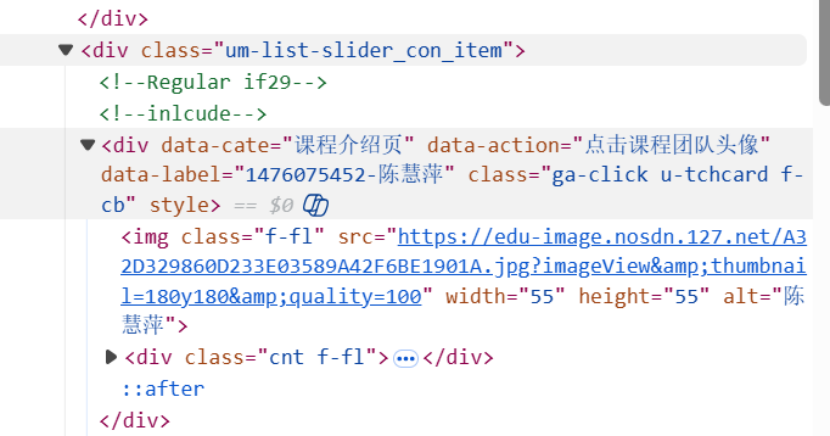

在爬虫实现层面,我深刻体会到 Selenium 处理动态交互场景的优势:模拟用户点击课程卡片、切换浏览器窗口、点击团队成员翻页按钮等操作,完美解决了 Ajax 异步加载的课程简介、授课团队等数据无法直接抓取的问题;而显式等待的合理运用,有效规避了元素加载延迟导致的定位失败,让我意识到 “精准等待” 是提升爬虫稳定性的关键。同时,XPath 定位的细节处理(如相对路径、多场景适配课程简介提取),也让我掌握了动态页面元素定位的核心技巧。
作业三
Python脚本生成测试数据

Kafka配置成功

安装flume运行环境

测试flume,kafka通道


gitee链接:https://gitee.com/lai-yixuan/2025_crawl_project/tree/master/作业4

 浙公网安备 33010602011771号