
python学习笔记(一)matplotlib、numpy、Pandas
整合自网络与https://space.bilibili.com/243821484?from=search&seid=8124768530697300938
2.numpy
-
2.1 平均值
使用np.mean()函数,numpy.mean(a, axis, dtype)
假设a为[time,lat,lon]的数据,那么
·axis 不设置值,对 timelatlon 个值求均值,返回一个数
·axis = 0:压缩时间维,对每一个经纬点求均值,返回 [lat, lon] 数组(如求一个场的N年气候态)
·axis =1,2 :压经度纬度,对每个时间求平均值,返回 [time] 矩阵(如求某时间序列,或指数)
需要特别注意的是,气象数据中常有缺测,在NCL中,使用求均值函数会自动略过,而在python中,当任意一数与缺测(np.nan)计算的结果均为np.nan,比如求[1,2,3,4,np.nan]的平均值,结果为np.nan
因此,当数据存在缺测数据时,通常使用np.nanmean()函数,用法同上,此时[1,2,3,4,np.nan]的平均值为(1+2+3+4)/4 = 2.5
同样的,求某数组最大最小值时也有np.nanmax(), np.nanmin()函数来补充np.max(), np.min()的不足。
其他很多np的计算函数也可以通过在前边加‘nan’来使用。
-
2.2 增减维数
增加
在操作数组情况下,需要按照某个轴将不同数组的维度对齐,这时候需要为数组添加维度(特别是将二维数组变成高维张量的情况下)。numpy提供了expand_dims()函数来为数组增加维度:
 1 import numpy as np
 2
 3 a = np.array([[1,2],[3,4]])
 4 a.shape
 5 print(a)
 6 >>>
 7 """
 8 (2L, 2L)
 9 [[1 2]
10  [3 4]]
11 """
12 # 如果需要在数组上增加维度,输入需要增添维度的轴即可,注意index从零还是
13 a_add_dimension = np.expand_dims(a,axis=0)
14 a_add_dimension.shape
15 >>> (1L, 2L, 2L)
16
17 a_add_dimension2 = np.expand_dims(a,axis=-1)
18 a_add_dimension2.shape
19 >>> (2L, 2L, 1L)
20
21
22 a_add_dimension3 = np.expand_dims(a,axis=1)
23 a_add_dimension3.shape
24 >>> (2L, 1L, 2L)
squeeze函数来压缩冗余维度1 e= np.arange(10) 2 e 3 array([0, 1, 2, 3, 4, 5, 6, 7, 8, 9])
1 e.reshape(1,1,10)
2 array([[[0, 1, 2, 3, 4, 5, 6, 7, 8, 9]]])
 1 e.reshape(1,1,10)
 2 array([[[0, 1, 2, 3, 4, 5, 6, 7, 8, 9]]])
 3 e.reshape(1,10,1)
 4 array([[[0],
 5         [1],
 6         [2],
 7         [3],
 8         [4],
 9         [5],
10         [6],
11         [7],
12         [8],
13         [9]]])
squeeze 函数:从数组的形状中删除单维度条目,即把shape中为1的维度去掉
用法:numpy.squeeze(a,axis = None)
-
a表示输入的数组;
-
axis用于指定需要删除的维度,但是指定的维度必须为单维度,否则将会报错;
-
axis的取值可为None 或 int 或 tuple of ints, 可选。若axis为空,则删除所有单维度的条目;
-
返回值:数组
-
不会修改原数组;
1 a = e.reshape(1,1,10)
2 a
3 array([[[0, 1, 2, 3, 4, 5, 6, 7, 8, 9]]])
4 np.squeeze(a)
5 array([0, 1, 2, 3, 4, 5, 6, 7, 8, 9])
3.Pandas
如果用 python 的列表和字典来作比较, 那么可以说 Numpy 是列表形式的,没有数值标签,而 Pandas 就是字典形式
1 import pandas as pd
2 import numpy as np
3 s = pd.Series([1,3,6,np.nan,44,1])
5 print(s)
###################
0     1.0
1     3.0
2     6.0
3     NaN
4    44.0
5     1.0
dtype: float64
###################
Series的字符串表现形式为:索引在左边,值在右边。由于我们没有为数据指定索引。
-
3.1DataFrame
1 dates = pd.date_range('20160101',periods=6)
2 print(dates)
3 df = pd.DataFrame(np.random.randn(6,4),index=dates,columns=['a','b','c','d']) # 行 列
5 print(df)
#############################################################################
DatetimeIndex(['2016-01-01', '2016-01-02', '2016-01-03', '2016-01-04',
               '2016-01-05', '2016-01-06'],
              dtype='datetime64[ns]', freq='D')
                   a         b         c         d
2016-01-01 -0.362729  0.025856 -0.453970  0.521317
2016-01-02 -0.694964 -0.418078 -0.034875 -0.382649
2016-01-03 -1.308891 -0.465486 -0.892237 -0.094203
2016-01-04  0.331540  0.621307  0.033407 -1.490113
2016-01-05 -1.770037  1.443139 -0.465179 -1.571931
2016-01-06  0.017418 -0.007310  1.151194 -0.043637
#############################################################################
DataFrame是一个表格型的数据结构,它包含有一组有序的列,每列可以是不同的值类型(数值,字符串,布尔值等)。DataFrame既有行索引也有列索引, 它可以被看做由Series组成的大字典。
选择显示pd其中一行
1 print(df['b'])
########################
2016-01-01    0.743081
2016-01-02   -0.558816
2016-01-03    0.287229
2016-01-04    1.850405
2016-01-05    0.619291
2016-01-06    0.847188
Freq: D, Name: b, dtype: float64
########################
不选择显示列索引,默认从零开始
1 df1 = pd.DataFrame(np.arange(12).reshape((3,4)))
2 print(df1)
##########
   0  1   2   3
0  0  1   2   3
1  4  5   6   7
2  8  9  10  11
##########
显示列的序号、数据的名称、所有的值
 1 df2 = pd.DataFrame({'A' : 1.,
 2                     'B' : pd.Timestamp('20130102'),
 3                     'C' : pd.Series(1,index=list(range(4)),dtype='float32'),
 4                     'D' : np.array([3] * 4,dtype='int32'),
 5                     'E' : pd.Categorical(["test","train","test","train"]),
 6                     'F' : 'foo'})
 7
 8 print(df2)
"""
     A          B    C  D      E    F
0  1.0 2013-01-02  1.0  3   test  foo
1  1.0 2013-01-02  1.0  3  train  foo
2  1.0 2013-01-02  1.0  3   test  foo
3  1.0 2013-01-02  1.0  3  train  foo
"""
1 print(df2.index)
"""
Int64Index([0, 1, 2, 3], dtype='int64')
"""
1 print(df2.columns)
"""
Index(['A', 'B', 'C', 'D', 'E', 'F'], dtype='object')
"""
1 print(df2.values)
"""
array([[1.0, Timestamp('2013-01-02 00:00:00'), 1.0, 3, 'test', 'foo'],
       [1.0, Timestamp('2013-01-02 00:00:00'), 1.0, 3, 'train', 'foo'],
       [1.0, Timestamp('2013-01-02 00:00:00'), 1.0, 3, 'test', 'foo'],
       [1.0, Timestamp('2013-01-02 00:00:00'), 1.0, 3, 'train', 'foo']], dtype=object)
"""
显示行索引信息
1 print(df2.dtypes)
"""
df2.dtypes
A           float64
B    datetime64[ns]
C           float32
D             int32
E          category
F            object
dtype: object
"""
数据的总结。只针对数值类型
1 df2.describe()
        A      C      D
count    4.0    4.0    4.0
mean    1.0    1.0    3.0
std    0.0    0.0    0.0
min    1.0    1.0    3.0
25%    1.0    1.0    3.0
50%    1.0    1.0    3.0
75%    1.0    1.0    3.0
max    1.0    1.0    3.0
翻转数据
1 print(df2.T)
                     0                    1                    2  \
A                    1                    1                    1
B  2013-01-02 00:00:00  2013-01-02 00:00:00  2013-01-02 00:00:00
C                    1                    1                    1
D                    3                    3                    3
E                 test                train                 test
F                  foo                  foo                  foo

                     3
A                    1
B  2013-01-02 00:00:00
C                    1
D                    3
E                train
F                  foo
对数据的 index 进行排序并输出
1 print(df2.sort_index(axis=0, ascending=True)) #axis=0为选择列索引,axis=1为选择行索引
2 print(df2.sort_index(axis=1, ascending=False)) #ascending=True为正序,False为倒序
     A          B    C  D      E    F
0  1.0 2013-01-02  1.0  3   test  foo
1  1.0 2013-01-02  1.0  3  train  foo
2  1.0 2013-01-02  1.0  3   test  foo
3  1.0 2013-01-02  1.0  3  train  foo
     F      E  D    C          B    A
0  foo   test  3  1.0 2013-01-02  1.0
1  foo  train  3  1.0 2013-01-02  1.0
2  foo   test  3  1.0 2013-01-02  1.0
3  foo  train  3  1.0 2013-01-02  1.0
对数据 值 某一列 排序输出:
1 print(df2.sort_values(by='E'))
     A          B    C  D      E    F
0  1.0 2013-01-02  1.0  3   test  foo
2  1.0 2013-01-02  1.0  3   test  foo
1  1.0 2013-01-02  1.0  3  train  foo
3  1.0 2013-01-02  1.0  3  train  foo
-
3.2 选择数据
1 dates = pd.date_range('20130101', periods=6)
2 df = pd.DataFrame(np.arange(24).reshape((6,4)),index=dates, columns=['A','B','C','D'])
3 df
"""
             A   B   C   D
2013-01-01   0   1   2   3
2013-01-02   4   5   6   7
2013-01-03   8   9  10  11
2013-01-04  12  13  14  15
2013-01-05  16  17  18  19
2013-01-06  20  21  22  23
"""
选择某一列
1 print(df['A'])
2 或者
3 print(df.A)
"""
2013-01-01     0
2013-01-02     4
2013-01-03     8
2013-01-04    12
2013-01-05    16
2013-01-06    20
"""
选择跨越多行或多列
1 print(df[0:3])
"""
            A  B   C   D
2013-01-01  0  1   2   3
2013-01-02  4  5   6   7
2013-01-03  8  9  10  11
"""
1 print(df[0:3]["A"])
"""
2013-01-01    0
2013-01-02    4
2013-01-03    8
"""
1 print(df['20130102':'20130104'])
"""
A   B   C   D
2013-01-02   4   5   6   7
2013-01-03   8   9  10  11
2013-01-04  12  13  14  15
"""
loc 使用标签来选择数据
1 print(df.loc['20130102'])
"""
A    4
B    5
C    6
D    7
Name: 2013-01-02 00:00:00, dtype: int64
"""
1 print(df.loc[:,['A','B']])
1 """
2              A   B
3 2013-01-01   0   1
4 2013-01-02   4   5
5 2013-01-03   8   9
6 2013-01-04  12  13
7 2013-01-05  16  17
8 2013-01-06  20  21
9 """
1 print(df.loc['20130102',['A','B']])
"""
A    4
B    5
Name: 2013-01-02 00:00:00, dtype: int64
"""
iloc 根据序列来选择数据
1 print(df)
2 print(df.iloc[3,1])    #第4行第2列
'''
             A   B   C   D
2013-01-01   0   1   2   3
2013-01-02   4   5   6   7
2013-01-03   8   9  10  11
2013-01-04  12  13  14  15
2013-01-05  16  17  18  19
2013-01-06  20  21  22  23


13

'''
1 print(df.iloc[3:5,1:3]) # 第三行到第五行,第一列到第三列
"""
             B   C
2013-01-04  13  14
2013-01-05  17  18
"""
1 print(df.iloc[[1,3,5],1:3])
"""
             B   C
2013-01-02   5   6
2013-01-04  13  14
2013-01-06  21  22

"""
通过判断的筛选
1 print(df[df.A>8])
"""
             A   B   C   D
2013-01-04  12  13  14  15
2013-01-05  16  17  18  19
2013-01-06  20  21  22  23
"""
当有条件筛选时,如下图筛选出所有C列PM2.5在I列1006A处的值:
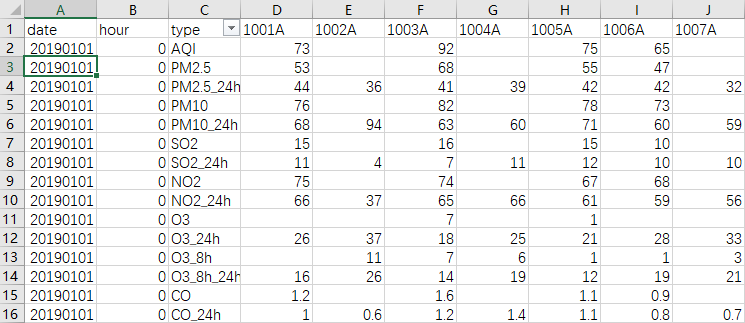
1 path = 'D:\python\站点_20190101-20191231\china_sites_20190101.csv'
2 csv_data = pd.read_csv(path)
3 aa=csv_data[csv_data['type'] == 'PM2.5'][['type', '1006A']]
4 aa
######
    1006A
1    47.0
16    44.0
31    43.0
46    40.0
61    42.0
76    46.0
91    47.0
106    49.0
121    47.0
136    53.0
151    46.0
166    34.0
。。。。。。
#######
3.2 编辑、写入值
1 # 创建数据
2 dates = pd.date_range('20130101', periods=6)
3 df = pd.DataFrame(np.arange(24).reshape((6,4)),index=dates, columns=['A','B','C','D'])
"""
             A   B   C   D
2013-01-01   0   1   2   3
2013-01-02   4   5   6   7
2013-01-03   8   9  10  11
2013-01-04  12  13  14  15
2013-01-05  16  17  18  19
2013-01-06  20  21  22  23
"""
根据位置用loc 和 iloc设置
1 df.iloc[2,2] = 1111
2 df.loc['20130101','B'] = 2222
"""
             A     B     C   D
2013-01-01   0  2222     2   3
2013-01-02   4     5     6   7
2013-01-03   8     9  1111  11
2013-01-04  12    13    14  15
2013-01-05  16    17    18  19
2013-01-06  20    21    22  23
"""
根据条件设置
1 df.B[df.A>4] = 0 #A列>4时,B列数据等于0
"""
             A     B     C   D
2013-01-01   0  2222     2   3
2013-01-02   4     5     6   7
2013-01-03   8     0  1111  11
2013-01-04  12     0    14  15
2013-01-05  16     0    18  19
2013-01-06  20     0    22  23
"""
按行或列设置
1 df['F'] = np.nan
"""
             A     B     C   D   F
2013-01-01   0  2222     2   3 NaN
2013-01-02   4     5     6   7 NaN
2013-01-03   8     0  1111  11 NaN
2013-01-04  12     0    14  15 NaN
2013-01-05  16     0    18  19 NaN
2013-01-06  20     0    22  23 NaN
"""
生成日期
1 date_l=[datetime.strftime(x,'%Y%m%d') for x in list(pd.date_range(start="20190101", end="20190131"))]
#'%Y%m%d'可以改变生成日期格式,如%Y-%m-%d,
['20190101',
 '20190102',
 '20190103',
 '20190104',
 '20190105',
 '20190106',
 '20190107',
 '20190108',
 '20190109',
 '20190110',
 '20190111',
 '20190112',
 '20190113',
 '20190114',
 '20190115',
 '20190116',
 '20190117',
 '20190118',
 '20190119',
 '20190120',
 '20190121',
 '20190122',
 '20190123',
 '20190124',
 '20190125',
 '20190126',
 '20190127',
 '20190128',
 '20190129',
 '20190130',
 '20190131']
处理nan
1.直接删除,将含有NaN的列(columns)去掉:
1 import pandas as pd
2
3 df = pd.DataFrame({'a':[None,1,2,3],'b':[4,None,None,6],'c':[1,2,1,2],'d':[7,7,9,2]})
4 print (df)
5
6 print (df.isnull().sum())
7 #查找有多少nan
     a    b  c  d
0  NaN  4.0  1  7
1  1.0  NaN  2  7
2  2.0  NaN  1  9
3  3.0  6.0  2  2
a    1
b    2
c    0
d    0
dtype: int64
1 data_without_NaN =df.dropna(axis=1)
2 print (data_without_NaN)
   c  d
0  1  7
1  2  7
2  1  9
3  2  2
2.遗失值插补法
以均值填补
1 from sklearn.preprocessing import Imputer
2 # 或者from sklearn.impute import SimpleImputer
3 my_imputer = Imputer()
4 data_imputed = my_imputer.fit_transform(df)
5 print (type(data_imputed))
6 # array转换成df
7 df_data_imputed = pd.DataFrame(data_imputed,columns=df.columns)
8 print (df_data_imputed)
     a    b    c    d
0  2.0  4.0  1.0  7.0
1  1.0  5.0  2.0  7.0
2  2.0  5.0  1.0  9.0
3  3.0  6.0  2.0  2.0

 浙公网安备 33010602011771号