Linux在线扩容
数据盘/dev/sda 空间不够申请在线扩容4T(大于2T),从原来的4T扩展到了8T,需要将新增4T空间添加至vg中,为谨慎起见先在测试环境中经过测试如何容量扩展,现将扩展过程步骤记录下来。
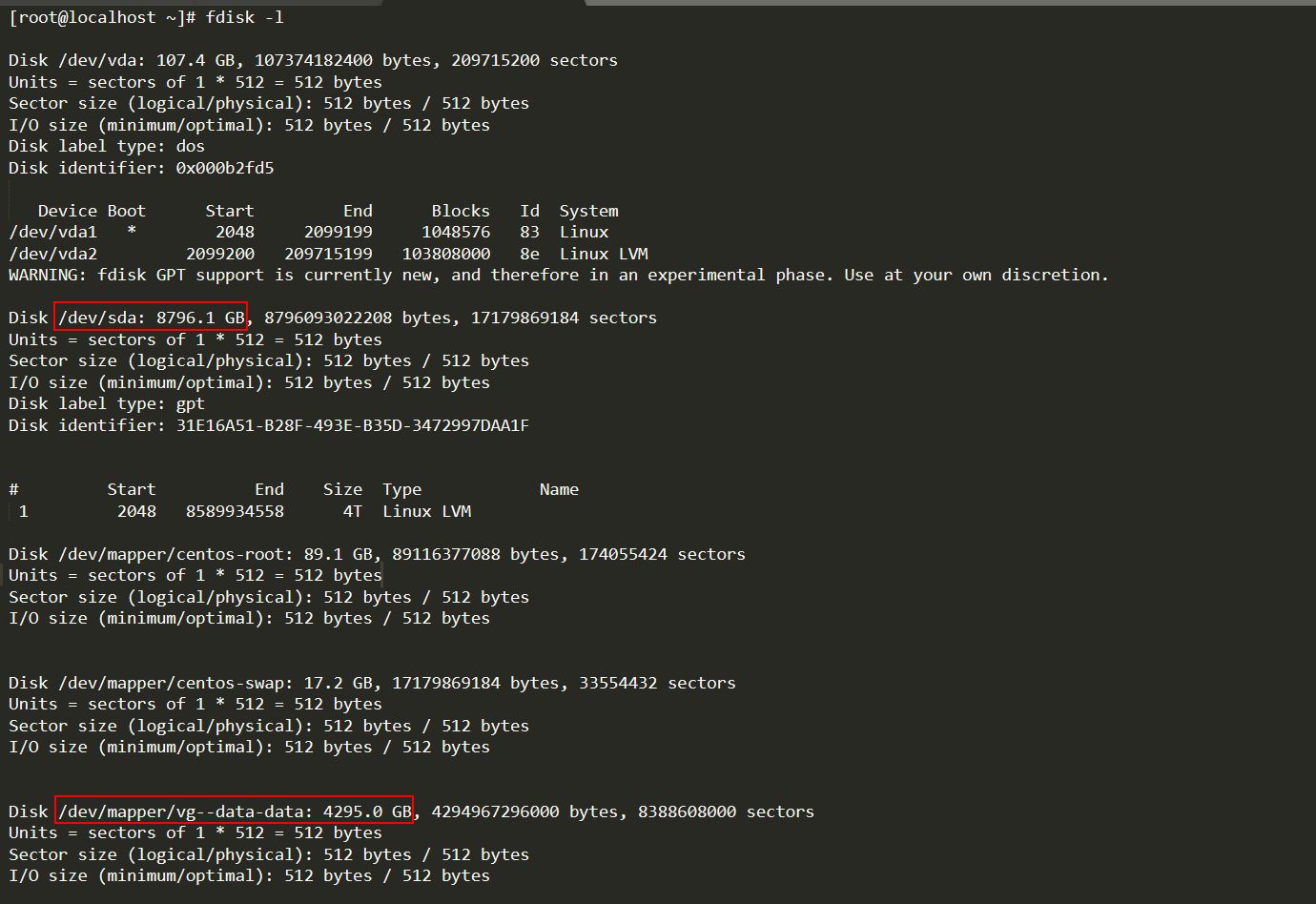
操作过程:
1、虚机新增磁盘
|
1
2
3
4
5
6
7
8
9
10
11
12
13
14
15
16
17
18
19
20
21
22
23
24
25
26
27
28
29
30
31
32
|
[root@cod-vm2 ~]# fdisk -lDisk /dev/sda: 53.7 GB, 53687091200 bytes, 104857600 sectorsUnits = sectors of 1 * 512 = 512 bytesSector size (logical/physical): 512 bytes / 512 bytesI/O size (minimum/optimal): 512 bytes / 512 bytesDisk label type: dosDisk identifier: 0x000b6637 Device Boot Start End Blocks Id System/dev/sda1 * 2048 616447 307200 83 Linux/dev/sda2 616448 4812799 2098176 82 Linux swap / Solaris/dev/sda3 4812800 104857599 50022400 83 Linux[root@cod-vm2 ~]# echo "- - -" > /sys/class/scsi_host/host0/scan[root@cod-vm2 ~]# fdisk -lDisk /dev/sda: 53.7 GB, 53687091200 bytes, 104857600 sectorsUnits = sectors of 1 * 512 = 512 bytesSector size (logical/physical): 512 bytes / 512 bytesI/O size (minimum/optimal): 512 bytes / 512 bytesDisk label type: dosDisk identifier: 0x000b6637 Device Boot Start End Blocks Id System/dev/sda1 * 2048 616447 307200 83 Linux/dev/sda2 616448 4812799 2098176 82 Linux swap / Solaris/dev/sda3 4812800 104857599 50022400 83 LinuxDisk /dev/sdb: 21.5 GB, 21474836480 bytes, 41943040 sectorsUnits = sectors of 1 * 512 = 512 bytesSector size (logical/physical): 512 bytes / 512 bytesI/O size (minimum/optimal): 512 bytes / 512 bytes |
echo "- - -" > /sys/class/scsi_host/host0/scan 意思是Linux下不重启主机识别新增磁盘
2、环境模拟(磁盘一部分分区挂在已使用,一部分未利用)
|
1
2
3
4
5
6
7
8
9
10
11
12
13
14
15
16
17
18
19
20
21
22
23
24
25
26
27
28
29
30
31
32
33
34
35
36
37
38
39
40
41
42
43
44
45
46
47
48
49
50
51
52
53
54
55
56
57
58
59
60
61
62
63
64
65
66
67
68
69
70
71
72
73
74
75
76
77
78
79
80
81
82
83
84
85
86
87
88
89
90
91
92
93
94
95
96
97
98
99
100
101
|
[root@cod-vm2 ~]# parted /dev/sdbGNU Parted 3.1Using /dev/sdbWelcome to GNU Parted! Type 'help' to view a list of commands.(parted) gpt align-check TYPE N check partition N for TYPE(min|opt) alignment help [COMMAND] print general help, or help on COMMAND mklabel,mktable LABEL-TYPE create a new disklabel (partition table) mkpart PART-TYPE [FS-TYPE] START END make a partition name NUMBER NAME name partition NUMBER as NAME print [devices|free|list,all|NUMBER] display the partition table, available devices, free space, all found partitions, or a particular partition quit exit program rescue START END rescue a lost partition near START and END resizepart NUMBER END resize partition NUMBER rm NUMBER delete partition NUMBER select DEVICE choose the device to edit disk_set FLAG STATE change the FLAG on selected device disk_toggle [FLAG] toggle the state of FLAG on selected device set NUMBER FLAG STATE change the FLAG on partition NUMBER toggle [NUMBER [FLAG]] toggle the state of FLAG on partition NUMBER unit UNIT set the default unit to UNIT version display the version number and copyright information of GNU Parted(parted) mklabel gpt (parted) mkpart test xfs 0 10GWarning: The resulting partition is not properly aligned for best performance.Ignore/Cancel? I (parted) print Model: VMware, VMware Virtual S (scsi)Disk /dev/sdb: 21.5GBSector size (logical/physical): 512B/512BPartition Table: gptDisk Flags:Number Start End Size File system Name Flags 1 17.4kB 10.0GB 10000MB test(parted) quit Information: You may need to update /etc/fstab.[root@cod-vm2 ~]# fdisk -l Disk /dev/sda: 53.7 GB, 53687091200 bytes, 104857600 sectorsUnits = sectors of 1 * 512 = 512 bytesSector size (logical/physical): 512 bytes / 512 bytesI/O size (minimum/optimal): 512 bytes / 512 bytesDisk label type: dosDisk identifier: 0x000b6637 Device Boot Start End Blocks Id System/dev/sda1 * 2048 616447 307200 83 Linux/dev/sda2 616448 4812799 2098176 82 Linux swap / Solaris/dev/sda3 4812800 104857599 50022400 83 LinuxWARNING: fdisk GPT support is currently new, and therefore in an experimental phase. Use at your own discretion.Disk /dev/sdb: 21.5 GB, 21474836480 bytes, 41943040 sectorsUnits = sectors of 1 * 512 = 512 bytesSector size (logical/physical): 512 bytes / 512 bytesI/O size (minimum/optimal): 512 bytes / 512 bytesDisk label type: gptDisk identifier: C3E27A78-A2DB-48D5-B922-FB9A13F081CD# Start End Size Type Name 1 34 19531250 9.3G Microsoft basic test[root@cod-vm2 ~]# ls -rlt /dev/sdb*brw-rw----. 1 root disk 8, 16 Dec 21 05:26 /dev/sdbbrw-rw----. 1 root disk 8, 17 Dec 21 05:26 /dev/sdb1[root@cod-vm2 ~]# pvcreate /dev/sdb1 Physical volume "/dev/sdb1" successfully created.[root@cod-vm2 ~]# vgcreate vg0 /dev/sdb1 Volume group "vg0" successfully created[root@cod-vm2 ~]# lvcreate -l +100%FREE -n lv_data vg0 Logical volume "lv_data" created.[root@cod-vm2 ~]# mkfs.xfs /dev/vg0/lv_datameta-data=/dev/vg0/lv_data isize=512 agcount=4, agsize=610048 blks = sectsz=512 attr=2, projid32bit=1 = crc=1 finobt=0, sparse=0data = bsize=4096 blocks=2440192, imaxpct=25 = sunit=0 swidth=0 blksnaming =version 2 bsize=4096 ascii-ci=0 ftype=1log =internal log bsize=4096 blocks=2560, version=2 = sectsz=512 sunit=0 blks, lazy-count=1realtime =none extsz=4096 blocks=0, rtextents=0[root@cod-vm2 ~]# mkdir /soft/test[root@cod-vm2 ~]# mount /dev/vg0/lv_data /soft/test[root@cod-vm2 ~]# df -hFilesystem Size Used Avail Use% Mounted on/dev/sda3 48G 6.6G 42G 14% /devtmpfs 895M 0 895M 0% /devtmpfs 910M 0 910M 0% /dev/shmtmpfs 910M 11M 900M 2% /runtmpfs 910M 0 910M 0% /sys/fs/cgroup/dev/sda1 297M 157M 140M 53% /boottmpfs 182M 4.0K 182M 1% /run/user/42tmpfs 182M 32K 182M 1% /run/user/0/dev/mapper/vg0-lv_data 9.3G 33M 9.3G 1% /soft/test[root@cod-vm2 ~]# cp /soft/YashanDB-TP-v21.1-linux-x86_64.tar.gz /soft/test/[root@cod-vm2 ~]# ls -rlt /soft/test/total 47396-rw-r--r--. 1 root root 48531669 Dec 21 05:30 YashanDB-TP-v21.1-linux-x86_64.tar.gz |
步骤提炼:
1、parted /dev/sdb
mklabel gpt
mkpart test xfs 0 10G
2、pvcreate /dev/sdb1
3、vgcreate vg0 /dev/sdb1
4、lvcreate -l +100%FREE -n lv_data vg0
5、mkfs.xfs /dev/vg0/lv_data
6、mkdir /soft/test && mount /dev/vg0/lv_data /soft/test
3、扩容
|
1
2
3
4
5
6
7
8
9
10
11
12
13
14
15
16
17
18
19
20
21
22
23
24
25
26
27
28
29
30
31
32
33
34
35
36
37
38
39
40
41
42
43
44
45
46
47
48
49
50
51
52
53
54
55
56
57
58
59
60
61
62
63
64
65
66
67
68
69
70
71
72
73
74
75
76
77
78
79
80
81
82
83
84
85
86
87
88
89
90
91
92
93
94
95
96
97
98
99
100
101
102
103
104
105
106
107
108
109
110
111
112
113
114
115
116
117
118
119
|
[root@cod-vm2 ~]# parted /dev/sdbGNU Parted 3.1Using /dev/sdbWelcome to GNU Parted! Type 'help' to view a list of commands.(parted) print Model: VMware, VMware Virtual S (scsi)Disk /dev/sdb: 21.5GBSector size (logical/physical): 512B/512BPartition Table: gptDisk Flags:Number Start End Size File system Name Flags 1 17.4kB 10.0GB 10000MB test(parted) help align-check TYPE N check partition N for TYPE(min|opt) alignment help [COMMAND] print general help, or help on COMMAND mklabel,mktable LABEL-TYPE create a new disklabel (partition table) mkpart PART-TYPE [FS-TYPE] START END make a partition name NUMBER NAME name partition NUMBER as NAME print [devices|free|list,all|NUMBER] display the partition table, available devices, free space, all found partitions, or a particular partition quit exit program rescue START END rescue a lost partition near START and END resizepart NUMBER END resize partition NUMBER rm NUMBER delete partition NUMBER select DEVICE choose the device to edit disk_set FLAG STATE change the FLAG on selected device disk_toggle [FLAG] toggle the state of FLAG on selected device set NUMBER FLAG STATE change the FLAG on partition NUMBER toggle [NUMBER [FLAG]] toggle the state of FLAG on partition NUMBER unit UNIT set the default unit to UNIT version display the version number and copyright information of GNU Parted(parted) resizepart 1 End? [10.0GB]? 100% (parted) printModel: VMware, VMware Virtual S (scsi)Disk /dev/sdb: 21.5GBSector size (logical/physical): 512B/512BPartition Table: gptDisk Flags:Number Start End Size File system Name Flags 1 17.4kB 21.5GB 21.5GB test(parted) quit Information: You may need to update /etc/fstab.[root@cod-vm2 ~]# pvresize /dev/sdb1 Physical volume "/dev/sdb1" changed 1 physical volume(s) resized or updated / 0 physical volume(s) not resized[root@cod-vm2 ~]# lvdisplay --- Logical volume --- LV Path /dev/vg0/lv_data LV Name lv_data VG Name vg0 LV UUID Zfb6nz-fwGF-SM47-7ZMW-3gJv-8fX7-2wCIFr LV Write Access read/write LV Creation host, time cod-vm2, 2021-12-21 05:28:57 -0800 LV Status available # open 1 LV Size <9.31 GiB Current LE 2383 Segments 1 Allocation inherit Read ahead sectors auto - currently set to 256 Block device 253:0 [root@cod-vm2 ~]# vgdisplay --- Volume group --- VG Name vg0 System ID Format lvm2 Metadata Areas 1 Metadata Sequence No 3 VG Access read/write VG Status resizable MAX LV 0 Cur LV 1 Open LV 1 Max PV 0 Cur PV 1 Act PV 1 VG Size <20.00 GiB PE Size 4.00 MiB Total PE 5119 Alloc PE / Size 2383 / <9.31 GiB Free PE / Size 2736 / <10.69 GiB VG UUID aJdj28-w6BP-8l9k-5KKl-d1fS-qPkt-1f4YV4[root@cod-vm2 ~]# lvextend -L +10G /dev/vg0/lv_data Size of logical volume vg0/lv_data changed from <9.31 GiB (2383 extents) to <19.31 GiB (4943 extents). Logical volume vg0/lv_data successfully resized.[root@cod-vm2 ~]# xfs_growfs /soft/test/meta-data=/dev/mapper/vg0-lv_data isize=512 agcount=4, agsize=610048 blks = sectsz=512 attr=2, projid32bit=1 = crc=1 finobt=0 spinodes=0data = bsize=4096 blocks=2440192, imaxpct=25 = sunit=0 swidth=0 blksnaming =version 2 bsize=4096 ascii-ci=0 ftype=1log =internal bsize=4096 blocks=2560, version=2 = sectsz=512 sunit=0 blks, lazy-count=1realtime =none extsz=4096 blocks=0, rtextents=0data blocks changed from 2440192 to 5061632[root@cod-vm2 ~]# df -hFilesystem Size Used Avail Use% Mounted on/dev/sda3 48G 6.6G 42G 14% /devtmpfs 895M 0 895M 0% /devtmpfs 910M 0 910M 0% /dev/shmtmpfs 910M 11M 900M 2% /runtmpfs 910M 0 910M 0% /sys/fs/cgroup/dev/sda1 297M 157M 140M 53% /boottmpfs 182M 4.0K 182M 1% /run/user/42tmpfs 182M 32K 182M 1% /run/user/0/dev/mapper/vg0-lv_data 20G 79M 20G 1% /soft/test[root@cod-vm2 ~]# ls -rlt /soft/test/total 47396-rw-r--r--. 1 root root 48531669 Dec 21 05:30 YashanDB-TP-v21.1-linux-x86_64.tar.gz[root@cod-vm2 ~]# |
步骤提炼:
1、parted /dev/sdb resizepart 1 100%
2、pvresize /dev/sdb1
3、vextend -L +10G /dev/vg0/lv_data
4、xfs_growfs /soft/test/
特别说明:
上面的步骤中,最后还漏了两个操作。
echo "/dev/vgdata1/lvdata1 /data1 xfs defaults 0 0" >> /etc/fstab
mount -a

 浙公网安备 33010602011771号