
vue项目
1、npm install --global vue-cli
2、vue init webpack Travel
3、reset.css 样式初始化
4、border.css 解决移动端1像素边框问题
5、npm install fastclick --save 移动端300ms点击延迟解决
fastClick.attach(document.body)
6、npm install stylus --save
npm install stylus-loader --save
7、git add .
git commit -m ''
git push
在线上新建分支后:
git pull 拉下新的分支
git checkout index-swiper 切换到新的分支
将分支的内容合并到主干
git checkout master
git merge origin/index-swiper
git push
8、vue-awesome-swiper 轮播插件
npm install swiper vue-awesome-swiper@2.6.7 --save 版本比较稳定
9、vue-devtools 开发工具
10、better-scroll
11、data 里定义 timer: null , 节流提高性能
if(this.timer){
clearTimeput(this.time)
}
this.timer = setTimeout(() => {
//TODO
}, 100)
12、vuex
npm install vuex --save
使用
import Vuex from 'vuex'
Vue.use(Vuex)
this.$store.dispatch('changeCity', city)
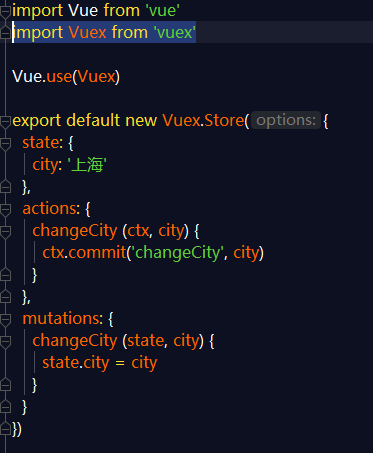
简介的数据更改,可以不通过actions,直接到mutations
可以将 state 和 mutations 拆分出去
this.$store.commit('changeCity', city)
13、vue-router 编程式导航
this.$router.push('/')
14、 vuex localStorage 实现cookie的作用
使用localStorage时要用try catch
15、import { mapState, mapMutations, mapGetters } from 'vuex'
...mapState (['city'])
...mapMutations(['changeCity'])
...mapGetters(['doubleCity'])
16、keep-alive 优化网页性能
17、router-link tag="li"
18、path: '/detail/:id'
19、垂直居中
display: flex
flex-direction: column
justify-content: center
20、activated 勾子 : 页面每次展示都会调用 keep-alive 才会有
有keep-alive,mounted 只会执行一次,想让某个页面不被缓存
给keep-alive 加上属性 exclude="Detail" (组件的name)
21、对全局事件进行解绑
deactivated 勾子,在页面会消失时自动调用
window.removeEventListener('scroll', this.xxx());
22、递归组件:在组件自身调用组件自身
23、获取路由上的id : this.$route.params.id
24、拖动多个页面互相影响,在路由后添加代码
scrollBehavior (to, from, savedPosition) {
return { x: 0, y: 0 }
}25、config index.js proxyTable 配置/api接口代理
26、package.json start --host 0.0.0.0 允许ip访问网站
27、.prevent 事件阻止
28、npm install babel-polyfill --save 网浏览器添加允许,解决手机展示白屏的问题
8-1

 浙公网安备 33010602011771号