
🎯 Prometheus 详解 及 基础exporter安装
参考文档:
Prometheus官方
一、Prometheus 是什么?解决什么问题?
1️⃣ 一句话理解
Prometheus 是一个“监控 + 时序数据库 + 查询语言 + 告警”的一体化系统
它主要用来回答这些问题:
-
服务器现在健康吗?
-
CPU / 内存 / 磁盘 / QPS / 延迟怎么样?
-
某个服务是不是越来越慢?
-
出问题前发生了什么?
-
什么时候该报警?
2️⃣ Prometheus 的核心特点
-
开源(CNCF 项目,和 Kubernetes 是一伙的)
-
通过指标名称和标签(key/value对)区分的多维度、时间序列数据模型(指标随时间变化)
-
利用http协议,通过pull模式来收集时间序列数据(主动去“抓”指标)
-
需要push模式的应用可以通过中间件gateway来实现
-
强大的查询语言 PromQL
-
不需要依赖额外的存储,一个服务节点就可以工作
-
监控目标支持服务发现和静态配置
-
支持各种各样的图表和监控面板组件
-
天然适配云原生 / 容器 / K8s
3️⃣ Prometheus 的典型使用场景
-
服务器监控(CPU / 内存 / 磁盘 / 网络)
-
应用监控(接口 QPS、延迟、错误率)
-
容器 & Kubernetes 监控
-
告警(服务异常、资源耗尽)
二、Prometheus 的整体架构⭐
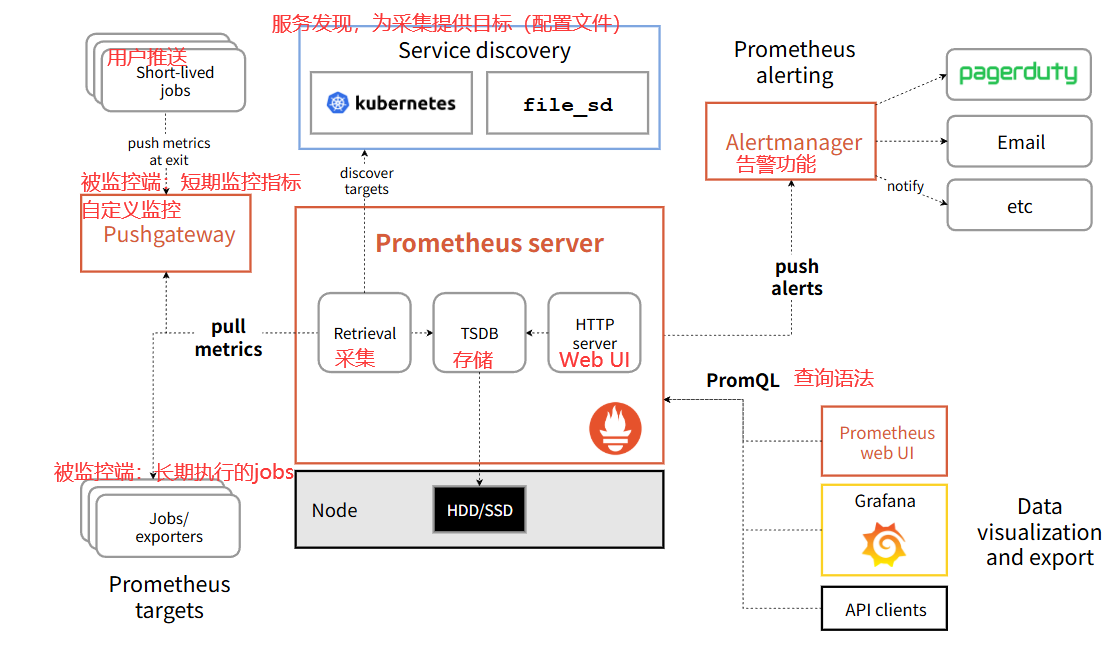
🔷 架构概览
Prometheus 的整体结构可分为 Server 内部子系统 与 外围生态组件。
Prometheus Server 内部核心子系统:
-
Scrape Manager(抓取管理器)
与 Service Discovery 子系统紧密协作,定期从动态更新的目标列表中拉取指标数据。负责每个抓取任务的调度、执行与异常处理。 -
Service Discovery(服务发现子系统)
根据配置从 Kubernetes、Consul、DNS 等注册中心获取目标组信息,整理为标准目标列表供抓取管理器使用。并非内嵌于抓取管理器中,而是一个独立运行的子系统。 -
TSDB(时序数据库)
本地存储引擎,负责高效存储所有抓取的时间序列数据,并实现压缩、过期数据清理等功能。同时提供 Remote Write / Remote Read 接口与外部长期存储集成。 -
PromQL Engine(查询引擎)
解析并执行 PromQL 语句,从 TSDB 或瞬时内存数据中检索、计算指标,为 API、Grafana、内置 UI 及告警规则评估提供查询能力。 -
Rules Manager(规则管理器)
按配置的时间间隔对采集数据进行规则评估:-
Recording rules:预计算并生成聚合时间序列写入 TSDB。
-
Alerting rules:条件满足时生成告警并推送至 Alertmanager。
-
-
HTTP Server / API
对外提供 Web 管理界面与 REST API,处理 PromQL 查询、配置热加载、状态查看等操作。 -
Alert State Handler(告警状态处理)
管理告警规则的生命周期状态(pending、firing、resolved),控制告警消息的发送、重复通知,以及与 Alertmanager 的交互。
外围生态组件(独立进程,不属于 Server 内部):
-
Alertmanager:告警处理服务,负责去重、分组、抑制、静默、路由与通知。
-
Pushgateway:面向短生命周期作业的指标中转网关。
-
Exporters:各类暴露指标的后台程序。
-
服务发现后端:如 Kubernetes API、Consul,仅作为目标数据来源。
🔷 模块详解
-
Retrieval(抓取模块)
对应架构中的 Scrape Manager + Service Discovery。定时通过 HTTP 从配置的 targets 拉取指标采样数据,自动处理超时、重试及指标过滤。 -
TSDB(存储模块)
本地时序数据库,负责数据持久化、压缩和过期清理,同时支持通过远程接口对接外部存储系统。 -
PromQL(查询语言模块)
专用查询语言,具备丰富的计算、聚合与函数能力,可集成于 Grafana 等 UI,用于查询、可视化及告警规则定义。 -
Jobs / Exporters(任务与导出器)
Prometheus 通过抓取任务(Jobs)从 Exporters 或原生暴露 /metrics 的应用拉取数据。Exporter 将特定系统指标转换为 Prometheus 标准格式并通过 Web API 暴露。 -
联邦(Federation)
允许一个 Prometheus Server 从另一个 Prometheus 拉取聚合后的关键指标,用于跨集群、分层的全局监控视图。 -
Pushgateway(推送网关)
面向临时任务或批处理作业,任务退出前将指标推送到 Pushgateway,再由 Prometheus 定期拉取,避免数据丢失。 -
Service Discovery(服务发现)
动态发现监控目标,可从 Kubernetes、Consul、DNS、EC2 等系统自动同步目标列表,也支持静态文件发现(file_sd)。 -
Alertmanager(告警管理器)
独立的外部组件,接收 Prometheus 的告警推送,负责告警的去重、分组、抑制、静默和路由,最终通过邮件、Slack、Webhook 等渠道通知。
🔷 核心组件说明
-
Prometheus Server
核心服务,负责数据采集、存储、查询。默认以 Pull 模型周期性拉取指标,数据存于本地 TSDB,并通过 API 提供 PromQL 查询。 -
Exporter
将第三方系统或应用的内部指标转化为 Prometheus 可抓取格式。常用 Exporter:-
node_exporter:采集主机硬件与操作系统指标 -
blackbox_exporter:探测服务可用性及网络时延
支持按客户端库自定义开发。
-
-
Alertmanager
独立告警管理组件,提供强大的告警编排能力:去重、分组、抑制、静默、路由,并可通知到多种渠道(邮件、Slack、PagerDuty 等)。 -
Pushgateway
为无法被直接抓取的短期作业设计,作业运行期间将指标推送到网关,再由 Prometheus Server 统一拉取。需配合清理策略避免指标残留。 -
Grafana
虽非 Prometheus 原生组件,但已成为监控可视化的事实标准。原生支持 PromQL,可创建丰富的仪表板与图表,常与告警、注释等功能深度集成。
推荐阅读:
云原生 CNCF 全景图:https://landscape.cncf.io/
Prometheus GitHub 仓库:https://github.com/prometheus/prometheus
Prometheus 官方文档:https://prometheus.io/
🔷 内部存储机制
Prometheus 的本地存储(TSDB)为单节点设计,核心目标是在高写入吞吐下,提供高效的数据持久化与查询能力。
每个采样数据仅仅占用3.5byte左右空间,上百万条时间序列,30秒间隔,保留60天,大概花200多G

1. 存储模型基础
-
每条时间序列由指标名称(Metric Name) 与一组键值对标签(Labels) 唯一标识。
-
时间序列存储的是带有毫秒精度时间戳的数值 float64样本。
-
标签信息、样本数据等均以压缩形式存储,以减少磁盘占用。
2. 本地存储的核心组件
其本地存储并非单一的“文件”,而是由几个关键部分协同工作:
-
Head Block(内存头块):所有最新写入的样本首先保留在内存的 Head Block 中,以便快速访问。同时,所有进入的样本会顺序写入 WAL(Write-Ahead Log,预写日志) 以防服务崩溃导致内存数据丢失。
-
持久化 Block:Head Block 会按时间范围(默认 2 小时)被“切分”并持久化到磁盘,生成一个或多个 Block。每个 Block 是一个独立的、不可变的目录。
-
WAL(预写日志):位于
wal/目录中。它的唯一作用是崩溃恢复:当 Prometheus 重启时,会重放 WAL 中的日志,以重建内存中的 Head Block。- 1.WAL目录中包含了多个连续编号且大小默认上限为128MB的文件,Prometheus称这样的文件为Segment,其中存放的就是对内存中series以及sample数据的备份。 - 2.另外,还包含一个以checkpoint为前缀的子目录,由于内存中的时序数据经常会做持久化处理,WAL中的数据也将因此出现冗余。 - 3.所以每次在对内存数据进行持久化之后,Prometheus都会对部分编号靠后的segment进行清理,但是我们并没有办法做到恰好将已经持久化的数据从Segment中剔除,也就是说被删除的segment中部分的数据依然可能是有用的。所以在清理segment时,我们会将肯定无效的数据删除,剩下的数据就存放在checkpoint中,而在Prometheus重启时,应该首先加载checkpoint中的内容,再按序加载各个segment的内容。 - 4.最后,series和samples以Record的形式被批量写入segment文件中,默认segment超过128MB时,会创建新的segment文件。若Prometheus因为各种原因崩溃了,WAL里的各个segment以及checkpoint里的的内容就是在崩溃时刻Prometheus内存的影响,Prometheus在重庆市只加载WAL中的内容就能完全"恢复现场"。
3. 块(Block)的内部结构
每个持久化到磁盘的 Block 目录通常包含:

-
chunks/: 存放实际采样数据(timestamp, value)的压缩文件。 -
index: 一个索引文件,用于根据标签快速查找时间序列及其关联的 chunks 位置。 -
meta.json: 记录该 Block 的时间范围、统计信息等元数据。
![image]()
-
tombstones: 记录逻辑删除的标记(如某个序列被删除但尚未物理清除)。

4. 数据压缩(Compaction)
这是后台自动运行的关键机制,旨在维持存储健康:
Prometheus对block进行定时压实(compaction),compaction压实的作用如下:
	- 1.将标记删除的数据清理;
	- 2.compaction主要操作包括合并block,删除过期数据,重构chunk数据;
	- 3.其中合并多个block成为更大的block,可以有效减少block个数,当查询覆盖的时间范围较长时,避免需要合并很多block的查询结果;
	- 4.为提高删除效率,删除时序数据时,会记录删除的位置,只有block所有数据都需要删除时,才将block整个目录删除,因此block合并的大小也需要进行限制;
5. 数据保留与清理
-
通过命令行参数配置数据的保留时间或最大磁盘占用:
-
--storage.tsdb.retention.time:设定样本保留时长(默认15天)。 -
--storage.tsdb.retention.size:设定本地存储占用的最大字节数(实验性)。
-
-
清理操作在压缩过程中进行:超出保留时限的 Block 整个目录会被删除。
6. 远程存储集成
Prometheus 本地存储非分布式/集群化,但提供标准化接口对接外部系统:
-
Remote Write:可实时将接收到的样本发送到远程存储后端(如 Thanos, Cortex, VictoriaMetrics 等)。
-
Remote Read:可从远程后端读取历史数据用于查询。
-
此特性使 Prometheus 专注于核心的采集和告警,长期存储与聚合分析交由专门的系统处理。
三、Prometheus 核心概念⭐
1️⃣ 什么是指标(Metric)?
指标 = 某个值随时间变化的记录
# 指标示例
http_requests_total{method="POST", handler="/api", status="200"} 1024
      ↑                ↑     ↑       ↑        ↑               ↑   ↑
   指标名称         标签名称  标签值  标签名称   标签值            结束  指标值

每个 Metric name 代表一类指标,可通过携带不同 Labels 形成不同维度的区分。一个唯一的 Metric name 与一组 Labels 的组合定义了一条时间序列。
在 Prometheus 中,所有采样值均为 64 位浮点数(float64)。每条时间序列中的数据点由一个毫秒精度的时间戳(64 位整型)和一个 float64 值组成。
-
Metric name(指标名称):命名应具有语义,用于表明该指标的含义,例如
http_requests_total表示 HTTP 请求总数。指标名称由 ASCII 字母、数字、下划线和冒号组成,必须匹配正则表达式[a-zA-Z_:][a-zA-Z0-9_:]*。 -
Labels(标签):使同一条时间序列具备不同维度的识别能力。例如
http_requests_total{method="GET"}表示所有 HTTP 请求中的 GET 请求,而method="POST"则是另一条时间序列。标签名由 ASCII 字母、数字和下划线组成,必须匹配正则表达式[a-zA-Z_][a-zA-Z0-9_]*;标签值可以为空或由字母、数字、点、连字符、下划线组成([a-zA-Z0-9_.-]*)。 -
Timestamp(时间戳):数据点的时间,标识该数值的记录时刻,使用毫秒精度的 Unix 时间戳,以 64 位整型存储。
-
Sample Value(采样值):时间序列在某一时刻的具体数值,存储为 float64 类型。
对于指标的命名可以使用"__name__"内置标签来指定。
up{instance="10.0.0.31:3000"}
{__name__="up",instance="10.0.0.31:3000"}


大多数情况下,不推荐使用"__name__"指定的,除非你的指标名称有多个匹配查询的场景,如下所示:
{__name__=~"node_cpu_.*", job="node-exporter"}
2️⃣ 时间序列(Time Series)
Prometheus 存的是时间序列数据:
指标名 + 标签 = 一条时间序列
例如:
http_requests_total{method="GET", status="200"}
这是一条序列:
(t1, 100)
(t2, 120)
(t3, 150)
3️⃣ Metric Name(指标名)
- 只能是字母、数字、下划线
- 建议有明确含义
常见例子:
| 指标名 | 含义 |
|---|---|
| cpu_usage_seconds_total | CPU 使用时间 |
| node_memory_MemAvailable_bytes | 可用内存 |
| http_requests_total | HTTP 请求总数 |
4️⃣ Label(标签)——Prometheus 的灵魂
标签 = 维度
http_requests_total{
  method="GET",
  status="200",
  instance="10.0.0.1:8080"
}
标签可以帮你:
- 区分不同实例
- 区分接口 / 状态码 / 服务
⚠️ 重要原则:
- 标签不是越多越好
- 高基数标签(如 user_id)会炸库 ❌
5️⃣ Metric 类型(四种)
1. Counter(计数器)
counter数据类型表示一个指标单调递增的计数器。

一般可以结合rate查看QPS,比如: rate(prometheus_http_requests_total[1m])

也可以结合increase查看增量,比如: increase(prometheus_http_requests_total[1m])

查询平均访问时间:
	prometheus_http_request_duration_seconds_sum / prometheus_http_request_duration_seconds_count

2. Gauge(仪表盘): 当前值,所见即所得
# 可增可减,反映当前状态
memory_usage_bytes 536870912  # 当前内存使用量
cpu_temperature 65.2          # 当前CPU温度
3. Histogram(直方图)

histogram数据类型表示直方图样本观测,通常用于查询"所有观察值的总和","请求持续时间","响应时间"等场景。

上一个案例中,我们可以使用"prometheus_http_request_duration_seconds_sum / prometheus_http_request_duration_seconds_count"查询平均访问时间。

但这种统计方式比较粗糙,用"请求的响应时间/请求的次数",算的是平均响应时间,并不能反应在某个时间段内是否有故障,比如在"12:30~12:35"之间出现大面积服务无法响应,其他时间段都是正常提供服务的,最终使用上面的公式算出来的是没有延迟的,因为5分钟的微小延迟在24小时内平均下来的话可能就可以忽略了,从而运维人员就无法及时发现问题并处理,这对于用户体验是比较差的。

因此Prometheus可以使用histogram数据类型可以采用分位值的方式随机采样短时间范围内的数据,从而及时发现问题,这需要配合histogram_quantile函数来使用。

举个例子: HTTP请求的延迟柱状图(下面的"0.95"表示的是分位值,你可以根据需求自行修改即可。)
histogram_quantile(0.95,sum(rate(prometheus_http_request_duration_seconds_bucket[1m])) by (le))

histogram_quantile(0.95,sum(rate(prometheus_http_request_duration_seconds_bucket{handler="/api/v1/query"}[5m])) by (le))

输出格式请参考:
    https://www.cnblogs.com/kyle-7Qc/p/22304898#二-histogram数据说明
4. Summary(摘要)

# 客户端计算分位数,更精确但消耗资源
rpc_duration_seconds{quantile="0.5"} 0.03
rpc_duration_seconds{quantile="0.9"} 0.08
rpc_duration_seconds{quantile="0.99"} 0.12
rpc_duration_seconds_sum 45.6
rpc_duration_seconds_count 1200

相比于histogram需要结合histogram_quantile函数进行实时计算结果,summary数据类型的数据是分值值的一个结果。

输出格式请参考:
    https://www.cnblogs.com/kyle-7Qc/p/22304898#三-summary数据说明
6️⃣ Exporter 是什么?
Prometheus 不会“魔法读取系统指标”,它需要 Exporter。
| Exporter | 用途 |
|---|---|
| node_exporter | 服务器指标 |
| mysql_exporter | MySQL |
| redis_exporter | Redis |
| jmx_exporter | Java |
| blackbox_exporter | 探测(HTTP / TCP) |
👉 Exporter 本质就是一个 HTTP 服务,暴露 /metrics
7️⃣ 数据抓取流程
抓取周期开始
    ↓
通过服务发现获取目标列表
    ↓
对每个目标发起HTTP请求
    ↓
目标返回metrics数据(通常是/metrics端点)
    ↓
解析数据并存入时间序列数据库
    ↓
等待下一个抓取周期
8️⃣服务发现机制
# 静态配置示例
static_configs:
  - targets:
    - 192.168.1.100:9100  # Node Exporter
    - 192.168.1.101:9090  # 另一个Prometheus
支持的发现方式:
-
静态配置
-
文件发现
-
DNS发现
-
Kubernetes发现
-
Consul发现
-
EC2发现
-
Azure发现
四、Prometheus 的工作流程
-
数据采集
应用 / 系统通过 Exporter 暴露/metrics,Prometheus Server 定期从配置的 Jobs、Exporters 或 Pushgateway 中拉取指标数据,也可通过联邦机制从其他 Prometheus Server 拉取数据。 -
存储与规则评估
拉取到的指标数据存储到本地时序数据库中(TSDB)。同时,Prometheus 按配置对数据进行规则评估:-
记录规则(Recording rules) 触发时,生成新的聚合时间序列并写入存储;
-
告警规则(Alerting rules) 触发时,向 Alertmanager 推送告警。
-
-
告警处理与通知
Alertmanager 接收告警后,根据配置进行去重、分组、静默等处理,并按路由规则将告警发送到指定的通知渠道。 -
可视化
通过 Grafana 等图形界面,使用 PromQL 查询数据,实现监控数据的可视化展示。
五、Prometheus 安装部署(单机入门版)
目标:10 分钟跑起来
1️⃣ 安装 Prometheus(Linux)
① 下载
wget https://github.com/prometheus/prometheus/releases/download/v2.48.0/prometheus-2.48.0.linux-amd64.tar.gz
② 解压
tar -zxvf prometheus-2.48.0.linux-amd64.tar.gz
cd prometheus-2.48.0.linux-amd64
2️⃣ 核心目录说明
prometheus
├── prometheus        # 主程序
├── promtool          # 配置校验工具
├── prometheus.yml    # 核心配置文件
├── data/             # 本地数据存储
3️⃣ Prometheus 配置文件详解(prometheus.yml)
# prometheus.yml - 完整示例
# 全局配置
global:
  scrape_interval: 15s      # 抓取间隔,默认15秒
  evaluation_interval: 15s  # 规则评估间隔
  # scrape_timeout: 10s     # 抓取超时时间(默认10秒)

# 告警配置(如果使用Alertmanager)
alerting:
  alertmanagers:
    - static_configs:
        - targets:
          # - alertmanager:9093  # Alertmanager地址

# 规则文件(告警和记录规则)
rule_files:
  # - "first_rules.yml"
  # - "second_rules.yml"

# 抓取配置
scrape_configs:
  # 监控Prometheus自身
  - job_name: 'prometheus'
    static_configs:
      - targets: ['localhost:9090']
        labels:
          service: 'prometheus'
          group: 'monitoring'

  # 监控Linux服务器(需要安装Node Exporter)
  - job_name: 'node'  # 任务名
    static_configs:
      - targets: ['localhost:9100']   # 要抓的地址
        labels:
          service: 'node-exporter'
          group: 'servers'
    # 抓取配置示例
    scrape_interval: 30s  # 覆盖全局配置
    metrics_path: /metrics  # 默认就是/metrics
    # 可添加认证信息
    # basic_auth:
    #   username: 'admin'
    #   password: 'secret'
4️⃣ 启动 Prometheus
# 1. 命令启动
./prometheus --config.file=prometheus.yml

# 2.systemd
tee /etc/systemd/system/prometheus.service << 'EOF'
[Unit]
Description=Prometheus Monitoring System  # 服务描述信息
Documentation=https://prometheus.io/docs/  # 官方文档地址
After=network.target  # 网络基础服务就绪后启动
After=network-online.target  # 网络完全连通后启动
Wants=network-online.target  # 依赖网络在线服务

[Service]
Type=simple  # 前台简单进程类型
User=root  # 进程运行用户
Group=root  # 进程运行用户组

# 工作目录
WorkingDirectory=/app/prometheus-3.5.0

# 启动命令(优化版,无语法错误,性能调优,存储保护)
ExecStart=/app/prometheus-3.5.0/prometheus \            # 主程序路径
  --config.file=/app/prometheus-3.5.0/prometheus.yml \  # 指定主配置文件路径
  --storage.tsdb.path=/app/prometheus-3.5.0/data \      # 时序数据tsdb存储目录
  --web.listen-address=0.0.0.0:9090 \                   # 监听所有网卡9090端口
  --web.enable-lifecycle \                              # 开启配置热重载接口
  --storage.tsdb.retention.time=15d \                   # 数据最长保留15天
  --storage.tsdb.retention.size=3GB \                   # 数据目录最大占用3GB空间
  --log.level=info \                                    # 日志输出级别
  --log.format=json \                                   # 日志以JSON格式输出,便于日志解析
  --web.max-connections=1024 \                          # 最大并发网页连接数
  --web.read-timeout=300s \                             # 网页请求空闲读取超时时间
  --query.timeout=20s \                                 # 单次查询最大超时时长
  --query.max-concurrency=50 \                          # 同时允许的最大查询并发数
  --query.max-samples=50000000                          # 单次查询最大采样点数上限

# 标准日志输出(systemd 托管,自动切割,不占磁盘)
StandardOutput=journal  # 标准输出交由系统日志管理
StandardError=journal   # 错误输出交由系统日志管理

# 热重载
ExecReload=/bin/kill -HUP $MAINPID  # 发送信号重载配置不重启进程

# 重启策略
Restart=on-failure      # 进程异常退出时自动重启
RestartSec=5            # 异常后间隔5秒重启
StartLimitInterval=60s  # 60秒内启动次数限制周期
StartLimitBurst=3       # 周期内最多尝试启动3次

# 资源限制(关键优化)
LimitNOFILE=65535  # 最大打开文件句柄数
LimitNPROC=65535  # 最大创建进程数
TasksMax=infinity  # 不限制任务数量

# 性能保护
IOWeight=1000   # 磁盘IO调度权重
MemoryHigh=80%  # 内存软上限,超出降负载
MemoryMax=90%   # 内存硬上限,超出终止进程

# 安全加固
ProtectHome=false     # 不隔离用户家目录访问
ProtectSystem=strict  # 严格限制系统目录只读权限
ReadWritePaths=/app/prometheus-3.5.0/data  # 仅允许该目录读写
PrivateTmp=true       # 独立临时目录,隔离文件访问
NoNewPrivileges=true  # 禁止进程提升权限

[Install]
WantedBy=multi-user.target  # 多用户模式下开机自启
EOF

# 3.应用配置
sudo systemctl daemon-reload
sudo systemctl restart prometheus

# 4. 日志查看
journalctl -u prometheus -f
直接复制Prometheus systemd 文件
[Unit]
Description=Prometheus Monitoring System
Documentation=https://prometheus.io/docs/
After=network.target network-online.target
Wants=network-online.target

[Service]
Type=simple  # 前台简单进程类型
User=root  # 进程运行用户
Group=root  # 进程运行用户组
# 推荐使用专用非root用户,执行前需创建并授权目录
# useradd -r -s /bin/false prometheus
# chown -R prometheus:prometheus /app/prometheus-3.5.0
# User=prometheus
# Group=prometheus

WorkingDirectory=/app/prometheus-3.5.0

# 启动命令(所有注释已移至行外,续行符后无额外字符)
ExecStart=/app/prometheus-3.5.0/prometheus \
  --config.file=/app/prometheus-3.5.0/prometheus.yml \
  --storage.tsdb.path=/app/prometheus-3.5.0/data \
  --web.listen-address=0.0.0.0:9090 \
  --web.enable-lifecycle \
  --storage.tsdb.retention.time=15d \
  --storage.tsdb.retention.size=3GB \
  --log.level=info \
  --log.format=json \
  --web.max-connections=1024 \
  --web.read-timeout=300s \
  --query.timeout=20s \
  --query.max-concurrency=50 \
  --query.max-samples=50000000

# 日志交由journald管理
StandardOutput=journal
StandardError=journal

# 热重载(发送HUP信号重新加载配置)
ExecReload=/bin/kill -HUP $MAINPID

# 自动重启策略
Restart=on-failure
RestartSec=5
StartLimitInterval=60s
StartLimitBurst=3

# 资源限制
LimitNOFILE=65535
LimitNPROC=65535
TasksMax=infinity

# IO调度权重(仅在有竞争时生效)
IOWeight=1000

# 内存限制(Prometheus查询时可能瞬时占用较高,建议先压测再决定是否开启)
# MemoryHigh=80%
# MemoryMax=90%

# 安全加固
ProtectSystem=strict                        # 除/boot, /etc, /usr外只读
ReadWritePaths=/app/prometheus-3.5.0/data   # 仅允许写数据目录(如需写日志可扩展为 /app/prometheus-3.5.0)
PrivateTmp=true                             # 独立/tmp,防止会话劫持
NoNewPrivileges=true                        # 禁止提权

[Install]
WantedBy=multi-user.target
访问:
http://localhost:9090
🎉 你已经成功启动 Prometheus!
5️⃣Prometheus一键安装脚本
点击查看代码
#!/bin/bash
# auther: kyle_7Qc

VERSION=3.5.0
ARCH=amd64
SOFTWARE=prometheus-${VERSION}.linux-${ARCH}.tar.gz
URL=https://github.com/prometheus/prometheus/releases/download/v${VERSION}/${SOFTWARE}
DOWNLOAD=./download
INSTALLDIR=/softwares
BASEDIR=${INSTALLDIR}/prometheus-${VERSION}.linux-amd64
DATADIR=/data/prometheus
LOGDIR=/logs/prometheus
HOSTIP=0.0.0.0
PORT=9090
HOSTNAME=$(hostname)

. /etc/os-release

# 颜色输出
RED='\033[0;31m'
GREEN='\033[0;32m'
NC='\033[0m'

function prepare() {
    [ -d "$INSTALLDIR" ] || install -d "$INSTALLDIR"
    [ -d "$DOWNLOAD" ] || install -d "$DOWNLOAD"
    [ -d "$DATADIR" ] || install -d "$DATADIR"
    [ -d "$LOGDIR" ] || install -d "$LOGDIR"

    if [[ "$ID" = @(centos|rocky|almalinux) ]]; then
        [ -x /usr/bin/wget ] || yum install -y wget
    elif [[ "$ID" = @(ubuntu|debian) ]]; then
        [ -x /usr/bin/wget ] || (apt update && apt install -y wget)
    fi

    [ -s "${DOWNLOAD}/${SOFTWARE}" ] || wget "$URL" -O "${DOWNLOAD}/${SOFTWARE}"
    id prometheus &>/dev/null || useradd -r -m -s /sbin/nologin prometheus
}

function deploy() {
    prepare

    tar xf "${DOWNLOAD}/${SOFTWARE}" -C "$INSTALLDIR"
    chown -R prometheus:prometheus "$BASEDIR" "$DATADIR" "$LOGDIR"

cat > /etc/systemd/system/prometheus-server.service <<EOF
[Unit]
Description=Prometheus Server
Documentation=https://prometheus.io/docs/
After=network.target

[Service]
User=prometheus
Group=prometheus
WorkingDirectory=$BASEDIR
Restart=on-failure
RestartSec=5

ExecStart=$BASEDIR/prometheus \\
  --config.file=$BASEDIR/prometheus.yml \\
  --web.enable-lifecycle \\
  --storage.tsdb.path=$DATADIR \\
  --storage.tsdb.retention.time=60d \\
  --storage.tsdb.retention.size=512GB \\
  --web.listen-address=$HOSTIP:$PORT \\
  --web.max-connections=65535 \\
  --query.timeout=10s \\
  --query.max-concurrency=20 \\
  --log.level=info \\
  --log.format=json \\
  --web.read-timeout=5m

ExecReload=/bin/kill -HUP \$MAINPID
LimitNOFILE=65535
StandardOutput=journal
StandardError=journal

[Install]
WantedBy=multi-user.target
EOF

    systemctl daemon-reload
    systemctl enable --now prometheus-server

    # ==================== 关键判断:服务是否启动成功 ====================
    sleep 2
    if ! systemctl is-active --quiet prometheus-server; then
        echo -e "${RED}[ERROR] Prometheus 启动失败!${NC}"
        echo "==== 日志如下 ===="
        journalctl -u prometheus-server --no-pager -n 10
        exit 1
    fi

    # ==================== 关键判断:端口是否监听 ====================
    sleep 1
    if ss -ntl | grep -q ":$PORT"; then
        echo -e "${GREEN}[SUCCESS] Prometheus 启动成功,端口 $PORT 已监听${NC}"
        ss -ntl | grep "$PORT"
    else
        echo -e "${RED}[ERROR] Prometheus 进程存在,但端口 $PORT 未监听${NC}"
        exit 1
    fi

    echo -e "${GREEN}${HOSTNAME} 的 prometheus-server 部署成功!${NC}"
}

function delete() {
    systemctl disable --now prometheus-server
    rm -rf /etc/systemd/system/prometheus-server.service
    rm -rf "$BASEDIR" "$DATADIR" "$LOGDIR"
    userdel -r prometheus &>/dev/null
    echo -e "${GREEN}${HOSTNAME} 的 prometheus 已完全卸载${NC}"
}

function main() {
    case "$1" in
        deploy|i) deploy ;;
        delete|r) delete ;;
        *) echo "Usage: $0 deploy|i 安装 | delete|r 卸载" ;;
    esac
}

main "$1"
六、Exporter介绍
Exporter 是 Prometheus 监控体系中负责指标采集的关键组件。从广义上讲,任何能够按 Prometheus 数据模型提供监控样本数据的程序都可以被称为 Exporter。Prometheus 抓取数据时所指向的一个具体网络端点(通常是一个 Exporter 实例的
/metrics接口)称为 target。
官方与社区提供了大量可直接使用的 Exporter,官方 Exporter 列表见:https://prometheus.io/docs/instrumenting/exporters/
1)常见 Exporter 简介
-
blackbox_exporter
GitHub 地址:https://github.com/prometheus/blackbox_exporter
提供黑盒监控能力,支持通过 HTTP、HTTPS、DNS、TCP、ICMP 等方式对网络端点进行探测。通常用于检测外部服务可达性、证书有效期等。 -
node_exporter
GitHub 地址:https://github.com/prometheus/node_exporter
用于采集主机(操作系统)级别的性能指标,包括 CPU、内存、磁盘、网络、文件系统等,是主机监控的基础组件。 -
mysqld_exporter
GitHub 地址:https://github.com/prometheus/mysqld_exporter
用于采集 MySQL 或 MariaDB 数据库的内部运行指标。需要提供具有相应权限的数据库连接。 -
snmp_exporter
GitHub 地址:https://github.com/prometheus/snmp_exporter
通过 SNMP 协议从网络设备(交换机、路由器等)采集信息,并转换为 Prometheus 可抓取的格式。
2)Exporter 的来源
从来源划分,Exporter 主要有两类:
① 社区提供
Prometheus 社区提供了大量覆盖基础设施、中间件、网络等领域的 Exporter,能满足大部分通用监控需求。以下按领域列举部分常用 Exporter:
| 范围 | 常用 Exporter |
|---|---|
| 数据库 | MySQL Exporter, Redis Exporter, MongoDB Exporter, MSSQL Exporter 等 |
| 硬件 | Node Exporter, IPMI Exporter, Apcupsd Exporter 等 |
| 消息队列 | Kafka Exporter, RabbitMQ Exporter, NSQ Exporter 等 |
| 存储 | Ceph Exporter, Gluster Exporter, HDFS Exporter 等 |
| HTTP 服务 | Apache Exporter, HAProxy Exporter, Nginx Exporter 等 |
| API 服务 | AWS ECS Exporter, Docker Hub Exporter, GitHub Exporter 等 |
| 日志 | Fluentd Exporter, Grok Exporter 等 |
| 监控系统 | Collectd Exporter, Graphite Exporter, InfluxDB Exporter, SNMP Exporter 等 |
| 其他 | Blackbox Exporter, Jenkins Exporter, JIRA Exporter 等 |
② 用户自定义
除社区 Exporter 外,用户还可利用 Prometheus 官方提供的客户端库(Client Library)自行开发 Exporter。目前官方支持的语言有:Go、Java/Scala、Python、Ruby。社区也提供了其他语言的实现,如 Rust、C++、Node.js、PHP、Bash 等。
3)Exporter 的运行方式
根据部署形态的不同,Exporter 的运行方式可分为两种:
① 独立运行
操作系统、数据库等系统本身并不直接以 Prometheus 格式暴露指标,因此需要单独运行一个中间代理程序。该程序通过操作系统或应用的接口采集运行状态数据,并转换为 Prometheus 可读的指标格式。典型的如 node_exporter、mysqld_exporter、redis_exporter 等均属此类。它们扮演了数据转换代理的角色。
② 集成到应用内部(推荐方式)
部分项目直接在代码中使用 Prometheus 客户端库暴露 /metrics 端点。这种集成方式打破了外部监控的界限,允许应用直接暴露其内部运行状态,同时能够轻松定义更多的自定义指标。Kubernetes、etcd、Prometheus 自身等均采用此模式。
4)Exporter 数据规范
所有 Exporter 的 /metrics 端点必须返回符合 Prometheus 规范的文本格式数据。以通过认证访问某个端点为例:
# 取前10行示例
$ curl -s -k --header "Authorization: Bearer $TOKEN" https://192.168.0.113:6443/metrics | head -10
返回的样本数据由注释行和数据行组成。Prometheus 按行解析:
-
如果行以
# HELP开头,则为指标说明,格式为:
# HELP <metric_name> <docstring> -
如果行以
# TYPE开头,则为指标类型,格式为:
# TYPE <metric_name> <metric_type>
类型可为counter、gauge、histogram、summary或untyped。
每个指标名的TYPE行必须出现在该指标第一个样本之前;无显式类型时标记为untyped。 -
除
#开头之外的所有行均视为样本数据行,格式为:<metric_name> [ "{" <label_name> "=" <label_value> { "," <label_name> "=" <label_value> } [ "," ] "}" ] <value> [ <timestamp> ]-
metric_name 必须匹配正则
[a-zA-Z_:][a-zA-Z0-9_:]*。 -
label_name 必须匹配
[a-zA-Z_][a-zA-Z0-9_]*。 -
label_value 可为任意 Unicode 字符,特殊字符(换行、反斜杠、双引号)须转义。
-
value 为 float64 格式(可含
NaN,+Inf,-Inf)。 -
timestamp 为可选整数,表示毫秒精度的 Unix 时间戳,省略时由 Prometheus 服务器记录抓取时间。
-
以上规范确保了 Exporter 与 Prometheus 之间的互操作性,所有符合规范的端点均可被 Prometheus 抓取并纳入监控体系。
七、 Node Exporter(监控服务器)
node-exporter用于采集node的运行指标,包括node的cpu、load、filesystem、meminfo、network等基础监控指标,类似于zabbix监控系统的的zabbix-agent
1️⃣ 下载 & 启动
>官网:https://prometheus.io/download/#node_exporter
  # 1.下载
  wget https://github.com/prometheus/node_exporter/releases/download/v1.8.2/node_exporter-1.8.2.linux-amd64.tar.gz
  # 2.解压
  tar  xf
  # 3.启动
  ./node_exporter-xxxxxx
  # 4.其他节点安装node exporter
  依照上面步骤
  # 5.访问WebUI验证
  http://localhost:9100/metrics
2️⃣ Node Exporter Systemd 服务配置
2.1 创建服务配置文件
vim /etc/systemd/system/node_exporter.service
2.2. 写入标准服务配置
[Unit]
# 服务描述
Description=Node Exporter for Prometheus
# 网络启动后再启动服务
After=network.target

[Service]
# 运行用户(推荐用普通用户,安全)
User=node_exporter
Group=node_exporter
# 可执行文件路径(必须和你实际路径一致)监听 9100 端口,开启 systemd 采集,忽略无关文件系统
ExecStart=/app/node_exporter-1.10.2/node_exporter \
  --web.listen-address=:9100 \
  --collector.systemd \
  --collector.filesystem.ignored-mount-points="^/(sys|proc|dev|run)($|/)"

# 重启策略:异常退出自动重启
Restart=on-failure
RestartSec=5

# 安全配置(生产环境建议开启)
PrivateTmp=true
ProtectSystem=full
NoNewPrivileges=true

[Install]
# 开机自启(多用户模式)
WantedBy=multi-user.target
2.3 注意事项
# 创建专用运行用户(安全必备)
  不要用 root 运行 node_exporter,创建专用低权限用户:
  useradd -rs /sbin/nologin node_exporter

# 重载 systemd 并管理服务
   刷新 systemd 配置  systemctl daemon-reload
   设置开机自启       systemctl enable node_exporter
   启动服务           systemctl start node_exporter
   查看服务状态       systemctl status node_exporter

# 查看实时日志
  journalctl -u node_exporter -f
3️⃣一键安装脚本
点击查看代码
#!/bin/bash
# auther: kyle_7Qc

VERSION=1.8.2
ARCH=amd64
SOFTWARE=node_exporter-${VERSION}.linux-${ARCH}.tar.gz
URL=https://github.com/prometheus/node_exporter/releases/download/v${VERSION}/${SOFTWARE}
DOWNLOAD=./download
INSTALLDIR=/softwares
BASEDIR=${INSTALLDIR}/node_exporter-${VERSION}.linux-amd64
HOST="0.0.0.0"
PORT=9100
HOSTNAME=$(hostname)

# 加载系统版本
. /etc/os-release

# 颜色输出
RED='\033[0;31m'
GREEN='\033[0;32m'
NC='\033[0m'

function prepare() {
    [ -d "$INSTALLDIR" ] || mkdir -pv "${INSTALLDIR}"
    [ -d "$DOWNLOAD" ] || mkdir -pv "${DOWNLOAD}"

    # 自动安装 wget,兼容多系统
    if [[ "$ID" = @(centos|rocky|almalinux) ]]; then
        [ -x /usr/bin/wget ] || yum -y install wget
    elif [[ "$ID" = @(ubuntu|debian) ]]; then
        [ -x /usr/bin/wget ] || (apt update && apt -y install wget)
    fi

    # 下载安装包
    [ -s "${DOWNLOAD}/${SOFTWARE}" ] || wget "$URL" -O "${DOWNLOAD}/${SOFTWARE}"

    # 创建专用用户
    id node_exporter &>/dev/null || useradd -r -s /sbin/nologin node_exporter
}

function install() {
    prepare

    # 解压
    tar xf "${DOWNLOAD}/${SOFTWARE}" -C "${INSTALLDIR}"

    # 生成 systemd 服务(生产优化)
    cat > /etc/systemd/system/node-exporter.service <<EOF
[Unit]
Description=Node Exporter for Prometheus
Documentation=https://prometheus.io/docs/
After=network.target

[Service]
User=node_exporter
Group=node_exporter
Restart=on-failure
RestartSec=3
LimitNOFILE=65535

ExecStart=${BASEDIR}/node_exporter \\
  --web.listen-address=${HOST}:${PORT} \\
  --web.telemetry-path=/metrics \\
  --collector.systemd \\
  --collector.filesystem.ignored-mount-points="^/(sys|proc|dev|run)($|/)"

StandardOutput=journal
StandardError=journal

[Install]
WantedBy=multi-user.target
EOF

    # 启动服务
    systemctl daemon-reload
    systemctl enable --now node-exporter.service

    # ==================== 启动状态判断 ====================
    sleep 2
    if ! systemctl is-active --quiet node-exporter; then
        echo -e "${RED}[ERROR] node_exporter 启动失败!${NC}"
        journalctl -u node-exporter --no-pager -n 10
        exit 1
    fi

    # ==================== 端口监听判断 ====================
    sleep 1
    if ss -ntl | grep -q ":${PORT}"; then
        echo -e "${GREEN}[SUCCESS] node_exporter 启动成功,端口 ${PORT} 已监听${NC}"
        ss -ntl | grep "${PORT}"
    else
        echo -e "${RED}[ERROR] node_exporter 端口 ${PORT} 未监听!${NC}"
        exit 1
    fi

    echo -e "${GREEN}${HOSTNAME} 的 node-exporter 部署成功!${NC}"
}

function remove() {
    systemctl disable --now node-exporter.service
    rm -rf /etc/systemd/system/node-exporter.service
    rm -rf "${BASEDIR}"
    userdel -r node_exporter &>/dev/null
    echo -e "${GREEN}${HOSTNAME} 的 node-exporter 已完全卸载!${NC}"
}

function main() {
    case "$1" in
        install|i)
            install
            ;;
        remove|r)
            remove
            ;;
        *)
            echo "Usage: $0 install|i  安装"
            echo "       $0 remove|i  卸载"
            ;;
    esac
}

main "$1"
4️⃣ 配置 Prometheus 抓 Node Exporter
 1. 修改配置文件  vim prometheus.yml # 注意yaml格式
    scrape_configs:
        ...
      - job_name: "node-elk"
        static_configs:
      - targets: ["10.0.0.91:9100","10.0.0.92:9100","10.0.0.93:9100"]

2.检查配置文件语法
  [root@study /app/prometheus-3.5.0]# ./promtool check config prometheus.yml
  Checking prometheus.yml
   SUCCESS: prometheus.yml is valid prometheus config file syntax

3.热重载配置(无需重启)
  # 方法1:发送SIGHUP信号(如果未启用lifecycle)
  sudo killall -HUP prometheus

  # 方法2:使用API(需要启用--web.enable-lifecycle)
  curl -X POST http://localhost:9090/-/reload

  # 方法3:使用promtool检查配置
  promtool check config /etc/prometheus/prometheus.yml

4.访问WebUI验证
  http://10.0.0.91:9090/targets

5.配置别名 (可选)
   vim ~/.bashrc
...
 84 alias yy='egrep -v "^.*#|^$"'
 85 alias check='/app/prometheus-3.5.0/promtool  check config /app/prometheus-3.5.0/prometheus.yml'
 86 alias rr='curl -X POST http://10.0.0.91:9090/-/reload'
...

 [root@study]# source ~/.bashrc
 [root@study]# check
 [root@study]# rr
八、mysql_exporter
8.1 安装exporter
【1】下载
# 注意MySQL对应的版本
export VER=0.12.0
wget https://github.com/prometheus/mysqld_exporter/releases/download/v${VER}/mysqld_exporter-${VER}.linux-amd64.tar.gz
tar xvf mysqld_exporter-${VER}.linux-amd64.tar.gz
mv mysqld_exporter-${VER}.linux-amd64/mysqld_exporter /usr/local/bin/
chmod +x /usr/local/bin/mysqld_exporter
【2】配置数据库凭证
创建数据库凭证文件,为用户创建添加正确的用户名和密码并设置所有权限:
cat > /root/.my.cnf <<EOF
[client]
host=192.168.182.110
port=3306
user=mha
password=123456
EOF
【3】配置mysql_exporter.service启动
# 默认端口:9104
cat > /etc/systemd/system/mysqld_exporter.service <<EOF
[Unit]
Description=Prometheus MySQL Exporter
After=network.target
#User=prometheus
#Group=prometheus

[Service]
Type=simple
Restart=always
ExecStart=/usr/local/bin/mysqld_exporter \
--config.my-cnf /root/.my.cnf \
--collect.global_status \
--collect.info_schema.innodb_metrics \
--collect.auto_increment.columns \
--collect.info_schema.processlist \
--collect.binlog_size \
--collect.info_schema.tablestats \
--collect.global_variables \
--collect.info_schema.query_response_time \
--collect.info_schema.userstats \
--collect.info_schema.tables \
--collect.perf_schema.tablelocks \
--collect.perf_schema.file_events \
--collect.perf_schema.eventswaits \
--collect.perf_schema.indexiowaits \
--collect.perf_schema.tableiowaits \
--collect.slave_status \
--web.listen-address=0.0.0.0:9104

[Install]
WantedBy=multi-user.target
EOF
【4】启动服务
systemctl daemon-reload
systemctl start mysqld_exporter
systemctl status mysqld_exporter
systemctl enable mysqld_exporter
# 启动并开机自启,等价于上面两行
# systemctl enable --now mysqld_exporter

【5】检查
curl http://localhost:9104/metrics

8.2 配置Prometheus加载mysql_exporter
添加或修改配置 prometheus.yml

重新加载
systemctl restart prometheus
# 1、 kill方式
#kill -HUP pid
# 2、curl方式(推荐)
#curl -X POST http://IP/-/reload
# 【注意】需要在启动的命令行增加参数: --web.enable-lifecycle
curl -X POST http://192.168.182.110:9090/-/reload
# 3、重启(不推荐,重启会导致所有的连接短暂性中断)
# systemctl restart prometheus

 浙公网安备 33010602011771号