
RabbitMQ中连接工具类封装
RabbitMQ中连接工具类封装
- 创建工具类
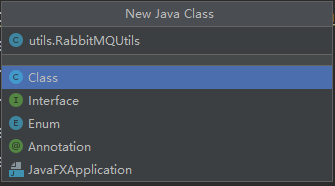
- 连接工具类的封装实现
package utils;

import com.rabbitmq.client.Channel;
import com.rabbitmq.client.Connection;
import com.rabbitmq.client.ConnectionFactory;

import java.io.IOException;
import java.util.concurrent.TimeoutException;

public class RabbitMQUtils {

    private static ConnectionFactory connectionFactory;

    static {
        //重量级资源 类加载执行只执行一次
        //创建连接mq的连接工厂对象
        connectionFactory = new ConnectionFactory();
        //设置连接rabbitmq主机
        connectionFactory.setHost("rabbitmq主机");
        //设置端口号
        connectionFactory.setPort(5672);
        //设置连接哪个虚拟主机
        connectionFactory.setVirtualHost("/虚拟主机");
        //设置访问虚拟主机的用户名和密码
        connectionFactory.setUsername("用户名");
        connectionFactory.setPassword("密码");
    }

    //定义提供连接对象的方法
    public static Connection getConnection() {

        try {
            return connectionFactory.newConnection();
        } catch (IOException e) {
            e.printStackTrace();
        } catch (TimeoutException e) {
            e.printStackTrace();
        }
        return null;
    }

    //关闭通道和关闭连接工具方法
    public static void closeConnectionAndChannel(Channel channel, Connection conn) {
        try {
            if (channel != null) {
                channel.close();
            }
            if (conn != null) {
                conn.close();
            }
        } catch (IOException e) {
            e.printStackTrace();
        } catch (TimeoutException e) {
            e.printStackTrace();
        }
    }
}
-
发布消息
package helloworld; import com.rabbitmq.client.Channel; import com.rabbitmq.client.Connection; import org.junit.Test; import utils.RabbitMQUtils; import java.io.IOException; import java.util.concurrent.TimeoutException; public class Provider { //生产消息 @Test public void testSendMessage() throws IOException, TimeoutException { //通过工具类获取连接对象 Connection connection = RabbitMQUtils.getConnection(); //获取连接中的通道 Channel channel = connection.createChannel(); //通道绑定对应消息队列 //参数1:队列名称 如果队列不存在自动创建 //参数2:用来定义队列特性是否要持久化 true 持久化队列 false 不持久化 //参数3:exclusive 是否独占队列 true 独占队列 false 不独占 //参数4:autoDelete:是否在消费完成后自动删除队列 true 自动删除 false 不自动删除 //参数5:额外附加参数 channel.queueDeclare("hello", false, false, false, null); //发布消息 //参数1:交换机名称 参数2:队列名称 参数3:传递消息额外设置 参数4:消息的具体内容 channel.basicPublish("", "hello", null, "hello rabbitmq".getBytes()); //调用工具类 RabbitMQUtils.closeConnectionAndChannel(channel, connection); } }- 消费消息
package helloworld; import com.rabbitmq.client.*; import utils.RabbitMQUtils; import java.io.IOException; import java.util.concurrent.TimeoutException; public class Customer { public static void main(String[] args) throws IOException, TimeoutException { //通过工具类获取连接 Connection connection = RabbitMQUtils.getConnection(); //创建通道 Channel channel = connection.createChannel(); //通道绑定对象 channel.queueDeclare("hello", false, false, false, null); //消费信息 //参数1:消费哪个队列的消息 队列名称 //参数2:开始消费的自动确认机制 //参数3:消费时的回调接口 channel.basicConsume("hello", true, new DefaultConsumer(channel) { @Override //最后一个参数:消息队列中取出的消息 public void handleDelivery(String consumerTag, Envelope envelope, AMQP.BasicProperties properties, byte[] body) throws IOException { System.out.println("==========================" + new String(body)); } }); } }5.项目结构
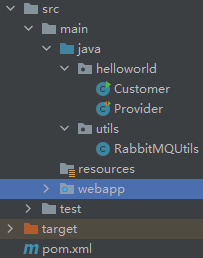
-
记得先引入引入rabbitmq的相关依赖
<!--引入rabbitmq的相关依赖-->
    <dependency>
      <groupId>com.rabbitmq</groupId>
      <artifactId>amqp-client</artifactId>
      <version>5.7.2</version>
    </dependency>

 浙公网安备 33010602011771号