


Maven第一篇【Maven的使用】
1、配置环境变量
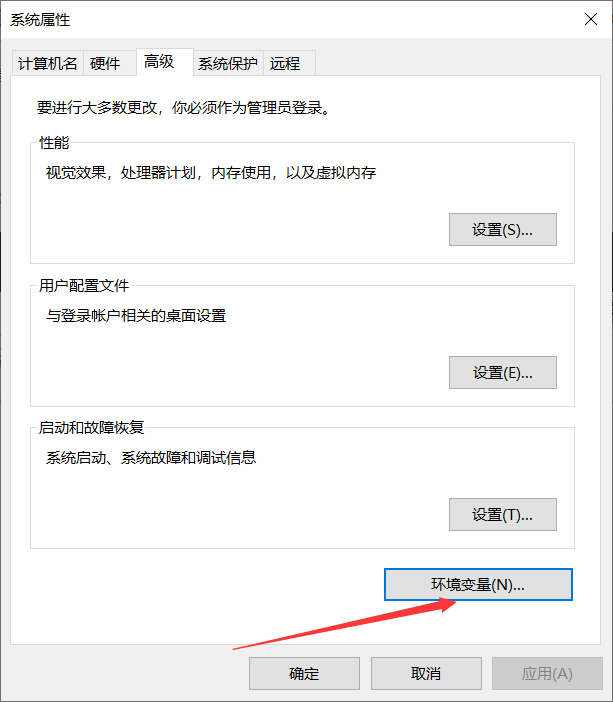
- 新建系统变量
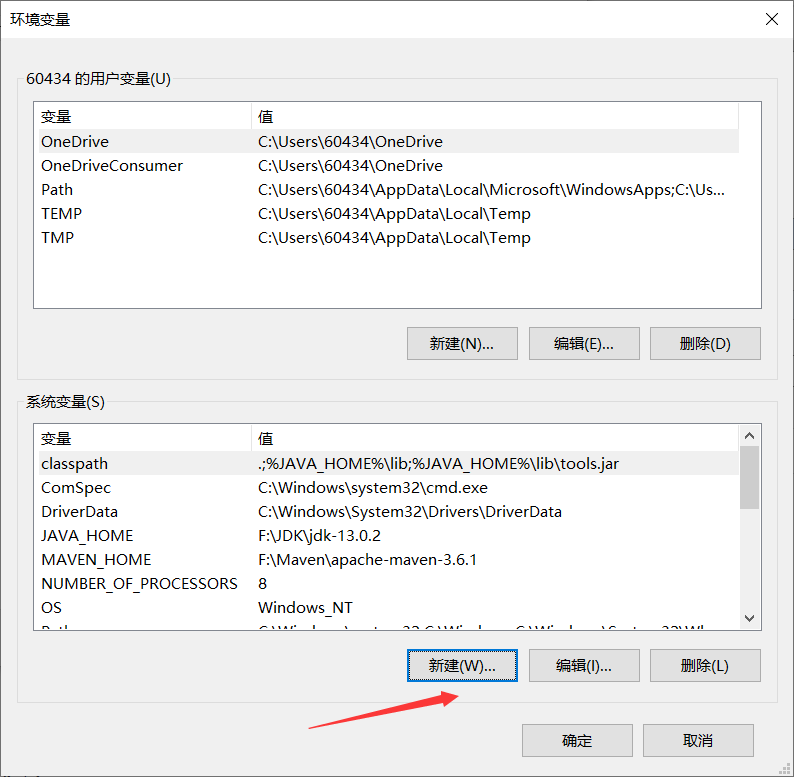
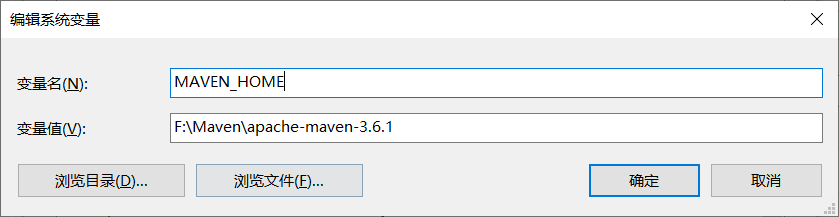
- 设置变量名:MAVEN_HOME,变量值:Maven的安装路径
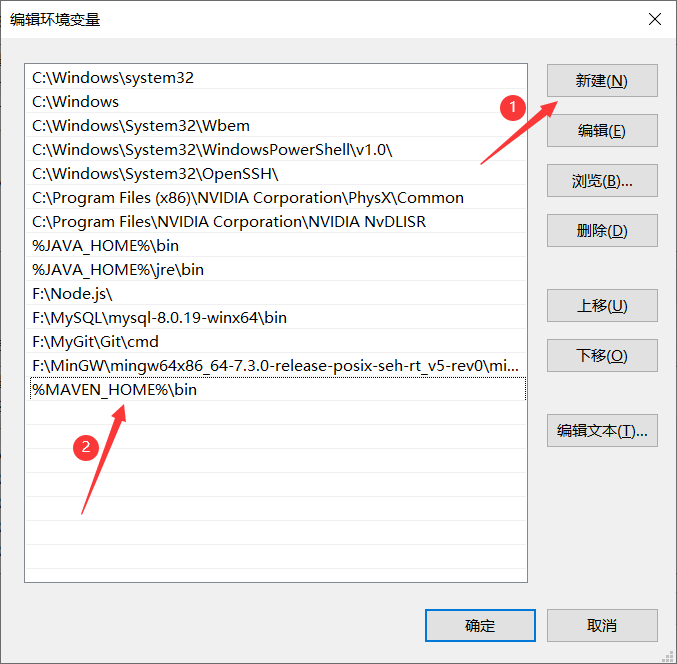
- 编辑Path变量
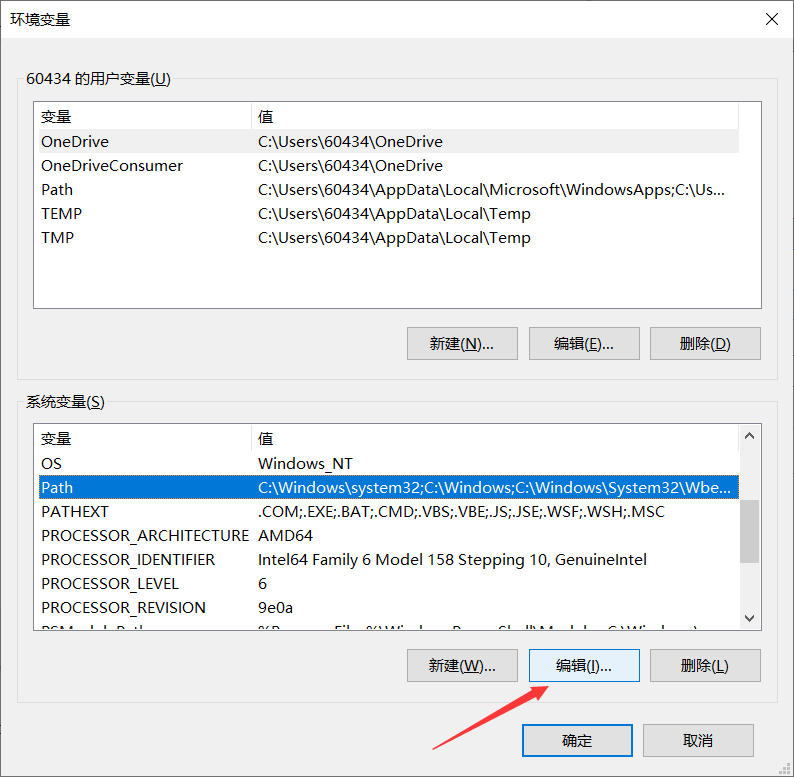
- 点击新建,设置值:%MAVEN_HOME%\bin
- 测试是否配置完成
cmd输入mvn -v,若出现maven版本,则配置成功

2、基础知识
Maven默认的本地仓库在哪?
答:${user.home}/.m2/repository
如何修改Maven的本地仓库?
答:修改Maven的setting.xml
3、Maven概念模型
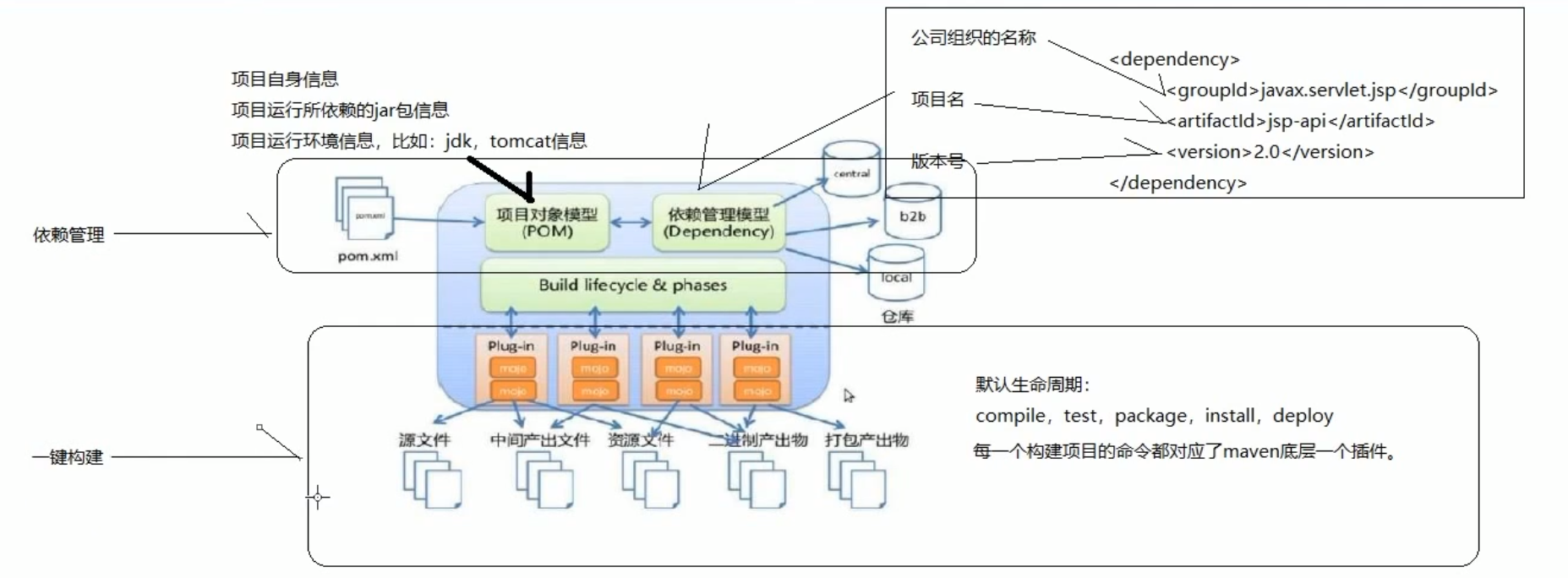
例如:<localRepository>F:\Maven\repository</localRepository>
Maven的setting.xml
<?xml version="1.0" encoding="UTF-8"?>

<settings xmlns="http://maven.apache.org/SETTINGS/1.0.0"
          xmlns:xsi="http://www.w3.org/2001/XMLSchema-instance"
          xsi:schemaLocation="http://maven.apache.org/SETTINGS/1.0.0 http://maven.apache.org/xsd/settings-1.0.0.xsd">

<localRepository>F:\Maven\repository</localRepository>

  <pluginGroups>

  </pluginGroups>

  <proxies>

  </proxies>

  <servers>

  </servers>

  <mirrors>
    <mirror>
      <id>aliyunmaven</id>
      <mirrorOf>central</mirrorOf>
      <name>Nexus aliyun</name>
      <url>https://maven.aliyun.com/repository/public</url>
    </mirror>
  </mirrors>

  <profiles>
    <profile>
      <id>jdk-1.8</id>
      <activation>
        <activeByDefault>true</activeByDefault>
        <jdk>1.8</jdk>
      </activation>
      <properties>
        <maven.compiler.source>1.8</maven.compiler.source>
        <maven.compiler.target>1.8</maven.compiler.target>
        <maven.compiler.compilerVersion>1.8</maven.compiler.compilerVersion>
      </properties>
    </profile>
  </profiles>

</settings>
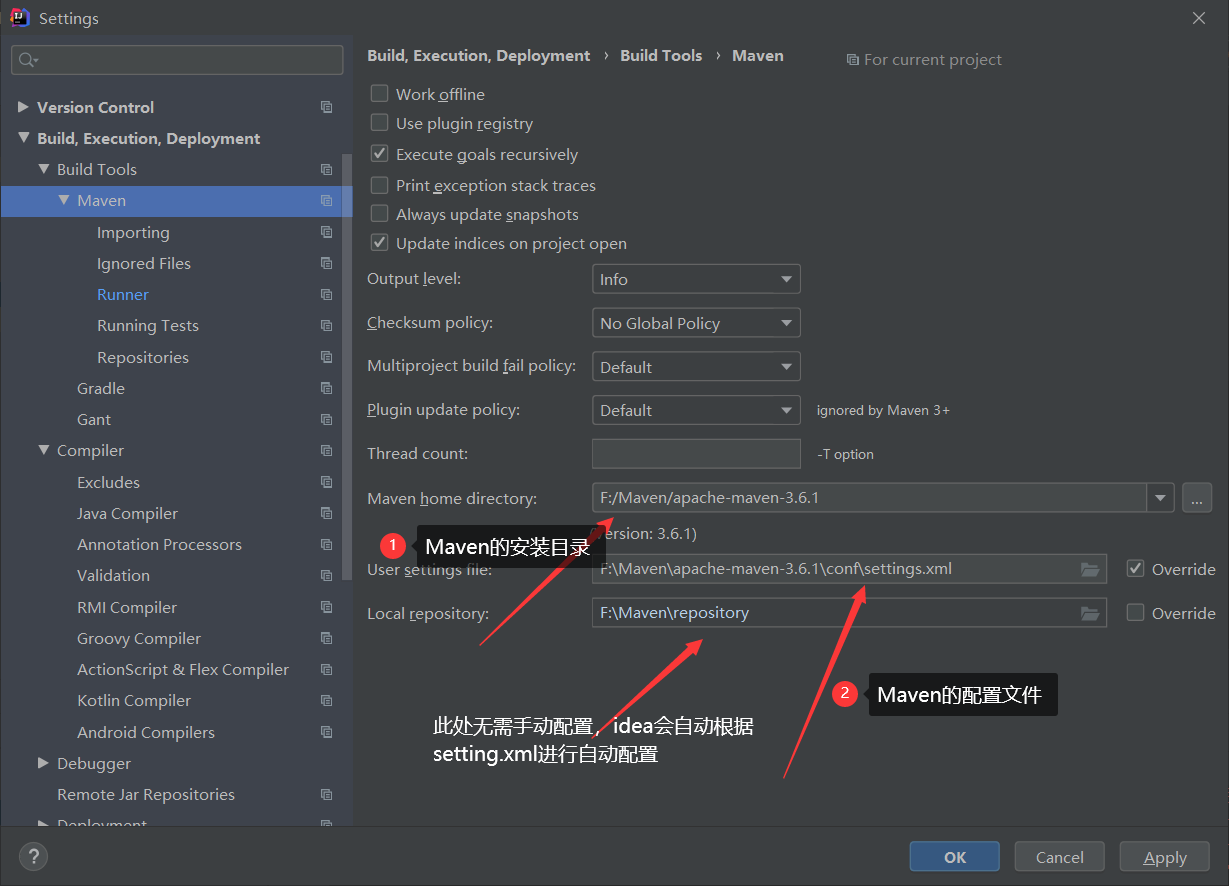
4、idea集成本地Maven
4.1、配置本地Maven
4.2、解决idea下载过慢的问题
6、遇到的坑
6.1 jar包下载失败
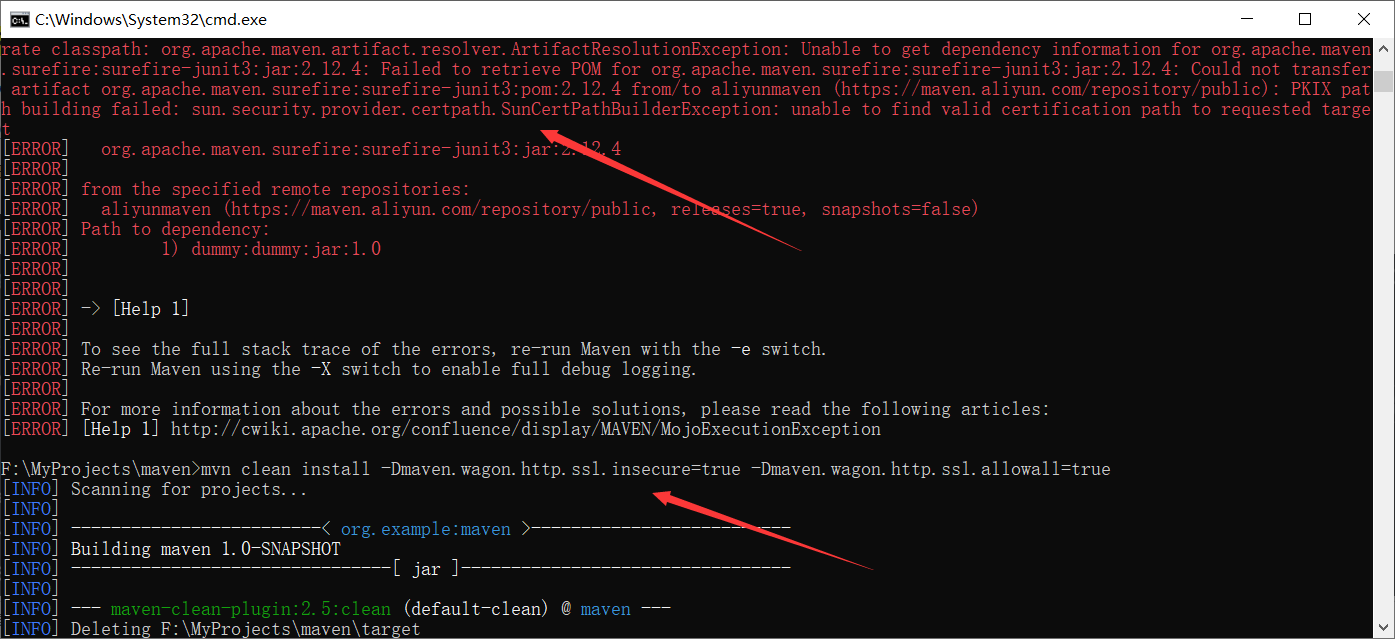
错误描述: PKIX path building failed: sun.security.provider.certpath.SunCertPathBuilderException: unable to find valid certification path to requested target
产生原因:"http://maven.aliyun.com/nexus/content/groups/public/"仓库地址协议更新为https,所以下载时需要ssl认证
解决方案:
忽略ssl认证,mvn clean install -Dmaven.wagon.http.ssl.insecure=true -Dmaven.wagon.http.ssl.allowall=true
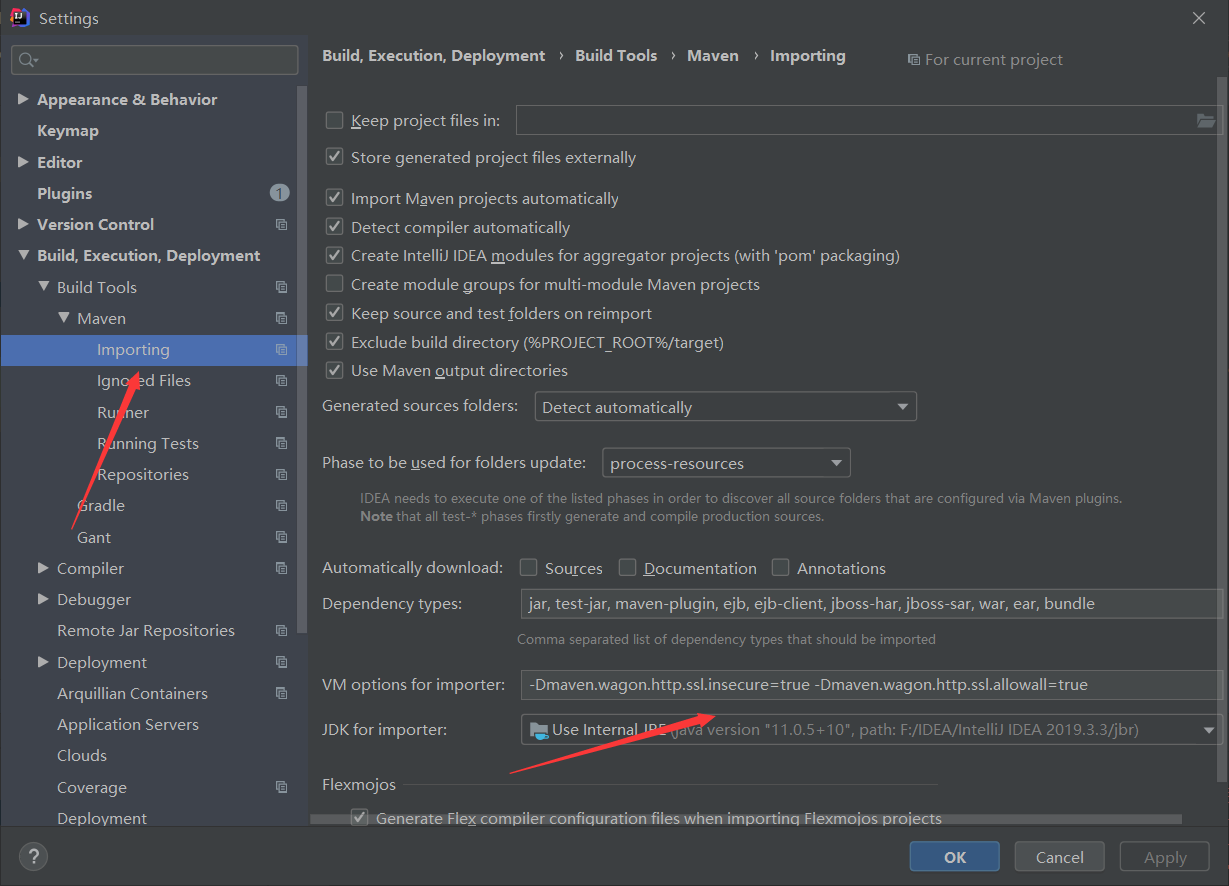
6.1.1 解决idea出现该问题
6.1.2 idea中maven create from archetype出现错误
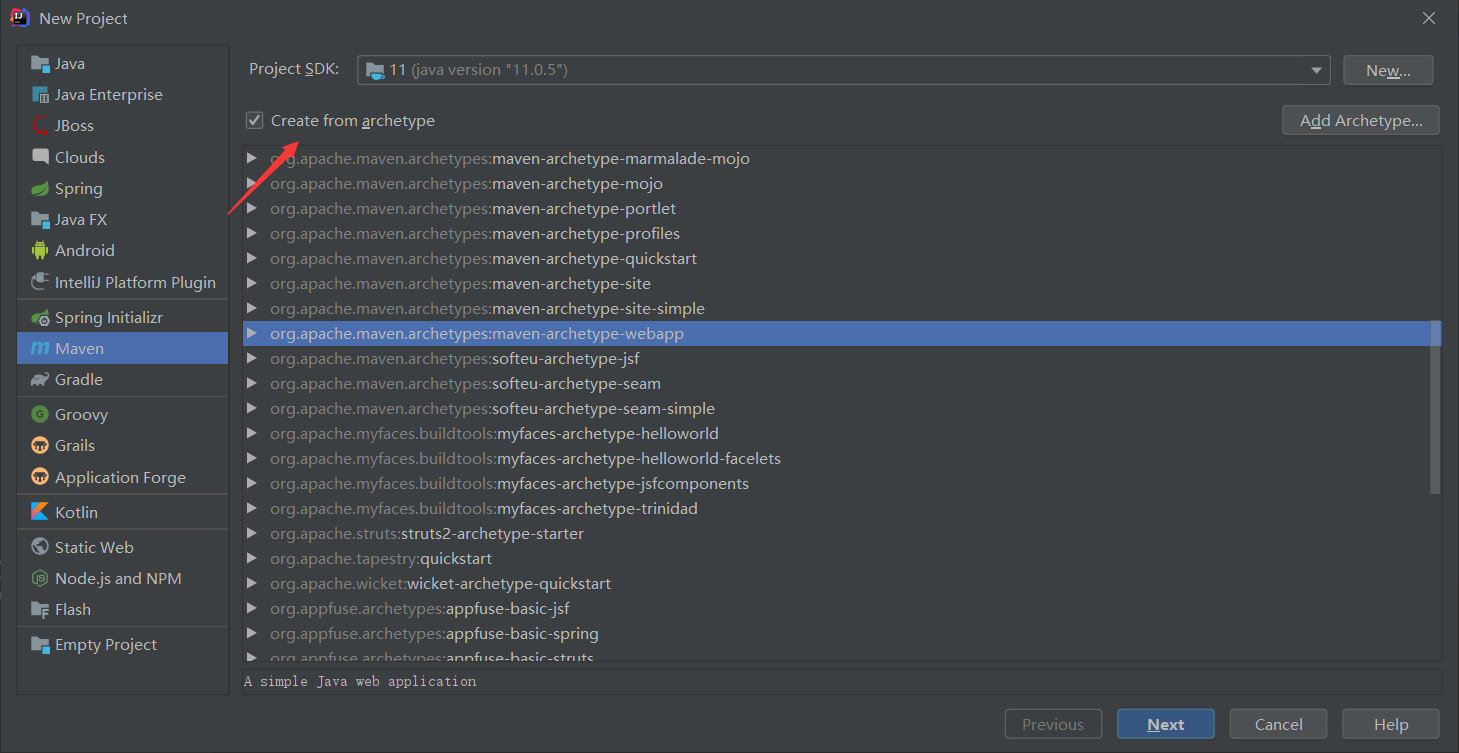
错误描述:
[WARNING] Could not transfer metadata org.apache.maven.plugins:maven-archetype-plugin/maven-metadata.xml from/to alimaven (https://maven.aliyun.com/repository/public): Received fatal alert: protocol_version
[INFO] ------------------------------------------------------------------------
[INFO] BUILD FAILURE
[INFO] ------------------------------------------------------------------------
[INFO] Total time:  1.346 s
[INFO] Finished at: 2020-10-19T23:28:25+08:00
[INFO] ------------------------------------------------------------------------
[ERROR] Plugin org.apache.maven.plugins:maven-archetype-plugin:RELEASE or one of its dependencies could not be resolved: Failed to read artifact descriptor for org.apache.maven.plugins:maven-archetype-plugin:jar:RELEASE: Failed to resolve version for org.apache.maven.plugins:maven-archetype-plugin:jar:RELEASE: Could not find metadata org.apache.maven.plugins:maven-archetype-plugin/maven-metadata.xml in local (F:\Maven\apache-maven-3.6.1\repository) -> [Help 1]
[ERROR]
[ERROR] To see the full stack trace of the errors, re-run Maven with the -e switch.
[ERROR] Re-run Maven using the -X switch to enable full debug logging.
[ERROR]
[ERROR] For more information about the errors and possible solutions, please read the following articles:
[ERROR] [Help 1] http://cwiki.apache.org/confluence/display/MAVEN/PluginResolutionException
[ERROR] Maven execution terminated abnormally (exit code 1)
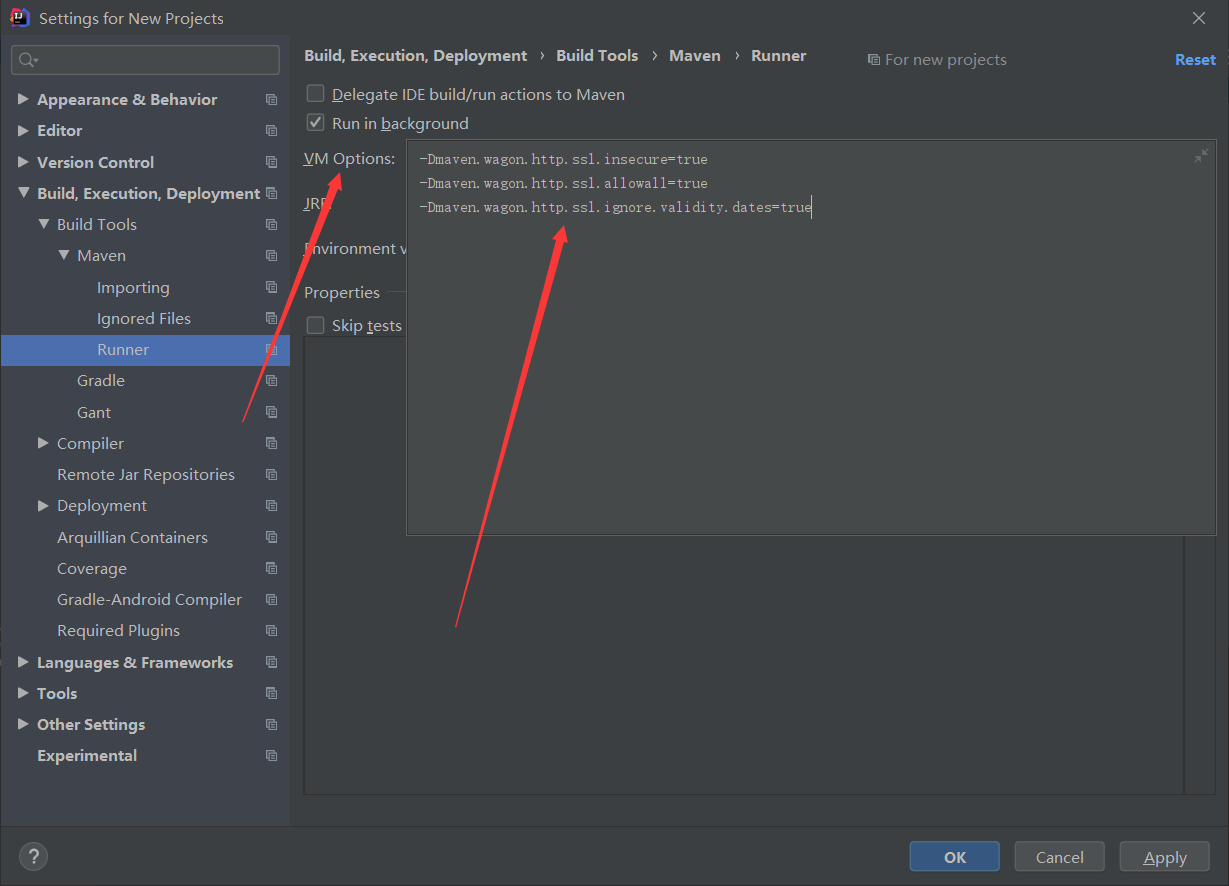
解决方案:
为全局进行如下配置
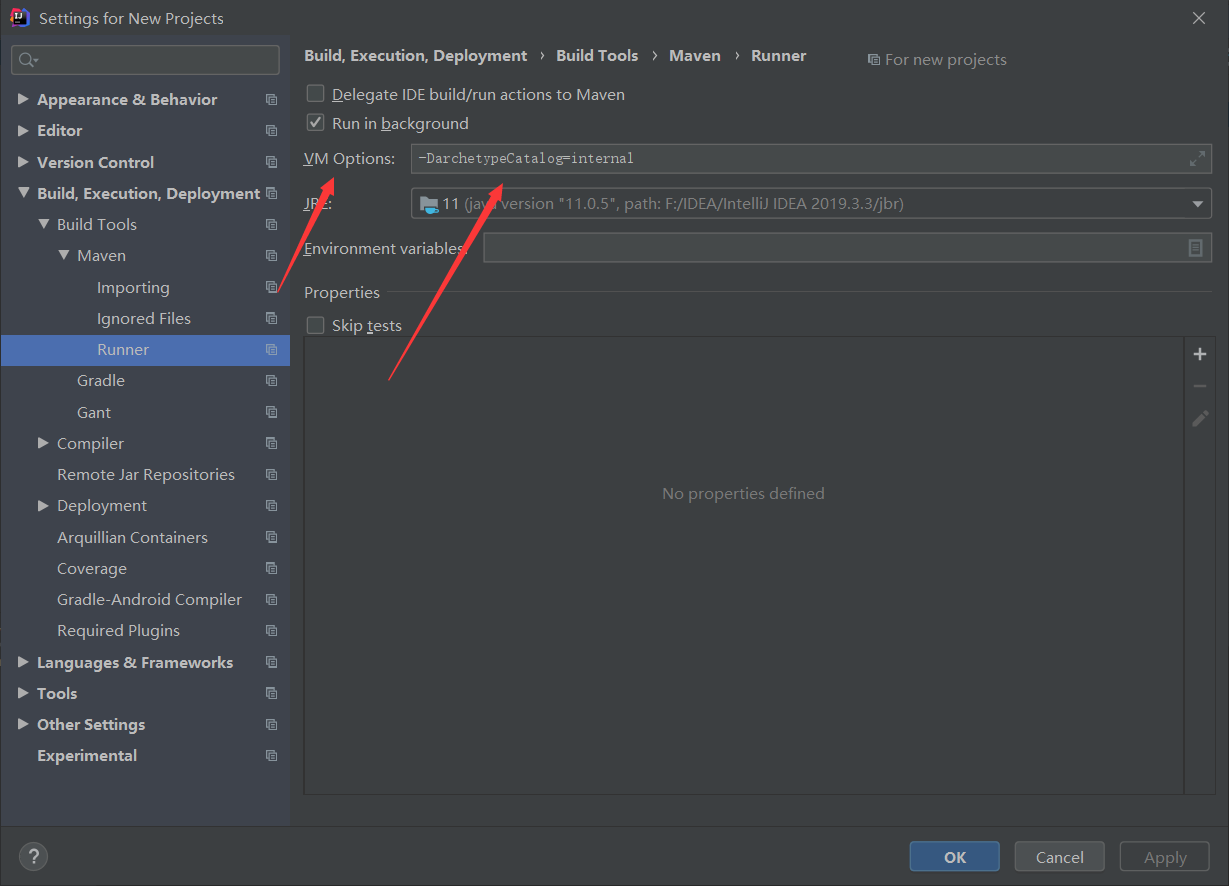
-Dmaven.wagon.http.ssl.insecure=true -Dmaven.wagon.http.ssl.allowall=true -Dmaven.wagon.http.ssl.ignore.validity.dates=true
拓展:
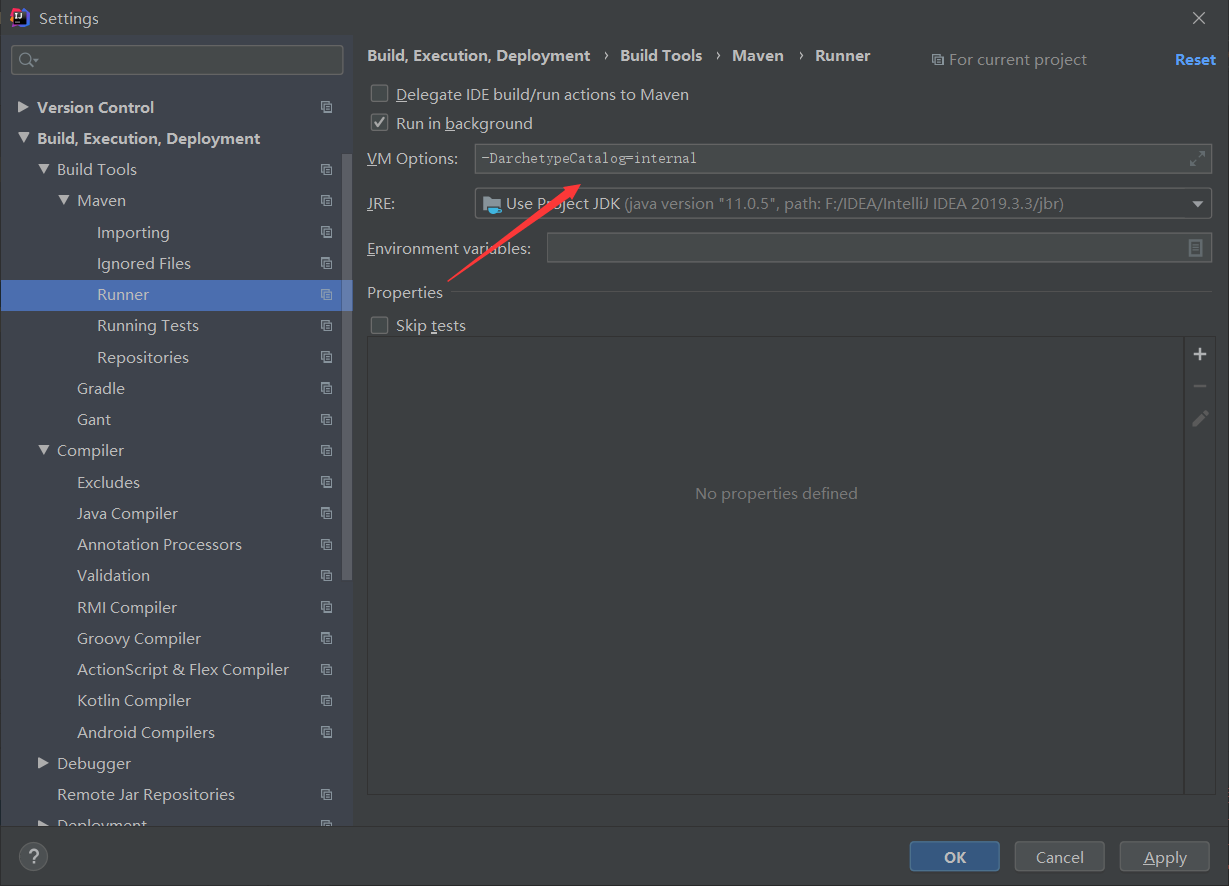
进行如下配置,以后每次create from archetype不会去联网下载,加快项目创建速度 -DarchetypeCatalog=internal
6.2、[WARNING] Using platform encoding (GBK actually)...
错误描述:
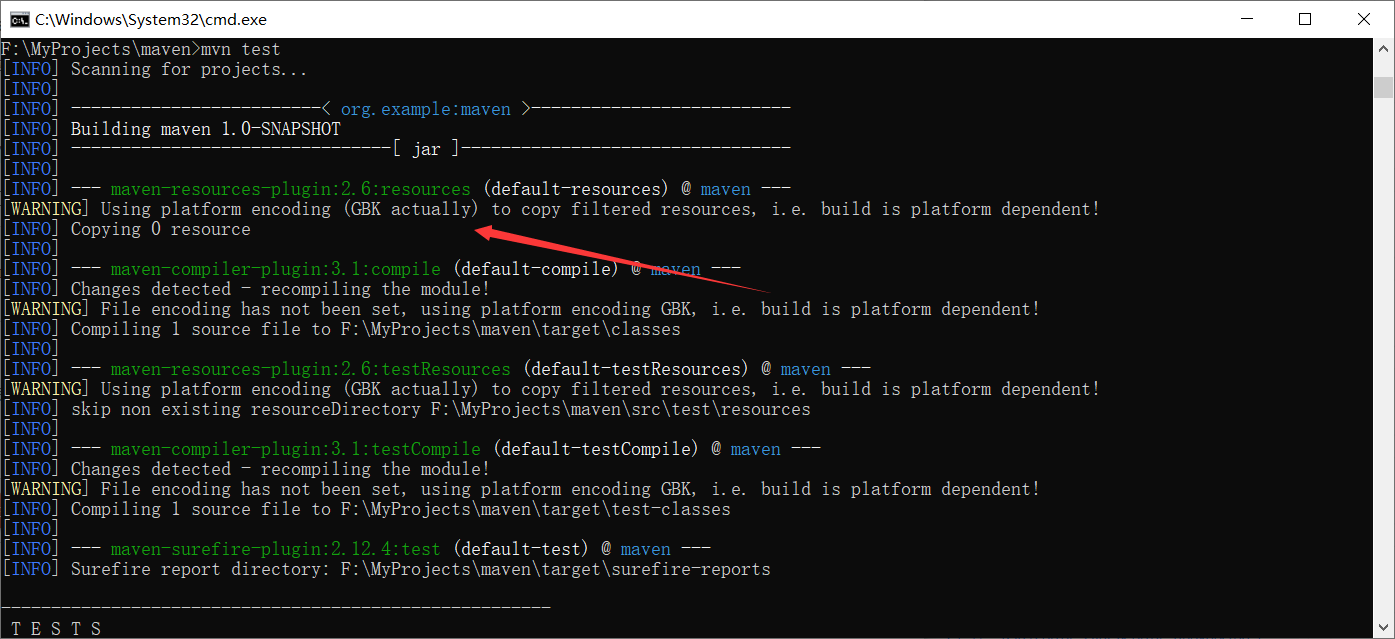
产生原因:编码冲突,源文件编码格式并不是GBK编码
解决方案:
    <!--在pom.xml添加-->
    <properties>
        <project.build.sourceEncoding>UTF-8</project.build.sourceEncoding>
    </properties>
pom.xml设置Maven的jdk版本
<build>
    <plugins>
        <plugin>
            <groupId>org.apache.maven.plugins</groupId>
            <artifactId>maven-compiler-plugin</artifactId>
            <version>3.1</version>
            <configuration>
                <source>1.8</source>
                <target>1.8</target>
            </configuration>
        </plugin>
    </plugins>
</build>
批量删除repository中下载失败的jar包
for /r %i in (*.lastUpdated) do del %i

 浙公网安备 33010602011771号