

【ESP】win10 win11 Arduino 安装 ESP32 C3 S2 ESP8266 扩展
1 安装并打开Arduino


2 设置 ESP32 C3 S2 ESP8266 扩展链接


https://dl.espressif.com/dl/package_esp32_index.json
http://arduino.esp8266.com/stable/package_esp8266com_index.json
https://raw.githubusercontent.com/espressif/arduino-esp32/gh-pages/package_esp32_dev_index.json
3 下载扩展库

等待其更新索引...
3.1 安装 ESP8266

3.2 安装 ESP32

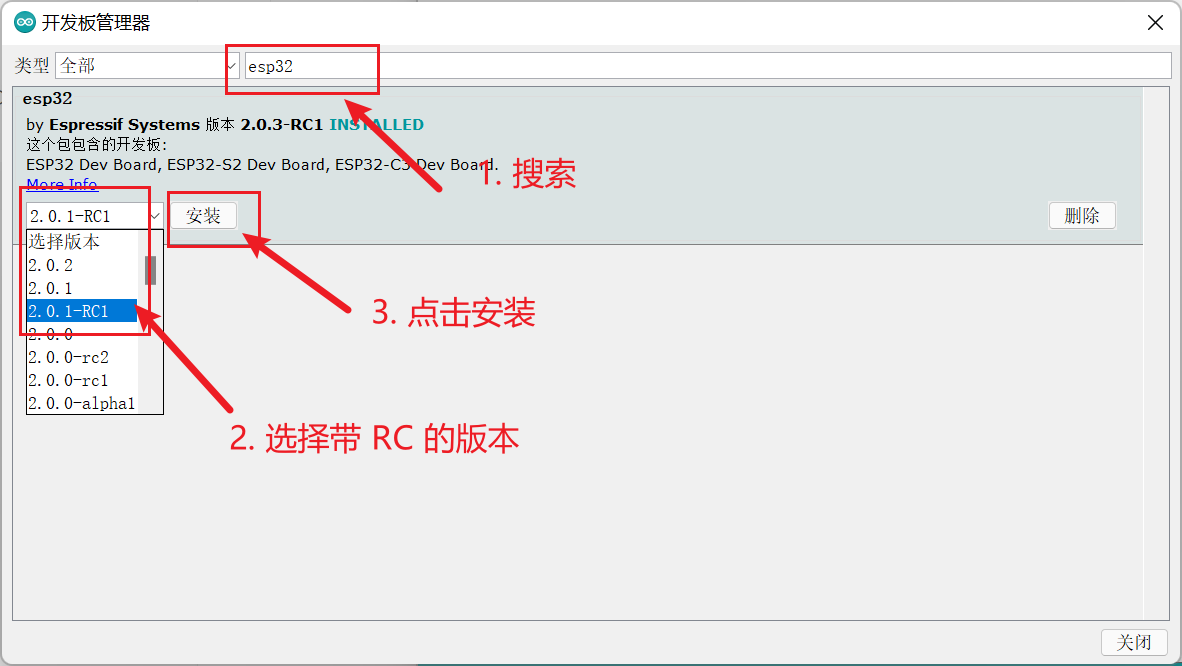
3.3 安装 EPS32-C3、EPS32-S2
4 安装成功确认



 浙公网安备 33010602011771号