
solitude组件wakatime编码时长侧边栏
本人博客原文
https://www.konoxin.top/posts/82e0e7c7/
前言
最近想在博客引入waketime的编码热力图,就研究了一下,
效果是这样的:

首先你已经使用过wakatime,
如果没有起前往如下教程,
{% link 'WakaTime的使用(vscode,idea,hbuilder)' 'WakaTime' 'https://juejin.cn/post/6981098690312142861' %}
教程
第一步
接下来前往WakaTime的API文档
{% link 'WakaTime的API文档' 'WakaTime' 'https://wakatime.com/share/embed' %}
按照如下操作会得到json的接口
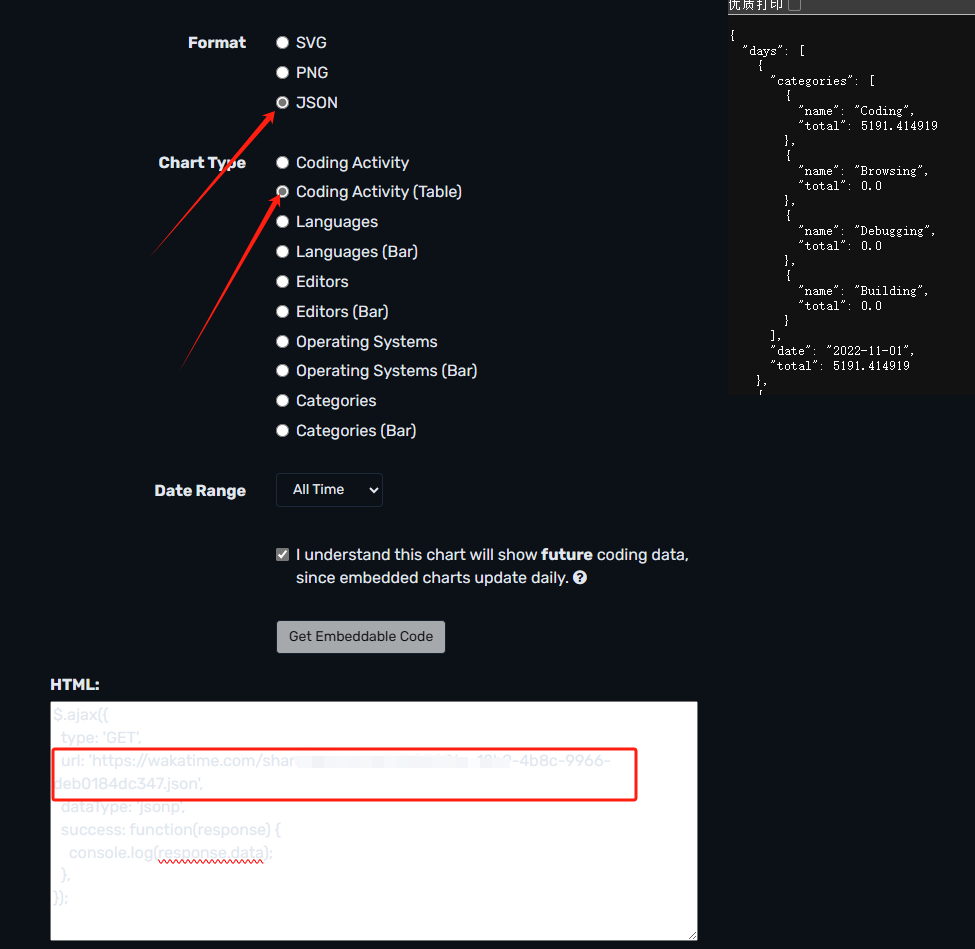
第二步
在source -> _data -> aside.yml (没有就新建)
下增加如下代码
- name: code
  title: 编码时长
  class: card-code
  id:
  icon: fas fa-calendar-days
  content_id: code-info
  # content_css: 'height:160px;overflow:hidden'
  content_html: '<div class="codeTime"><div class="code" id="code"></div></div>
    <div class="legend">
        <div class="legend-item"><div class="legend-color" style="background: #ebedf0;"></div>无数据</div>
        <div class="legend-item"><div class="legend-color" style="background: #9be9a8;"></div>0-2小时</div>
        <div class="legend-item"><div class="legend-color" style="background: #40c463;"></div>2-4小时</div>
        <div class="legend-item"><div class="legend-color" style="background: #30a14e;"></div>4-6小时</div>
        <div class="legend-item"><div class="legend-color" style="background: #216e39;"></div>6+小时</div>
    </div>'
然后在你的自定义入口 js 下输入
在source -> js -> 你的js (没有就新建)
在const response = await fetch('')引入你在wakatime得到的接口
async function fetchData() {

    try {
        // 使用CORS代理
        const response = await fetch(`https://wakatime.com/xxx.json`);
        const data = await response.json();
        // 修正数据访问路径
        if (data) {
            console.log('成功获取数据,天数:', data.days.length);
            return data.days;
        } else {
            console.warn('数据格式不符合预期:', data);
            return [];
        }
    } catch (error) {
        console.error('获取数据失败:', error);
        return [];
    }
}

function getColor(hours) {
    if (!hours || hours === 0) return '#ebedf0'; // 无数据或0小时显示灰色
    if (hours < 2) return '#9be9a8'; // 0-2小时: 浅绿
    if (hours < 4) return '#40c463'; // 2-4小时: 中绿
    if (hours < 6) return '#30a14e'; // 4-6小时: 深绿
    return '#216e39'; // 6+小时: 最深绿
}

function renderCalendar(days) {
    const calendarEl = document.getElementById('code');
    const today = new Date();
    const startDate = new Date();
    startDate.setMonth(today.getMonth() - 11); // 显示最近12个月

    let currentDate = new Date(startDate);
    let currentMonth = currentDate.getMonth();

    // 添加月份标签
    // const monthLabel = document.createElement('div');
    // monthLabel.className = 'month-label';
    // monthLabel.textContent = currentDate.toLocaleString('zh-CN', { month: 'long' }) + ' ' + currentDate.getFullYear();
    // calendarEl.appendChild(monthLabel);

    // 跳过第一周的空白天数
    const firstDayOfWeek = currentDate.getDay();
    for (let i = 0; i < firstDayOfWeek; i++) {
        const emptyDay = document.createElement('div');
        emptyDay.className = 'day';
        emptyDay.style.visibility = 'hidden';
        calendarEl.appendChild(emptyDay);
    }

    while (currentDate <= today) {
        // 检查是否需要添加新的月份标签
        if (currentDate.getMonth() !== currentMonth) {
            currentMonth = currentDate.getMonth();
            // const monthLabel = document.createElement('div');
            // monthLabel.className = 'month-label';
            // monthLabel.textContent = currentDate.toLocaleString('zh-CN', { month: 'long' }) + ' ' + currentDate.getFullYear();
            // calendarEl.appendChild(monthLabel);
        }

        const dateStr = currentDate.toISOString().split('T')[0];
        const dayData = days.find(d => d.date === dateStr);
        const hours = dayData ? dayData.total / 3600 : 0; // 使用total字段计算小时数

        const dayEl = document.createElement('div');
        dayEl.className = 'day';
        dayEl.style.backgroundColor = getColor(hours);
        dayEl.setAttribute('data-date', dateStr);
        dayEl.setAttribute('data-hours', hours.toFixed(1));

        calendarEl.appendChild(dayEl);

        currentDate.setDate(currentDate.getDate() + 1);
    }
}

(async function () {

    const data = await fetchData();
    renderCalendar(data);
})();

async function codeTime(){
    const data = await fetchData();
    renderCalendar(data);
}
function handlePjaxComplete() {
    if (isHomePage()) {
        codeTime()
    }
}

function isHomePage() {
    return window.location.pathname === '/' || window.location.pathname === '/index.html';
}

window.onload = function () {
    document.addEventListener("pjax:complete", handlePjaxComplete);
}
接下来在你的自定义入口 css 下输入
在source -> css -> 你的css (没有就新建)
        .code {
          display: flex;
          flex-wrap: wrap;
          gap: 3px;
          margin-top: 7px;
        }

        .day {
          width: 10px;
          height: 10px;
          border-radius: 2px;
          background: #ebedf0;
          position: relative;
        }

        .day:hover::after {
          content: attr(data-date) " - " attr(data-hours) "小时";
          position: absolute;
          top: -30px;
          left: 50%;
          transform: translateX(-50%);
          background: #333;
          color: white;
          padding: 3px 6px;
          border-radius: 3px;
          font-size: 12px;
          white-space: nowrap;
          z-index: 100000;

        }

        .month-label {
          width: 100%;
          margin-top: 10px;
          font-size: 12px;
          color: #666;
        }

        .legend {
          margin-top: 5px;
          margin-bottom: 7px;
          display: flex;
          justify-content: space-between;
        }

        .legend-item {
          display: flex;
          align-items: center;
          font-size: 9px;
        }

        .legend-color {
          width: 12px;
          height: 12px;
          border-radius: 2px;
          margin-right: 5px;
        }
最后修改你的 _config.solitude.yml 中的aside下的home新增code
aside:
  # Values: about (info card), newestPost (latest article), allInfo (website information), newest_comment (latest comment)
  # 值: about(信息卡), newestPost(最新文章), allInfo(网站信息), newest_comment(最新评论)

  # Sticky: Fixed position / noSticky: Not fixed position
  # Sticky: 固定位置 / noSticky: 不固定位置
  home: # on the homepage
    noSticky: "about"
    Sticky: "code,allInfo"
  post: # on the article page
    noSticky: "about"
    Sticky: "newestPost"
  page: # on the page
    noSticky: "about"
    Sticky: "newestPost,allInfo"
  # 菜单栏位置(0: 左 1: 右)
  position: 1 # Sidebar positioning(0: left 1: right)
以及在extends下的head引入你的 js 和 css
示例:
extends:
  # Insert in head
  # 插入到 head
  head:
  - <link rel="stylesheet" href="/css/customize.css">
  - <script src="/js/custom.js"></script>
最后在首页就出现效果啦!
本文由博客一文多发平台 OpenWrite 发布!

 浙公网安备 33010602011771号