

实验7:基于REST API的SDN北向应用实践
实验7:基于REST API的SDN北向应用实践
一、实验目的
- 能够编写程序调用OpenDaylight REST API实现特定网络功能;
- 能够编写程序调用Ryu REST API实现特定网络功能。
二、实验环境
- 下载虚拟机软件Oracle VisualBox或VMware;
- 在虚拟机中安装Ubuntu 20.04 Desktop amd64,并完整安装Mininet、OpenDaylight(Carbon版本)、Postman和Ryu;
三、实验要求
(一)基本要求
- OpenDaylight
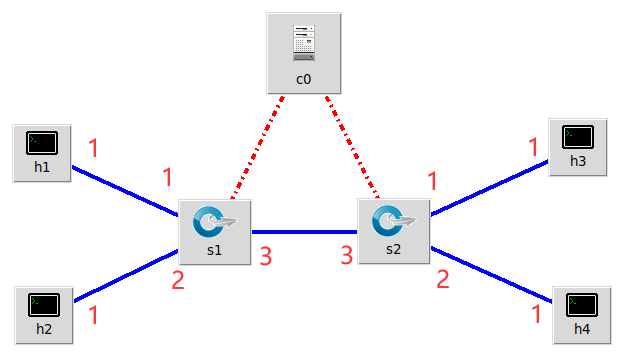
(1) 利用Mininet平台搭建下图所示网络拓扑,并连接OpenDaylight;
![img]()
(2) 编写Python程序,调用OpenDaylight的北向接口下发指令删除s1上的流表数据。
(3) 编写Python程序,调用OpenDaylight的北向接口下发硬超时流表,实现拓扑内主机h1和h3网络中断20s。
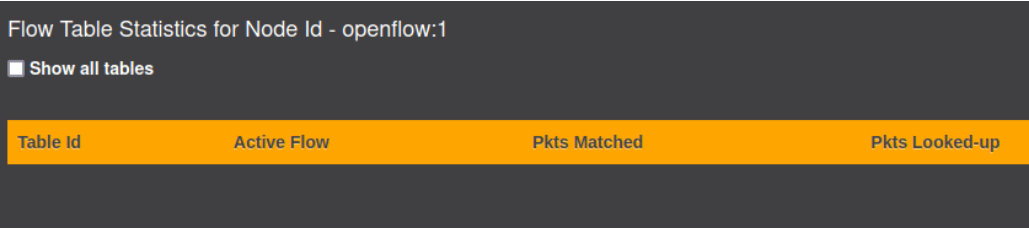
(4) 编写Python程序,调用OpenDaylight的北向接口获取s1上活动的流表数。 - Ryu
(1) 编写Python程序,调用Ryu的北向接口,实现上述OpenDaylight实验拓扑上相同的硬超时流表下发。
(2) 利用Mininet平台搭建下图所示网络拓扑,要求支持OpenFlow 1.3协议,主机名、交换机名以及端口对应正确。拓扑生成后需连接Ryu,且Ryu应能够提供REST API服务。
![img]()
(3) 整理一个Shell脚本,参考Ryu REST API的文档,利用curl命令,实现和实验2相同的VLAN。

| VLAN_ID | Hosts |
|---|---|
| 0 | h1 h3 |
| 1 | h2 h4 |
(二)进阶要求
编程实现基本要求第2部分Ryu(3)中的VLAN划分。
三、实验内容
(一)
1.ODL
(2)程序代码:
def http_detele(url):
    url = url
    headers = {'Content-Type': 'application/json'}
    resp = requests.delete(url, headers=headers, auth=HTTPBasicAuth('admin', 'admin'))
    return resp

if __name__ == '__main__':
    url = 'http://127.0.0.1:8181/restconf/config/opendaylight-inventory:nodes/node/openflow:1/'
    with open('test.json') as f:
        jstr = f.read()
    resp = http_detele(url)
    print(resp.content)
(3)程序代码:
import requests
from requests.auth import HTTPBasicAuth

def http_put(url, jstr):
    url = url
    headers = {'Content-Type': 'application/json'}
    resp = requests.put(url, jstr, headers=headers, auth=HTTPBasicAuth('admin', 'admin'))
    return resp
if __name__ == '__main__':
    url = 'http://127.0.0.1:8181/restconf/config/opendaylight-inventory:nodes/node/openflow:1/flow-node-inventory:table/0/flow/1'
    with open('test.json') as f:
        jstr = f.read()
    resp = http_put(url, jstr)
    print(resp.content)
(4)程序代码
def http_get(url):
    url = url
    headers = {'Content-Type': 'application/json'}
    resp = requests.get(url, headers=headers, auth=HTTPBasicAuth('admin', 'admin'))
    return resp
if __name__ == '__main__':
    url = 'http://127.0.0.1:8181/restconf/operational/opendaylight-inventory:nodes/node/openflow:1/flow-node-inventory:table/0/opendaylight-flow-table-statistics:flow-table-statistics'
    with open('test.json') as f:
        jstr = f.read()
    resp = http_get(url)
    print(resp.content)
2.ryu
(1)程序代码
def http_post(url, js):
    headers = {'Content-Type': 'application/json'}
    resp = requests.post(url, jstr, headers=headers)
    print(resp)
if __name__ == '__main__':
    url = 'http://localhost:8080/stats/flowentry/add'
    with open('test.json') as f:
   	 	jstr = f.read()
    http_post(url, jstr)
四、个人体会
感觉这次实验有点花时间吧,可能是因为要写一些代码了,本来对这网络方面已经不算太了解,也是勉勉强强的,也就是不断试错,向别的同学不断学习才慢慢做出来的,有时候实属把我搞懵了,动手能力还有待提高,希望后面的大作业能如期完成吧。

 浙公网安备 33010602011771号