


Yarn的学习
一、Yarn 资源调度器
Yarn 是一个资源调度平台,负责为运算程序提供服务器运算资源,相当于一个分布式的操作系统平台,而 MapReduce 等运算程序则相当于运行于操作系统之上的应用程序。
1.1 Yarn 基础架构
YARN 主要由 ResourceManager、NodeManager、ApplicationMaster 和 Container 等组件构成。

总结来说就是,ResourceManager(RM)是整个集群资源的老大,NodeManager(NM)是单个节点资源的老大,ApplicationMaster(AM)是整个任务的老大。
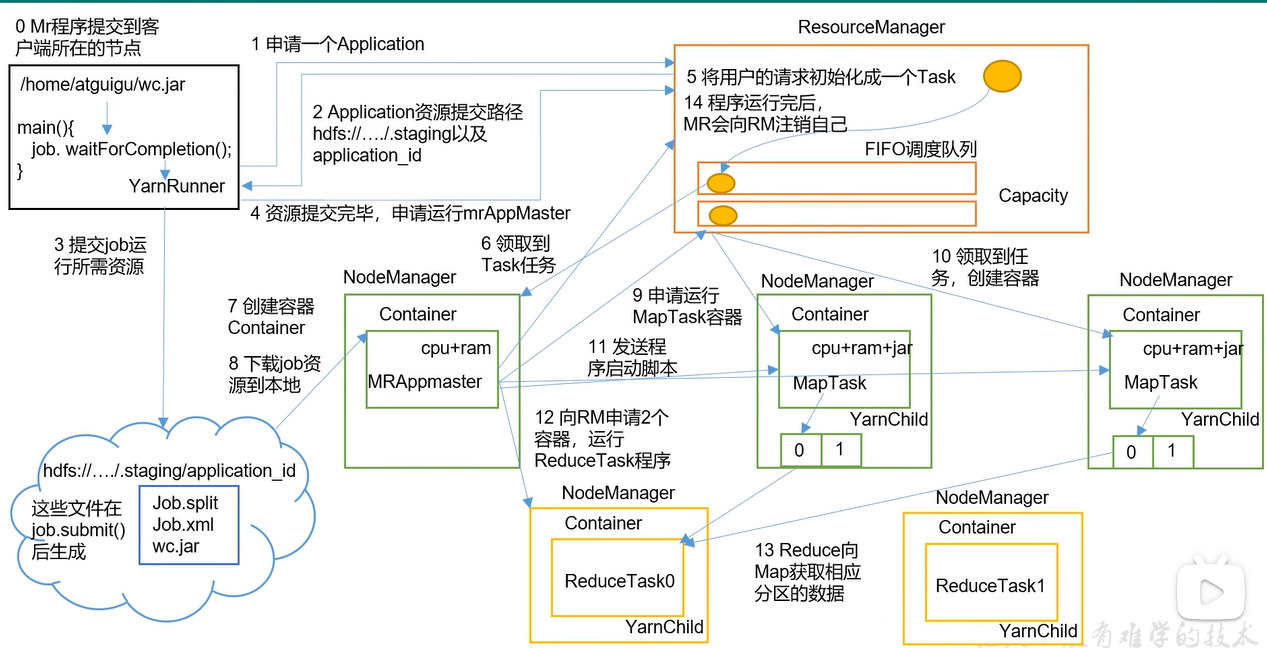
1.2 yarn的工作机制
1.3 Yarn 调度器和调度算法
目前,Hadoop 作业调度器主要有三种:FIFO、容量(Capacity Scheduler)和公平(Fair Scheduler)。
1.3.1 先进先出调度器(FIFO)
FIFO 调度器(First In First Out):单队列,根据提交作业的先后顺序,先来先服务。优点:简单易懂;缺点:不支持多队列,生产环境很少使用;
1.3.2 容量调度器(Capacity Scheduler)
Capacity Scheduler 是 Yahoo(雅虎,美国互联网网站)开发的多用户调度器。
1.3.2.1 容量调度器的特点
1、多队列:每个队列可配置一定的资源量,每个队列采用FIFO调度策略。
2、容量保证:管理员可为每个队列设置资源最低保证和资源使用上限
3、灵活性:如果一个队列中的资源有剩余,可以暂时共享给那些需要资源的队列,而一旦该队列有新的应用程序提交,则其他队列借调的资源会归还给该队列。
4、多租户:支持多用户共享集群和多应用程序同时运行。为了防止同一个用户的作业独占队列中的资源,该调度器会对同一用户提交的作业所占资源量进行限定。
1.3.2.2 容量调度器资源分配算法
1)队列资源分配:从root开始,使用深度优先算法,优先选择资源占用率最低的队列分配资源。
2)作业资源分配:默认按照提交作业的优先级和提交时间顺序分配资源。
3)容器资源分配:按照容器的优先级分配资源;如果优先级相同,按照数据本地性原则:(1)任务和数据在同一节点;(2)任务和数据在同一机架;(3)任务和数据不在同一节点也不在同一机架;
1.3.3 公平调度器(Fair Scheduler)
Fair Schedulere 是 Facebook(脸书,美国社交网络服务网站)开发的多用户调度器。
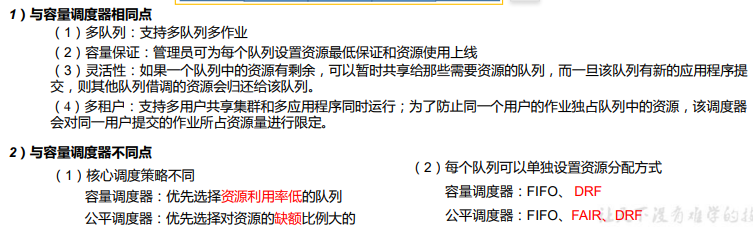
1.3.3.1公平调度器的特点
1.3.3.2什么是缺额
在时间尺度上,所有作业获得公平的资源。某一时刻一个作业应获资源和实际获取资源的差距叫“缺额”。调度器会优先为缺额大的作业分配资源。
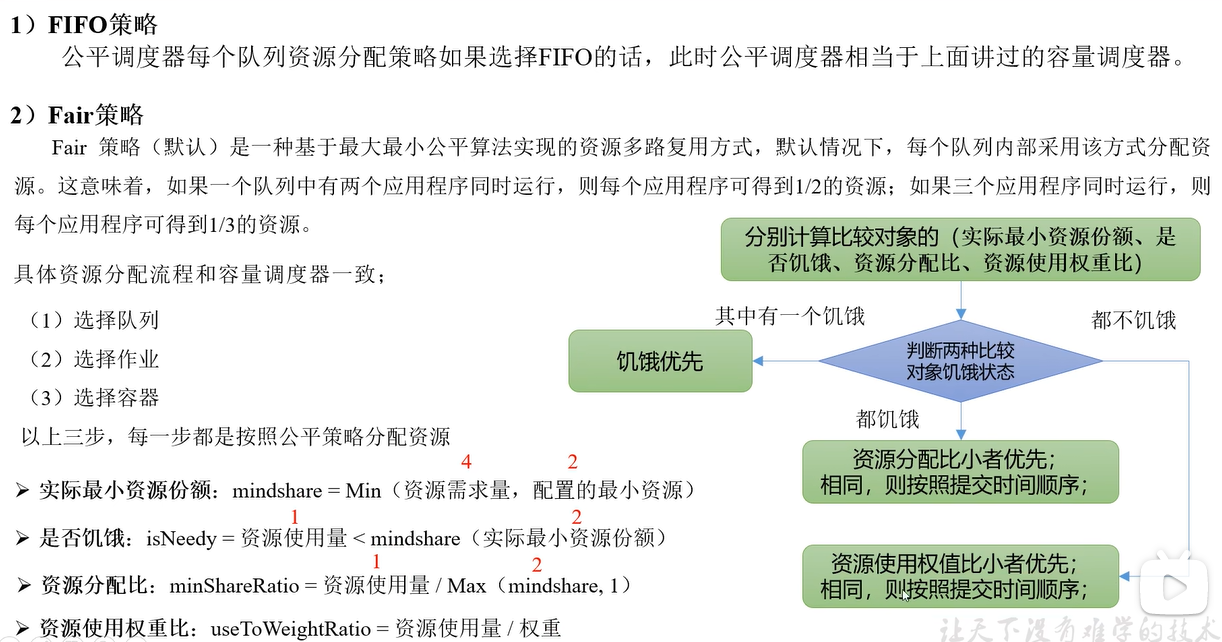
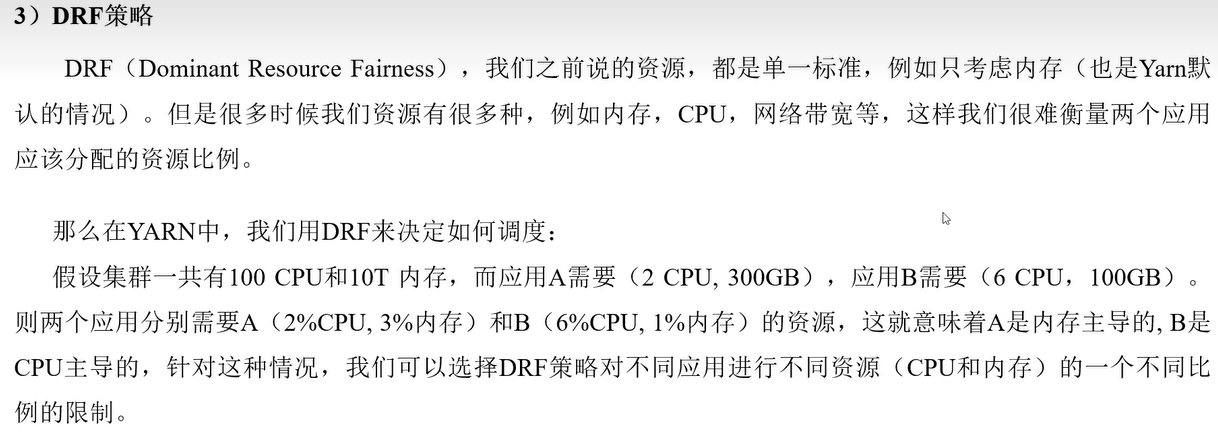
1.3.3.3公平调度器队列资源分配方式
1.4 Yarn 常用命令
1.4.1 yarn application 查看任务
1)yarn application -list:列出所有 Application;
2)yarn application -list -appStates FINISHED:根据 Application 状态过滤,yarn application -list -appStates(所有状态:ALL、NEW、NEW_SAVING、SUBMITTED、ACCEPTED、RUNNING、FINISHED、FAILED、KILLED);
3)yarn application -kill application_0001:杀死指定应用;
1.4.2 yarn logs 查看日志
1)yarn logs -applicationId
2)yarn logs -applicationId
1.4.3 yarn applicationattempt 查看尝试运行的任务
1)yarn applicationattempt -list
2)yarn applicationattempt -status
1.4.4 yarn container 查看容器
1)yarn container -list
2)yarn container -status
注:只有在任务跑的途中才能看到 container 的状态。
1.4.5 yarn node 查看节点状态
列出所有节点:yarn node -list -all
1.4.6 yarn rmadmin 更新配置
加载队列配置:yarn rmadmin -refreshQueues
1.4.7 yarn queue 查看队列
打印队列信息:yarn queue -status
1.5 Yarn 生产环境核心参数
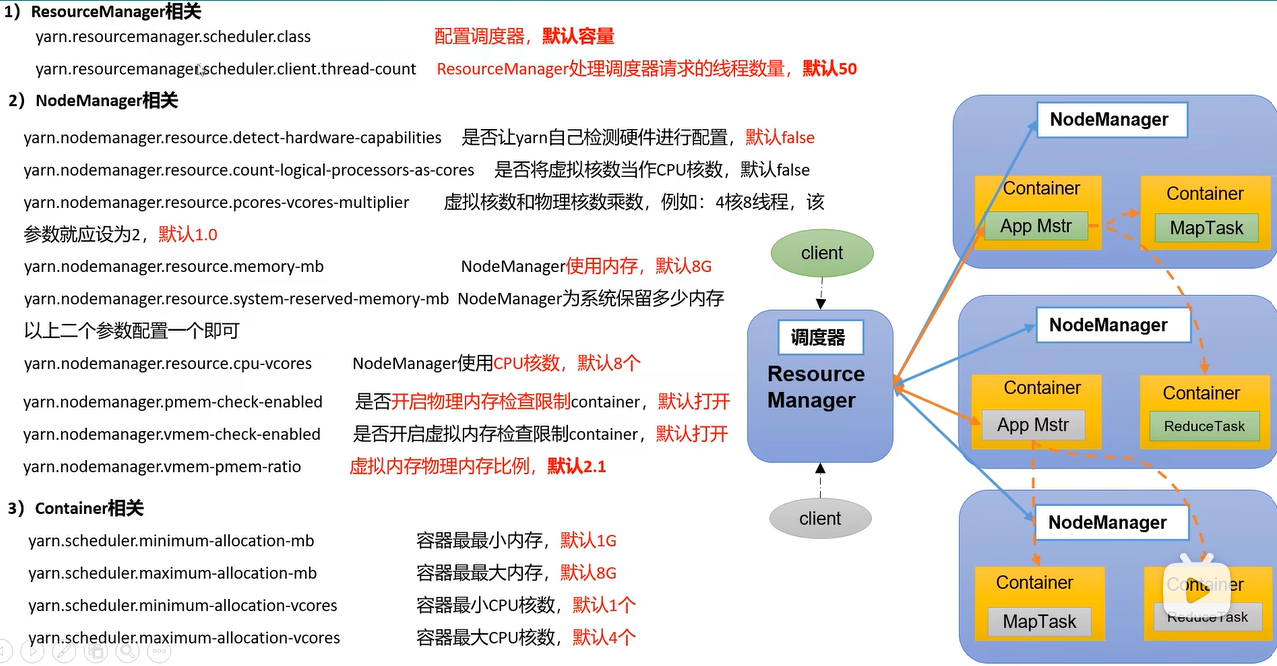
二、实际操作
2.1 配置yarn案例
1.首先根据集群分析实际的配置;
2.修改 yarn-site.xml 根据需求配置参数(按需修改):
<!-- 选择调度器,默认容量 -->
<property>
 <description>The class to use as the resource scheduler.</description>
 <name>yarn.resourcemanager.scheduler.class</name>
 <value>org.apache.hadoop.yarn.server.resourcemanager.scheduler.capacity.CapacityScheduler</value>
</property>

<!-- ResourceManager 处理调度器请求的线程数量,默认 50;如果提交的任务数大于 50,可以增加该值,但是不能超过 3 台 * 4 线程 = 12 线程(去除其他应用程序实际不能超过 8) -->
<property>
 <description>Number of threads to handle scheduler interface.</description>
 <name>yarn.resourcemanager.scheduler.client.thread-count</name>
 <value>8</value>
</property>

<!-- 是否让 yarn 自动检测硬件进行配置,默认是 false,如果该节点有很多其他应用程序,建议手动配置。如果该节点没有其他应用程序,可以采用自动 -->
<property>
 <description>Enable auto-detection of node capabilities such as memory and CPU. </description>
 <name>yarn.nodemanager.resource.detect-hardware-capabilities</name>
 <value>false</value>
</property>

<!-- 是否将虚拟核数当作 CPU 核数,默认是 false,采用物理 CPU 核数 -->
<property>
 <description>Flag to determine if logical processors(such as hyperthreads) should be counted as cores. Only applicable on Linux when yarn.nodemanager.resource.cpu-vcores is set to -1 and
 yarn.nodemanager.resource.detect-hardware-capabilities is true. </description>
 <name>yarn.nodemanager.resource.count-logical-processors-ascores</name>
 <value>false</value>
</property>

<!-- 虚拟核数和物理核数乘数,默认是 1.0 -->
<property>
 <description>Multiplier to determine how to convert phyiscal cores to vcores. This value is used if yarn.nodemanager.resource.cpu-vcores is set to -1(which implies auto-calculate vcores) and
  yarn.nodemanager.resource.detect-hardware-capabilities is set to true.The number of vcores will be calculated as number of CPUs * multiplier. </description>
 <name>yarn.nodemanager.resource.pcores-vcores-multiplier</name>
 <value>1.0</value>
</property>

<!-- NodeManager 使用内存数,默认 8G,修改为 4G 内存 -->
<property>
 <description>Amount of physical memory, in MB, that can be allocated for containers. If set to -1 and yarn.nodemanager.resource.detect-hardware-capabilities is true, it is automatically calculated(in case of Windows and Linux). In other cases, the default is 8192MB. </description>
 <name>yarn.nodemanager.resource.memory-mb</name>
 <value>4096</value>
</property>

<!-- nodemanager 的 CPU 核数,不按照硬件环境自动设定时默认是 8 个,修改为 4 个 -->
<property>
 <description>Number of vcores that can be allocated for containers. This is used by the RM scheduler when allocating resources for containers. This is not used to limit the number of CPUs used by YARN containers. If it is set to -1 and yarn.nodemanager.resource.detect-hardware-capabilities is true, it is automatically determined from the hardware in case of Windows and Linux.
 In other cases, number of vcores is 8 by default.</description>
 <name>yarn.nodemanager.resource.cpu-vcores</name>
 <value>4</value>
</property>

<!-- 容器最小内存,默认 1G -->
<property>
 <description>The minimum allocation for every container request at the RM in MBs. Memory requests lower than this will be set to the value of this property. Additionally, a node manager that is configured to have less memory than this value will be shut down by the resource manager.
 </description>
 <name>yarn.scheduler.minimum-allocation-mb</name>
 <value>1024</value>
</property>

<!-- 容器最大内存,默认 8G,修改为 2G -->
<property>
 <description>The maximum allocation for every container request at the RM in MBs. Memory requests higher than this will throw an InvalidResourceRequestException. </description>
 <name>yarn.scheduler.maximum-allocation-mb</name>
 <value>2048</value>
</property>

<!-- 容器最小 CPU 核数,默认 1 个 -->
<property>
 <description>The minimum allocation for every container request at the RM in terms of virtual CPU cores. Requests lower than this will be set to the value of this property. Additionally, a node manager that is configured to have fewer virtual cores than this value will be shut down by the
resource manager. </description>
 <name>yarn.scheduler.minimum-allocation-vcores</name>
 <value>1</value>
</property>

<!-- 容器最大 CPU 核数,默认 4 个,修改为 2 个 -->
<property>
 <description>The maximum allocation for every container request at the RM in terms of virtual CPU cores. Requests higher than this will throw an InvalidResourceRequestException.</description>
 <name>yarn.scheduler.maximum-allocation-vcores</name>
 <value>2</value>
</property>

<!-- 虚拟内存检查,默认打开,修改为关闭 -->
<property>
 <description>Whether virtual memory limits will be enforced for containers.</description>
 <name>yarn.nodemanager.vmem-check-enabled</name>
 <value>false</value>
</property>

<!-- 虚拟内存和物理内存设置比例,默认 2.1 -->
<property>
 <description>Ratio between virtual memory to physical memory when setting memory limits for containers. Container allocations are expressed in terms of physical memory, and virtual memory usage is allowed to exceed this allocation by this ratio. </description>
 <name>yarn.nodemanager.vmem-pmem-ratio</name>
 <value>2.1</value>
</property>
3.分发配置。 注意:如果集群的硬件资源不一致,要每个 NodeManager 单独配置
4.重启集群。
2.2 容量调度器
2.2.1 配置多队列的容量调度器
假设当前的需求为增加一个hive队列,则需要在hadoop中修改capacity-scheduler.xml 文件,如下:
<!-- 指定多队列,增加 hive 队列 -->
<property>
 <name>yarn.scheduler.capacity.root.queues</name>
 <value>default,hive</value>
 <description> The queues at the this level (root is the root queue). </description>
</property>

<!-- 降低 default 队列资源额定容量为 40%,默认 100% -->
<property>
 <name>yarn.scheduler.capacity.root.default.capacity</name>
 <value>40</value>
</property>

<!-- 降低 default 队列资源最大容量为 60%,默认 100% -->
<property>
 <name>yarn.scheduler.capacity.root.default.maximum-capacity</name>
 <value>60</value>
</property>
然后在该文件中继续增加如下的配置:
<!-- 指定 hive 队列的资源额定容量 -->
<property>
 <name>yarn.scheduler.capacity.root.hive.capacity</name>
 <value>60</value>
</property>

<!-- 用户最多可以使用队列多少资源,1 表示 -->
<property>
 <name>yarn.scheduler.capacity.root.hive.user-limit-factor</name>
 <value>1</value>
</property>

<!-- 指定 hive 队列的资源最大容量 -->
<property>
 <name>yarn.scheduler.capacity.root.hive.maximum-capacity</name>
 <value>80</value>
</property>

<!-- 启动 hive 队列 -->
<property>
 <name>yarn.scheduler.capacity.root.hive.state</name>
 <value>RUNNING</value>
</property>

<!-- 哪些用户有权向队列提交作业 -->
<property>
 <name>yarn.scheduler.capacity.root.hive.acl_submit_applications</name>
 <value>*</value>
</property>

<!-- 哪些用户有权操作队列,管理员权限(查看/杀死) -->
<property>
 <name>yarn.scheduler.capacity.root.hive.acl_administer_queue</name>
 <value>*</value>
</property>

<!-- 哪些用户有权配置提交任务优先级 -->
<property>
<name>yarn.scheduler.capacity.root.hive.acl_application_max_priority</name>
 <value>*</value>
</property>

<!-- 任务的超时时间设置:yarn application -appId appId -updateLifetime Timeout 参 考 资 料 : https://blog.cloudera.com/enforcing-application-lifetime-slasyarn/ -->
 <!-- 如果 application 指定了超时时间,则提交到该队列的 application 能够指定的最大超时时间不能超过该值。-->
<property>
 <name>yarn.scheduler.capacity.root.hive.maximum-applicationlifetime</name>
 <value>-1</value>
</property>

<!-- 如果 application 没指定超时时间,则用 default-application-lifetime 作为默认值 -->
<property>
 <name>yarn.scheduler.capacity.root.hive.default-applicationlifetime</name>
 <value>-1</value>
</property>
分发配置文件,然后重启 Yarn 或者执行 yarn rmadmin -refreshQueues 刷新队列,就可以看到增加的队列了。
2.2.2 任务优先级
容量调度器,支持任务优先级的配置,在资源紧张时,优先级高的任务将优先获取资源。默认情况,Yarn 将所有任务的优先级限制为 0,若想使用任务的优先级功能,须开放该限制。
1)修改 yarn-site.xml 文件,增加以下参数
<property>
 <name>yarn.cluster.max-application-priority</name>
 <value>5</value>
</property>
2)分发配置,并重启 Yarn。
3)也可以通过以下命令修改正在执行的任务的优先级。
yarn application -appID
2.3 公平调度器
公平调度器的配置涉及到两个文件,一个是 yarn-site.xml,另一个是公平调度器队列分配文件 fair-scheduler.xml(文件名可自定义)。
配置文件参考资料:https://hadoop.apache.org/docs/r3.1.3/hadoop-yarn/hadoop-yarn-site/FairScheduler.html
任务队列放置规则参考资料:https://blog.cloudera.com/untangling-apache-hadoop-yarn-part-4-fair-scheduler-queuebasics/
2.3.1 配置多队列的公平调度器
1)修改 yarn-site.xml 文件,加入以下参数
<property>
 <name>yarn.resourcemanager.scheduler.class</name>
 <value>org.apache.hadoop.yarn.server.resourcemanager.scheduler.fair.FairScheduler</value>
 <description>配置使用公平调度器</description>
</property>

<property>
 <name>yarn.scheduler.fair.allocation.file</name>
 <value>/opt/module/hadoop-3.1.3/etc/hadoop/fair-scheduler.xml</value>
 <description>指明公平调度器队列分配配置文件</description>
</property>

<property>
 <name>yarn.scheduler.fair.preemption</name>
 <value>false</value>
 <description>禁止队列间资源抢占</description>
</property>
2)配置 fair-scheduler.xml
<?xml version="1.0"?>
<allocations>
 <!-- 单个队列中 Application Master 占用资源的最大比例,取值 0-1 ,企业一般配置 0.1 -->
 <queueMaxAMShareDefault>0.5</queueMaxAMShareDefault>
 <!-- 单个队列最大资源的默认值 test atguigu default -->
 <queueMaxResourcesDefault>4096mb,4vcores</queueMaxResourcesDefault>

 <!-- 增加一个队列 test -->
 <queue name="test">
   <!-- 队列最小资源 -->
   <minResources>2048mb,2vcores</minResources>
   <!-- 队列最大资源 -->
   <maxResources>4096mb,4vcores</maxResources>
   <!-- 队列中最多同时运行的应用数,默认 50,根据线程数配置 -->
   <maxRunningApps>4</maxRunningApps>
   <!-- 队列中 Application Master 占用资源的最大比例 -->
   <maxAMShare>0.5</maxAMShare>
   <!-- 该队列资源权重,默认值为 1.0 -->
   <weight>1.0</weight>
   <!-- 队列内部的资源分配策略 -->
   <schedulingPolicy>fair</schedulingPolicy>
 </queue>

 <!-- 增加一个队列 atguigu -->
 <queue name="atguigu" type="parent">
   <!-- 队列最小资源 -->
   <minResources>2048mb,2vcores</minResources>
   <!-- 队列最大资源 -->
   <maxResources>4096mb,4vcores</maxResources>
   <!-- 队列中最多同时运行的应用数,默认 50,根据线程数配置 -->
   <maxRunningApps>4</maxRunningApps>
   <!-- 队列中 Application Master 占用资源的最大比例 -->
   <maxAMShare>0.5</maxAMShare>
   <!-- 该队列资源权重,默认值为 1.0 -->
   <weight>1.0</weight>
   <!-- 队列内部的资源分配策略 -->
   <schedulingPolicy>fair</schedulingPolicy>
 </queue>

 <!-- 任务队列分配策略,可配置多层规则,从第一个规则开始匹配,直到匹配成功 -->
 <queuePlacementPolicy>
   <!-- 提交任务时指定队列,如未指定提交队列,则继续匹配下一个规则; false 表示:如果指定队列不存在,不允许自动创建-->
   <rule name="specified" create="false"/>
   <!-- 提交到 root.group.username 队列,若 root.group 不存在,不允许自动创建;若root.group.user 不存在,允许自动创建 -->
   <rule name="nestedUserQueue" create="true">
   <rule name="primaryGroup" create="false"/>
   </rule>
   <!-- 最后一个规则必须为 reject 或者 default。Reject 表示拒绝创建提交失败,default 表示把任务提交到 default 队列 -->
   <rule name="reject" />
</queuePlacementPolicy>
</allocations>
3)分发这两个配置并重启yarn
2.4 yarn的tool接口
可以根据实际需要自己编写yarn的tool接口,也是很有用的。

 浙公网安备 33010602011771号