
关于《从零自制操作系统》MikanOS系统的配置
本地采用WSL2 ubuntu18.4.6LTS操作系统
基本运行环境配置
$ sudo apt update
$ sudo apt install git
$ cd $HOME
$ git clone https://github.com/uchan-nos/mikanos-build.git osbook
$ cd osbook
$ git checkout 8d4882122ec548ef680b6b5a2ae841a0fd4d07a1

ubuntu@LAPTOP-5A:~/osbook/devenv$ ansible-playbook -K -i ansible_inventory ansible_provision.yml
最后一步执行脚本100%出问题
如果是如下问题

则修改\home\ubuntu\osbook\devenv\ansible_provision.yml可以解决
 - name: clone EDK II repositoryls
      git:
        repo: "https://github.com/tianocore/edk2.git"
        dest: "{{ ansible_env.HOME }}/edk2"
        force: yes  # 加上这一行
        version: "38c8be123aced4cc8ad5c7e0da9121a181b94251"
这个下载EDK2由于项目太老,再加上git,下载特别容易出问题,且极度耗时,建议晚上github链接快的时候下载
正常情况如下
ubuntu@LAPTOP-5A:~/osbook/devenv$ ansible-playbook -K -i ansible_inventory ansible_provision.yml
SUDO password:

PLAY [all] ***************************************************************************************************

TASK [Gathering Facts] ***************************************************************************************
ok: [localhost]

TASK [ensure development tools are at the latest version] ****************************************************
ok: [localhost]

TASK [check whether qemu-system-gui exists] ******************************************************************
ok: [localhost]

TASK [install qemu gui package if exists] ********************************************************************
skipping: [localhost]

TASK [set llvm 7 as default] *********************************************************************************
ok: [localhost] => (item=llvm-PerfectShuffle)
ok: [localhost] => (item=llvm-ar)
ok: [localhost] => (item=llvm-as)
ok: [localhost] => (item=llvm-bcanalyzer)
ok: [localhost] => (item=llvm-cat)
ok: [localhost] => (item=llvm-cfi-verify)
ok: [localhost] => (item=llvm-config)
ok: [localhost] => (item=llvm-cov)
ok: [localhost] => (item=llvm-c-test)
ok: [localhost] => (item=llvm-cvtres)
ok: [localhost] => (item=llvm-cxxdump)
ok: [localhost] => (item=llvm-cxxfilt)
ok: [localhost] => (item=llvm-diff)
ok: [localhost] => (item=llvm-dis)
ok: [localhost] => (item=llvm-dlltool)
ok: [localhost] => (item=llvm-dwarfdump)
ok: [localhost] => (item=llvm-dwp)
ok: [localhost] => (item=llvm-exegesis)
ok: [localhost] => (item=llvm-extract)
ok: [localhost] => (item=llvm-lib)
ok: [localhost] => (item=llvm-link)
ok: [localhost] => (item=llvm-lto)
ok: [localhost] => (item=llvm-lto2)
ok: [localhost] => (item=llvm-mc)
ok: [localhost] => (item=llvm-mca)
ok: [localhost] => (item=llvm-modextract)
ok: [localhost] => (item=llvm-mt)
ok: [localhost] => (item=llvm-nm)
ok: [localhost] => (item=llvm-objcopy)
ok: [localhost] => (item=llvm-objdump)
ok: [localhost] => (item=llvm-opt-report)
ok: [localhost] => (item=llvm-pdbutil)
ok: [localhost] => (item=llvm-profdata)
ok: [localhost] => (item=llvm-ranlib)
ok: [localhost] => (item=llvm-rc)
ok: [localhost] => (item=llvm-readelf)
ok: [localhost] => (item=llvm-readobj)
ok: [localhost] => (item=llvm-rtdyld)
ok: [localhost] => (item=llvm-size)
ok: [localhost] => (item=llvm-split)
ok: [localhost] => (item=llvm-stress)
ok: [localhost] => (item=llvm-strings)
ok: [localhost] => (item=llvm-strip)
ok: [localhost] => (item=llvm-symbolizer)
ok: [localhost] => (item=llvm-tblgen)
ok: [localhost] => (item=llvm-undname)
ok: [localhost] => (item=llvm-xray)
ok: [localhost] => (item=ld.lld)
ok: [localhost] => (item=lld-link)
ok: [localhost] => (item=clang)
ok: [localhost] => (item=clang++)
ok: [localhost] => (item=clang-cpp)

TASK [clone EDK II repositoryls] *****************************************************************************
changed: [localhost]

TASK [build EDK II base tools] *******************************************************************************
changed: [localhost]

TASK [download standard libraries] ***************************************************************************
changed: [localhost]

TASK [configure display variable if WSL1] ********************************************************************
skipping: [localhost]

TASK [configure display variable if WSL2] ********************************************************************
skipping: [localhost]

PLAY RECAP ***************************************************************************************************
localhost                  : ok=7    changed=3    unreachable=0    failed=0
验证安装成功
ubuntu@LAPTOP-5A:~/osbook/devenv$ iasl -v

Intel ACPI Component Architecture
ASL+ Optimizing Compiler/Disassembler version 20180105
Copyright (c) 2000 - 2018 Intel Corporation

ubuntu@LAPTOP-5A:~/osbook/devenv$ ls $HOME/edk2
ArmPkg           DynamicTablesPkg     License-History.txt  PcAtChipsetPkg       StandaloneMmPkg
ArmPlatformPkg   EmbeddedPkg          License.txt          ReadMe.rst           UefiCpuPkg
ArmVirtPkg       EmulatorPkg          Maintainers.txt      RedfishPkg           UefiPayloadPkg
BaseTools        FatPkg               MdeModulePkg         SecurityPkg          UnitTestFrameworkPkg
CONTRIBUTING.md  FmpDevicePkg         MdePkg               ShellPkg             edksetup.bat
Conf             IntelFsp2Pkg         NetworkPkg           SignedCapsulePkg     edksetup.sh
CryptoPkg        IntelFsp2WrapperPkg  OvmfPkg              SourceLevelDebugPkg  pip-requirements.txt
ubuntu@LAPTOP-5A:~/osbook/devenv$ source $HOME/.profile
获取源码
ubuntu@LAPTOP-5A:~$  git clone https://github.com/uchan-nos/mikanos.git
Cloning into 'mikanos'...
remote: Enumerating objects: 11511, done.
remote: Counting objects: 100% (4078/4078), done.
remote: Compressing objects: 100% (305/305), done.
remote: Total 11511 (delta 3864), reused 3773 (delta 3773), pack-reused 7433 (from 1)
Receiving objects: 100% (11511/11511), 6.17 MiB | 5.05 MiB/s, done.
Resolving deltas: 100% (7991/7991), done.
- 创建链接:进入
<font style="color:rgb(0, 0, 0);">$HOME/edk2</font>目录,执行<font style="color:rgb(0, 0, 0);">ln -s /path/to/mikanos/MikanLoaderPkg ./</font>(需将<font style="color:rgb(0, 0, 0);">/path/to/mikanos</font>替换为实际的<font style="color:rgb(0, 0, 0);">mikanos</font>目录路径),并通过<font style="color:rgb(0, 0, 0);">ls MikanLoaderPkg/Main.c</font>验证链接是否成功。
ubuntu@LAPTOP-5:~/edk2$ rm -f ~/edk2/MikanLoaderPkg
ubuntu@LAPTOP-5:~/edk2$ cd ~/edk2
ubuntu@LAPTOP-5:~/edk2$ ln -s ~/mikanos/MikanLoaderPkg ./
ubuntu@LAPTOP-5:~/edk2$ ls -l MikanLoaderPkg
lrwxrwxrwx 1 ubuntu ubuntu 35 Sep 22 10:06 MikanLoaderPkg -> /home/ubuntu/mikanos/MikanLoaderPkg
ubuntu@LAPTOP-5:~/edk2$ ls MikanLoaderPkg/Main.c
MikanLoaderPkg/Main.c
- 设置环境变量:运行
<font style="color:rgb(0, 0, 0);">source edksetup.sh</font>加载 EDK II 构建所需的环境变量,该操作还会自动生成<font style="color:rgb(0, 0, 0);">Conf/target.txt</font>文件。
ubuntu@LAPTOP-5A:~/edk2$ source edksetup.sh
Using EDK2 in-source Basetools
WORKSPACE: /home/ubuntu/edk2
EDK_TOOLS_PATH: /home/ubuntu/edk2/BaseTools
CONF_PATH: /home/ubuntu/edk2/Conf
Copying $EDK_TOOLS_PATH/Conf/build_rule.template
     to /home/ubuntu/edk2/Conf/build_rule.txt
Copying $EDK_TOOLS_PATH/Conf/tools_def.template
     to /home/ubuntu/edk2/Conf/tools_def.txt
Copying $EDK_TOOLS_PATH/Conf/target.template
     to /home/ubuntu/edk2/Conf/target.txt
- 修改配置文件:编辑
<font style="color:rgb(0, 0, 0);">edk2/Conf/target.txt</font>文件,将<font style="color:rgb(0, 0, 0);">ACTIVE_PLATFORM</font>设为<font style="color:rgb(0, 0, 0);">MikanLoaderPkg/MikanLoaderPkg.dsc</font>,<font style="color:rgb(0, 0, 0);">TARGET</font>设为<font style="color:rgb(0, 0, 0);">DEBUG</font>,<font style="color:rgb(0, 0, 0);">TARGET_ARCH</font>设为<font style="color:rgb(0, 0, 0);">X64</font>,<font style="color:rgb(0, 0, 0);">TOOL_CHAIN_TAG</font>设为<font style="color:rgb(0, 0, 0);">CLANG38</font>。
#
#  Copyright (c) 2006 - 2019, Intel Corporation. All rights reserved.<BR>
#
#  SPDX-License-Identifier: BSD-2-Clause-Patent
#
#
#  ALL Paths are Relative to WORKSPACE

#  Separate multiple LIST entries with a SINGLE SPACE character, do not use comma characters.
#  Un-set an option by either commenting out the line, or not setting a value.

#
#  PROPERTY              Type       Use         Description
#  ----------------      --------   --------    -----------------------------------------------------------
#  ACTIVE_PLATFORM       Filename   Recommended Specify the WORKSPACE relative Path and Filename
#                                               of the platform description file that will be used for the
#                                               build. This line is required if and only if the current
#                                               working directory does not contain one or more description
#                                               files.
ACTIVE_PLATFORM       = MikanLoaderPkg/MikanLoaderPkg.dsc
#  TARGET                List       Optional    Zero or more of the following: DEBUG, RELEASE, NOOPT
#                                               UserDefined; separated by a space character.
#                                               If the line is missing or no value is specified, all
#                                               valid targets specified in the platform description file
#                                               will attempt to be built. The following line will build
#                                               DEBUG platform target.
TARGET                = DEBUG

#  TARGET_ARCH           List       Optional    What kind of architecture is the binary being target for.
#                                               One, or more, of the following, IA32, IPF, X64, EBC, ARM
#                                               or AArch64.
#                                               Multiple values can be specified on a single line, using
#                                               space characters to separate the values.  These are used
#                                               during the parsing of a platform description file,
#                                               restricting the build output target(s.)
#                                               The Build Target ARCH is determined by (precedence high to low):
#                                                 Command-line: -a ARCH option
#                                                 target.txt: TARGET_ARCH values
#                                                 DSC file: [Defines] SUPPORTED_ARCHITECTURES tag
#                                               If not specified, then all valid architectures specified
#                                               in the platform file, for which tools are available, will be
#                                               built.
TARGET_ARCH           = X64

#  TOOL_DEFINITION_FILE  Filename  Optional   Specify the name of the filename to use for specifying
#                                             the tools to use for the build.  If not specified,
#                                             WORKSPACE/Conf/tools_def.txt will be used for the build.
TOOL_CHAIN_CONF       = Conf/tools_def.txt

#  TAGNAME               List      Optional   Specify the name(s) of the tools_def.txt TagName to use.
#                                             If not specified, all applicable TagName tools will be
#                                             used for the build.  The list uses space character separation.
TOOL_CHAIN_TAG        = CLANG38

# MAX_CONCURRENT_THREAD_NUMBER  NUMBER  Optional  The number of concurrent threads. If not specified or set
#                                                 to zero, tool automatically detect number of processor
#                                                 threads. Recommend to set this value to one less than the
#                                                 number of your computer cores or CPUs. When value set to 1,
#                                                 means disable multi-thread build, value set to more than 1,
#                                                 means user specify the thread number to build. Not specify
#                                                 the default value in this file.
# MAX_CONCURRENT_THREAD_NUMBER = 1


# BUILD_RULE_CONF  Filename Optional  Specify the file name to use for the build rules that are followed
#                                     when generating Makefiles. If not specified, the file:
#                                     WORKSPACE/Conf/build_rule.txt will be used
BUILD_RULE_CONF = Conf/build_rule.txt
- 构建引导程序:执行
<font style="color:rgb(0, 0, 0);">build</font>命令进行构建。若出现 “ModuleNotFoundError: No module named 'distutils.util'” 错误,可运行<font style="color:rgb(0, 0, 0);">sudo apt install python3-distutils</font>后重试;若出现 “Instance of library class [RegisterFilterLib] is not found” 错误,需参考相关文档解决。构建成功后会生成<font style="color:rgb(0, 0, 0);">Loader.efi</font>文件,可通过<font style="color:rgb(0, 0, 0);">ls Build/MikanLoaderX64/DEBUG_CLANG38/X64/Loader.efi</font>查看。
MikanOS 构建
- 加载环境变量:执行
<font style="color:rgb(0, 0, 0);">source $HOME/osbook/devenv/buildenv.sh</font>加载构建所需的环境变量。 - 进行构建:进入
<font style="color:rgb(0, 0, 0);">mikanos</font>目录,运行<font style="color:rgb(0, 0, 0);">./build.sh</font>进行构建。 - 运行系统:若要通过 QEMU 启动,可使用
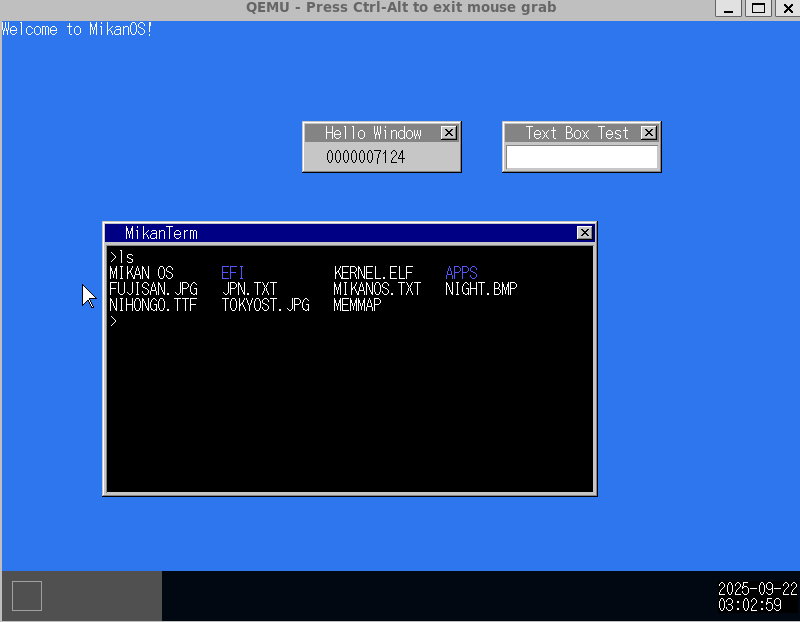
<font style="color:rgb(0, 0, 0);">./build.sh run</font>命令;若要包含应用程序和资源文件构建磁盘镜像,可执行<font style="color:rgb(0, 0, 0);">APPS_DIR=apps RESOURCE_DIR=resource ./build.sh run</font>(其中<font style="color:rgb(0, 0, 0);">APPS_DIR</font>和<font style="color:rgb(0, 0, 0);">RESOURCE_DIR</font>分别指定应用程序和资源文件的目录)。
ubuntu@LAPTOP-5:~/mikanos$ ./build.sh
make: Entering directory '/home/ubuntu/mikanos/kernel'

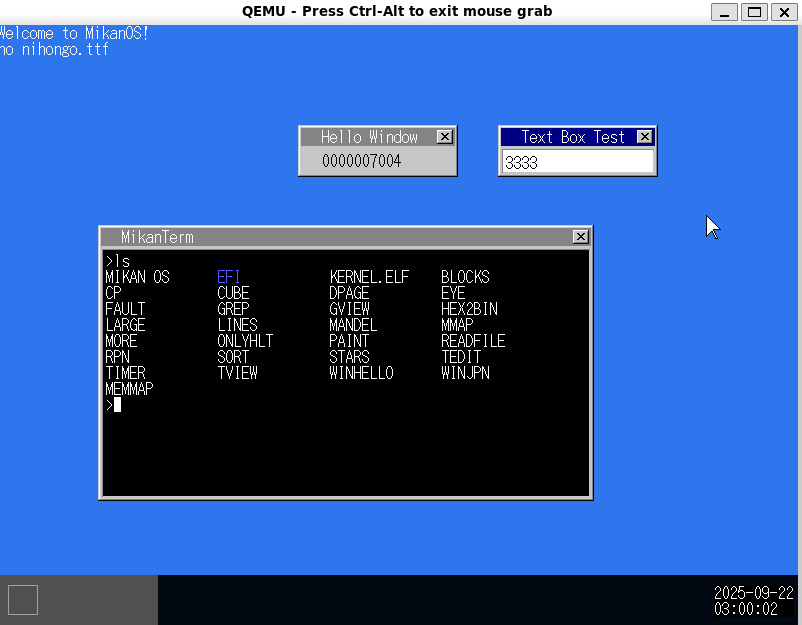
ubuntu@LAPTOP-5:~/mikanos$ APPS_DIR=apps RESOURCE_DIR=resource ./build.sh run
make: Entering directory '/home/ubuntu/mikanos/kernel'
make: 'kernel.elf' is up to date.
make: Leaving directory '/home/ubuntu/mikanos/kernel'
make: Entering directory '/home/ubuntu/mikanos/apps/blocks'

 浙公网安备 33010602011771号