
SpringBoot里面创建导出Excel的接口
在Web项目中,难免需要导出Excel这样的功能,后端接口怎么实现呢,Controller代码在下面,复制到项目的Controller中即可使用:
一,首先加入Excel的依赖,本例中我们用apache的poi:
<dependency>
    <groupId>org.apache.poi</groupId>
    <artifactId>poi</artifactId>
    <version>3.17</version>
</dependency>
二,后台导出Excel的Controller接口代码:
import org.apache.poi.hssf.usermodel.*;
import org.springframework.stereotype.Controller;
import org.springframework.web.bind.annotation.RequestMapping;
import javax.servlet.http.HttpServletResponse;
import java.io.IOException;
@Controller
public class ExcelController {
/**
* Excel表格导出接口
* http://localhost:8080/ExcelDownload
* @param response response对象
* @throws IOException 抛IO异常
*/
@RequestMapping("/ExcelDownload")
public void excelDownload(HttpServletResponse response) throws IOException {
//表头数据
String[] header = {"ID", "姓名", "性别", "年龄", "地址", "分数"};
//数据内容
String[] student1 = {"1", "小红", "女", "23", "成都青羊区", "96"};
String[] student2 = {"2", "小强", "男", "26", "成都金牛区", "91"};
String[] student3 = {"3", "小明", "男", "28", "成都武侯区", "90"};
//声明一个工作簿
HSSFWorkbook workbook = new HSSFWorkbook();
//生成一个表格,设置表格名称为"学生表"
HSSFSheet sheet = workbook.createSheet("学生表");
//设置表格列宽度为10个字节
sheet.setDefaultColumnWidth(10);
//创建第一行表头
HSSFRow headrow = sheet.createRow(0);
//遍历添加表头(下面模拟遍历学生,也是同样的操作过程)
for (int i = 0; i < header.length; i++) {
//创建一个单元格
HSSFCell cell = headrow.createCell(i);
//创建一个内容对象
HSSFRichTextString text = new HSSFRichTextString(header[i]);
//将内容对象的文字内容写入到单元格中
cell.setCellValue(text);
}
//模拟遍历结果集,把内容加入表格
//模拟遍历第一个学生
HSSFRow row1 = sheet.createRow(1);
for (int i = 0; i < student1.length; i++) {
HSSFCell cell = row1.createCell(i);
HSSFRichTextString text = new HSSFRichTextString(student1[i]);
cell.setCellValue(text);
}
//模拟遍历第二个学生
HSSFRow row2 = sheet.createRow(2);
for (int i = 0; i < student2.length; i++) {
HSSFCell cell = row2.createCell(i);
HSSFRichTextString text = new HSSFRichTextString(student2[i]);
cell.setCellValue(text);
}
//模拟遍历第三个学生
HSSFRow row3 = sheet.createRow(3);
for (int i = 0; i < student3.length; i++) {
HSSFCell cell = row3.createCell(i);
HSSFRichTextString text = new HSSFRichTextString(student3[i]);
cell.setCellValue(text);
}
//准备将Excel的输出流通过response输出到页面下载
//八进制输出流
response.setContentType("application/octet-stream");
//这后面可以设置导出Excel的名称,此例中名为student.xls
response.setHeader("Content-disposition", "attachment;filename=student.xls");
//刷新缓冲
response.flushBuffer();
//workbook将Excel写入到response的输出流中,供页面下载
workbook.write(response.getOutputStream());
}
}
三,测试
然后访问接口,弹出页面:
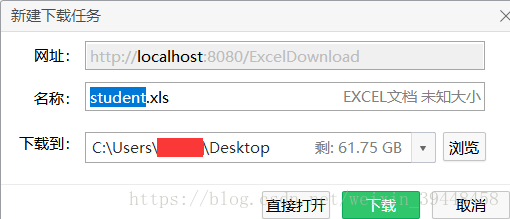
下载该Excel,打开后如下图:

至此为止,SpringBoot的后台Controller接口导出Excel数据表,已成功实现!
四,在项目中作为工具类使用:
import org.apache.poi.hssf.usermodel.*;
import javax.servlet.http.HttpServletResponse;
import java.io.IOException;
import java.util.List;
/**
-
Excel工具类
*/
public class ExcelUtil {/**
-
Excel表格导出
-
@param response HttpServletResponse对象
-
@param excelData Excel表格的数据,封装为List<List
> -
@param sheetName sheet的名字
-
@param fileName 导出Excel的文件名
-
@param columnWidth Excel表格的宽度,建议为15
-
@throws IOException 抛IO异常
*/
public static void exportExcel(HttpServletResponse response,
List<List> excelData,
String sheetName,
String fileName,
int columnWidth) throws IOException {//声明一个工作簿
HSSFWorkbook workbook = new HSSFWorkbook();//生成一个表格,设置表格名称
HSSFSheet sheet = workbook.createSheet(sheetName);//设置表格列宽度
sheet.setDefaultColumnWidth(columnWidth);//写入List<List
>中的数据
int rowIndex = 0;
for(Listdata : excelData){
//创建一个row行,然后自增1
HSSFRow row = sheet.createRow(rowIndex++);//遍历添加本行数据
for (int i = 0; i < data.size(); i++) {
//创建一个单元格
HSSFCell cell = row.createCell(i);//创建一个内容对象
HSSFRichTextString text = new HSSFRichTextString(data.get(i));//将内容对象的文字内容写入到单元格中
cell.setCellValue(text);
}
}//准备将Excel的输出流通过response输出到页面下载
//八进制输出流
response.setContentType("application/octet-stream");//设置导出Excel的名称
response.setHeader("Content-disposition", "attachment;filename=" + fileName);//刷新缓冲
response.flushBuffer();//workbook将Excel写入到response的输出流中,供页面下载该Excel文件
workbook.write(response.getOutputStream());//关闭workbook
workbook.close();
}
-
}
五,封装工具调用示例:
/**
-
Excel表格导出接口
-
@param response response对象
-
@throws IOException 抛IO异常
*/
@RequestMapping("/ExcelDownload")
public void excelDownload(HttpServletResponse response) throws IOException {List<List
> excelData = new ArrayList<>(); List
head = new ArrayList<>();
head.add("第一列");
head.add("第二列");
head.add("第三列");List
data1 = new ArrayList<>();
data1.add("123");
data1.add("234");
data1.add("345");List
data2 = new ArrayList<>();
data2.add("abc");
data2.add("bcd");
data2.add("cde");excelData.add(head);
excelData.add(data1);
excelData.add(data2);String sheetName = "测试";
String fileName = "ExcelTest.xls";ExcelUtil.exportExcel(response, excelData, sheetName, fileName, 15);
}

 浙公网安备 33010602011771号