
常用检测端口是否连通方法
常用命令
telnet
telnet 是一个简单的网络工具,可以用来测试远程主机的某个端口是否开放。
命令格式:
telnet <ip_address> <port>
如果端口开放,命令行会显示连接成功的信息;如果端口未开放,通常会显示连接失败的信息。
端口连通示例:
Windows下显示:
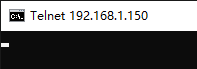
Linux下显示:
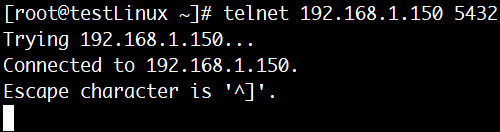
端口不通示例:
Windows:
C:\Users\User>telnet 192.168.1.150 3306
正在连接192.168.1.150...无法打开到主机的连接。 在端口 3306: 连接失败

C:\Users\User>
Linux:
[root@testLinux ~]# telnet 192.168.1.150 3306
Trying 192.168.1.150...
telnet: connect to address 192.168.1.150: Connection refused
[root@testLinux ~]#
curl
curl 也可以用于检测 HTTP 服务端口是否开放,尤其适用于检测 Web 端口(例如 80 或 443)。
命令格式:
curl -I <ip_address>:<port>
解释:
-I:获取 HTTP 响应头。
示例:
curl -I 192.168.1.1:80
如果端口开放并且服务响应,curl 会返回 HTTP 状态码,例如 200 OK。
也可以用来检测其他端口
端口通示例:
[root@testLinux ~]# curl -v 192.168.1.150:5432
* About to connect() to 192.168.1.150 port 5432 (#0)
*   Trying 192.168.1.150...
* Connected to 192.168.1.150 (192.168.1.150) port 5432 (#0)
> GET / HTTP/1.1
> User-Agent: curl/7.29.0
> Host: 192.168.1.150:5432
> Accept: */*
>
* Empty reply from server
* Connection #0 to host 192.168.1.150 left intact
curl: (52) Empty reply from server
[root@testLinux ~]#
端口不通示例:
[root@testLinux ~]# curl -v 192.168.1.150:3306
* About to connect() to 192.168.1.150 port 3306 (#0)
*   Trying 192.168.1.150...
* Connection refused
* Failed connect to 192.168.1.150:3306; Connection refused
* Closing connection 0
curl: (7) Failed connect to 192.168.1.150:3306; Connection refused
[root@testLinux ~]#
参数说明:
-v或--verbose:启用详细输出模式,显示完整的HTTP请求和响应过程,包括连接信息、请求头、响应头等
nc(Netcat)
nc (Netcat) 是一个功能强大的网络工具,可以用来进行端口扫描和网络调试。
命令格式:
nc -zv <ip_address> <port>
解释:
-z:只扫描端口,不发送数据。-v:显示详细的输出信息。
如果端口开放,nc 会显示类似 succeeded 的信息;如果端口关闭,则显示 refused 等错误信息。
端口连通示例:
[root@testLinux ~]# nc -zv 192.168.1.150 5432
Ncat: Version 7.50 ( https://nmap.org/ncat )
Ncat: Connected to 192.168.1.150:5432.
Ncat: 0 bytes sent, 0 bytes received in 0.01 seconds.
[root@testLinux ~]#
端口不通示例:
[root@testLinux ~]# nc -zv 192.168.1.150 3306
Ncat: Version 7.50 ( https://nmap.org/ncat )
Ncat: Connection refused.
[root@testLinux ~]#
nmap
nmap 是一款强大的网络扫描工具,常用于检测目标主机上的开放端口。
格式:
nmap -p <port> <ip_address>
解释:
-p <port>:指定要扫描的端口。-p-扫描所有端口<ip_address>:目标主机的 IP 地址。
端口连通示例:
[root@testLinux ~]# nmap -p 5432 192.168.1.150

Starting Nmap 6.40 ( http://nmap.org ) at 2025-11-22 11:10 CST
Nmap scan report for 192.168.1.150
Host is up (0.00056s latency).
PORT     STATE SERVICE
5432/tcp open  postgresql
MAC Address: 00:0C:29:5F:60:7B (VMware)

Nmap done: 1 IP address (1 host up) scanned in 0.12 seconds
[root@testLinux ~]#
端口不通示例:
[root@testLinux ~]# nmap -p 3306 192.168.1.150

Starting Nmap 6.40 ( http://nmap.org ) at 2025-11-22 11:10 CST
Nmap scan report for 192.168.1.150
Host is up (0.00055s latency).
PORT     STATE  SERVICE
3306/tcp closed mysql
MAC Address: 00:0C:29:5F:60:7B (VMware)

Nmap done: 1 IP address (1 host up) scanned in 0.13 seconds
[root@testLinux ~]#
tnc
Powershell的Test-NetConnection命令
命令格式:
tnc <ip_address> -p <port>
端口连通示例:
PS C:\Users\User> tnc 192.168.1.150 -p 5432


ComputerName     : 192.168.1.150
RemoteAddress    : 192.168.1.150
RemotePort       : 5432
InterfaceAlias   : 以太网
SourceAddress    : 192.168.1.239
TcpTestSucceeded : True
端口不通示例:
PS C:\Users\User> tnc 192.168.1.150 -p 3306
警告: TCP connect to (192.168.1.150 : 3306) failed
ComputerName           : 192.168.1.150
RemoteAddress          : 192.168.1.150
RemotePort             : 3306
InterfaceAlias         : 以太网
SourceAddress          : 192.168.1.239
PingSucceeded          : True
PingReplyDetails (RTT) : 1 ms
TcpTestSucceeded       : False
Python
import socket

def test_port(host, port):
    try:
        # 创建一个 socket 对象
        sock = socket.create_connection((host, port), timeout=5)
        print(f"connect to {host}:{port} succeed!")
        sock.close()
    except (socket.timeout, socket.error) as e:
        print(f"connect to {host}:{port} fail: {e}")

# 测试 IP 地址和端口
host = "192.168.1.10"
port = 3306
test_port(host, port)
总结
按环境分:
- Windows:
- telnet命令
- Powershell下的tnc命令
- Linux:
- telnet
- curl
- nc
- nmap
- 通用方法:python脚本
按功能分:
telnet和nc是最直接的检测端口是否开放的工具。nmap适合扫描多个端口,功能更强大。curl适用于 Web 服务端口的测试(HTTP/HTTPS)

 浙公网安备 33010602011771号