

Hbase API操作
Hbase API表操作
1.创建工程
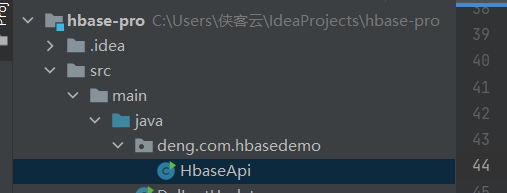
2. pom.xml 文件,添加依赖(红色部分)
<?xml version="1.0" encoding="UTF-8"?>
<project xmlns="http://maven.apache.org/POM/4.0.0"
         xmlns:xsi="http://www.w3.org/2001/XMLSchema-instance"
         xsi:schemaLocation="http://maven.apache.org/POM/4.0.0 http://maven.apache.org/xsd/maven-4.0.0.xsd">
    <modelVersion>4.0.0</modelVersion>

    <groupId>org.example</groupId>
    <artifactId>hbase-pro</artifactId>
    <version>1.0-SNAPSHOT</version>

    <properties>
        <maven.compiler.source>8</maven.compiler.source>
        <maven.compiler.target>8</maven.compiler.target>
    </properties>
    <dependencies>
        <dependency>
            <groupId>org.apache.logging.log4j</groupId>
            <artifactId>log4j-core</artifactId>
            <version>2.8.2</version>
        </dependency>
        <!-- https://mvnrepository.com/artifact/org.apache.zookeeper/zookeeper -->
        <dependency>
            <groupId>org.apache.zookeeper</groupId>
            <artifactId>zookeeper</artifactId>
            <version>3.4.10</version>
        </dependency>

        <dependency>
            <groupId>junit</groupId>
            <artifactId>junit</artifactId>
            <version>RELEASE</version>
        </dependency>

        <dependency>
            <groupId>org.jsoup</groupId>
            <artifactId>jsoup</artifactId>
            <version>1.11.3</version>
        </dependency>


        <dependency>
            <groupId>org.apache.spark</groupId>
            <artifactId>spark-core_2.12</artifactId>
            <version>2.4.4</version>
        </dependency>

        <dependency>
            <groupId>org.apache.commons</groupId>
            <artifactId>commons-lang3</artifactId>
            <version>3.4</version>
        </dependency>


        <dependency>
            <groupId>com.alibaba</groupId>
            <artifactId>fastjson</artifactId>
            <version>1.2.70</version>
        </dependency>

        <dependency>
            <groupId>junit</groupId>
            <artifactId>junit</artifactId>
            <version>4.12</version>
            <scope>compile</scope>
        </dependency>

        <dependency>
            <groupId>org.apache.hbase</groupId>
            <artifactId>hbase-client</artifactId>
            <version>1.3.1</version>
        </dependency>

        <dependency>
            <groupId>org.apache.hbase</groupId>
            <artifactId>hbase-server</artifactId>
            <version>1.3.1</version>
        </dependency>


    </dependencies>

</project>
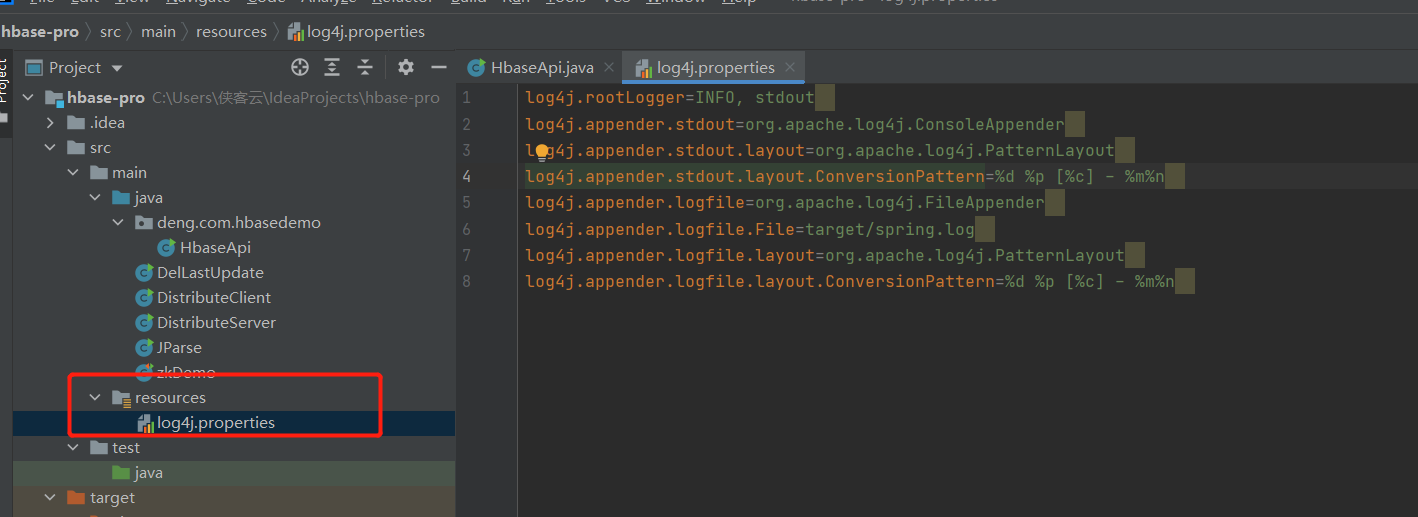
3.配置日志
在项目的resources 文件夹下创建文件名为:log4j.properties,写入以下内容。
log4j.rootLogger=INFO, stdout
log4j.appender.stdout=org.apache.log4j.ConsoleAppender
log4j.appender.stdout.layout=org.apache.log4j.PatternLayout
log4j.appender.stdout.layout.ConversionPattern=%d %p [%c] - %m%n
log4j.appender.logfile=org.apache.log4j.FileAppender
log4j.appender.logfile.File=target/spring.log
log4j.appender.logfile.layout=org.apache.log4j.PatternLayout
log4j.appender.logfile.layout.ConversionPattern=%d %p [%c] - %m%n
4. DDL api 操作代码
package deng.com.hbasedemo;
import org.apache.hadoop.conf.Configuration;
import org.apache.hadoop.hbase.*;
import org.apache.hadoop.hbase.client.Admin;
import org.apache.hadoop.hbase.client.Connection;
import org.apache.hadoop.hbase.client.ConnectionFactory;

/*
* DDL 操作
* 1. 判断表是否存在
* 2. 创建表
* 3. 创建命名空间
* 4. 删除表
*
* */
import java.io.IOException;

public class HbaseApi {

    public static Configuration conf;
    public static Connection connection;
    public static Admin admin;

    //静态代码块
    static {
        conf = HBaseConfiguration.create();
        conf.set("hbase.zookeeper.quorum", "192.168.10.102");
        conf.set("hbase.zookeeper.property.clientPort", "2181");

        //创建连接
        try {
            connection = ConnectionFactory.createConnection(conf);
            admin = connection.getAdmin();
        } catch (Exception e) {
            System.out.println("创建connect 和admin 失败!");
        }

    }

    // 判断表是否出存在
    public static boolean isTableExist(String tableName) throws IOException {

//        //创建连接
//        Connection connection = ConnectionFactory.createConnection(conf);
//        // 获取admin
//        Admin admin = connection.getAdmin();
        boolean result = admin.tableExists(TableName.valueOf(tableName));

        if (result) {
            System.out.println(tableName + " is exist!");
        } else {
            System.out.println(tableName + " is  not exist!");
        }

        return result;
    }

    // 创建表
    public static void createTable(String tableName, String... cf) throws IOException {
        // 判断表是否存在
        if (isTableExist(tableName)) {
            return;
        }
//        //创建连接
//        Connection connection = ConnectionFactory.createConnection(conf);
//        // 获取admin
//        Admin admin = connection.getAdmin();
        // 创建表描述器
        HTableDescriptor hTableDescriptor = new HTableDescriptor(TableName.valueOf(tableName));

        for (String s : cf) {
            // 创建多个列族
            hTableDescriptor.addFamily(new HColumnDescriptor(s));
        }
        //创建表
        admin.createTable(hTableDescriptor);
        System.out.println(tableName + "创建成功!");
    }
    // 创建命名空间
    public static void createNameSpace(String ns) {
        //创建命名空间描述器
        NamespaceDescriptor namespaceDescriptor = NamespaceDescriptor.create(ns).build();
        try {
            // 创建命令空间
            admin.createNamespace(namespaceDescriptor);
            System.out.println("命名空间:"+ns+"创建成功!");
        } catch (NamespaceExistException e) {
            System.out.println("命名空间:"+ns+"已存在!");
        } catch (IOException e) {
            e.printStackTrace();
        }

    }

    // 删除表
    public static void delTable(String tableName) throws IOException {
        // 判读表 是否存在
        if (isTableExist(tableName)) {
            //使table 下线
            admin.disableTable(TableName.valueOf(tableName));
            // 删除表
            admin.deleteTable(TableName.valueOf(tableName));
            System.out.println("删除" + tableName + "表成功!");
        }

    }

    // 关闭资源
    public static void close() throws IOException {
        admin.close();
        connection.close();

    }


    public static void main(String[] args) throws IOException {
        // 1. 判断表是否存在
        isTableExist("member");
        // 2. 创建表,放在了默认的命名空间下
        createTable("teacher","id","info");
         //3. 删除表
        delTable("student");
         //最后关闭资源
        // 创建命名空间
        createNameSpace("0427");
        // 在命名空间0427 下创建一张表
        createTable("0427:teacher","info");
        // 关闭资源
        close();
    }

}
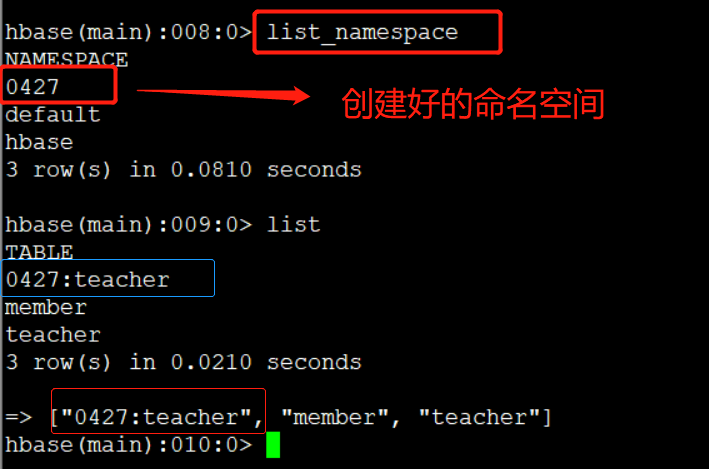
在命名空间0427 下创建了一张teacher表,查看命名空间 list_namespace
5. DML api 操作代码
package deng.com.hbasedemo;

import org.apache.hadoop.conf.Configuration;
import org.apache.hadoop.hbase.*;
import org.apache.hadoop.hbase.client.*;
import org.apache.hadoop.hbase.util.Bytes;

import java.io.IOException;

public class HbaseApi {

    public static Configuration conf;
    public static Connection connection;
    public static Admin admin;

    //静态代码块
    static {
        conf = HBaseConfiguration.create();
        conf.set("hbase.zookeeper.quorum", "192.168.10.102");
        conf.set("hbase.zookeeper.property.clientPort", "2181");

        //创建连接
        try {
            connection = ConnectionFactory.createConnection(conf);
            admin = connection.getAdmin();
        } catch (Exception e) {
            System.out.println("创建connect 和admin 失败!");
        }

    }

   // 关闭资源
    public static void close() throws IOException {
        admin.close();
        connection.close();

    }

    // 向表中添加数据
    public static void putData(String tableName, String rowKey, String cf, String cn, String value) throws IOException {
        if (isTableExist(tableName)) {
            // 获取表对象
            Table table = connection.getTable(TableName.valueOf(tableName));
            // 创建put 对象
            Put put = new Put(Bytes.toBytes(rowKey));
            // 给put 对象赋值
            put.addColumn(Bytes.toBytes(cf), Bytes.toBytes(cn), Bytes.toBytes(value));
            put.addColumn(Bytes.toBytes(cf), Bytes.toBytes(cn), Bytes.toBytes(value));
            // 插入数据
            table.put(put);
            System.out.println("插入数据成功!");
            // 关闭资源
            table.close();
        } else {
            System.out.println(tableName + "表不存在,无法插入数据!");
        }


    }

    // 获取数据
    public static void getData(String tableName, String rowKey, String cf, String cn) throws IOException {
        // 获取表
        Table table = connection.getTable(TableName.valueOf(tableName));
        // 获取get 对象
        Get get = new Get(Bytes.toBytes(rowKey));
        // 指定获取的列族
        get.addFamily(Bytes.toBytes(cf));
        // 指定列族和列
        get.addColumn(Bytes.toBytes(cf), Bytes.toBytes(cn));
//        // 设置获取数据的版本数
        get.setMaxVersions(5);
        // 获取数据
        Result result = table.get(get);
        Cell[] cells = result.rawCells();
        for (Cell cell : cells) {
            String cf1 = Bytes.toString(CellUtil.cloneFamily(cell));
            String cn1 = Bytes.toString(CellUtil.cloneQualifier(cell));
            String value1 = Bytes.toString(CellUtil.cloneValue(cell));
            System.out.println("cf:" + cf1 + ",cn:" + cn1 + ",value:" + value1);
        }
    }

    public static void scanData(String tableName) throws IOException {
        //获取表
        Table table = connection.getTable(TableName.valueOf(tableName));
        // 扫描全表
//        Scan scan = new Scan();
        //限制rowkey的范围,左闭右开 方式
        Scan scan = new Scan(Bytes.toBytes("deng"), Bytes.toBytes("wa"));
        ResultScanner resultScanner = table.getScanner(scan);
        for (Result result : resultScanner) {
            Cell[] cells = result.rawCells();
            for (Cell cell : cells) {
                String cf = Bytes.toString(CellUtil.cloneFamily(cell));
                String rowKey = Bytes.toString(CellUtil.cloneRow(cell));
                String cn = Bytes.toString(CellUtil.cloneQualifier(cell));
                String value = Bytes.toString(CellUtil.cloneValue(cell));
                System.out.println("rowkey:" + rowKey + ",cf:" + cf + ",cn:" + cn + ",value:" + value);
            }
        }
    }
    // 删除数据
    public static void deleteDate(String tableName,String rowKey,String cf,String cn) throws IOException {
        //获取 table
        Table table = connection.getTable(TableName.valueOf(tableName));
        //
        Delete delete = new Delete(Bytes.toBytes(rowKey));
        // 设置删除指定的列
        delete.addColumns(Bytes.toBytes(cf),Bytes.toBytes(cn));
        // 设置删除指定的列族

        table.delete(delete);

        table.close();
    }


    public static void main(String[] args) throws IOException {//DML操作
        // 插入数据
        putData("member","deng","info","phone","18179642114");

        //获取数据
        getData("member","deng","info","age");

        // Scan获取数据
        scanData("member");

        // 删除数据
        //
        deleteDate("member","wang","info","age");


        // 关闭资源
        close();
    }

}
有疑问可以加wx:18179641802,进行探讨

 浙公网安备 33010602011771号