

使用 helm 构建后端使用的 chart (一)
背景
目前公司的测试环境和生产环境都是跑在K8S上的,为了加快新服务的部署,减少编写 deployment.yaml 的错误。决定尝试逐步用 helm chart 来进行管理。
环境安装
工作的 PC 是 Windows 操作系统,所以需要去 github 上下载 helm 和 helm-cm-push
helm 地址:https://github.com/helm/helm
helm-cm-push 地址: https://github.com/chartmuseum/helm-push
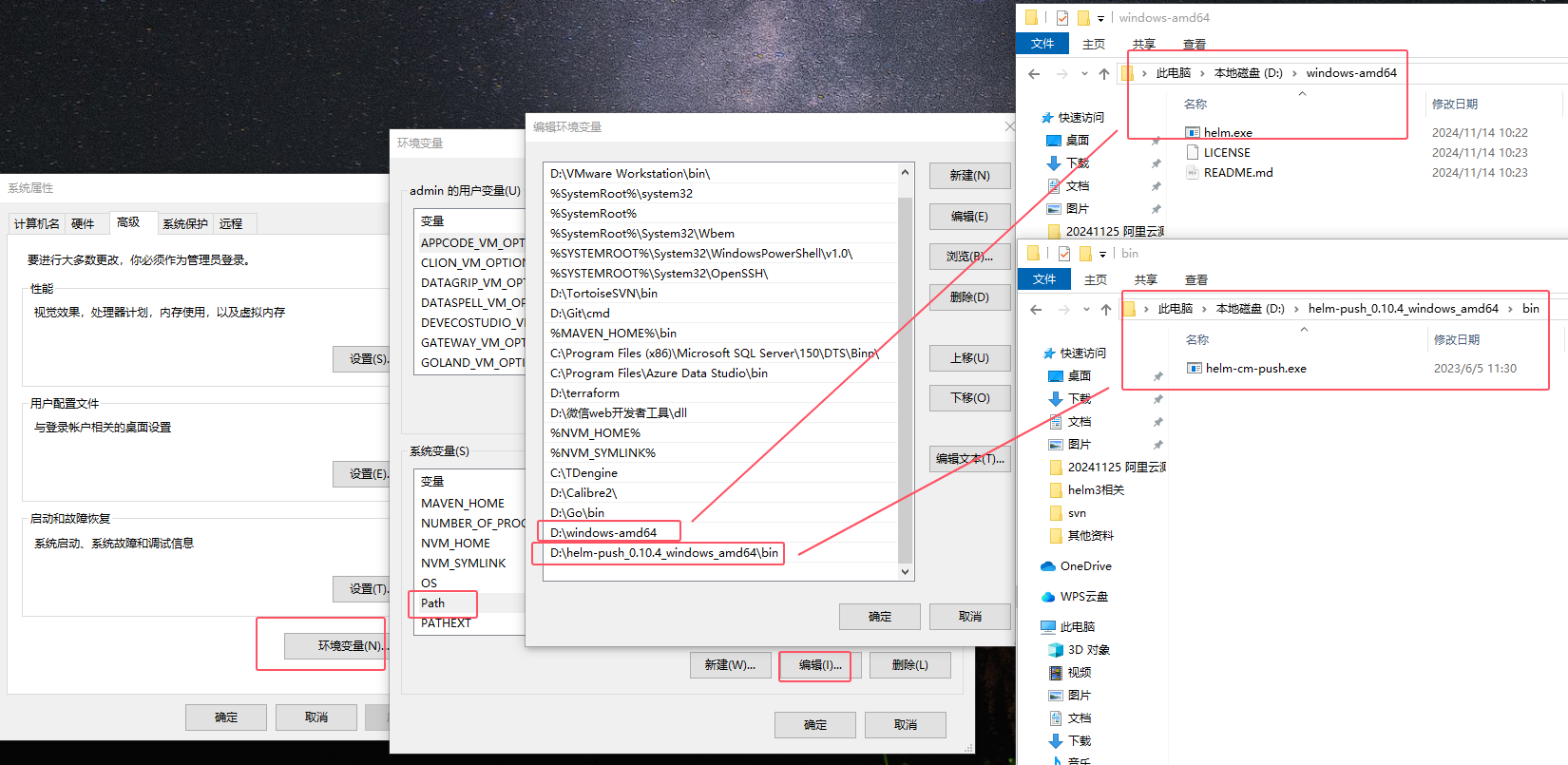
下载完解压,并配置环境变量。根据自身情况来,下面是我机子的配置
创建 jdk11 基本模板
在 F 盘下执行
mkdir helm-template
cd helm-template
helm create hdyl-jdk11

# 手动删掉不需要的配置,目前只剩下面
F:\HELM-TEMPLATE\HDYL-JDK11
│  Chart.yaml
│  values.yaml
│
├─charts
└─templates
        deployment.yaml
        service.yaml
        ingress.yaml
编辑 deployment.yaml
apiVersion: apps/v1
kind: Deployment
metadata:
  name: {{ .Values.appName }}
  labels:
    app: {{ .Values.appName }}
    app.kubernetes.io/managed-by: Helm
spec:
  replicas: {{ .Values.replicaCount }}
  minReadySeconds: 100
  strategy:
    type: RollingUpdate
    rollingUpdate:
      maxSurge: 1
      maxUnavailable: 0
  selector:
    matchLabels:
      app: {{ .Values.appName }}
      app.kubernetes.io/managed-by: Helm
  template:
    metadata:
      {{- with .Values.podAnnotations }}
      annotations:
        {{- toYaml . | nindent 8 }}
      {{- end }}
      labels:
        app: {{ .Values.appName }}
        app.kubernetes.io/managed-by: Helm
    spec:
      {{- with .Values.imagePullSecrets }}
      imagePullSecrets:
        {{- toYaml . | nindent 8 }}
      {{- end }}
      terminationGracePeriodSeconds: 60  # 给要退出的进程留出充裕的时间来处理所有请求
      restartPolicy: Always # 只要退出就重启
      securityContext:
        {{- toYaml .Values.podSecurityContext | nindent 8 }}
      {{- with .Values.nodeSelector }}
      nodeSelector:
        {{- toYaml . | nindent 8 }}
      {{- end }}
      containers:
        - name: {{ .Values.appName }}
          image: "{{ .Values.image.repository }}:{{ .Values.image.tag }}"
          imagePullPolicy: {{ .Values.image.pullPolicy }}
          volumeMounts:
            - mountPath: /etc/localtime
              readOnly: true
              name: time-data
          resources:
            {{- toYaml .Values.resources | nindent 12 }}
          livenessProbe:
            tcpSocket:
              port: 8080
            initialDelaySeconds: 30 # 在执行第一次检查之前等待的时间,单位秒
            periodSeconds: 90       # 指定kubelet 每隔多少秒执行一次检查
          readinessProbe:
            tcpSocket:
              port: 8080
            initialDelaySeconds: 60 # 在执行第一次检查之前等待的时间,单位秒
            timeoutSeconds: 1       # 探测的超时时间,默认为1,单位秒
          lifecycle:
            preStop: #  确认删除 pod 和更新网络规则之间的顺序关系。
              exec:
                command: ["sh", "-c", "sleep 10"]
          env:
            {{- with .Values.env }}
              {{- toYaml . | nindent 12 }}
            {{- end }}

      {{- with .Values.affinity }}
      affinity:
        {{- toYaml . | nindent 8 }}
      {{- end }}
      {{- with .Values.tolerations }}
      tolerations:
        {{- toYaml . | nindent 8 }}
      {{- end }}
      volumes:
        - name: time-data
          hostPath:
            path: /usr/share/zoneinfo/Asia/Shanghai
编辑 service.yaml
{{- if .Values.service.create -}}
apiVersion: v1
kind: Service
metadata:
  name: {{ .Values.appName }}
  labels:
    app: {{ .Values.appName }}
    app.kubernetes.io/managed-by: Helm
spec:
  type: {{ .Values.service.type }}
  ports:
    - port: 8080
      targetPort: 8080
      {{ if .Values.service.type | eq "NodePort" }}
      nodePort: {{ .Values.service.nodePort | default 30001 }}
      {{ end }}
      protocol: TCP
      name: http
  selector:
    app: {{ .Values.appName }}
    app.kubernetes.io/managed-by: Helm
{{- end }}
编辑 ingress.yaml
{{- if .Values.ingress.enabled -}}
apiVersion: networking.k8s.io/v1
kind: Ingress
metadata:
  name: {{ .Values.appName}}
  {{- with .Values.ingress.annotations }}
  annotations:
    {{- toYaml . | nindent 4 }}
  {{- end }}
spec:
  rules:
  - host: www.abc.com
    http:
      paths:
      - pathType: Prefix
        path: "/"
        backend:
          service:
            name: {{ .Values.appName}}
            port:
              number: 8080
{{- end -}}
编辑 Chart.yaml
apiVersion: v2
name: hdyl-jdk11
description: A Helm chart for Kubernetes

# A chart can be either an 'application' or a 'library' chart.
#
# Application charts are a collection of templates that can be packaged into versioned archives
# to be deployed.
#
# Library charts provide useful utilities or functions for the chart developer. They're included as
# a dependency of application charts to inject those utilities and functions into the rendering
# pipeline. Library charts do not define any templates and therefore cannot be deployed.
type: application

# This is the chart version. This version number should be incremented each time you make changes
# to the chart and its templates, including the app version.
# Versions are expected to follow Semantic Versioning (https://semver.org/)
version: 0.1.1

# This is the version number of the application being deployed. This version number should be
# incremented each time you make changes to the application. Versions are not expected to
# follow Semantic Versioning. They should reflect the version the application is using.
# It is recommended to use it with quotes.
appVersion: "1.0.0"
编辑 values.yaml
# app 名字
appName: hdyl-jdk11-sample

# 副本数
replicaCount: 1

# 镜像信息
image:
  repository: tomcat
  tag: "9.0.87-jdk11"
  pullPolicy: IfNotPresent

# 资源限制
resources:
  limits:
    cpu: 1
    memory: 2Gi
  requests:
    cpu: 50m
    memory: 256Mi

# 环境变量
env:
  - name: server.port      # 后端在K8S部署的服务端口都为8080
    value: "8080"

service:
  create: false
  type: NodePort
  nodePort: 30002


# 镜像拉取秘钥
imagePullSecrets:
  - name: harbor


ingress:
  enabled: false
  annotations:
    kubernetes.io/ingress.class: nginx
    nginx.ingress.kubernetes.io/proxy-body-size: "300m"
    nginx.ingress.kubernetes.io/proxy-send-timeout: "300"
    nginx.ingress.kubernetes.io/proxy-read-timeout: "300"
    nginx.ingress.kubernetes.io/proxy-connect-timeout: "300"
  hosts:
    rules:
    - host: www.junengcloud.com


# 节点选择
nodeSelector: {}
#nodeSelector:
#  nodeName: k8s-node2

tolerations: []

affinity: {}

podAnnotations: {}

podSecurityContext: {}
调试
可以使用 IDEA 打开这个项目,安装插件【Kubernetes】
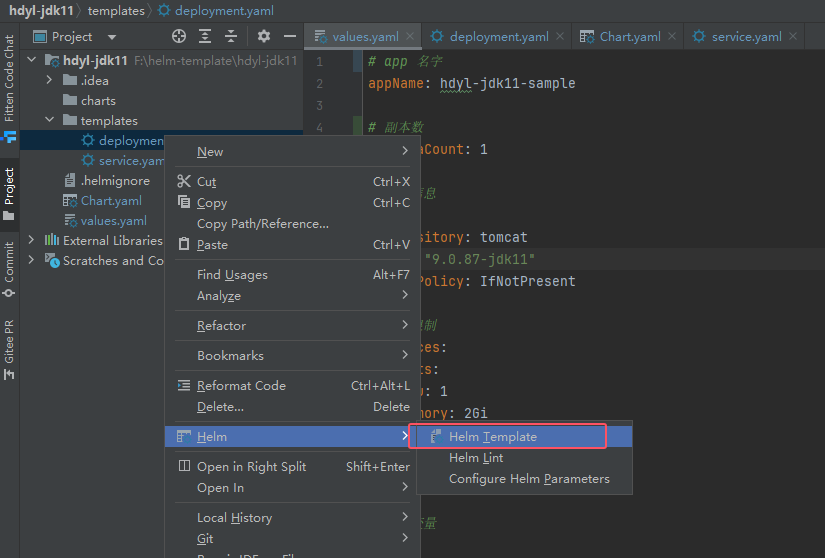
鼠标右键 deployment.yaml -> 【Helm】->【Helm Template】
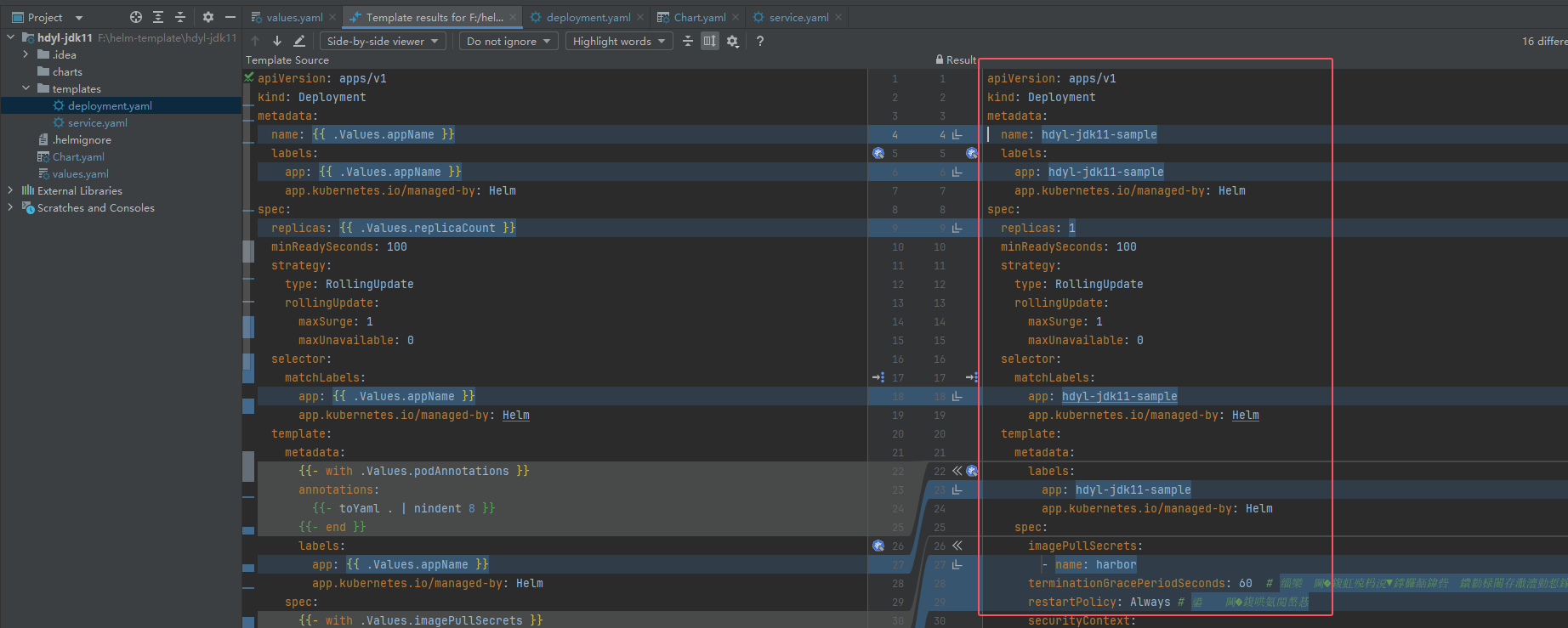
右侧可以展示渲染后的模板,提高开发效率

 浙公网安备 33010602011771号