

docker-compose redis 高可用哨兵模式搭建
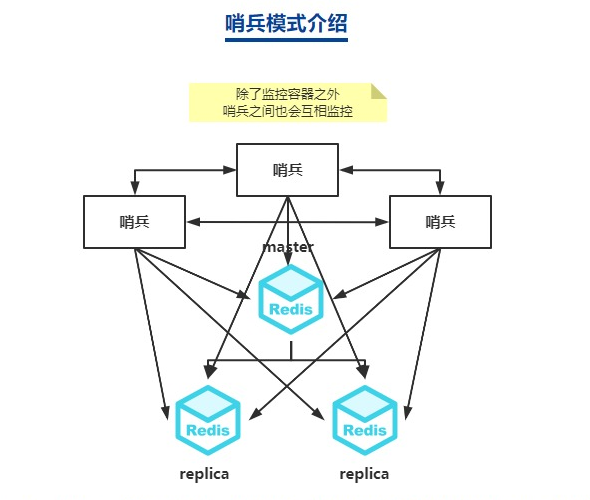
| 主机名 | IP | 角色 |
|---|---|---|
| test1 | 172.16.16.119 | master |
| test2 | 172.16.16.120 | slave1 |
| test3 | 172.16.16.121 | slave2 |
创建 Redis 集群
test1 上操作
mkdir -p /data/docker-compose/redis-cluster/conf
cd /data/docker-compose/redis-cluster

cat docker-compose.yaml
version: '3.4'
services:
  redis-cluster:
    image: redis:5.0.14
    network_mode: "host"
    container_name: redis-cluster
    volumes:
      - ./data:/data
      - ./conf/redis.conf:/etc/redis/redis.conf
      - /etc/localtime:/etc/localtime
    command: redis-server /etc/redis/redis.conf
    restart: always

# 启用持久化,设置密码,主从切换时,作为从节点认证密码
cat conf/redis.conf
port 6379
bind 0.0.0.0
save ""
appendonly yes
appendfilename appendonly.aof
appendfsync everysec
auto-aof-rewrite-min-size 10M
auto-aof-rewrite-percentage 100
requirepass qwer123456
logfile "redis.log"

masterauth qwer123456

docker-compose up -d
test2,test3 上操作
mkdir -p /data/docker-compose/redis-cluster/conf
cd /data/docker-compose/redis-cluster

cat docker-compose.yaml
version: '3.4'
services:
  redis-cluster:
    image: redis:5.0.14
    network_mode: "host"
    container_name: redis-cluster
    volumes:
      - ./data:/data
      - ./conf/redis.conf:/etc/redis/redis.conf
      - /etc/localtime:/etc/localtime
    command: redis-server /etc/redis/redis.conf
    restart: always

# 启用持久化,设置密码,主从切换时,作为从节点认证密码
cat conf/redis.conf
bind 0.0.0.0
save ""
appendonly yes
appendfilename appendonly.aof
appendfsync everysec
auto-aof-rewrite-min-size 10M
auto-aof-rewrite-percentage 100
requirepass qwer123456

replicaof 172.16.16.119 6379
masterauth qwer123456
replica-read-only yes


docker-compose up -d
创建 3 个 redis sentinel
test1 上操作
mkdir -p /data/docker-compose/redis-sentinel/conf
cd /data/docker-compose/redis-sentinel/

cat docker-compose.yaml
version: '3.4'
services:
  redis-sentinel:
    image: redis:5.0.14
    network_mode: "host"
    container_name: redis-sentinel
    volumes:
      - ./data:/data
      - ./conf/sentinel.conf:/etc/redis/sentinel.conf
      - /etc/localtime:/etc/localtime
    command: redis-sentinel /etc/redis/sentinel.conf
    restart: always

cat conf/sentinel.conf
port 26379
logfile "sentinel.log"
sentinel monitor master001 172.16.16.119 6379 2
sentinel auth-pass master001 qwer123456
sentinel down-after-milliseconds master001 10000
sentinel parallel-syncs master001 1
sentinel failover-timeout master001 180000

sentinel announce-ip 172.16.16.119
sentinel announce-port 26379

sentinel deny-scripts-reconfig yes

docker-compose up -d


# 核心配置说明
# sentinel monitor master001 172.16.16.119 6379 2
# 第三个参数:哨兵名字,可自行修改。(若修改了,那后面涉及到的都得同步)
# 第四个参数:master主机ip地址
# 第五个参数:redis端口号
# 第六个参数:哨兵的数量。比如2表示,当至少有2个哨兵发现master的redis挂了,
#               那么就将此master标记为宕机节点。
#               这个时候就会进行故障的转移,将其中的一个从节点变为master
test2, test3 上操作
mkdir -p /data/docker-compose/redis-sentinel/conf
cd /data/docker-compose/redis-sentinel/

cat docker-compose.yaml
version: '3.4'
services:
  redis-sentinel:
    image: redis:5.0.14
    network_mode: "host"
    container_name: redis-sentinel
    volumes:
      - ./data:/data
      - ./conf/sentinel.conf:/etc/redis/sentinel.conf
      - /etc/localtime:/etc/localtime
    command: redis-sentinel /etc/redis/sentinel.conf
    restart: always

# 注意 这里的 announce-ip 要写本机IP,test2 是 172.16.16.120;test3 是 172.16.16.121
cat conf/sentinel.conf
port 26379
logfile "sentinel.log"
sentinel monitor master001 172.16.16.119 6379 2
sentinel auth-pass master001 qwer123456
sentinel down-after-milliseconds master001 10000
sentinel parallel-syncs master001 1
sentinel failover-timeout master001 180000

sentinel announce-ip 172.16.16.120
sentinel announce-port 26379

sentinel deny-scripts-reconfig yes

docker-compose up -d
注意
如果有 redis 主节点服务宕机后,重新加 redis 集群的话,该节点会变成从节点的方式加入。集群主记得靠 redis sentinel 来进行维护,最多可以宕机一台服务器。redis 的写入需要靠程序自行判断!

 浙公网安备 33010602011771号