

Flask + flask_apscheduler + logging 定时获取阿里云 elasticsearch 慢查询日志
需求:每天定时获取阿里云上 elasticsearch 上的慢查询日志,通过钉钉发送消息到群里并提供下载 xlsx 文件。
目录结构
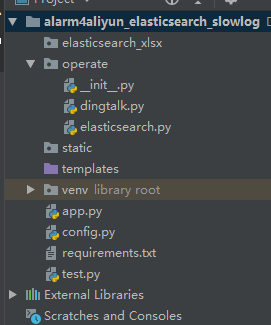
创建一个 Python Package 名为 operate 文件夹,在该文件夹下创建两个 py 文件,elasticsearch.py 和 dingtalk.py
elasticsearch.py 内容为:
from aliyunsdkcore.client import AcsClient
from aliyunsdkcore.request import CommonRequest
from config import CurrentConfig as Config
import json
import time
from datetime import datetime, date, timedelta
import openpyxl
from operate import dingtalk
import logging


accessKeyId = Config.accessKeyId
accessSecret = Config.accessSecret
folder = Config.folder

client = AcsClient(accessKeyId, accessSecret, 'cn-shenzhen')

request = CommonRequest()
request.set_accept_format('json')
request.set_method('GET')
request.set_protocol_type('https') # https | http
request.set_domain('elasticsearch.cn-shenzhen.aliyuncs.com')
request.set_version('2017-06-13')

yesterday = (date.today() + timedelta(days=-1)).strftime("%Y-%m-%d")


def get_elastic_slow_log(begin_time, end_time, type):
    request.add_query_param('type', type)
    request.add_query_param('query', "level:warn")
    request.add_query_param('beginTime', begin_time)
    request.add_query_param('endTime', end_time)
    request.add_query_param('size', "50")
    request.add_header('Content-Type', 'application/json')
    request.set_uri_pattern('/openapi/instances/es-cn-xxxxxxxxxxxxxx/search-log')
    body = '''{}'''
    request.set_content(body.encode('utf-8'))

    response = client.do_action_with_exception(request)

    result_json = json.loads(str(response, encoding='utf-8'))

    return result_json['Headers']['X-Total-Count'], result_json['Result']


def generate_xlsx(result_count, result_json, type):
    if result_json and result_count != 0:
        filename = folder + "elasticsearch_slow_sql_" + type + "_" + yesterday + ".xlsx"
        workbook = openpyxl.Workbook()
        sheet = workbook.active

        for i in range(result_count):
            timestamp = result_json[i]['timestamp']
            instanceId = result_json[i]['instanceId']
            host = result_json[i]['host']
            level = result_json[i]['contentCollection']['level']
            mytime = result_json[i]['contentCollection']['time']
            content = result_json[i]['contentCollection']['content']

            data = [timestamp, mytime, instanceId, host, level, content]
            sheet.append(data)

        workbook.save(filename=filename)

        # 发送钉钉消息
        msg = "http://192.168.0.200:81" + filename
        dingtalk.send_msg(msg)


def main():
    end_time = int(round(time.time() * 1000))
    begin_time = end_time - 86400 * 1000

    from app import app      # 把 app 作为变量公开,在函数中导入
    app.logger.warning('program is running: %s', datetime.now())

    # searching 慢查询日志
    result_count1, result_json1 = get_elastic_slow_log(begin_time, end_time, 'SEARCHSLOW')
    generate_xlsx(result_count1, result_json1, 'searching')

    # indexing 慢查询日志
    result_count2, result_json2 = get_elastic_slow_log(begin_time, end_time, 'INDEXINGSLOW')
    generate_xlsx(result_count2, result_json2, 'indexing')
dingtalk.py 内容为:
import json
import requests

# 定义环境
from config import CurrentConfig as Config

url = Config.DINGTALK_URL


def send_msg(msg):
    parameter = {
        "msgtype": "text",
        "text": {
            "content": "云服务 -- 线上 elasticsearch 慢查询日志已生成,下载请点击:%s ,请及时查看(该链接只可以在公司内网打开)~" % msg
        },
    }
    headers = {
        'Content-Type': 'application/json'
    }
    requests.post(url, data=json.dumps(parameter), headers=headers)
app.py 内容为
from flask import Flask
from flask_apscheduler import APScheduler
from operate import elasticsearch
import logging

app = Flask(__name__)


@app.route('/')
def hello_world():
    return 'aliyun elasticsearch slow log is running!'


class SchedulerConfig(object):
    JOBS = [
        {
            'id': 'elasticsearch',                       # 任务id
            'func': 'operate.elasticsearch:main',        # 任务执行程序
            'args': None,                                # 执行程序参数
            'trigger': 'interval',                       # 任务执行类型
            'seconds': 60
        }
    ]
    SCHEDULER_TIMEZONE = 'Asia/Shanghai'                 # 设定时区


app.config.from_object(SchedulerConfig())                # 为实例化的flask引入定时任务配置
scheduler = APScheduler()                                # 实例化APScheduler
scheduler.init_app(app)                                  # 把任务列表载入实例flask
scheduler.start()                                        # 启动任务计划

handler = logging.FileHandler('flask.log', encoding='UTF-8')   # 设置日志字符集和存储路径名字
logging_format = logging.Formatter('%(asctime)s - %(levelname)s - %(filename)s - %(funcName)s - %(lineno)s - %(message)s')  # 设置日志格式
handler.setFormatter(logging_format)
app.logger.addHandler(handler)


if __name__ == '__main__':
    app.run()
配置文件 config.py 的内容:
class ProductionConfig:
    accessKeyId = 'xxxxxxxxxxxxxxxx'
    accessSecret = 'xxxxxxxxxxxxxxxx'
    folder = '/elasticsearch_xlsx/'
    DINGTALK_URL = 'https://oapi.dingtalk.com/robot/send?access_token=xxxxxxxxxxxxxxxx' # 运维组


class DevConfig:
    accessKeyId = 'xxxxxxxxxxxxxxxx'
    accessSecret = 'xxxxxxxxxxxxxxxx'
    folder = 'D:\\flask_projects\\alarm4aliyun_elasticsearch_slowlog\\elasticsearch_xlsx\\'
    DINGTALK_URL = 'https://oapi.dingtalk.com/robot/send?access_token=xxxxxxxxxxxxxxxx' # 运维组


class CurrentConfig(DevConfig):
    pass
在 PyCharm 中 使用命令导出依赖
pip freeze > requirements.txt
把程序打包到 docker 镜像
# 代码上传到 /data/alarm4slow_elasticsearch

# 拷贝时区文件到目录下
cp /usr/share/zoneinfo/Asia/Shanghai .

# 编辑 Dockerfile  内容为
FROM python:3.6
WORKDIR /data

RUN echo "Asia/Shanghai" > /etc/timezone
RUN mkdir /elasticsearch_xlsx/
COPY Shanghai /etc/localtime
COPY requirements.txt ./
RUN pip install -r requirements.txt -i https://mirrors.aliyun.com/pypi/simple/

COPY . .

CMD ["gunicorn", "-w", "1", "-b", "0.0.0.0:8888", "app:app"]

# 打包成 docker 镜像

docker build -t alarm4aliyun_elasticsearch_slow_log:0.0.1 ./
创建 docker-compose.yml
# 创建目录保存 xlsx 文件
mkdir -p /data/elasticsearch_xlsx

# 编辑 docker-compose.yml
version: '3.4'
services:
  alarm4aliyun_elasticsearch_slow_log:
    image: alarm4aliyun_elasticsearch_slow_log:0.0.1
    volumes:
      - /data/elasticsearch_xlsx:/elasticsearch_xlsx

# 启动
docker-compose up -d
在这台机器上启动一个 nginx 提供下载 xlsx 服务
vi docker-compose.yml
version: '3.4'
services:
  nginx:
    image: nginx:1.19
    ports:
      - 81:80
    volumes:
      - /data/elasticsearch_xlsx:/usr/share/nginx/html/elasticsearch_xlsx

# 启动
docker-compose up -d
若需要在镜像中调试,需要在容器中安装 vim
sed -i 's#http://deb.debian.org#https://mirrors.163.com#g' /etc/apt/sources.list
apt-get update
apt-get install vim
参考:https://github.com/viniciuschiele/flask-apscheduler/issues/16

 浙公网安备 33010602011771号