


1.for循环结构
1.1for循环结构语法
语法:
for 变量名 in 变量取值列表
do
指令...
done
提示:在此结构中“ in 变量取值列表”可省略,省略时相当于in "$@",使用for i 就相当于使用for i in "$@"。
1.2C语言型for循环结构
语法:
for((exp1;exp2;exp3))
do
指令...
done
例:for和while对比
[root@localhost ~]# cat compare_for.sh
#!/bin/sh
for((i=1;i<=5;i++))
do
echo $i
done
[root@localhost ~]# cat compare_while.sh
#!/bin/sh
i=1
while ((i<=5))
do
echo $i
((i++))
done
[root@localhost ~]# cat test.sh
#!/bin/sh
for i in `seq 5` ==>结合seq命令输出
do
echo $i
done
说明:1)程序持续运行多用while,包括守护进程,还有配置read读入处理
2)有限次循环多用for,工作中for使用更多。
补充知识:
[root@localhost ~]# cat test.log
1 2 3 4 5 6 7 8 9 10
[root@localhost ~]# cat test.log | xargs -n4
1 2 3 4
5 6 7 8
9 10
[root@localhost ~]# xargs -n4 < test.log ==>尽量少用管道符,接不了输出内容的使用"<"符号直接输出给命令处理
1 2 3 4
5 6 7 8
9 10
[root@localhost ~]# cat test.log |grep 8
1 2 3 4 5 6 7 8 9 10
[root@localhost ~]# grep 8 test.log
1 2 3 4 5 6 7 8 9 10
实例1:打印当前目录下所有文件名
[root@localhost ~]# cat test.sh
#!/bin/sh
for i in `ls`
do
echo $i
done
实例2:批量生成10个随机以文件的md5前8位数为文件名
[root@localhost ~]# cat for1.sh
#!/bin/sh
for ((i=1;i<=10;i++))
do
mkdir -p ./test
touch ./test/`echo $RANDOM|md5sum|cut -c 1-8`.html
done
实例3.将上面随机生成的文件,批量更换为.jpg后缀的文件
方法一:
#!/bin/sh
for i in `ls ./test`
do
mv ./test/$i ./test/`echo $i|awk -F"." '{print $1}'`.jpg
done
执行结果:
[root@localhost ~]# ls test/
1518ad24.html 5abec9ea.html 923130d5.html a0b86bb2.html d30f76d0.html
1a2ed7c0.html 8be534a2.html 96649599.html cc454a77.html fc215628.html
[root@localhost ~]# sh for2.sh
[root@localhost ~]# ls test/
1518ad24.jpg 5abec9ea.jpg 923130d5.jpg a0b86bb2.jpg d30f76d0.jpg
1a2ed7c0.jpg 8be534a2.jpg 96649599.jpg cc454a77.jpg fc215628.jpg
方法二:
与上面类似,同时模拟去除生成文件的相同后缀_test.html批量修改未jpg后缀
[root@localhost ~]# cat for2.sh
#!/bin/sh
for i in `ls ./test/*.html`
do
mv $i `echo $i|sed 's#_test.html#.jpg#g'`
done
执行:
[root@localhost ~]# ls test/
0db67a7f_test.html 753b5b67_test.html c16f5b7c_test.html e14d8f38_test.html
117796bc_test.html 80bc93b2_test.html c3e3b270_test.html
4b588f64_test.html ba0760ff_test.html cff8f3c6_test.html
[root@localhost ~]# sh for2.sh
[root@localhost ~]# ls test/
0db67a7f.jpg 4b588f64.jpg 80bc93b2.jpg c16f5b7c.jpg cff8f3c6.jpg
117796bc.jpg 753b5b67.jpg ba0760ff.jpg c3e3b270.jpg e14d8f38.jpg
方法三:
#!/bin/sh
for i in `ls ./test/*.html`
do
echo $i|awk -F'[_]' '{print "mv " $0,$1".jpg"}'|bash
done
方法四:rename命令修改 ls|rename "_test.html" ".jpg" *.html
知识点回顾,将开机启动项里除 rsyslog、sshd、sysstat的服务都设为off
chkconfig --list|grep 3:on|awk '{print $1}'|egrep -v "rsyslog|sshd|sysstat"|sed -r 's#(.*)#chkconfig \1 off#g'|bash
实例4:用for循环实现上述修改
#!/bin/sh
LANG=en
for i in `chkconfig --list|grep 3:on|awk '{print $1}'|egrep -v "rsyslog|sshd|sysstat"`
do
chkconfig $i off
done
实例5:用for循环从1加到100
方法一:
#!/bin/sh
for ((i=1;i<=100;i++))
do
let sum+=i
done
echo $sum
方法二:
#!/bin/sh
for ((i=1;i<=100;i++))
do
((sum+=i))
done
echo $sum
方法三:
数学算法:[root@localhost test]# echo $((100*(100+1)/2))
5050
2.break continue exit return
2.1 break continue exit 对比
break continue exit一般用于循环结构中控制循环(for,while,if)的走向
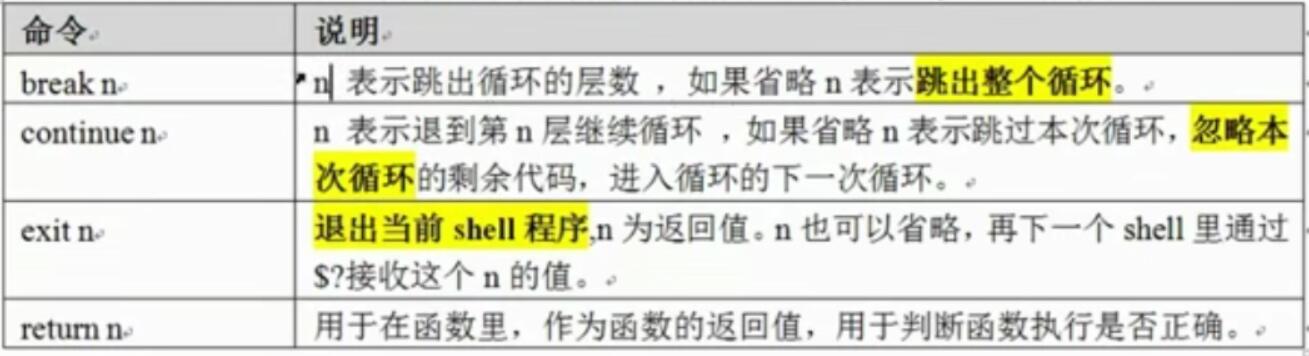
范例:
分别使用break、continue、exit跳出循环,查看执行结果。
#!/bin/sh
for((i=0;i<=5;i++))
do
if [ $i -eq 3 ];then
#continue;
#break;
exit
fi
echo $i
done
echo "ok!
执行break如下:
[root@localhost test]# sh break-1.sh ==>跳出整个循环,执行循环外的程序
0
1
2
ok!
执行continue如下:
[root@localhost test]# sh break-1.sh ==>跳出当前循环,执行后面的循环以及循环外的程序
0
1
2
4
5
ok!
执行exit如下:
[root@localhost test]# sh break-1.sh ==>跳出整个循环结束程序,不执行循环外的程序
0
1
2
实例1:
写一个脚本,实现判断10.0.0.0/24网络里,当前在线用户的IP有哪些(方法很多)。
实例2:
写一个脚本解决DOS攻击生产案例
提示:根据web日志或者网络连接数,监控当前某个IP并发连接数或者短时间内PV达到100,即调用防火墙命令封掉对应的IP。防火墙命令为:iptables -A INPUT -s 10.0.1.10 -j DROP。
实例3:开发Shell脚本实现给服务器临时配置多个别名IP,并可以随时撤销配置的所有IP。IP地址为:10.0.2.1-10.0.2.16,其中10.0.2.10不能配置。
配置IP命令(ifconfig/ip)提示:
配置ip的两种方法:
ifconfig eth0:0 10.0.2.10/24 up
ifconfig eth0:0 10.0.2.10/24 down
--------------------------------------------------
ip addr add 10.0.2.1/24 dev eth0:0
ip addr del 10.0.2.1/24 dev eth0:0
小结:for循环通常有两种形式
①:for 变量 in 变量列表
do
指令...
done
②:for ((表达式1;表达式2;表达式3))
do
指令...
done

 浙公网安备 33010602011771号