Jenkins构建Java应用至k8s

前言(本文需要对Jenkins和gitlab有一定的使用经验,只是描述了主要步骤。。)

本文中构建部署过程大致分为jenkins获取gitlab上的代码,在docker中执行代码编译、构建docker镜像、上传docker镜像至镜像仓库、执行kubectl命令部署至k8s。(自动触发构建的话,可以自行搜索gitlab通过webhook自动触发jenkins执行任务,这里不在概述)

Jenkins+GItlab部署

Jenkins下载地址:https://mirrors.tuna.tsinghua.edu.cn/jenkins/war-stable/2.277.4/jenkins.war

tomcat下载地址:https://mirrors.bfsu.edu.cn/apache/tomcat/tomcat-9/v9.0.46/bin/apache-tomcat-9.0.46.tar.gz

在tomcat安装目录下的webapps,把下载好的jenkins.war放进去,启动tomcat就行

gitlab通过yum方式安装:

在/etc/yum.repos.d/gitlab-ce.repo中配置gitlab镜像源:

[gitlab-ce]
name=Gitlab CE Repository
baseurl=https://mirrors.tuna.tsinghua.edu.cn/gitlab-ce/yum/el7/
gpgcheck=0
enabled=1

执行yum install -y gitlab-ce

安装完成后需要修改/etc/gitlab/gitlab.rb中的配置文件:

 需要把external_url 换成自己的ip地址地址
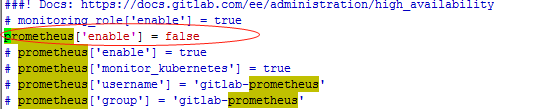
 如果机器配置不高,可以把一些不用的功能给禁用,默认都是开启的,比如prometheus,其他功能禁用方法一样。

修改完gitlab配置都需要先执行gitlab-ctl reconfigure,然后执行gitlab-ctl restart

操作步骤:

1、首先把Jenkins服务器的公钥地址配置到gitlab上面,方便Jenkins拉取代
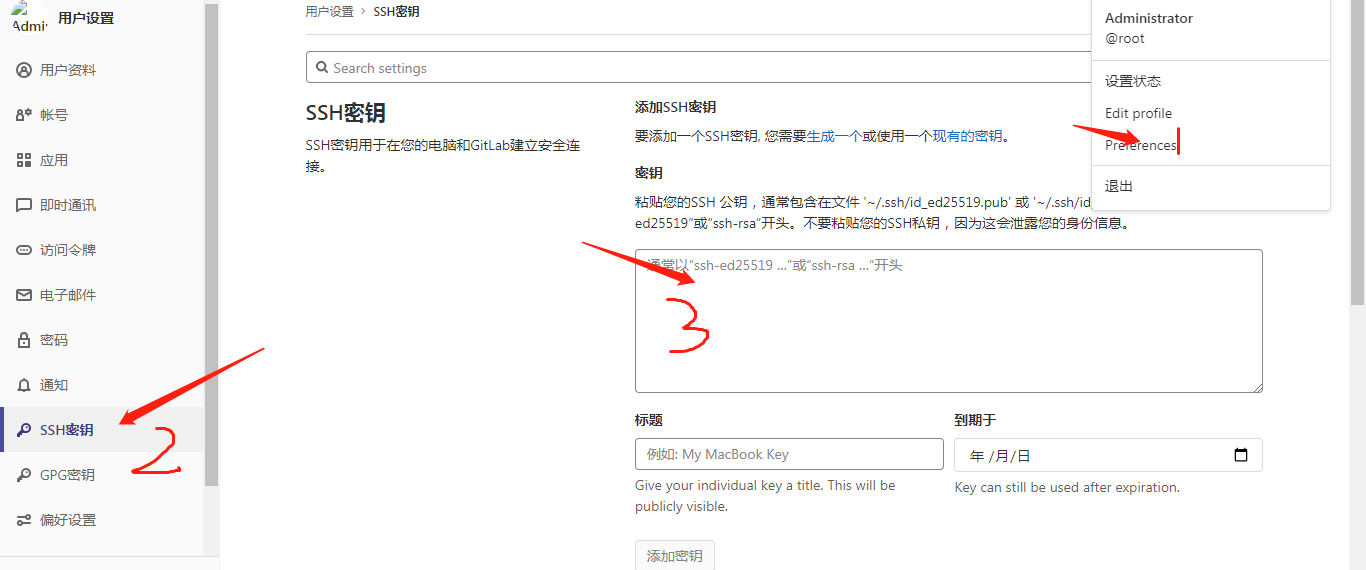


 随便找个Java项目地址:https://github.com/gongchangwangpi/spring-cloud-demo2进行测试

克隆项目地址到本地gitlab,删除其他无用的spring cloud项目,只保留spring-cloud-eureka项目,最终如下图所示:
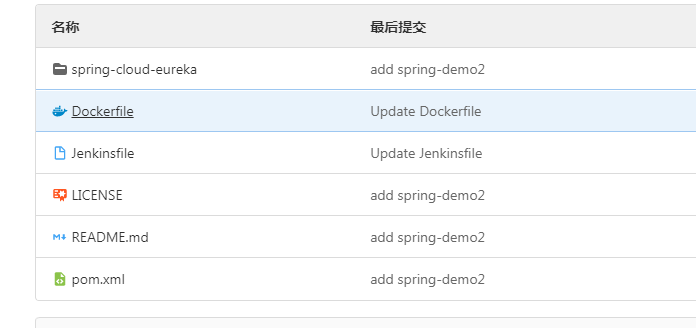
根目录创建Dockerfile,用来构建docker镜像,Dockerfile内容:

FROM registry.cn-beijing.aliyuncs.com/citools/maven:3.5.3
COPY spring-cloud-eureka/target/*.jar /opt
EXPOSE 8080
Jenkinsfile通过bule ocean插件编写生成,目前还不支持一些高级语法,但基本满足使用,具体命令在生成的stages步骤里修改,避免格式问题。

创建完成,具体步骤如下,点击保存,会在你项目的根目录下,生成Jenkinsfile文件

用来执行jenkins pipeline任务Jenkinsfile内容,其中kubernetes模块后期在gitlab上面添加的,在Jenkinsfile里编辑保存 会自动同步到Jenkins pipeline:

pipeline {
agent {
    kubernetes {
      cloud 'kubernetes'
      slaveConnectTimeout 1200
      yaml '''
apiVersion: v1
kind: Pod
spec:
  containers:
    - args: [\'$(JENKINS_SECRET)\', \'$(JENKINS_NAME)\']
      image: 'registry.cn-beijing.aliyuncs.com/citools/jnlp:alpine'
      name: jnlp
      imagePullPolicy: IfNotPresent
      volumeMounts:
        - mountPath: "/etc/localtime"
          name: "volume-2"
          readOnly: false
        - mountPath: "/etc/hosts"
          name: "volume-hosts"
          readOnly: false        
    - command:
        - "cat"
      env:
        - name: "LANGUAGE"
          value: "en_US:en"
        - name: "LC_ALL"
          value: "en_US.UTF-8"
        - name: "LANG"
          value: "en_US.UTF-8"
      image: "registry.cn-beijing.aliyuncs.com/citools/maven:3.5.3"
      imagePullPolicy: "IfNotPresent"
      name: "build"
      tty: true
      volumeMounts:
        - mountPath: "/etc/localtime"
          name: "volume-2"
          readOnly: false
        - mountPath: "/root/.m2/"
          name: "volume-maven-repo"
          readOnly: false
        - mountPath: "/etc/hosts"
          name: "volume-hosts"
          readOnly: false
    - command:
        - "cat"
      env:
        - name: "LANGUAGE"
          value: "en_US:en"
        - name: "LC_ALL"
          value: "en_US.UTF-8"
        - name: "LANG"
          value: "en_US.UTF-8"
      image: "registry.cn-beijing.aliyuncs.com/citools/kubectl:self-1.17"
      imagePullPolicy: "IfNotPresent"
      name: "kubectl"
      tty: true
      volumeMounts:
        - mountPath: "/etc/localtime"
          name: "volume-2"
          readOnly: false
        - mountPath: "/var/run/docker.sock"
          name: "volume-docker"
          readOnly: false
        - mountPath: "/etc/hosts"
          name: "volume-hosts"
          readOnly: false
        - mountPath: "/mnt/.kube/"
          name: "volume-kubeconfig"
          readOnly: false
    - command:
        - "cat"
      env:
        - name: "LANGUAGE"
          value: "en_US:en"
        - name: "LC_ALL"
          value: "en_US.UTF-8"
        - name: "LANG"
          value: "en_US.UTF-8"
      image: "registry.cn-beijing.aliyuncs.com/citools/docker:19.03.9-git"
      imagePullPolicy: "IfNotPresent"
      name: "docker"
      tty: true
      volumeMounts:
        - mountPath: "/etc/localtime"
          name: "volume-2"
          readOnly: false
        - mountPath: "/var/run/docker.sock"
          name: "volume-docker"
          readOnly: false
        - mountPath: "/etc/hosts"
          name: "volume-hosts"
          readOnly: false
  restartPolicy: "Never"
  nodeSelector:
    build: "true"
  securityContext: {}
  volumes:
    - hostPath:
        path: "/var/run/docker.sock"
      name: "volume-docker"
    - hostPath:
        path: "/usr/share/zoneinfo/Asia/Shanghai"
      name: "volume-2"
    - hostPath:
        path: "/etc/hosts"
      name: "volume-hosts"
    - name: "volume-maven-repo"
      hostPath:
        path: "/opt/m2"
    - name: "volume-kubeconfig"
      secret:
        secretName: "default-token-qnnk7"
'''	
}
}
  stages {
    stage('pulling Code') {
      parallel {
        stage('pulling Code') {
         when {
            expression {
              env.gitlabBranch == null
            }
          }
          steps {
            git(url: 'http://192.168.110.142/root/test.git', branch: "${BRANCH}", changelog: true, credentialsId: 'gitlab_passwd')
          }
        }
        stage('pulling code by trigger') {
        when {
            expression {
              env.gitlabBranch != null
            }
          }
          steps {
            git(credentialsId: 'gitlab_passwd', branch: 'env.gitlabBranch', url: 'http://192.168.110.142/root/test.git', changelog: true)
          }
        }
      }
    }
    stage('initConfiguration') {
      steps {
        script {
        CommitID = sh(returnStdout: true, script: "git log -n 1 --pretty=format:\'%h\'").trim()
	CommitMessage = sh(returnStdout: true, script: "git log -1 --pretty=format:\'%h : %an  %s\'").trim()
	def curDate = sh(script: "date \'+%Y%m%d-%H%M%S\'", returnStdout: true).trim()
	TAG = curDate[0..14] + "-" + CommitID + "-" + BRANCH
      }
      }
    }
    stage('Buiding') {
      parallel {
        stage('Buiding') {
          steps {
            container(name: 'build') {
              sh """
	echo "Building Project..."
	${BUILD_COMMAND}
 		"""
            }
          }
        }
        stage('Scan Code') {
          steps {
            sh  "echo Scan Code"
          }
        }
      }
    }

    stage('Build image') {
        steps {
                withCredentials([usernamePassword(credentialsId: 'aliyun_image', passwordVariable: 'Password', usernameVariable: 'Username')]) {
        container(name: 'docker') {
          sh """
          pwd 
          ls
          docker build -t ${HARBOR_ADDRESS}/${REGISTRY_DIR}/${IMAGE_NAME}:${TAG} .
          docker login -u ${Username} -p ${Password} ${HARBOR_ADDRESS}
          docker push ${HARBOR_ADDRESS}/${REGISTRY_DIR}/${IMAGE_NAME}:${TAG}
          """
        }
        }
      }
    }
    stage('Deploy') {
      steps {
        container(name: 'kubectl') {
          sh "/usr/local/bin/kubectl set image ${DEPLOY_TYPE}  ${CONTAINER_NAME} ${CONTAINER_NAME}=${HARBOR_ADDRESS}/${REGISTRY_DIR}/${IMAGE_NAME}:${TAG}"
        }
      }
    }
  }
  environment {
    CommitMessage = '""'
    CommitID = '""'
    TAG = '""'
  }
}

 jenkinsfile中的变量,都需要在pipeline job中创建,下面只列出一部分。


编译的时候会在k8s集群里启动个pod进行构建:


 因为对spring cloud生态不太熟悉,打包的镜像,启动不了。。。但是k8s集群里能看到镜像更新成功,达到更新的目的。。。


 部分报错信息:

Error from server (Forbidden): pods is forbidden: User "system:serviceaccount:default:default" cannot list resource "pods" in API group "" in the namespace "default"

解决:kubectl create clusterrolebinding default --clusterrole=cluster-admin --group=system:serviceaccounts --namespace=default 赋予default用户 cluster-admin的权限。


posted @ 2021-06-08 14:36  心隐﹡  阅读(527)  评论(0)    收藏  举报