

FragmentTabHost
MainActivity布局
<?xml version="1.0" encoding="utf-8"?>
<LinearLayout xmlns:android="http://schemas.android.com/apk/res/android"
    xmlns:app="http://schemas.android.com/apk/res-auto"
    xmlns:tools="http://schemas.android.com/tools"
    android:layout_width="match_parent"
    android:layout_height="match_parent"
    android:orientation="vertical"
    tools:context=".MainActivity">

    <FrameLayout
        android:id="@+id/content"
        android:layout_width="match_parent"
        android:layout_height="0dp"
        android:layout_weight="1"
        />

    <android.support.v4.app.FragmentTabHost
        android:id="@+id/tab_Host"
        android:layout_width="match_parent"      <!--此处必须为match_parent,否则有可能无法显示标签-->
        android:layout_height="wrap_content">
        <LinearLayout
            android:layout_width="wrap_content"
            android:layout_height="wrap_content"
            android:orientation="vertical">

            <FrameLayout
                android:id="@android:id/tabcontent"
                android:layout_width="0dp"
                android:layout_height="0dp"
                />

        </LinearLayout>
    </android.support.v4.app.FragmentTabHost>

</LinearLayout>
底部标签的布局
<?xml version="1.0" encoding="utf-8"?>
<LinearLayout
    xmlns:android="http://schemas.android.com/apk/res/android"
    android:layout_width="match_parent"
    android:layout_height="match_parent"
    android:orientation="vertical"
    android:layout_centerInParent="true"
    >

    <ImageView
        android:id="@+id/tab_item_iv"
        android:layout_gravity="center"
        android:layout_width="wrap_content"
        android:layout_height="wrap_content" />

    <TextView
        android:id="@+id/tab_item_tv"
        android:layout_gravity="center"
        android:layout_width="wrap_content"
        android:layout_height="wrap_content" />

</LinearLayout>
Strings.xml
<resources>
    <string name="app_name">completeNewsProject</string>

    <string-array name="tab_title">
        <item>新闻</item>
        <item>阅读</item>
        <item>视频</item>
        <item>话题</item>
        <item> 我 </item>
    </string-array>

</resources>
mainActivity
public class MainActivity extends AppCompatActivity {

    private FragmentTabHost mTabHost;
    private String[] mTab_title;

    /**
     * tab图片资源
     */
    private int[] mItemResource;

    @Override
    protected void onCreate(Bundle savedInstanceState) {
        super.onCreate(savedInstanceState);
        setContentView(R.layout.activity_main);

        initView();
        initData();

        initTabHost();
    }

    /**
     * 对TabHost进行一系列的绑定
     */
    private void initTabHost() {
//      将TabHost与Frament(要展示内容的地方)进行绑定
        mTabHost.setup(this,getSupportFragmentManager(),R.id.content);

        for (int i = 0; i< mTab_title.length; i++){
//          生成tab,i即为没个tab的id
            TabHost.TabSpec tabSpec = mTabHost.newTabSpec("i");
//          tab的布局
            tabSpec.setIndicator(getItemView(i,mItemResource));
//          将tab与对应的内容进行绑定
            mTabHost.addTab(tabSpec, NewsFragment.class,null);
        }
    }

    /**
     * 初始化控件
     */
    private void initView() {
        mTabHost = findViewById(R.id.tab_Host);
    }

    /**
     * 初始化数据
     */
    private void initData(){
        mTab_title = getResources().getStringArray(R.array.tab_title);
        int[] itemResource = {R.drawable.news_selector, R.drawable.reading_selector, R.drawable.video_selector
                , R.drawable.topic_selector, R.drawable.mine_selector};
        mItemResource = itemResource;
    }


    private View getItemView(int index,int[] itemResource){
        View tabItemView = LayoutInflater.from(this).inflate(R.layout.tab_item,null);

        ImageView item_iv = tabItemView.findViewById(R.id.tab_item_iv);
        TextView item_tx = tabItemView.findViewById(R.id.tab_item_tv);

        item_tx.setText(mTab_title[index]);
        item_iv.setImageResource(itemResource[index]);


        return tabItemView;
    }
}
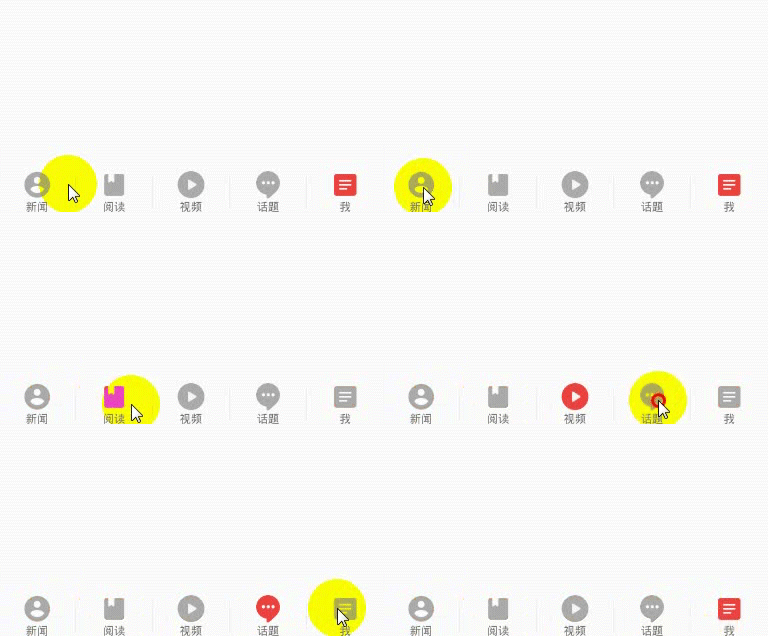
最终效果:

 浙公网安备 33010602011771号