
vue3-SVG编辑器
SVG编辑器(VUE3实现)
作者: kkdlk
需要一个svg的编辑器用来绘图,基于vue3,开源都不符合需求,所以有了这个demo,这是一个基于 Vue 3 + Vite 开发的 SVG 图形编辑器,提供完整的 SVG 编辑功能,支持多种绘图工具、样式编辑、元素管理等。
仅为第一版DEMO,已开源可以自行参考修改
技术栈
- 框架: Vue 3 (Composition API)
- 构建工具: Vite
- UI组件库: Element Plus
- 样式: SCSS
- 核心功能: 基于@svgdotjs/svg.js自定义 SVG 编辑引擎
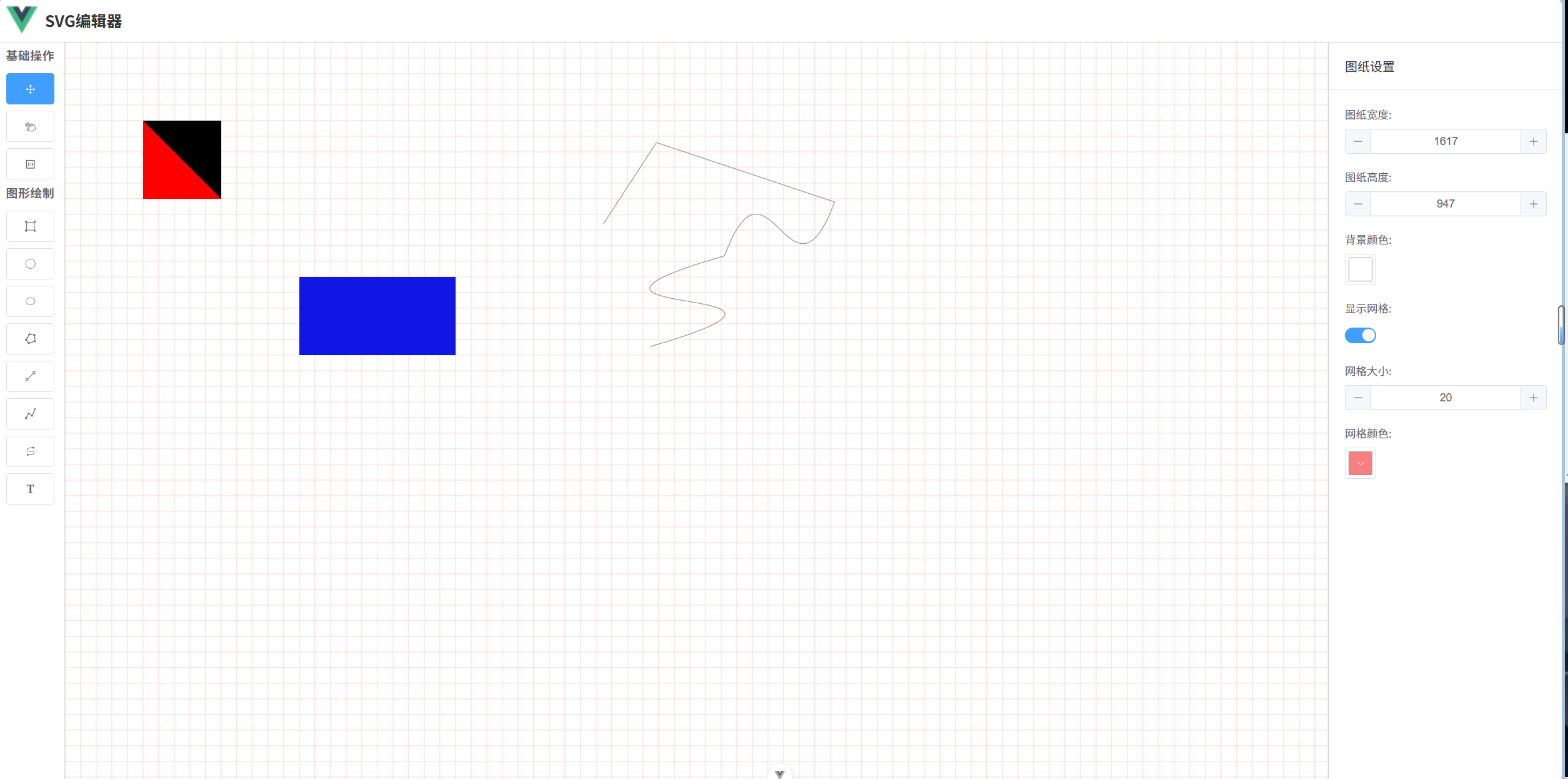
效果截图
项目架构
目录结构
graphic-editor-vue/
├── src/
│   ├── svgeditjs/              # SVG编辑器核心包
│   │   ├── components/         # Vue组件
│   │   ├── constant/           # 常量定义
│   │   ├── core/               # 核心管理类
│   │   ├── drawing/            # 绘图工具
│   │   ├── event/              # 事件系统
│   │   ├── expand/             # 扩展资源
│   │   ├── extend/             # 扩展功能
│   │   ├── utils/              # 工具函数
│   │   └── SvgEditor.js        # 编辑器入口
│   ├── App.vue                 # 应用入口组件
│   └── main.js                 # 应用入口文件
├── public/                     # 静态资源
├── index.html                  # HTML模板
├── package.json                # 项目配置
├── vite.config.js              # Vite配置
└── README.md                   # 项目文档
核心组件
| 组件名称 | 功能描述 |
|---|---|
| SvgEditorContainerComponent | 编辑器主容器,整合所有子组件 |
| SvgHeaderEditorComponent | SVG头部信息编辑器 |
| SvgEditorToolbarComponent | 绘图工具栏,提供各种绘图工具 |
| SvgEditorPaperContainerComponent | 画布容器,处理SVG内容渲染和交互 |
| SvgStyleEditorComponent | 样式编辑器,包括元素样式和画布样式 |
核心管理类
| 类名 | 功能描述 |
|---|---|
| CanvasManager | 画布管理,处理缩放、平移等 |
| DrawingManager | 绘图管理,处理各种图形的绘制 |
| ElementManager | 元素管理,处理SVG元素的增删改查 |
| SelectionHandler | 选择处理,处理元素的选择和操作 |
| EditorState | 编辑器状态管理 |
| SvgCoreContext | SVG核心上下文管理 |
| SvgElementStyle | SVG元素样式管理 |
绘图工具
- BaseDrawingTool: 基础绘图工具
- BezierCurveDrawingTool: 贝塞尔曲线绘图工具
- TextDrawingTool: 文本绘图工具
功能特性
基础功能
- ✅ 多种绘图工具支持
- ✅ 元素选择和编辑
- ✅ 样式编辑(元素样式和画布样式)
- ✅ SVG头部信息编辑
- ✅ 缩放和平移操作
- ✅ 只读模式支持
高级功能
- ✅ 元素吸附功能
- ✅ 连续绘制模式
- ✅ 框选功能
- ✅ 自定义工具栏
- ✅ 初始化SVG加载
快速开始
安装依赖
pnpm install
开发模式
pnpm dev
构建生产版本
pnpm build
预览生产版本
pnpm preview
使用方法
基本使用
<template>
    <div class="app">
        <SvgEditorContainerComponent />
    </div>
</template>

<script setup>
import SvgEditorContainerComponent from "@/svgeditjs/components/svg-editor-container-component/svg-editor-container-component.vue"
</script>
配置选项
<template>
    <div class="app">
        <SvgEditorContainerComponent
            :readonly="false"
            :bgColor="'#f5f5f5'"
            :isBoxSelection="true"
            :isDragAdoption="true"
            :isDrawAdoption="true"
            :enableContinuousDraw="true"
            :controlList="controlList"
            :initSvgLoadEvent="handleInitSvgLoad"
        />
    </div>
</template>

<script setup>
import SvgEditorContainerComponent from "@/svgeditjs/components/svg-editor-container-component/svg-editor-container-component.vue"

const controlList = [
    // 自定义头部控制项
]

const handleInitSvgLoad = () => {
    // 初始化SVG加载逻辑
}
</script>
配置参数说明
| 参数名 | 类型 | 默认值 | 描述 |
|---|---|---|---|
| readonly | Boolean | false | 是否只读模式 |
| controlList | Array | [] | 头部工具栏自定义控制项 |
| initSvgLoadEvent | Function | () => null | 初始化SVG加载事件 |
| width | String/Number | "100%" | 编辑器宽度 |
| height | String/Number | "100%" | 编辑器高度 |
| bgColor | String | "#ffffff" | 画布背景色 |
| isBoxSelection | Boolean | false | 是否开启框选功能 |
| isDragAdoption | Boolean | false | 是否启用拖拽吸附 |
| isDrawAdoption | Boolean | false | 是否启用绘制吸附 |
| enableContinuousDraw | Boolean | true | 是否开启连续绘制 |
组件API
SvgEditorContainerComponent
编辑器主容器组件,整合所有功能模块。
Props
readonly: 布尔值,是否只读controlList: 数组,头部工具栏自定义控制项initSvgLoadEvent: 函数,初始化SVG加载事件width: 字符串/数字,编辑器宽度height: 字符串/数字,编辑器高度bgColor: 字符串,画布背景色isBoxSelection: 布尔值,是否开启框选isDragAdoption: 布尔值,是否启用拖拽吸附isDrawAdoption: 布尔值,是否启用绘制吸附enableContinuousDraw: 布尔值,是否开启连续绘制
SvgEditorToolbarComponent
绘图工具栏组件,提供各种绘图工具。
Props
readonly: 布尔值,是否只读modelValue: 字符串,当前选中的工具
SvgEditorPaperContainerComponent
画布容器组件,处理SVG内容渲染和交互。
Props
readonly: 布尔值,是否只读initSvgLoadEvent: 函数,初始化SVG加载事件
核心概念
事件系统
使用自定义事件总线(EventBus)处理组件间通信,支持以下事件类型:
- 工具切换事件
- 元素选择事件
- 元素修改事件
- 画布操作事件
状态管理
使用 Vue 3 的响应式系统和 provide/inject 模式管理编辑器状态,确保组件间状态同步。
扩展机制
支持通过扩展机制添加自定义功能:
- 自定义绘图工具
- 自定义样式选项
- 自定义工具栏
转载请注明出处,该博客只为交流学习。

 浙公网安备 33010602011771号